
הקדמה
Thank you for choosing the CHENZILIN L9 Mini Camera. This portable digital video recorder is designed for versatile use, offering high-definition 1080P video recording, night vision capabilities, and a compact, wearable design. It is suitable for various applications including sports, law enforcement, and as a car driving recorder. This manual provides detailed instructions for setup, operation, and maintenance to ensure optimal performance of your device.
שליסל פֿעיִקייטן
- Portable and Wearable Design: Features a back clip for easy attachment to backpacks or pockets, ensuring discreet and convenient recording.
- High-Definition 1080P Video: Captures clear and crisp video footage at 1920x1080 resolution.
- באַוועגונג דעטעקשאַן: Automatically starts recording when motion is detected, conserving battery and storage.
- נאַכט זעאונג: Equipped with 5 white light lamps for clear recording in low-light conditions up to 5 meters.
- 180-Degree Rotatable Lens: The lens can be manually rotated 180 degrees, providing flexible recording angles.
- 140-גראַד ברייט ווינקל: Captures a broad field of view, ensuring comprehensive coverage.
- לופּינג רעקאָרדינג: איבערשרייבט די עלטסטע fileווען די זכּרון קאַרטל איז פול, וואָס זיכערט קאַנטיניואַס רעקאָרדינג.
- Photo Taking Capability: Allows for still image capture during video recording.
- Invisible and Quiet Recording: Designed for discreet operation.
- 1.3 אינטש פאַרשטעלן: Provides a clear display for viewing recordings and navigating settings.
- Wi-Fi קאַנעקטיוויטי: (For "With wifi" model) Enables remote control and file transfer via a mobile application.
פּראָדוקט איבערview און קאַמפּאָונאַנץ
Familiarize yourself with the various parts of your L9 Mini Camera:

פיגורע 1: פראָנט view of the L9 Mini Camera, showcasing its compact design, 1.3-inch screen, and rotatable lens. The screen displays a live feed of a cyclist.

פיגורע 2: Illustrates key features of the L9 Mini Camera, including one-click recording, the detachable back clip, video recording capability, motion detection, and night vision functionality.

פיגורע 3: א דיטיילד view of the L9 Mini Camera's screen and the control buttons located on its side. The screen shows a live recording, and the buttons are clearly visible for operation.

פיגורע 4: דערציען view of the L9 Mini Camera, highlighting the integrated back clip mechanism. This clip allows for secure attachment to clothing or gear.
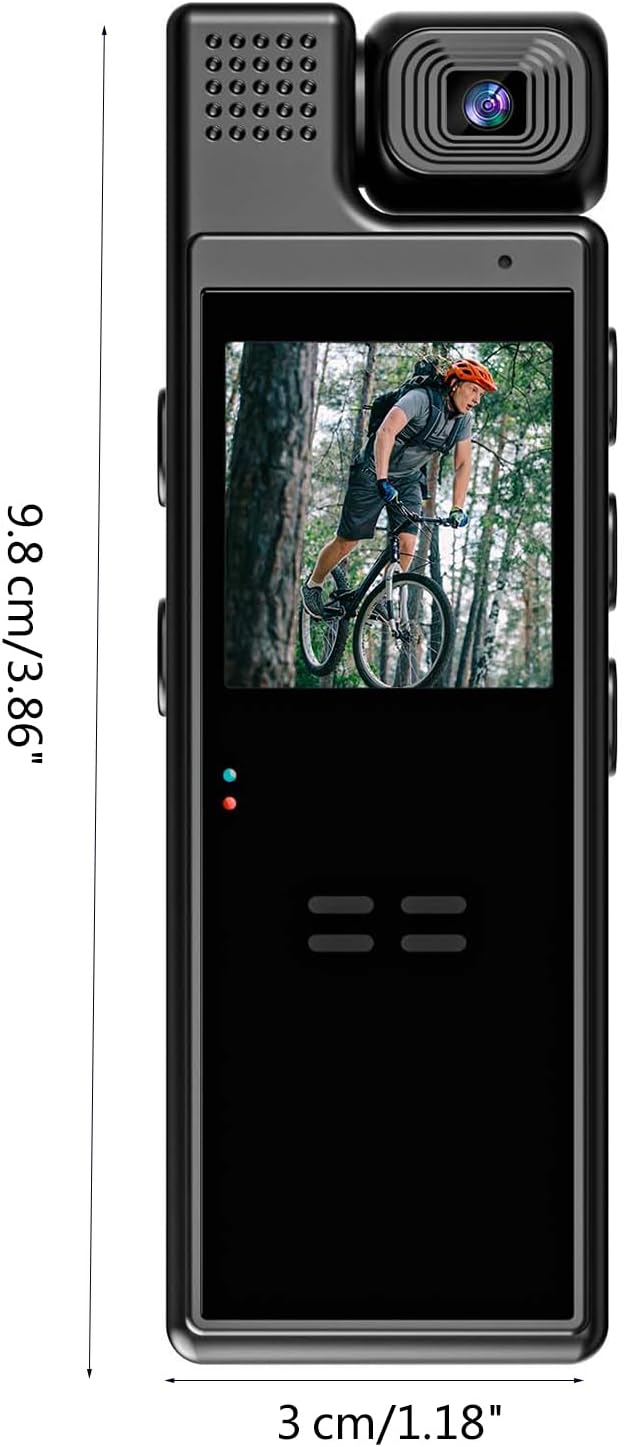
פיגורע 5: Depicts the compact dimensions of the L9 Mini Camera, measuring approximately 9.8 cm (3.86 inches) in length and 3 cm (1.18 inches) in width, emphasizing its portability.
Button and Port Identification:
- מאַכט קנעפּל: גענוצט צו קערן די מיטל אויף / אַוועק.
- רעקאָרד קנעפּל: הייבט אן און שטעלט אפ ווידעא רעקארדירונג.
- מאָדע קנעפּל: טוישט צווישן ווידעא, פאָטאָ, און ווידערשפּיל מאָדעס.
- Navigation Buttons (Up/Down/OK): פֿאַר מעניו נאַוויגאַציע און סעלעקציע.
- וסב פּאָרט: פֿאַר טשאַרדזשינג און דאַטן אַריבערפירן.
- מיקראָסד קאָרט שפּעלטל: For external memory storage.
- לענס: The rotatable camera lens.
- פאַרשטעלן: 1.3-inch display for live view און פּלייבאַק.
- ינדיקאַטאָר לייץ: Provide status information (e.g., charging, recording).
סעטאַפּ גייד
1. טשאַרדזשינג די מיטל
Before first use, fully charge the L9 Mini Camera. Connect the camera to a USB power adapter (not included) or a computer's USB port using the provided USB cable. The indicator light will show charging status and turn off or change color when fully charged.
באַמערקונג: The battery capacity is 1200mAh, providing approximately 8 hours of battery life.
2. אריינשטעלן א מיקראָסד קאַרטל
The L9 Mini Camera requires a MicroSD card (not included) for storing recordings. Locate the MicroSD card slot on the device. Gently insert the MicroSD card with the gold contacts facing down until it clicks into place. To remove, push the card in again until it springs out.
- Ensure the card is formatted to FAT32 for optimal performance.
- Use a high-speed MicroSD card (Class 10 or higher) for smooth video recording.
3. פּאָווערינג אויף / אויסגעלאשן
To power on the camera, press and hold the Power button for a few seconds until the screen lights up. To power off, press and hold the Power button again until the screen turns off.
אַפּערייטינג ינסטראַקשאַנז
ווידעא רעקאָרדינג
- אַרייַן ווידעא מאָדע: After powering on, the camera typically defaults to video recording mode. If not, use the Mode button to switch to video mode.
- אָנהייב רעקאָרדינג: Press the Record button once to begin video recording. A red indicator light will typically flash, and a recording icon will appear on the screen.
- האַלטן רעקאָרדינג: Press the Record button again to stop recording. The indicator light will stop flashing.
- שלייף רעקאָרדינג: The camera supports loop recording. When the memory card is full, the oldest files will be automatically overwritten to make space for new recordings.
פאָטאָ גענומען
- Enter Photo Mode: Use the Mode button to switch to photo mode.
- נעם א בילד: Press the Record button (or a dedicated photo button if available) once to capture a still image.
באַוועגונג דעטעקשאַן
To activate motion detection recording:
- אַקסעס סעטטינגס: Navigate through the camera's menu using the navigation buttons to find the motion detection setting.
- אַקטיווירן באַוועגונג דעטעקציע: Select "On" or "Enable" for motion detection. Once enabled, the camera will automatically start recording when movement is detected within its field of view and stop when motion ceases.
נאַכט זעאונג
The L9 Mini Camera features night vision for recording in low-light conditions.
- אָטאַמאַטיק אַקטאַוויישאַן: Night vision may activate automatically in low light.
- מאַנואַל אַקטאַוויישאַן: Refer to the on-screen menu for an option to manually turn night vision on or off if available. The 5 white light lamps will illuminate to assist recording in darkness.
אָביעקטיוו ראָוטיישאַן
The camera lens can be manually rotated 180 degrees to adjust the recording angle as needed. Gently rotate the lens housing to achieve the desired perspective.
Connecting to Wi-Fi (For "With wifi" model)
For models with Wi-Fi, you can connect the camera to your smartphone for remote control and file פאַרוואַלטונג.
- אראפקאפיע אַפּ: זוכן פֿאַר the recommended companion app (e.g., "L9 Camera" or similar) on your smartphone's app store.
- Enable Camera Wi-Fi: Turn on Wi-Fi on the L9 Mini Camera via its settings menu.
- Connect Phone to Camera Wi-Fi: On your smartphone, go to Wi-Fi settings and connect to the camera's Wi-Fi network (SSID usually starts with "L9" or similar). The default password might be "12345678" or "88888888".
- עפענען אַפּ: Launch the app and follow the on-screen instructions to connect to your camera. You can then view לעבן פאָאָtage, control recording, and download files.
וישאַלט און זאָרג
- רייניקונג: ניצט אַ ווייכע, טרוקענע שטאָף צו רייניקן די קאַמעראַ קערפּער. פֿאַר די אָביעקטיוו, ניצט אַ ספּעציאַליזירטע אָביעקטיוו רייניקונג שטאָף און לייזונג. פֿאַרמייַדט אַברייסיוו רייניגער אָדער סאָלווענטן.
- סטאָרידזש: האַלט די קאַמעראַ אין אַ קיל, טרוקן אָרט אַוועק פון דירעקט זונשייַן און עקסטרעמע טעמפּעראַטורן.
- באַטערי זאָרגן: To prolong battery life, avoid fully discharging the battery frequently. If storing for a long period, charge the battery to about 50% every few months.
- Firmware דערהייַנטיקונגען: קוק די פאַבריקאַנט ס webזוכט דעם וועבזייטל פון צייט צו צייט פאר אלע פארהאן פירמווער דערהייַנטיקונגען צו פארבעסערן די פאָרשטעלונג און צולייגן פֿעיִקייטן.
- ויסמיידן ימפּאַקס: The device is designed to be durable, but avoid dropping or subjecting it to strong impacts.
- וואַסער קעגנשטעל: די דעווייס איז נישט וואַסערפּרוף. פֿאַרמייַדט אויסשטעלונג צו וואַסער אָדער הויכער פֿײַכטקייט.
טראָובלעשאָאָטינג
| פּראָבלעם | מעגלעך סיבה | לייזונג |
|---|---|---|
| די קאַמעראַ צינדט זיך נישט אָן. | נידעריגע באַטעריע; אַפּאַראַט פֿאַרפֿרוירן. | Charge the camera fully. If unresponsive, try a soft reset (press and hold power button for longer, or look for a reset pinhole if available). |
| קען נישט רעקאָרדירן ווידעא/נעמען פאָטאָס. | No MicroSD card; card full; card error; incorrect mode. | Insert a MicroSD card. Format or replace the card. Ensure sufficient storage. Switch to the correct recording mode. |
| נעבעך ווידעא קוואַליטעט. | Dirty lens; low light; incorrect settings. | Clean the lens. Ensure adequate lighting or activate night vision. Check resolution settings. |
| Wi-Fi פֿאַרבינדונג פּראָבלעמען. | Incorrect password; app issues; camera Wi-Fi off. | Verify Wi-Fi password. Restart camera and phone. Reinstall the app. Ensure camera Wi-Fi is enabled. |
| קורץ באַטאַרייע לעבן. | Frequent use of power-intensive features (Wi-Fi, night vision); aging battery. | Reduce use of power-intensive features. Ensure full charge. Battery degradation is normal over time. |
טעכניש ספּעסאַפאַקיישאַנז
| שטריך | דעטאַל |
|---|---|
| מאָדעל | L9 |
| סקרין | 1.3-inch (240x240 resolution) |
| האַכלאָטע | 1920x1080 (1080P) |
| אָביעקטיוו ראָוטיישאַן | 180 דיגריז |
| לינז ברייט ווינקל | 140 דיגריז |
| באַטאַרייע קאַפּאַציטעט | 1200 מאַה |
| ווידעא פֿאָרמאַט | AVI |
| באַטערי לעבן | בעערעך 8 שעה |
| נאַכט זעאונג לamps | 5pcs White light lamps |
| נאַכט זעאונג דיסטאַנסע | אַרויף צו 5 מעטער |
| מאַטעריאַל | אַקרילאָניטרילע בוטאַדיענע סטירענע (אַבס) |
| קאַנעקטיוויטי | Wi-Fi (for "With wifi" model) |
| דימענשאַנז | אומגעפער 9.8 x 3 ס״מ (3.86 x 1.18 אינטשעס) |
וואָראַנטי און שטיצן
For warranty information and technical support, please refer to the retailer or the official CHENZILIN website where you purchased the product. Keep your proof of purchase for any warranty claims.
If you encounter issues not covered in this manual, please contact customer service for assistance.