
1. הקדמה
Welcome to the HOTWAV Hyper 7 Pro rugged smartphone user manual. This guide will assist you in understanding and utilizing all the features of your new device. The Hyper 7 Pro is designed for durability and high performance, featuring Android 14, 5G connectivity, a 200MP camera, and a large 10800mAh battery.
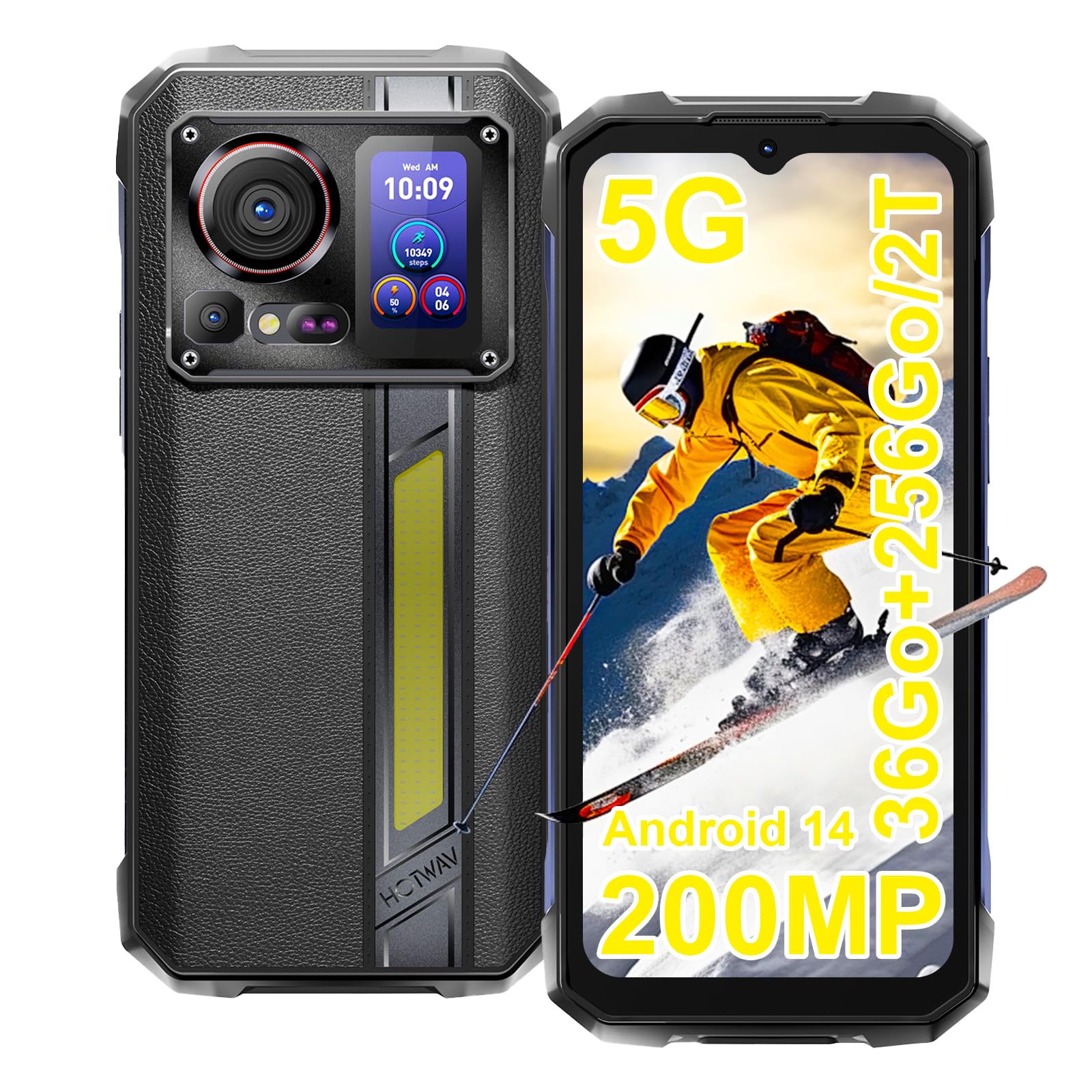
Image: The HOTWAV Hyper 7 Pro rugged smartphone, showcasing its robust design and rear display.
2. וואָס איז אין דער קעסטל
Upon unboxing your HOTWAV Hyper 7 Pro, please ensure all the following items are present:
- HOTWAV Hyper 7 Pro Smartphone
- וסב טיפּע- C קאַבלע
- מאַכט אַדאַפּטער (33W)
- סים עדזשעקטאָר טול
- Pre-applied Screen Protector (Gorilla Glass)
- Additional Screen Protector
- באַניצער מאַנואַל

Image: All items included in the HOTWAV Hyper 7 Pro package, including the phone, charger, cables, and documentation.
3. סעטאַפּ גייד
3.1. אינסטאַלירן סים קאַרדס און מיקראָסד קאַרטל
- געפינט די סים קארטל טאַץ אויף דער לינקער זייט פון דעם מיטל.
- שטעקט אריין דעם סים אויסווארף געצייג אין דעם קליינעם לאך לעבן דעם טרעי און דריקט לײַכט ביז דער טרעי קומט ארויס.
- Place your Nano-SIM card(s) and/or a microSD card (up to 2TB) into the designated slots on the tray. Ensure the gold contacts face downwards.
- פֿאָרזיכטיק צוריקשטעלט דעם טאַץ אין דעם טעלעפֿאָן ביז עס קליקט אַרײַן אין פּלאַץ.
3.2. ערשטע איינשטראָם און גרונטלעכע קאָנפיגוראַציע
- Press and hold the Power button (located on the right side) until the HOTWAV logo appears.
- פֿאָלגט די אינסטרוקציעס אויף דעם עקראַן צו אויסקלײַבן אײַער שפּראַך, פֿאַרבינדן זיך צו אַ Wi-Fi נעץ, און אויפֿשטעלן אײַער Google חשבון.
- Configure your preferred security methods, such as Face ID and Fingerprint Unlock.
3.3. טשאַרדזשינג די מיטל
פארן ערשטן באַנוץ, איז רעקאָמענדירט צו גאָר אָפּלאָדן אייער מיטל.
- פֿאַרבינדט דעם USB טיפּ-C קאַבל צום טשאַרדזשינג פּאָרט אין דער אונטערשטער טייל פֿון טעלעפֿאָן.
- Connect the other end of the cable to the provided 33W power adapter.
- Plug the power adapter into a wall outlet. The charging indicator will appear on the screen.

Image: The HOTWAV Hyper 7 Pro charging with its 33W fast charger, highlighting the OTG function.
4. אַפּערייטינג ינסטרוקטיאָנס
4.1. הויפּט אַרויסווייַז און נאַוויגאַציע
The Hyper 7 Pro features a 6.6-inch FHD+ display with a 120Hz refresh rate for smooth interactions. Navigate through the Android 14 interface using standard touch gestures: tap, swipe, pinch-to-zoom.

Image: The vibrant 6.6-inch FHD+ display of the Hyper 7 Pro, showcasing its visual quality.
4.2. Secondary Rear Screen
The innovative secondary screen on the back provides quick access to essential information and controls without activating the main display.
- צייט ווייַז: View קראַנט צייט און דאַטע.
- אַפּאַראַט קאָנטראָל: ניצן ווי אַ viewזוכער פֿאַר הינטערשטע קאַמעראַ סעלפֿיז אָדער שנעלע שאַץ.
- Music Applications: Control playback for music apps.
- נאָטיפיקאַטיאָנס: See incoming call and message alerts.
- Battery Status & Step Count: Monitor battery level and daily steps.

Image: The versatile secondary display on the back of the Hyper 7 Pro, showing different information widgets.
4.3. קאַמעראַ פונקציעס
The Hyper 7 Pro is equipped with a powerful camera system:
- דערציען אַפּאַראַט: 200MP main sensor for high-resolution photos and a 24MP night vision camera with infrared LEDs for clear images in low light.
- פראָנט אַפּאַראַט: 32MP פֿאַר שאַרפֿע סעלפֿיז און ווידעאָ קאָלס.
- AI Algorithms: Enhance saturation for night scenes, portraits, and landscapes.
- ווידעא רעקאָרדינג: Supports 4K video capture.

Image: A visual comparison demonstrating the superior detail captured by the Hyper 7 Pro's 200MP camera.
4.4. Customizable Side Button
The red side button can be configured for three different actions:
- איין פרעסע: באַשטימט צו עפענען אַ ספּעציפֿישע אַפּ אָדער פֿונקציע.
- טאָפּל פּרעס: באַשטימט צו עפענען אַן אַנדער אַפּ אָדער פונקציע.
- לאנג פּרעס: Assign to open a third app or function.
Configure these settings in the phone's 'Side Key Function' menu.

Image: The customizable side button on the Hyper 7 Pro, showing how different press actions can launch various applications.
4.5. Connectivity and Special Features
- 5G נעץ: Enjoy high-speed internet connectivity.
- Wi-Fi 6 און בלועטוט 5.2: Advanced wireless connectivity for faster speeds and stable connections.
- NFC: For contactless payments and quick pairing with other devices.
- גפּס: Integrated GPS, Beidou, Galileo, and GLONASS for precise navigation.
- Campמיט ליכט: A powerful 280-lumen LED light on the back, with timer and SOS/Flash functions.
- OTG פונקציע: Connect USB devices or use your phone as a power bank to charge other devices.
- הענטשקע מאָדע: Enhanced touch sensitivity for use with gloves.
- עפעם ראַדיאָ: Listen to your favorite radio stations.

Image: The powerful LED camping light of the Hyper 7 Pro, demonstrating its illumination capabilities.
5. וישאַלט
5.1. רייניקן דיין דעווייס
The HOTWAV Hyper 7 Pro is IP68/IP69K rated for water and dust resistance. To clean, gently wipe the device with a soft, damp cloth. For stubborn dirt, you may rinse it under low-pressure fresh water, ensuring all ports are securely closed. Avoid using harsh chemicals or abrasive materials.

Image: The Hyper 7 Pro enduring water splashes, highlighting its waterproof design.
5.2. באַטערי קער
צו פארלענגערן די לעבן פון אייער 10800mAh באַטעריע:
- ויסמיידן עקסטרעם טעמפּעראַטורעס.
- Use only the provided 33W charger and USB-C cable.
- לאָזט נישט די באַטאַרייע גאָר אויסליידיקן אָפט.
5.3. ווייכווארג דערהייַנטיקונגען
Regularly check for and install system updates to ensure optimal performance, security, and access to new features. You can usually find this option in your phone's Settings menu under 'System' or 'About phone'.
5.4. סטאָרידזש מאַנאַגעמענט
With 256GB of internal storage and support for up to 2TB microSD cards, you have ample space. Periodically review דיין files and applications to free up space and maintain performance. Consider backing up important data to cloud storage or an external device.
6. טראָובלעשאָאָטינג
If you encounter issues with your HOTWAV Hyper 7 Pro, refer to the following common solutions:
- מיטל נישט פּאַוערינג אויף: Ensure the battery is charged. Connect the phone to the charger for at least 30 minutes, then try powering on again.
- טשאַרדזשינג ישוז: Verify that the charger and USB-C cable are securely connected and undamaged. Try a different power outlet. Ensure the charging port is clean and free of debris.
- Network Connectivity Problems (5G/Wi-Fi): Check if Airplane Mode is off. Restart your phone. For mobile data, ensure your SIM card is correctly inserted and your plan is active. For Wi-Fi, forget the network and reconnect.
- קאַמעראַ אַרבעט נישט: Restart the camera app or the phone. Check app permissions for the camera in Settings.
- פּאַמעלעך פאָרשטעלונג: Close unnecessary background apps. Clear cache for frequently used apps. Ensure you have sufficient storage space. Restart the device.
- עקראַן רעאַגירט נישט: Restart the phone by holding the power button for an extended period (usually 10-15 seconds). If a hard reset is needed, consult the online support resources.
- ווייכווארג גליטשיז: Ensure your Android 14 system is up to date. If issues persist, a factory reset might be necessary (back up your data first).
If these steps do not resolve your issue, please contact HOTWAV customer support for further assistance.
7. ספּעסאַפאַקיישאַנז
| שטריך | באַשרייַבונג |
|---|---|
| סאָרט | האָטוואַוו |
| מאָדעל נאָמען | היפּער 7 פּראָ |
| אָפּערייטינג סיסטעם | אַנדרויד 14 |
| פּראַסעסער | מעדיעטעק דימענסיטי 7050 אקטא-קאָר (2.6 GHz) |
| באַראַן | 16 גיגאבייט (אויסברייטבאר ביז 36 גיגאבייט מיט ווירטועל זכּרון) |
| אינערלעכער סטאָרידזש | 256 גיגאבייט |
| יקספּאַנדאַבאַל סטאָרידזש | ביז 2 טב (מיקראָSD) |
| ווייַז גרייס | 6.6 אינטשעס FHD+ |
| ווייַז האַכלאָטע | 1080 * 2408 בילדצעלן |
| דערפרישן קורס | 120 הז |
| ווייַז פּראַטעקשאַן | קאָרנינג גאָריללאַ גלאז 3 |
| באַטאַרייע קאַפּאַציטעט | 10800 מאַה |
| טשאַרדזשינג | 33 וואט שנעלע טשאַרדזשינג, OTG פאַרקערטע טשאַרדזשינג |
| דערציען אַפּאַראַט | 200 MP Main, 24 MP Night Vision |
| פראָנט אַפּאַראַט | 32 מפּ |
| ווידעא האַכלאָטע | 4K |
| האַלטבארקייט רייטינגז | IP68, IP69K, MIL-STD-810H |
| קאַנעקטיוויטי | 5G, Wi-Fi 6, Bluetooth 5.2, NFC |
| נאַוויגאַציע | GPS, Beidou, Galileo, GLONASS |
| סים קאָרט טיפּ | צווייענדיק נאַנאָ סים |
| דימענשאַנז | 17.5 X 8.2 X 1.8 סענטימעטער |
| וואָג | 406 גראַמז |
8. וואָראַנטי און שטיצן
8.1. וואָראַנטי אינפֿאָרמאַציע
Your HOTWAV Hyper 7 Pro comes with a 2 יאָר וואָראַנטי פֿון דעם קויפֿדאַטום. די וואָראַנטי דעקט פֿאַבריקאַציע־דעפֿעקטן און פֿאַלפֿונקציעס אונטער נאָרמאַלן באַנוץ. ביטע באַהאַלטן אייער קויפֿבאַווײַז פֿאַר וואָראַנטי־קליימז.
8.2. קונה שטיצן
For any technical assistance, warranty claims, or product-related inquiries, please contact HOTWAV customer support through their official website or the contact information provided with your purchase. Ensure you have your device model and purchase details ready when contacting support.

Image: HOTWAV's commitment to customer satisfaction, including a 2-year warranty and dedicated customer service.