
1. הקדמה
This manual provides essential information for the safe and efficient operation, installation, and maintenance of your DATOUBOSS 24V to 230V Pure Sine Wave Inverter, Model PSW-E24V3500W. This inverter is designed to convert 24V DC battery power into stable 220V-240V AC 50Hz power, suitable for a wide range of sensitive electronic devices and appliances.

פיגורע 1.1: DATOUBOSS 24V 3500W Pure Sine Wave Inverter with LCD display and connection cables. This image shows the DATOUBOSS 24V 3500W Pure Sine Wave Inverter, a white and black unit with an LCD screen displaying voltagE און וואַטtage. It features two EU power outlets, USB and Type-C ports, and an ON/OFF switch on the front. Included are red and black battery connection cables.
2. זיכערקייַט אינפֿאָרמאַציע
Please read and understand all safety warnings and instructions before operating the inverter. Failure to follow these instructions may result in electric shock, fire, or serious injury.
- ווענטילאַטיאָן: זיכערט זיך אז עס איז דא גענוג ווענטילאציע ארום דעם אינווערטער. בלאקירט נישט די ווענטילאציע עפענונגען.
- סוויווע: Operate the inverter in a dry, cool, and well-ventilated area, away from direct sunlight, heat sources, and flammable materials.
- פֿאַרבינדונגען: שטענדיק פֿאַרבינדן דעם ינווערטער צו אַ באַטאַרייע מיטן ריכטיקן וואָולטאַזשtage (24V for this model). Ensure all connections are secure and properly insulated.
- אָווערלאָאַד: Do not exceed the inverter's rated continuous power output (3500W) or peak power (7000W). Overloading can damage the inverter and connected appliances.
- שוץ פֿעיִקייטן: The inverter is equipped with multiple protection systems, including:
- אַרייַנשרייַב ונדערוואָלtagE פּראַטעקשאַן
- אַרייַנשרייַב אָווערוואָלtagE פּראַטעקשאַן
- אָווערלאָאַד פּראַטעקשאַן
- רעזולטאַט קורץ-קרייַז פּראַטעקשאַן
- אָוווערטעמפּעראַטור פּראַטעקשאַן
- Reverse Polarity Protection (via fuse)
- וישאַלט: Only qualified personnel should perform maintenance or repairs. Do not attempt to disassemble the inverter.

פיגורע 2.1: Intelligent Protection Systems. This visual depicts the comprehensive safety features integrated into the inverter, including protection against reverse polarity, overtemperature, overload, surge, low voltage, and short circuits. These systems ensure safe and reliable operation.
3. פּראָדוקט פֿעיִקייטן און קאָמפּאָנענטן
The DATOUBOSS PSW-E24V3500W inverter is designed for user convenience and robust performance.
שליסל פֿעיִקייטן:
- פּורע סינע וואַווע רעזולטאַט: Provides clean and stable power, ideal for sensitive electronics, reducing noise and energy consumption.
- הויך עפעקטיווקייַט: Conversion efficiency greater than 95%.
- LCD ווייַז: Easy-to-read screen showing inverter status, input voltagE, און רעזולטאַט וואָסtage.
- סמאַרט קאָאָלינג פאָכער: Operates based on load and temperature, ensuring efficient heat dissipation and quiet operation at lower loads.
- קייפל רעזולטאַט פּאָרץ: Includes 2 EU AC outlets, 1 USB port, and 1 Type-C port.
- דוראַבאַל קאַנסטראַקשאַן: Robust aluminum casing for advanced protection and improved cooling.
קאָמפּאָנענט אידענטיטעט:
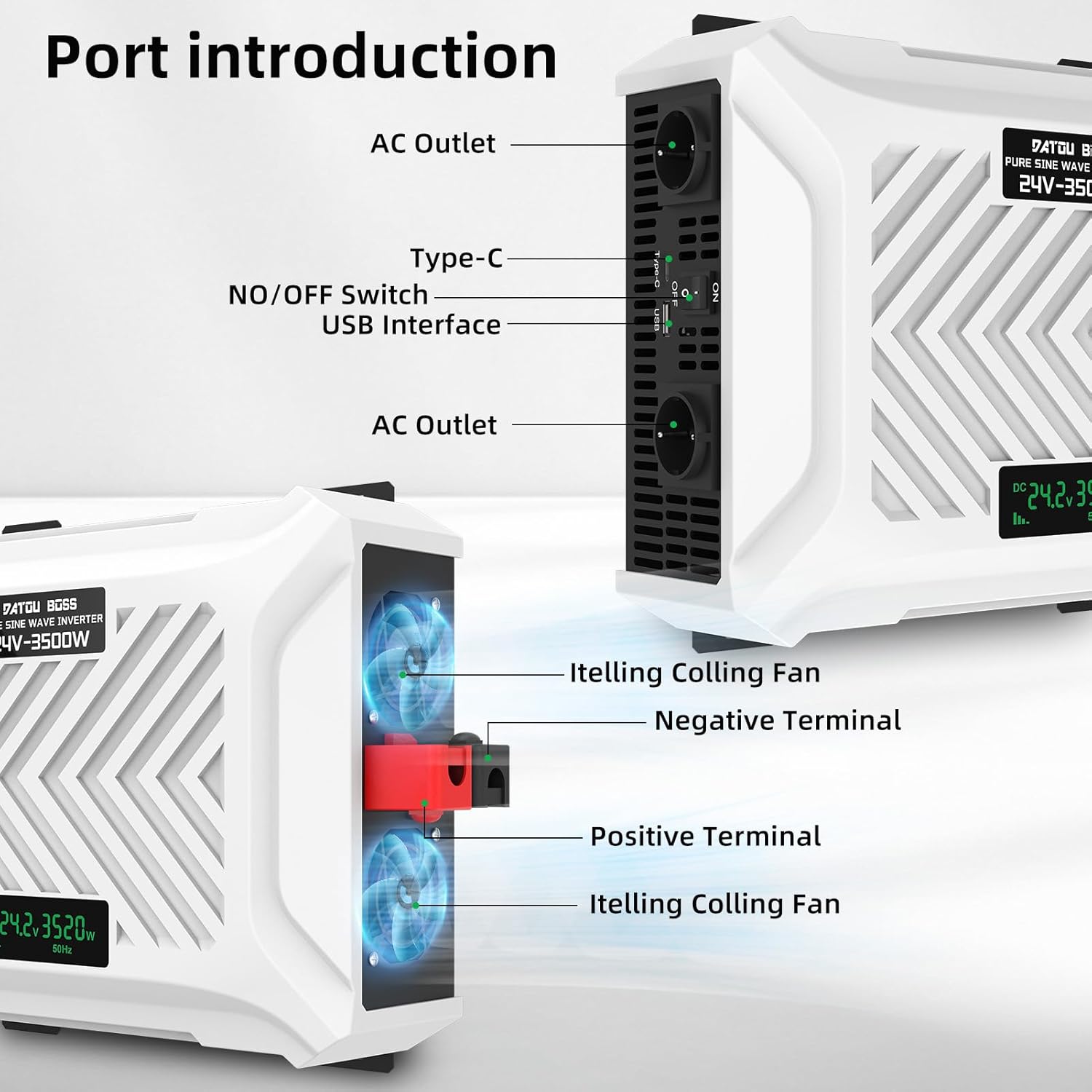
פיגורע 3.1: Port Introduction. This image highlights the various ports and cooling features of the inverter. On the front, it shows two AC outlets, a Type-C port, a USB interface, and the ON/OFF switch. On the side, it illustrates the intelligent cooling fans, positive terminal (red), and negative terminal (black).
The inverter's front panel includes the ON/OFF switch, USB and Type-C charging ports, and two standard EU AC outlets. The rear features the positive (red) and negative (black) battery terminals, along with integrated cooling fans.
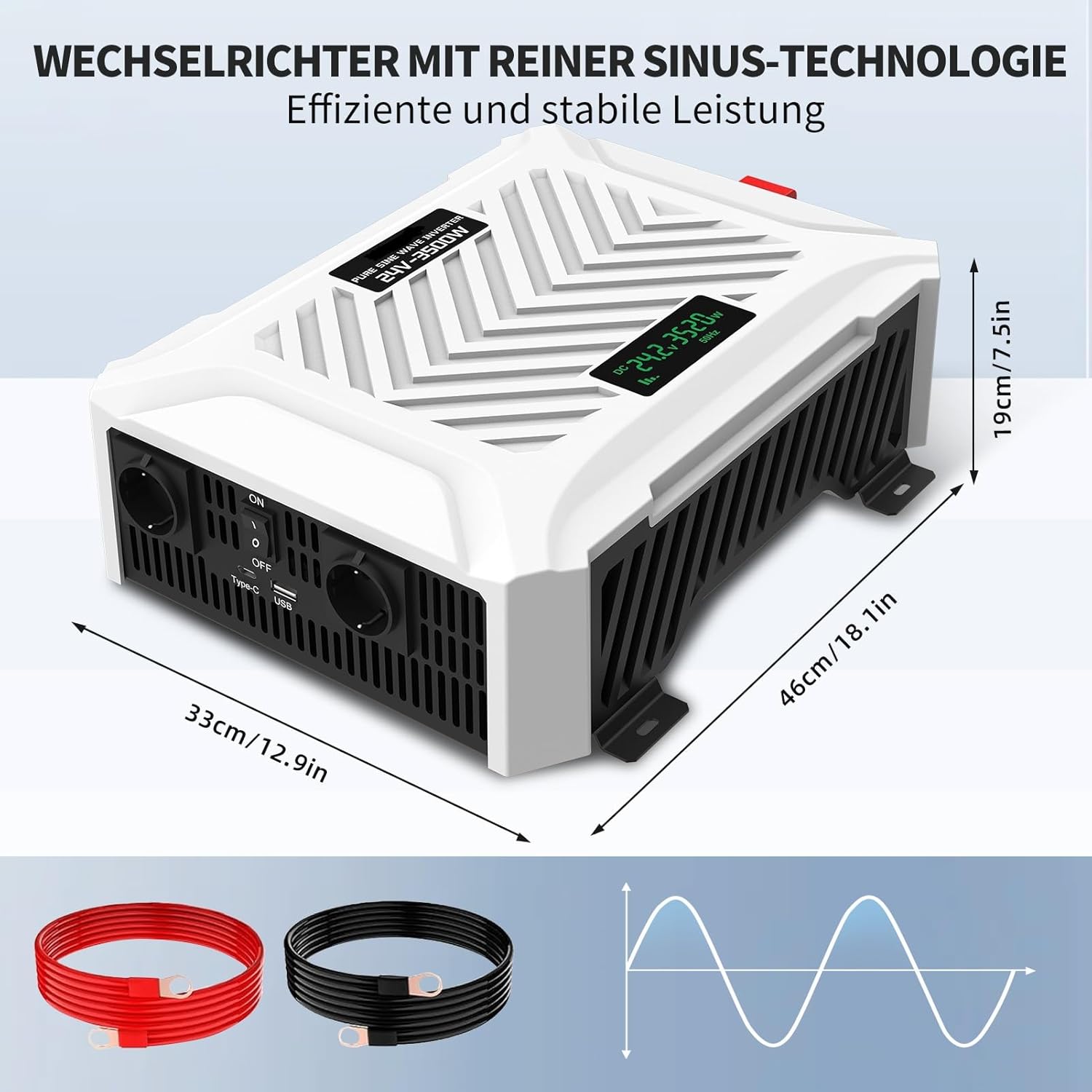
פיגורע 3.2: Inverter Dimensions. This image provides the physical dimensions of the inverter: approximately 33 cm (12.9 inches) in length, 46 cm (18.1 inches) in width, and 19 cm (7.5 inches) in height. The image also shows the included red and black battery cables and a pure sine wave graphic.
4. סעטאַפּ
Proper setup is crucial for the inverter's performance and safety.
Connecting to a Battery:
- זיכער מאַכן אַז דער ינווערטער'ס אָן/אויס קנעפּל איז אין דער 'אויס' פּאָזיציע.
- Connect the red battery cable to the positive (+) terminal of your 24V battery and the red terminal on the inverter.
- Connect the black battery cable to the negative (-) terminal of your 24V battery and the black terminal on the inverter.
- Ensure all connections are tight and secure to prevent loose connections and potential arcing.
Optional: Connecting to Solar Power:
The inverter can be integrated into a solar power system for off-grid applications.
- Connect your solar panels to a compatible solar charge controller.
- Connect the solar charge controller to your 24V battery.
- Then, connect the inverter to the battery as described in the previous steps.

פיגורע 4.1: Wiring Diagram. This diagram illustrates a typical setup for the inverter, showing connections from solar panels (via solar connectors and a solar charge controller) to a battery, and then from the battery to the inverter. The inverter then provides AC output for various appliances like phones, computers, washers, electric cookers, and refrigerators.

פיגורע 4.2: Connecting Solar Power. This image shows the inverter and a battery connected to portable solar panels in an outdoor setting, emphasizing its use as an off-grid solution for clean energy. It highlights the high performance and durability of the system.
5. אָפּעראַציע
Once the inverter is properly set up, follow these steps for operation:
- מאַכט אויף: Flip the ON/OFF switch on the inverter to the 'ON' position. The LCD screen will illuminate, displaying the input voltagE און רעזולטאַט וואָסtage.
- פאַרבינדן אַפּפּליאַנסעס: Plug your AC appliances into the EU outlets. For charging smaller devices, use the USB or Type-C ports.
- מאָניטאָר פאָרשטעלונג: Observe the LCD screen for real-time information on battery voltagE און מאַכט קאַנסאַמשאַן.
- מאַכט אַוועק: When finished, first turn off all connected appliances, then flip the inverter's ON/OFF switch to the 'OFF' position.
רעקאַמענדיד ניצט:
This inverter is highly versatile and suitable for various applications, including:
- וועהיקלעס: Powering electronics in trucks, RVs, and cars.
- Campינג: Running lights, small refrigerators, and charging devices during outdoor activities.
- היים אַפּפּליאַנסעס: Operating sensitive electronics like computers, fans, and other household devices during power outages or in off-grid setups.
Note: While this model is rated for 3500W continuous output, some general usage diagrams indicate that the maximum operating wattage for certain applications may not exceed 3000 Watts. Always ensure the total power consumption of your connected devices does not exceed the inverter's continuous power rating to prevent overload.

פיגורע 5.1: Usage Scenarios. This collage demonstrates the versatility of the inverter, showing its use in camping, with drones/cameras, RVs/vehicles, computers, car refrigerators, microwave ovens, coffee machines, and fans.
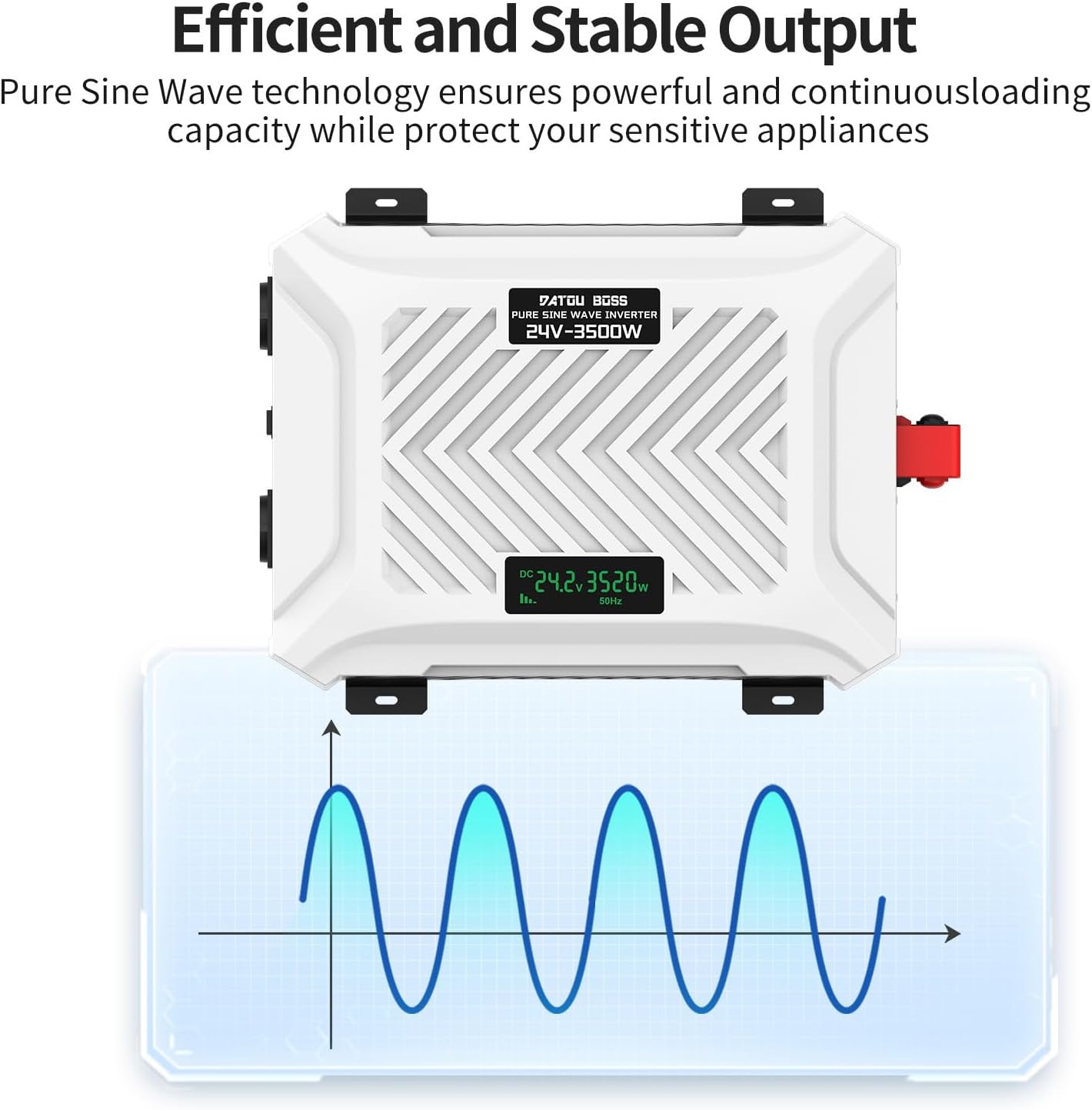
פיגורע 5.2: Efficient and Stable Output. This image illustrates the pure sine wave technology of the inverter, showing a smooth, continuous waveform. This technology provides clean and stable power, essential for sensitive electronic devices.
6. וישאַלט
רעגולערע אויפהאלטונג גאראנטירט די לאנגעוויטי און אפטימאלע פאָרשטעלונג פון אייער ינווערטער.
- רייניקונג: Keep the inverter clean and free from dust and debris. Use a dry, soft cloth for cleaning. Do not use liquid cleaners.
- ווענטילאַטיאָן: Periodically check that the ventilation openings are clear and not obstructed. Ensure the cooling fans are operating correctly.
- פֿאַרבינדונגען: Regularly inspect battery connections for tightness and corrosion. Clean terminals if necessary.
- סטאָרידזש: If storing the inverter for an extended period, ensure it is in a cool, dry place. Disconnect it from the battery.
7. טראָובלעשאָאָטינג
די סעקציע באהאנדלט אלגעמיינע פראבלעמען וואס איר קענט באגעגענען מיט אייער אינווערטער.
| פּראָבלעם | מעגלעך סיבה | לייזונג |
|---|---|---|
| דער אינווערטער טוט זיך נישט אן | No battery connection; Low battery voltage; Blown fuse; Loose connections. | Check battery cables and connections; Charge battery; Check and replace fuse if necessary; Tighten all connections. |
| קיין AC רעזולטאַט | Overload; Overtemperature; Low/High input voltage; קורץ-שליס. | Reduce load; Allow inverter to cool down; Check battery voltage; Disconnect faulty appliance. |
| שרעק סאָונדס | Low battery alarm; Overload alarm; Overtemperature alarm. | Charge battery; Reduce load; Allow inverter to cool down. |
| פאַן נישט פליסנדיק | Low load/temperature; Fan malfunction. | Fan operates intelligently, may not run at low load. If persistent at high load, contact support. |
אויב די פראבלעם בלייבט נאך פרובירן די לייזונגען, ביטע קאנטאקטירן DATOUBOSS קאסטומער סופארט.
8. ספּעסאַפאַקיישאַנז
| פּאַראַמעטער | ווערט |
|---|---|
| מאָדעל נומער | PSW-E3500W |
| אַרייַנשרייַב וואָלtage | 24 וואלטס דק |
| קעסיידערדיק מאַכט רעזולטאַט | 3500 וואטס |
| שפּיץ מאַכט רעזולטאַט | 7000 וואטס |
| רעזולטאַט חלקtage | 220 וו, 230 וו, 240 וו אַק |
| רעזולטאַט אָפטקייַט | 50 הז |
| רעזולטאַט וואַוועפאָרם | ריין סיין וואַווע |
| עפעקטיווקייַט | > 95% |
| ניט-לאָאַד קראַנט | < 0.7 א |
| דימענסיעס (L X W X H) | 38 x 28 x 11 ס״מ (אומגעפער 14.9 x 11 x 4.3 אינטשעס) |
| אַפּערייטינג טעמפּעראַטור | -10 צו 50 °C |
| קאָאָלינג אופֿן | אינטעליגענטע לופט קילונג |
| גאַנץ AC אַוטלעץ | 2 (EU type) |
| USB/Type-C Ports | יא |
9. וואָראַנטי און שטיצן
The DATOUBOSS PSW-E24V3500W Pure Sine Wave Inverter comes with a 3-יאָר פאַבריקאַנט ס וואָראַנטי.
For technical support, warranty claims, or any inquiries regarding your product, please contact DATOUBOSS customer service through the retailer where you purchased the product or visit the official DATOUBOSS webפּלאַץ פֿאַר קאָנטאַקט אינפֿאָרמאַציע.
ביטע באַהאַלטן אייער קויפן-באַווייַז פֿאַר גאַראַנטיע צוועקן.