
DD Audio VO-W712-D2
DD Audio VO-W712-D2 12-inch Midwoofer User Manual
Model: VO-W712-D2
הקדמה
This manual provides essential information for the proper installation, operation, and maintenance of your DD Audio VO-W712-D2 12-inch Midwoofer. Please read this manual thoroughly before attempting to install or operate the product to ensure optimal performance and safety.
The VO-W712-D2 is designed to bridge the gap between midrange and subwoofer frequencies, offering a balance of clarity and power. Its compact design allows for installation in various vehicle applications where space is limited.
זיכערקייַט אינפֿאָרמאַציע
- שטענדיק אָפּשטעקן די באַטאַרייע פֿון פֿאָרמיטל איידער איר טוט יעדע עלעקטרישע אַרבעט.
- זיכער מאַכן אַז אַלע וויירינג איז ריכטיק איזאָלירט און פֿאַרזיכערט צו פאַרמייַדן קורץ קרייזן און שאָדן.
- Do not expose the midwoofer to excessive moisture or extreme temperatures.
- Use appropriate personal protective equipment (PPE) during installation, such as safety glasses.
- באַראַטן זיך מיט אַ פאַכמאַן אינסטאַללער אויב איר זענט נישט זיכער וועגן קיין טייל פון די ינסטאַלירונג פּראָצעס.
- Operating audio systems at high volumes for extended periods can cause permanent hearing damage.
פּעקל אינהאַלט
באַשטעטיקן אַז אַלע זאכן זענען פאַראַן אין פּעקל:
- DD Audio VO-W712-D2 12-inch Midwoofer (1 unit)
- באַניצער מאַנואַל (דעם דאָקומענט)
- מאָנטירונג שרויפן (קוואַנטיטעט קען זיין אַנדערש)
סעטאַפּ און ינסטאַלירונג
Proper installation is crucial for the performance and longevity of your midwoofer. Follow these guidelines carefully.
1. Enclosure Design
The VO-W712-D2 is optimized for small vented box designs. Consult the specifications section for recommended enclosure volumes and tuning frequencies. An appropriately designed enclosure will maximize the midwoofer's performance and protect it from damage.
2. מאַונטינג
Ensure the mounting surface is rigid and free from obstructions. Use the provided mounting screws to secure the midwoofer firmly into the enclosure. Refer to the specifications for mounting diameter and depth.
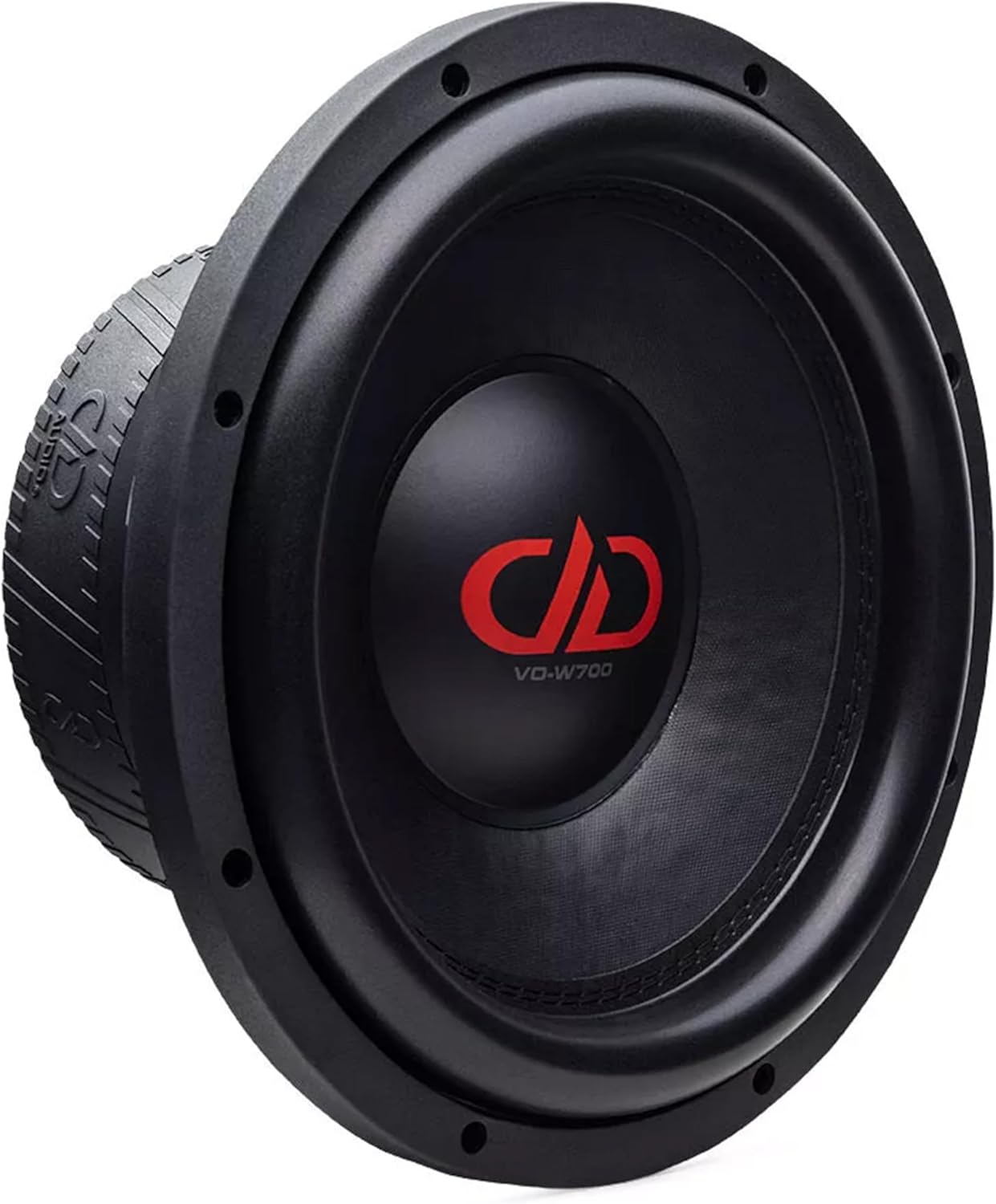
בילד 1: פראָנט view of the DD Audio VO-W712-D2 midwoofer, showing the cone and surround. This view highlights the speaker's primary radiating surface and mounting flange.

בילד 2: זייט view of the DD Audio VO-W712-D2 midwoofer, illustrating its compact cast frame and the depth of the motor structure. This perspective is useful for assessing mounting depth requirements.
3. וויירינג
The VO-W712-D2 features a Dual 2-Ohm voice coil. Proper wiring configuration is essential for matching the midwoofer's impedance to your ampליפיער'ס מעגלעכקייטן. זעט אייער amplifier's manual for compatible load impedances.
- סעריע וויירינג (4 אָום): פֿאַרבינדט דעם פּאָזיטיוון טערמינאַל פֿון איין שטימע שפּול צום נעגאַטיוון טערמינאַל פֿון דער אַנדערער שטימע שפּול. פֿאַרבינדט די איבעריקע פּאָזיטיווע און נעגאַטיווע טערמינאַלן צום ampליפער.
- פּאַראַלעל וויירינג (1 אָום): Connect both positive terminals together and both negative terminals together. Connect the combined positive and negative terminals to the ampליפער.
Ensure all connections are secure and free from corrosion. Use appropriate gauge speaker wire for the power levels involved.

בילד 3: דערציען view of the DD Audio VO-W712-D2 midwoofer, highlighting the double magnet motor, voice coil terminals, and the embossed DD Audio logo on the magnet boot. This view is critical for understanding wiring connections.
אַפּערייטינג ינסטראַקשאַנז
Once installed, follow these steps for initial operation:
- ערשט מאַכט-אַרויף: After verifying all connections, turn on your audio system at a low volume.
- ברייק-אין צייט: Allow the midwoofer to break in for approximately 10-20 hours of normal listening at moderate volumes. This allows the suspension components to loosen and reach their optimal performance characteristics.
- באַשטעטיקן Amplifier Gains: Carefully adjust your amplifier's gain settings to match the output of your head unit. Avoid setting the gain too high, which can lead to clipping and damage to the midwoofer.
- קראָססאָווער סעטטינגס: נוץ אויס אייער amplifier's or head unit's crossover functions to properly filter frequencies. For the VO-W712-D2, a low-pass filter (LPF) is typically used to prevent it from playing frequencies too high, while a high-pass filter (HPF) might be used on other speakers to prevent them from playing frequencies too low. Refer to the specifications for recommended frequency response.
וישאַלט
The DD Audio VO-W712-D2 midwoofer requires minimal maintenance to ensure long-term performance.
- רייניקונג: Use a soft, dry cloth to gently wipe the cone and surround. Avoid using harsh chemicals or excessive moisture.
- דורכקוק: Periodically inspect the midwoofer for any signs of damage to the cone, surround, or dust cap. Check wiring connections for tightness and corrosion.
- ענוויראָנמענטאַל שוץ: Keep the midwoofer away from direct sunlight, extreme heat, and moisture.
טראָובלעשאָאָטינג
If you encounter issues with your midwoofer, refer to the following common problems and solutions:
| פּראָבלעם | מעגלעך סיבה | לייזונג |
|---|---|---|
| No sound from midwoofer |
|
|
| פאַרקרימט געזונט |
|
|
| Midwoofer gets hot |
|
|
If the problem persists after attempting these solutions, please contact DD Audio customer support.
ספּעסאַפאַקיישאַנז
Detailed technical specifications for the DD Audio VO-W712-D2 12-inch Midwoofer:
| שטריך | ווערט |
|---|---|
| רעדנער גרייס | 12 אינטשעס |
| וואטס רמס | 1200 וואטס |
| ימפּידאַנס | דואַל 2-אָהם (D2) |
| Voice Coil Diameter (VCD) | 3 אינטשעס |
| פּיסטאָן דיאַמעטער | 247.7 מם |
| אָפטקייַט ענטפער | 35 - 2k Hz |
| Fs (רעזאָנאַנט פרעקווענץ) | 40.85 הז |
| Qms (Mechanical Q) | 5.807 |
| Qes (Electrical Q) | 0.517 |
| Qts (Total Q) | 0.475 |
| Vas (Equivalent Volume) | 17.57 ליטער |
| BL (Motor Strength) | 30 טם |
| Xmech (Mechanical Excursion) | 30 מם |
| Xmax (לינעאַר שפּאַציר) | 12 מם |
| Frame OD w/Gasket | 12.625 אינטשעס |
| מאָונטינג דיאַמעטער | 11 3/8 Inches (286 MM) |
| מאַונטינג טיפקייַט | 5.125 Inches (130 MM) |
| מאַגנעט מאָטאָר | Double Magnet |
| קאָאָלינג סיסטעם | Multi-Vent Free Flow |
| שישקע מאַטעריאַל | Weather Resistant Pressed Cone |
| שפּין | 7.5” Dual Layer Cloth |
| ראַם טיפּ | Compact Cast Frame |
| פּונקט וואָג | 26 פונט |
| אַודיאָ דרייווער טיפּ | דינאַמיש דרייווער |
וואָראַנטי אינפֿאָרמאַציע
The DD Audio VO-W712-D2 midwoofer comes with a 1 יאָר לימיטעד וואָראַנטי from the date of purchase. This warranty covers defects in materials and workmanship under normal use. It does not cover damage caused by improper installation, abuse, accident, neglect, unauthorized repair, or modification.
Please retain your proof of purchase for warranty claims. For detailed warranty terms and conditions, please visit the official DD Audio webפּלאַץ אָדער קאָנטאַקט קונה שטיצן.
קונה שטיצן
For technical assistance, warranty inquiries, or replacement parts, please contact DD Audio customer support:
- Webפּלאַץ: ddaudio.com
- בליצפּאָסט: אָפּשיקן צו די webזייטל פֿאַר קאָנטאַקט פֿאָרמען אָדער אימעיל אַדרעסן.
- טעלעפֿאָן: אָפּשיקן צו די webזייטל פֿאַר איצטיקע קאָנטאַקט נומערן.
When contacting support, please have your product model number (VO-W712-D2) and proof of purchase readily available.
Ask a question about this manual
Ask about setup, troubleshooting, compatibility, parts, safety, or missing instructions. Manuals+ will review the question and use this page’s manual context to help answer it.