
Walfront PM6508
PM6508 Digital Humidity and Temperature Meter User Manual
Model: PM6508 | Brand: Walfront
הקדמה
This user manual provides detailed instructions for the operation and maintenance of the Walfront PM6508 Digital Humidity and Temperature Meter. This device is designed for accurate measurement of ambient temperature, humidity, dew point temperature, and wet bulb temperature. Please read this manual thoroughly before use to ensure proper operation and to prevent damage.
זיכערקייַט אינפֿאָרמאַציע
- דו זאלסט נישט פּרווון צו דיסאַסעמבאַל אָדער מאָדיפיצירן די מעטער.
- האַלט דעם אַפּאַראַט אַוועק פון וואַסער און הויך-פייכטקייט סביבות סיידן עס איז ספּעציפֿירט פֿאַר אַזאַ נוצן.
- Avoid exposing the sensor to direct sunlight or extreme temperatures.
- אַרויסנעמען באַטעריעס אויב די דעוויס וועט נישט ווערן גענוצט פֿאַר אַ לענגערע צייט צו פאַרמייַדן ליקאַדזש.
- אַוועקוואַרפן באַטעריעס און דעם אַפּאַראַט לויט די לאָקאַלע רעגולאַציעס.
פּראָדוקט איבערview
The PM6508 is an ergonomic, handheld digital meter featuring a clear LCD backlight display and intuitive button controls.

This image displays the front of the PM6508 meter, highlighting its orange protective casing, the black control panel, and the LCD screen. The screen shows current humidity and temperature readings. Below the screen are the power button, backlight button, unit conversion button (°C/°F), memory button (MEM), data hold button (H), dew point/wet bulb button (DP/WB), MIN/MAX button, and READ button. The sensor probe is visible at the top.
קאַמפּאָונאַנץ:
- LCD ווייַז: Shows humidity, temperature, and other indicators.
- Humidity/Temperature Sensor: Located at the top of the device, protected by a cover.
- קאָנטראָל קנעפּלעך:
- מאַכט קנעפּל: טורנס די מיטל אויף / אַוועק.
- באַקלייט קנעפּל: אַקטיוויזירט/דעאַקטיוויזירט די הינטערגרונט ליכט פון די דיספּליי.
- °C/°F קנעפּל: טוישט צווישן צעלזיוס און פאַהרענהייט טעמפּעראַטור איינהייטן.
- MEM קנעפּל: Accesses stored data records.
- H קנעפּל: דאַטן האַלטן פונקציע.
- DP/WB Button: Switches between Dew Point and Wet Bulb temperature display.
- מינימום/מאַקס קנעפּל: Displays minimum and maximum recorded values.
- לייענען קנעפּל: Used for reading stored data.
- באַטערי אָפּטייל: לאָוקייטאַד אויף די צוריק פון די מיטל.
סעטאַפּ
ייַנמאָנטירונג פון באַטאַרייע:
- Locate the battery compartment cover on the back of the PM6508 meter.
- שלעפּט דעם דעקל אַראָפּ צו עפֿענען דעם אָפּטייל.
- Insert four (4) AAA dry batteries (24A, LR03) into the compartment, ensuring correct polarity (+/-).
- פֿאַרמאַכט דעם דעקל פֿון דער באַטעריע־אָפּטיילונג דורך עס אַרויפֿצושיִבן ביז עס קליקט אַרײַן אין פּלאַץ.
באַמערקונג: Batteries are not included with the device. A low battery indicator will appear on the display when battery power is low.

This image provides a dual view of the PM6508 meter, displaying both its front and back. The back view clearly shows the battery compartment cover and a "Q.C. PASSED" sticker, indicating quality control. This view is useful for understanding how to access and install batteries.
אַפּערייטינג ינסטראַקשאַנז
מאַכט אויף / אַוועק:
- דרוק די מאַכט קנעפּל צו ווענדן די מעטער.
- דריקן און האַלטן די מאַכט קנעפּל for approximately 2 seconds to turn the meter off.
- The device has an automatic shutdown function to conserve battery life.
נעמען מידות:
- Once powered on, the meter will immediately begin displaying ambient humidity and temperature readings.
- Ensure the sensor probe at the top of the device is exposed to the environment you wish to measure.
- Allow a few moments for the readings to stabilize, especially when moving between environments with different conditions. The update rate is approximately 400ms.
טוישן טעמפּעראַטור איינהייטן (°C/°F):
- דרוק די ° C / ° F קנעפּל to toggle the temperature display between Celsius (°C) and Fahrenheit (°F).
Dew Point and Wet Bulb Temperature:
- דרוק די DP/WB Button to cycle through the display modes: Ambient Temperature, Dew Point Temperature, and Wet Bulb Temperature.
דאַטן האַלטן (H):
- דרוק די ה קנעפּל to freeze the current readings on the display. The "H" icon will appear.
- דרוק די ה קנעפּל again to release the data hold and resume live readings.
Minimum/Maximum Readings (MIN/MAX):
- דרוק די MIN/MAX קנעפּל once to display the maximum recorded values (MAX icon).
- דרוק די MIN/MAX קנעפּל again to display the minimum recorded values (MIN icon).
- דרוק די MIN/MAX קנעפּל a third time to exit MIN/MAX mode and return to live readings.
Memory Storage (MEM) and Recall:
- The meter has a capacity to store up to 99 records.
- To save a current reading, press and hold the MEM קנעפּל.
- צו צוריקרופן די אויפגעהיטע דאטן, דריק די MEM קנעפּל briefly. Use the READ Button or arrow keys (if available, not explicitly shown but implied by "READ") to navigate through the stored records.
באַקלייט פונקציע:
- דרוק די באַקלייט קנעפּל to illuminate the LCD display for better visibility in low-light conditions.
- דרוק די באַקלייט קנעפּל ווידער צו קער אַוועק די באַקלייט.
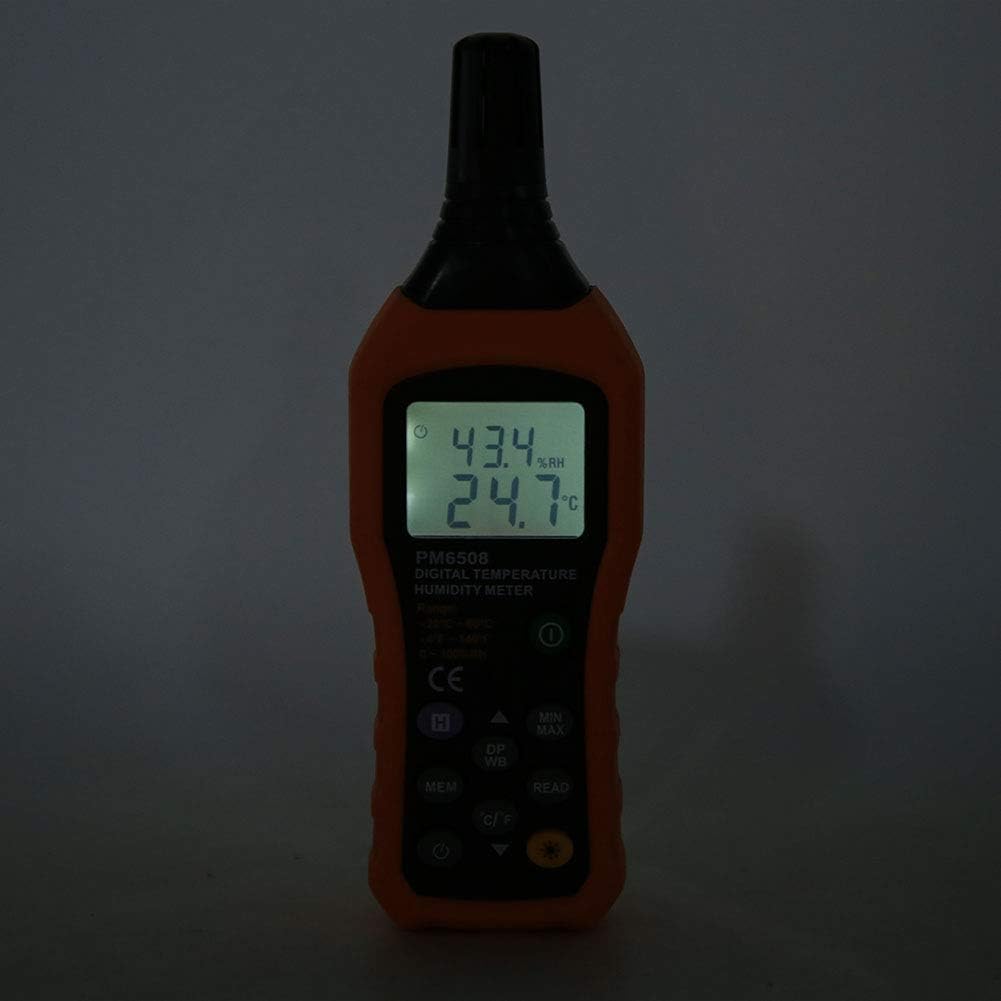
This image shows the PM6508 meter in a dark environment with its LCD backlight turned on. The illuminated display clearly shows the humidity and temperature readings, demonstrating the effectiveness of the backlight feature for use in low-light conditions.
וישאַלט
רייניקונג:
- ווישט אויס דעם מעטער'ס קasinג מיט אַ ווייך, דamp שטאָף. דו זאלסט נישט נוצן אַברייסיוו קלינערז אָדער סאָלוואַנץ.
- Keep the sensor area clean and free from dust or debris. Do not insert objects into the sensor opening.
סטאָרידזש:
- Store the meter in a cool, dry place, away from direct sunlight and extreme temperatures.
- If storing for an extended period, remove the batteries to prevent leakage and potential damage to the device.
- Utilize the provided protective holster/bag for storage to prevent physical damage.
טראָובלעשאָאָטינג
| פּראָבלעם | מעגלעך סיבה | לייזונג |
|---|---|---|
| דער מעטער גייט נישט אן. | טויטע אדער נישט ריכטיק אינסטאלירטע באַטעריעס. | קאָנטראָלירט די פּאָלאַריטעט פון די באַטעריעס. פאַרבייטן מיט נייע AAA באַטעריעס. |
| ומפּינקטלעך רידינגז. | Sensor obstructed or dirty; rapid environmental changes; device not calibrated. | Clean the sensor. Allow time for readings to stabilize. Ensure sensor is exposed to the correct environment. If issues persist, contact support. |
| דער עקראַן איז טונקל אָדער פליקערט. | נידעריק באַטאַרייע. | פאַרבייַטן באַטעריז. |
| Cannot recall stored data. | No data saved; incorrect button sequence. | Ensure data was saved. Refer to "Memory Storage" section for correct recall procedure. |
ספּעסאַפאַקיישאַנז
| פּאַראַמעטער | ווערט |
|---|---|
| מאָדעל | PM6508 (Item model number: WALFRONTinpedoqgs5) |
| אַמביאַנט טעמפּעראַטור ראַנגע | -20 צו 60 ° C (-4 צו 140 ° F) |
| Ambient Temperature Accuracy | ±1.0°C (0 to 45°C), ±1.5°C (-20 to 0°C, 45 to 60°C) |
| Ambient Temperature Resolution | 0.1°C/°F |
| RH קייט | 0-100% RH |
| RH אַקיעראַסי | ±3.0% RH (20% to 80%), ±4.0% RH (0% to 20%, 80% to 100%) |
| רה האַכלאָטע | 0.1% |
| נאַס באַלב טעמפּעראַטור קייט | -20 צו 60 ° C (-4 צו 140 ° F) |
| Wet Bulb Temperature Accuracy | ±1°C (0 to 45°C), ±1.5°C (-20 to 0°C, 45 to 60°C) |
| Wet Bulb Temperature Resolution | 0.1°C/°F |
| Dew-point Temperature Range | -50 צו 60 ° C (-58 צו 140 ° F) |
| Dew-point Temperature Accuracy | ±1°C (0 to 45°C), ±1.5°C (-50 to 0°C, 45 to 60°C) |
| Dew-point Temperature Resolution | 0.1°C/°F |
| דערהייַנטיקן קורס | 400ms |
| Number of Storage Records | 99 |
| מאַכט צושטעלן | 4 * AAA dry Batteries (not included) |
| באַטערי לעבן | 200 שעה |
| וואָג | בעערעך. 261 ג / 9.2 אַז |
| דימענשאַנז | Approx. 184 * 60 * 29mm / 7.2 * 2.4 * 1.1in |
| פאַבריקאַנט | WALFRONT |
| לאַנד פון אָריגין | כינע |
וואָראַנטי און שטיצן
For product support, technical assistance, or warranty inquiries, please contact Walfront customer service through the retailer where the product was purchased or visit the official Walfront store page on Amazon: Walfront Amazon Store.
ביטע באַהאַלטן אייער קויף קוויטל ווי אַ באַווייַז פון קויפן פֿאַר קיין וואָראַנטי קליימז.
Ask a question about this manual
Ask about setup, troubleshooting, compatibility, parts, safety, or missing instructions. Manuals+ will review the question and use this page’s manual context to help answer it.