
1. הקדמה
This manual provides detailed instructions for the SEQURE SQESC 12100 AM32 Brushless Electronic Speed Controller (ESC). It covers product features, specifications, setup, operation, and maintenance to ensure optimal performance and longevity of your device. Please read this manual thoroughly before use.
1.1 וואָס איז אין דער קעסטל
- 1 x SEQURE SQESC 12100 AM32 Electric Speed Controller
2. ספּעסאַפאַקיישאַנז
The SEQURE SQESC 12100 AM32 Brushless ESC is designed for high-performance applications, offering robust features and reliable operation.

Image: Detailed specifications of the SQESC 12100 AM32 Brushless ESC, including model name, processor, input voltage, current ratings, supported firmware, signal protocols, and application scenarios.
| פּאַראַמעטער | ווערט |
|---|---|
| מאָדעל נאָמען | SQESC 12100 |
| פּראַסעסער | STM32G071 |
| אַרייַנשרייַב וואָלtage | DC 18V-50.4V (5-12S Lipo) |
| קעסיידערדיק קראַנט | 100 א |
| מאַקסימום קראַנט | 180 א |
| שטיצן פירמוואַרע | BLHeli_32, AM32 |
| Signal Protocols | Dshot (All), PWM, Oneshot, Multishot, etc. |
| Programming Parameter Adjustment | געשטיצט |
| גערגל קאַלאַבריישאַן | געשטיצט |
| Timing Angle Setting | געשטיצט |
| קראַנט דעטעקטיאָן | געשטיצט |
| Telemetry Signal | געשטיצט |
| Motor Steering Settings | געשטיצט |
| RGB LED Color Lights | געשטיצט |
| אַפּפּליקאַטיאָן סינעריאָוז | Multi-axis drones, fixed-wing aircraft models, multi-rotor drones, plant protection machines, model ships, RC model cars, rock crawlers. |
| פּראָדוקט דימענשאַנז | 2.54 X 1.25 X 0.87 אינטשעס |
| פּונקט וואָג | 2.64 אונסעס (61.8 ג) |

Image: Diagram showing the physical dimensions (length, width, height) and weight of the SQESC 12100 AM32 Brushless ESC.
2.1 שליסל פֿעיִקייטן
- Dual-way brushless ESC supporting 5-12S Lipo.
- אַרייַנשרייַב וואָלtage 18V-50.4V, Continuous Current 100A, Peak Current 180A.
- Supports multiple protocols including Dshot (All), PWM, Oneshot, Multishot.
- Functions: Forward, reverse, braking.
- כולל נידעריק וואָלומעןtage protection, temperature protection, locked rotor protection, and current protection.
- Supports motor timing, throttle calibration, current detection, motor steering, and telemetry signal settings.
- Onboard RGB LED color lights with customizable settings.
- Adopts 32-bit high-performance processor STM32G071 with a working frequency up to 64MHz and maximum support for 128KHz motor PWM frequency.
- High-power MOSFET combined with CNC metal radiator for effective heat dissipation under high current load.
3. סעטאַפּ
3.1 וויירינג דיאַגראַמע
Proper wiring is crucial for the safe and correct operation of the ESC. Follow the diagram below for connections.

Image: A clear wiring diagram illustrating connections for the motor (A, B, C), signal input (S), ground (GND), telemetry signal, and battery (DC 18V-50.4V, 5-12S Lipo).
3.2 Physical Installation Considerations

בילד: נאָענט-אַרויף view of the ESC highlighting the CNC metal aluminum radiator, designed for efficient heat dissipation to ensure stable operation.
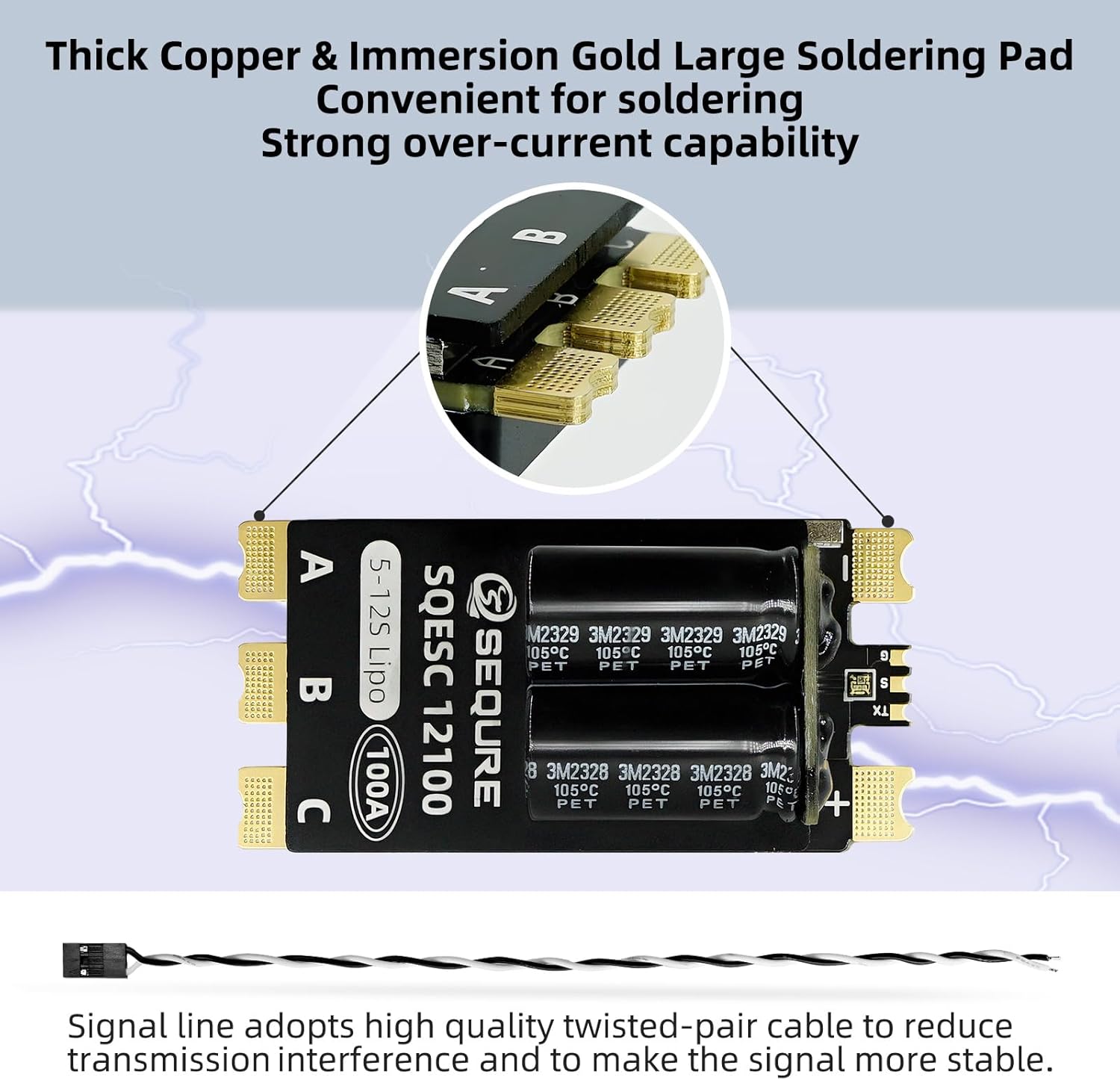
בילד: דעטאַלירט view of the ESC's thick copper and immersion gold large soldering pads, which facilitate convenient soldering and provide strong over-current capability. Also shows a signal line with twisted-pair cable for reduced interference.

Image: Illustration of the double-sided metal wrapping design that effectively protects the PCB components. It also shows a reserved location for tie straps for secure installation.
4. אַפּערייטינג ינסטרוקטיאָנס
4.1 Parameter Configuration and Firmware Upgrade
The SEQURE SQESC 12100 AM32 ESC allows for parameter adjustment and firmware upgrades using a dedicated configuration tool. Follow these steps:
- מאַכט אויף און קאָננעקט: Connect the ESC to a power supply (5-12S Lipo). Connect the ESC's 3-pin cable to the ECL_Link adapter. Connect the ECL_Link adapter to your computer via a data cable.
- ווייכווארג דאַונלאָוד: Download the 'Serial Port Connector' program (e.g., AM32 Firmware ESC configuration tool) from the official SEQURE webפּלאַץ (sequremall.com/pages/blhelisuite32). Select the appropriate version (Windows/Linux) for AM32.
- קאַטער ווייכווארג: Double-click to open the downloaded 'Serial Port Connector' program.
- שאַפֿן קשר: In the software, check 'Direct Connect'. Select the corresponding COM port for your ECL_Link and click 'Connect'.
- לייענען פּאַראַמעטערס: Click on 'M1' to read the current parameters from the ESC.
- מאָדיפֿיצירן פּאַראַמעטערס: Adjust parameters as required (e.g., Reverse Rotation, Timing Advance, Motor KV, etc.).
- היט סעטטינגס: After making modifications, click 'Save Settings'. You can click 'M1' again to re-read parameters and confirm changes.
- Firmware Upgrade (if needed):
- Click on 'Flash' in the top menu of the software.
- Click 'Load Firmware' and select the appropriate firmware file.
- Wait for the firmware upgrade process to complete.
- דיסקאַנעקט: After completing parameter modification or firmware upgrade, click 'Close Connection' to disconnect. Then, disconnect the power supply from the ESC and finally disconnect the ECL_Link from the computer.
Video: A step-by-step guide on how to configure parameters and upgrade firmware for AM32/BLHeli_32 ESCs using the ESC-LINK tool and the Serial Port Connector program.
5. אַפּפּליקאַטיאָן סינעריאָוז
The SEQURE SQESC 12100 AM32 Brushless ESC is versatile and suitable for a wide range of remote-controlled applications:
- Multi-axis drones
- Fixed-wing aircraft models
- Multi-rotor drones
- Plant protection machines
- Model ships
- RC model cars
- Rock crawlers

Image: Collage showing different applications for the ESC, including plant protection machines, unmanned multi-rotor aircraft, RC ship models, and RC off-road vehicle models.
6. זיכערקייַט וואָרנינגז
No specific safety warnings were provided beyond general product usage. Always ensure proper handling of electrical components and batteries. Refer to the safety guidelines of your specific RC model for additional precautions.
7. וואָראַנטי און שטיצן
For warranty information and technical support, please refer to the official SEQURE webזייטל אדער קאנטאקט זייער קאסטומער סערוויס. האלט אייער קויף קוויטל פאר גאראנטיע טענות.