
הקדמה
This manual provides detailed instructions for the setup, operation, maintenance, and troubleshooting of your RedThunder K10 Wired Gaming Keyboard and Mouse Combo. Please read this manual thoroughly before using the product to ensure optimal performance and longevity.
The RedThunder K10 combo includes a 104-key full-size wired gaming keyboard, a 7-button wired gaming mouse, and a soft leather wrist rest, all designed to enhance your gaming and computing experience with ergonomic comfort and customizable RGB lighting.
סעטאַפּ
Follow these steps to connect your RedThunder K10 Gaming Keyboard and Mouse Combo to your computer.
- ופשליסן די קאַמפּאָונאַנץ: Carefully remove the keyboard, mouse, and wrist rest from their packaging.
- פֿאַרבינדן די קלאַוויאַטור: Locate an available USB port on your computer. Plug the USB connector of the keyboard into the USB port.
- פאַרבינדן די מויז: Locate another available USB port on your computer. Plug the USB connector of the mouse into the USB port.
- באַפעסטיקט די האַנטגעלענק רו: Position the soft leather wrist rest in front of the keyboard for ergonomic support.
- סיסטעם דערקענונג: Your operating system (Windows 11, 10, 8, 7, Vista, XP, or limited macOS) should automatically detect and install the necessary drivers. This process may take a few moments.
Once connected, the RGB lighting on both the keyboard and mouse should illuminate, indicating they are powered on and ready for use.

Image: The RedThunder K10 keyboard and mouse combo demonstrating wide compatibility with various operating systems, including Windows and macOS, via USB connection.
אַפּערייטינג ינסטראַקשאַנז
קלאַוויאַטור פאַנגקשאַנז
The K10 keyboard features a 104-key full-size layout with dedicated F-keys and a numeric keypad. It supports 26-key anti-ghosting for precise input during intense gaming sessions.
RGB ליגהטינג קאָנטראָל
The keyboard's RGB backlighting can be customized using the Function (Fn) key in combination with other keys:
- Fn + ינס: Cycle through various lighting modes.
- Fn + Del: Activate streamer lighting mode.
- Fn + היים: Switch between different static color options.
- Fn + סוף: Toggle breathing lighting mode.
- Fn + PgUp / PgDn: Adjust backlight brightness (PgUp for brighter, PgDn for dimmer).
- Fn + '+' / '-': Adjust the speed of dynamic lighting effects.
Multimedia and System Functions
Access multimedia controls and system functions using the Fn key:
- Fn + F1-F12: Access various multimedia and system shortcuts (e.g., volume control, media playback, email, browser).
- Fn + געווינען: פארשליסן אדער אויפשליסן דעם ווינדאָוס קנעפּל צו פארמיידן אַקסאַדענטאַלע דריקונגען בעת גיימינג.

Image: Visual guide to the RedThunder K10 keyboard's RGB lighting modes and function key combinations for customization.
מויז פאַנגקשאַנז
The K10 gaming mouse features a high-precision optical sensor and 7 programmable buttons, designed for responsive and accurate tracking.
- דפּי אַדזשאַסטמאַנט: The mouse offers adjustable sensitivity up to 7200 DPI, with a 12000fps scan rate and 1000Hz polling rate. DPI settings can typically be cycled through using a dedicated button on the mouse (often located behind the scroll wheel).
- 7 קנעפּלעך: Includes standard left/right click, scroll wheel, DPI button, and two side buttons for forward/backward navigation or custom assignments.
- RGB לייטינג: The mouse features dynamic RGB lighting effects that complement the keyboard.
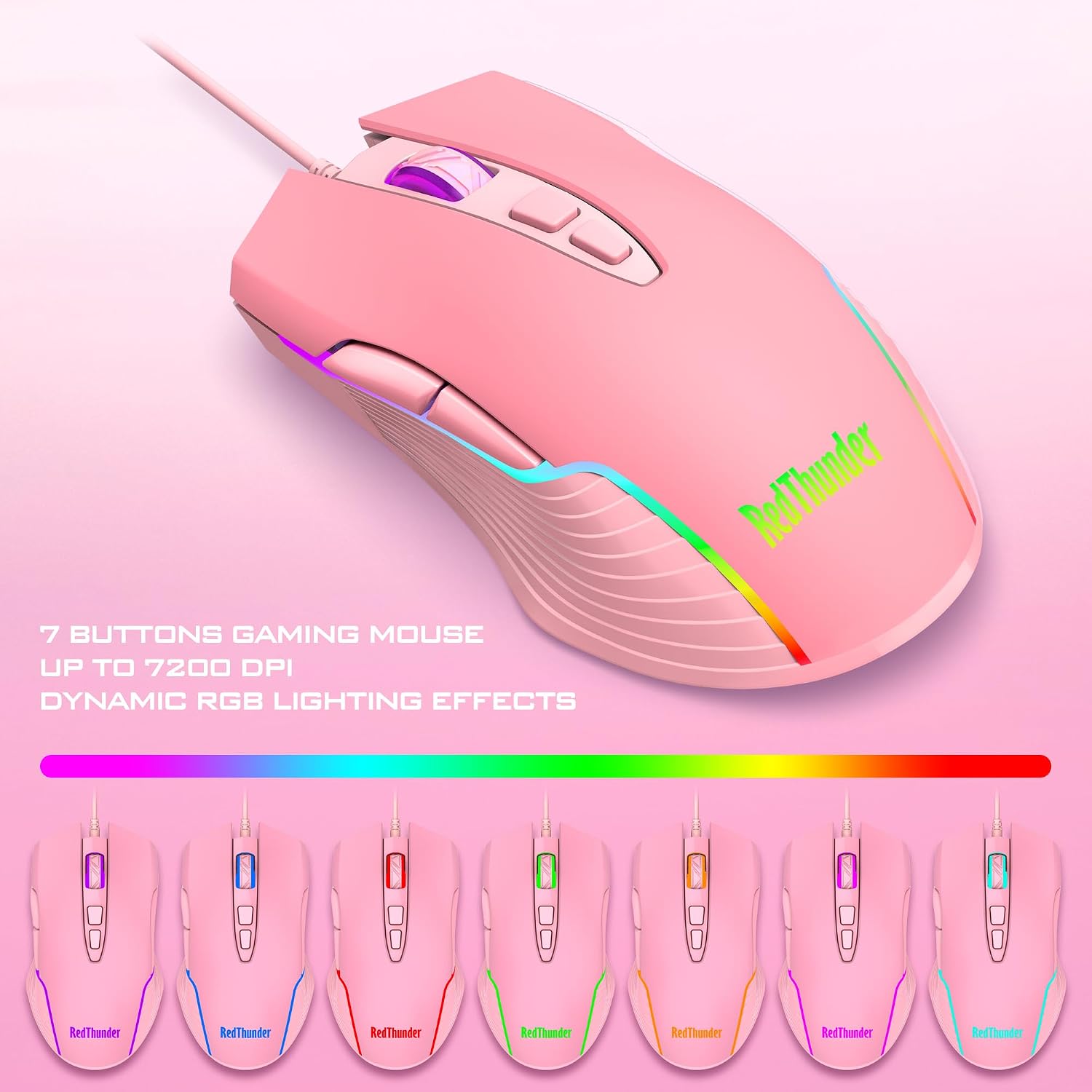
Image: The RedThunder K10 gaming mouse highlighting its 7-button design, 7200 DPI capability, and dynamic RGB lighting effects.

Image: An illustration demonstrating the ergonomic design of the RedThunder K10 mouse and keyboard, including the wrist rest, for comfortable use.
וישאַלט
Proper maintenance ensures the longevity and performance of your RedThunder K10 combo.
- רייניקונג: Use a soft, dry cloth to wipe down the keyboard and mouse surfaces regularly. For deeper cleaning, a slightly damp cloth (water only) can be used, ensuring no liquid enters the device. Avoid harsh chemicals or abrasive materials.
- באַזייַטיקונג פון שטויב: Use compressed air to remove dust and debris from between the keycaps of the keyboard and from the mouse sensor area.
- סטאָרידזש: ווען נישט אין באַנוץ פֿאַר לענגערע פּעריאָדן, זאָל מען האַלטן די דעווייסעס אין אַ ריינער, טרוקענער סביבה, אַוועק פֿון דירעקטער זון און עקסטרעמע טעמפּעראַטורן.
טראָובלעשאָאָטינג
If you encounter issues with your RedThunder K10 combo, refer to the following common solutions:
| פּראָבלעם | מעגלעך לייזונג |
|---|---|
| קלאַוויאַטור/מויז רעאַגירט נישט |
|
| RGB לייטינג טוט נישט אַרבעטן |
|
| פּראָבלעמען מיט מאַוס טראַקינג |
|
If problems persist after trying these steps, please contact RedThunder customer support.
ספּעסאַפאַקיישאַנז
- סאָרט: RedThunder
- מאָדעל: K10
- קאַנעקטיוויטי: ווייערד וסב
- קלאַוויאַטור טיפּ: 104-key Full-size Gaming Keyboard
- קלאַוויאַטור פֿעיִקייטן: RGB Backlit, Mechanical Feel, 26-Key Anti-Ghosting, Adjustable Tripod
- מויז טיפּ: 7-קנעפּל גיימינג מאַוס
- מויז פֿעיִקייטן: High-precision Optical Sensor, Up to 7200 DPI, 12000fps Scan Rate, 1000Hz Polling Rate, Dynamic RGB Lighting
- האַנטגעלענק רו: Soft Leather, Memory Foam
- פּראָדוקט דימענשאַנז: 17.52 x 9.53 x 1.77 inches (Keyboard and Wrist Rest)
- נומער וואָג: 2.64 פונט
- קאַמפּאַטאַבילאַטי: Windows 11, Windows 10, Windows 8, Windows 7, Windows Vista, Windows XP; Limited macOS support. Requires USB Port.
וואָראַנטי און שטיצן
RedThunder products are designed for quality and performance. This product is covered by a manufacturer's warranty against defects in materials and workmanship. For specific warranty terms and conditions, please refer to the documentation included with your purchase or visit the official RedThunder webפּלאַץ.
For technical support, troubleshooting assistance, or warranty claims, please contact RedThunder customer service. You can find more information and contact details on the RedThunder Store on Amazon.