
nubia V60 (Model Number: 123439101056)
ZTE נוביאַ V60 סמאַרטפאָון באַניצער מאַנואַל
Model: V60 (123439101056) | Brand: nubia
1. הקדמה
Welcome to the user manual for your new ZTE nubia V60 smartphone. This guide provides essential information to help you set up, operate, maintain, and troubleshoot your device. Please read this manual thoroughly to ensure optimal performance and longevity of your smartphone.
The nubia V60 features a 6.72-inch FHD+ display, a powerful 50MP AI rear camera, a 32MP front camera, 8GB RAM (expandable with 12GB Dynamic RAM), 256GB ROM, a 5000mAh battery with 22.5W fast charging, NFC, fingerprint recognition, and DTS sound effects.
2. ערשט סעטאַפּ
2.1. אויספּאַקן און פּאַקעט אינהאַלט
איידער איר הייבט אן, זיכערט זיך אז אלע זאכן זענען פאראן אין פעקל:
- ZTE nubia V60 Smartphone
- מאַכט אַדאַפּטער
- וסב קאַבלע
- סים ארויסווארפער טול (קען זיין אנדערש לויט ראיאן)
- שנעלע אָנהייב גייד (דאָס דאָקומענט דינט ווי אַ פולשטענדיק גייד)
2.2. אריינשטעלן די סים קארטל און microSD קארטל
- געפינט די סים קארטל טאַץ אויף דער זייט פון אייער דעווייס.
- שטעקט אריין דעם סים אויסווארף געצייג אין דעם קליינעם לאך לעבן דעם טרעי און דריקט פעסט ביז דער טרעי קומט ארויס.
- Place your Nano-SIM card(s) and/or microSD card (if applicable) into the tray with the gold contacts facing down, ensuring they are correctly aligned.
- שטופּן דעם טאַץ צוריק אין דעם שפּאַלט ביז עס קליקט אַרײַן אין פּלאַץ.

בילד: זייט view of the nubia V60, illustrating the location of the SIM card tray and physical buttons.
2.3. טשאַרדזשינג די באַטערי
Before first use, fully charge your device. Connect the USB cable to the power adapter and then to the phone's charging port. Plug the power adapter into a wall outlet. The device supports 22.5W fast charging.
2.4. אײַנצושאַלטן און ערשטע קאָנפיגוראַציע
- Press and hold the Power button (located on the right side) until the screen lights up.
- Follow the on-screen instructions to select your language, connect to Wi-Fi, set up your Google account, and configure security features like fingerprint recognition.
3. אַפּערייטינג דיין מיטל
3.1. יקערדיק נאַוויגאַציע
The nubia V60 operates on Android 13.0. Use touch gestures such as tap, swipe, pinch-to-zoom, and long-press to navigate the interface. The power button and volume buttons are located on the right side of the device.

בילד: פראָנט view of the nubia V60, showcasing its 6.72-inch FHD+ display.
3.2. קאַמעראַ פֿעיִקייטן
Your device is equipped with a 50MP AI Rear Camera and a 32MP Front Camera.
- קאַטערינג די אַפּאַראַט: צאַפּן אויף די קאַמעראַ ייקאַן אויף דיין היים פאַרשטעלן אָדער שלאָס פאַרשטעלן.
- נעמען בילדער/ווידעאס: Tap the shutter button to capture an image or switch to video mode to record.
- AI Enhancements: The AI features automatically optimize settings for various scenes and subjects.
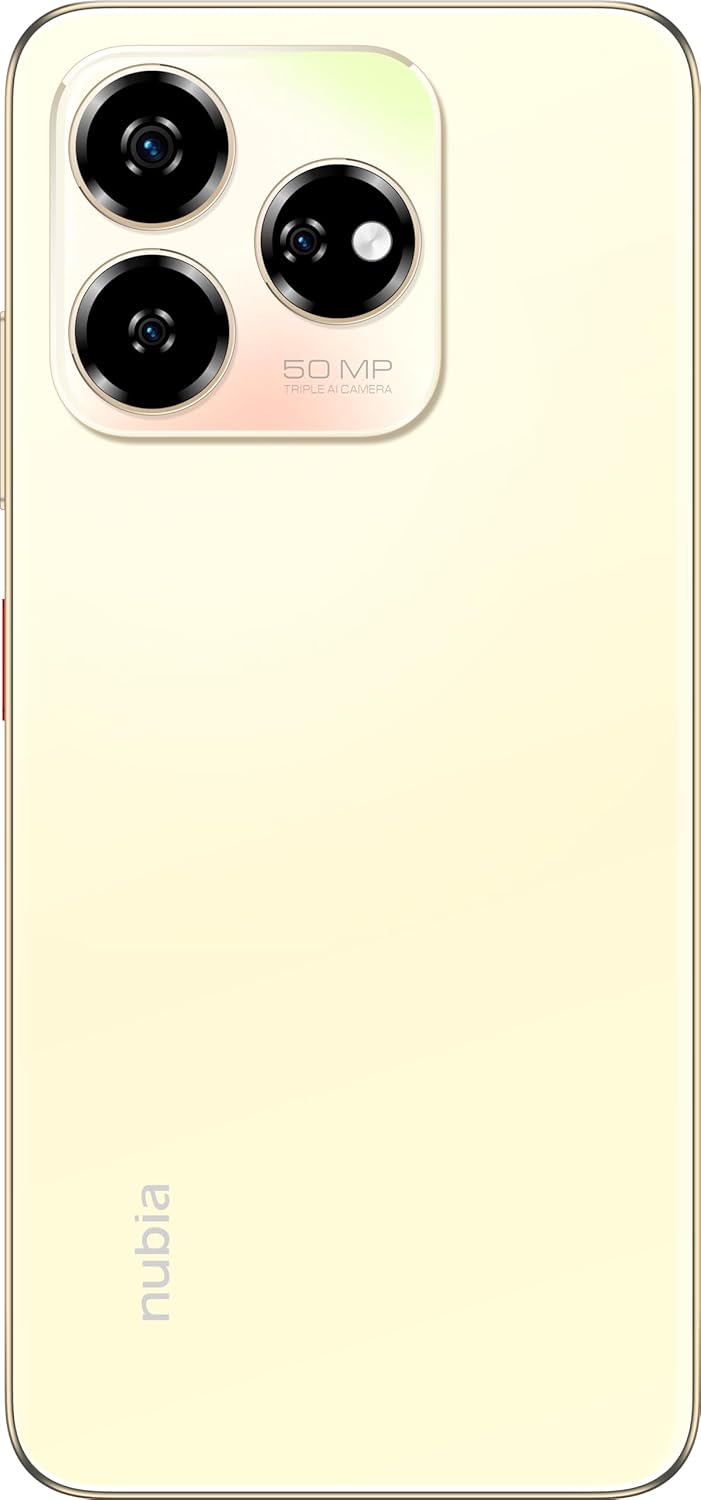
בילד: הינטערשטע view of the nubia V60, highlighting the 50MP triple AI camera module.
3.3. פינגערפּרינט דערקענונג
The device features a side-mounted fingerprint sensor for secure and quick unlocking. To set up:
- גיין צו סעטטינגס> זיכערהייט> פינגערפּרינט.
- Follow the on-screen prompts to register your fingerprint(s).
3.4. NFC פונקציאָנאַליטעט
NFC (Near Field Communication) allows for quick data exchange and contactless payments. To use NFC:
- Ensure NFC is enabled in סעטטינגס > פארבונדענע דעווייסעס > פארבינדונג פרעפערענצן > NFC.
- Tap your phone to another NFC-enabled device or payment terminal to initiate a connection or transaction.
3.5. DTS Sound Effect
Experience enhanced audio quality with DTS sound effects. This feature can be configured in your device's sound settings to optimize audio for various media types.
3.6. Live Island
The Live Island feature provides dynamic notifications and quick access to certain functions around the front camera cutout. Explore its functionalities through your device's display settings or by interacting with notifications.
4. וישאַלט און קער
4.1. רייניקן דיין דעווייס
Use a soft, lint-free cloth to clean the screen and body of your phone. Avoid using harsh chemicals or abrasive materials that could damage the finish or screen coating.
4.2. ווייכווארג דערהייַנטיקונגען
קאָנטראָלירט און אינסטאַלירט רעגולער ווייכווארג דערהייַנטיקונגען צו זיכער מאַכן אַז אייער מיטל האט די לעצטע פֿעיִקייטן, זיכערהייט פּאַטשאַז און פאָרשטעלונג פֿאַרבעסערונגען. גייט צו סעטטינגס > סיסטעם > סיסטעם דערהייַנטיקונג.
4.3. באַטערי קער
- פֿאַרמײַדט עקסטרעמע טעמפּעראַטורן, ווײַל זיי קענען פֿאַרערגערן די לעבן פֿון דער באַטעריע.
- ניצט נאָר די אָריגינעלע אָדער סערטיפיצירטע טשאַרדזשינג אַקסעסאָריעס.
- פֿאַר אַן אָפּטימאַלן באַטאַריע געזונט, זאָלט איר נישט אָפֿט אויסלאָדן די באַטאַריע גאָר אָדער האַלטן זי ביי 100% פֿאַר לענגערע פּעריאָדן.
4.4. סטאָרידזש מאַנאַגעמענט
פּיריאַדיקלי שייַעךview your device's storage (256GB ROM) and clear unnecessary files, apps, or media to maintain optimal performance. You can check storage usage in סעטטינגס> סטאָרידזש.
5. טראָובלעשאָאָטינג
This section addresses common issues you might encounter with your nubia V60.
5.1. מיטל ניט טורנינג אויף
- זיכער מאַכן אַז די באַטאַרייע איז אויפגעלאָדן. פֿאַרבינדט דעם טשאַרדזשער און וואַרט אַ פּאָר מינוט איידער איר פּרוּווט עס אָנצוצינדן.
- דריק און האלט דעם פּאַוער קנעפּל פֿאַר לפּחות 10-15 סעקונדעס צו צווינגען אַ ריסטאַרט.
5.2. פּראָבלעמען מיטן אויפלאָדן
- באַשטעטיקן אַז דער טשאַרדזשינג קאַבל און אַדאַפּטער זענען זיכער פארבונדן און נישט געשעדיגט.
- Try using a different power outlet or charging accessory.
- Clean the charging port gently with a soft, dry brush to remove any debris.
5.3. נעץ קאָנעקטיוויטי פּראָבלעמען
- Check if your SIM card is properly inserted and activated.
- אַקטיווירן און אויסלעשן די עראָפּלאַן מאָדע.
- ריסטאַרט דיין מיטל.
- גיין צו סעטטינגס> נעץ & אינטערנעט> מאָביל נעץ and ensure your preferred network type is selected.
5.4. אַפּפּס קראַשן אָדער פרירן
- נאָענט און ריאָופּאַן די אַפּ.
- אויסמעקן די אַפּ'ס קאַש און דאַטן אין סעטטינגס > אַפּפּס > [אַפּ נאָמען] > סטאָרידזש און קאַש.
- זיכער מאַכן אַז די אַפּ איז דערהייַנטיקט צו איר לעצטער ווערסיע.
- ריסטאַרט דיין מיטל.
5.5. פאַבריק ריסעט (לעצטע מיטל)
ווארענונג: א פאַבריק ריסעט וועט אויסמעקן אַלע דאַטן אויף דיין טעלעפאָן. באַקאַפּ וויכטיקע דאַטן איידער איר גייט ווייטער.
To perform a factory reset, go to סעטטינגס> סיסטעם> באַשטעטיק אָפּציעס> מעקן אַלע דאַטן (פאַבריק באַשטעטיק) און נאָכגיין די ינסטראַקשאַנז.
6. טעכניש ספּעסאַפאַקיישאַנז
| שטריך | באַשרייַבונג |
|---|---|
| מאָדעל נאָמען | V60 |
| נומער מאָדעל נומער | 123439101056 |
| סאָרט | nubia |
| אָפּערייטינג סיסטעם | אַנדרויד 13.0 |
| פאַרשטעלן גרייס | 6.72 אינטשעס |
| אינסטאַלירטע ראַם זכּרון גרייס | 8 GB (Additional 12GB Dynamic RAM) |
| זכּרון סטאָרידזש קאַפּאַסיטי | 256 גיגאבייט |
| קפּו ספּיד | 1.8 גהז |
| דערציען אַפּאַראַט | 50MP אַי אַפּאַראַט |
| פראָנט אַפּאַראַט | 32MP |
| באַטערי פּאָווער שאַץ | 5000 מאַה |
| שנעל טשאַרדזשינג | 22.5 וו |
| דראָטלאָזע קאָמוניקאַציע טעכנאָלאָגיעס | NFC |
| קאַנעקטיוויטי טעכנאָלאָגיע | NFC |
| סעליאַלער טעכנאָלאָגיע | 4G |
| גפּס | GLONASS |
| אַודיאָ דזשאַק | קיין כעדפאָון דזשעק |
| פאָרם פאַקטאָר | בַּר |
| קאָליר | Sunlit Gold |
| פּונקט וואָג | 510 ג |
| פּעקל דימענשאַנז | 18 X 8.6 X 5.6 סענטימעטער |
| וואָס ס אין די קעסטל | מאַכט אַדאַפּטער, USB קאַבל |
7. וואָראַנטי אינפֿאָרמאַציע
Your ZTE nubia V60 smartphone comes with a standard manufacturer's warranty, covering defects in materials and workmanship under normal use. The duration and terms of this warranty may vary by region. Please refer to the warranty card included in your product packaging for specific details.
Additionally, extended warranty and accidental damage protection plans may be available for purchase. For example, options such as a 1-Year Extended Warranty Plan, 2-Years Extended Warranty Plan, and 1-Year Accidental Damage Protection Plan might be offered by authorized retailers.
האַלט אייער קויפן-באַווייַז פֿאַר יעדע וואָראַנטי-פאָדערונג.
8. קונה שטיצן
For further assistance, technical support, or service inquiries regarding your ZTE nubia V60, please contact nubia customer service through their official webזייטל אדער די קאָנטאַקט אינפֿאָרמאַציע וואָס איז צוגעשטעלט אין אייער פּראָדוקט דאָקומענטאַציע.
You can often find FAQs, troubleshooting guides, and software downloads on the official nubia support website. When contacting support, please have your device model number (V60) and item model number (123439101056) ready.
Ask a question about this manual
Ask about setup, troubleshooting, compatibility, parts, safety, or missing instructions. Manuals+ will review the question and use this page’s manual context to help answer it.