
1. הקדמה
The VOOPOO ARGUS P2 Pod System is an advanced electronic cigarette device designed for a superior vaping experience. Building upon the popular ARGUS P1, the ARGUS P2 features a futuristic design and incorporates five key 'Super Powers': super capacity, super long lifespan, super output, super-fast charging, and superior flavor. It integrates essential functions such as precise airflow adjustment and supports a wide range of vaping styles from Mouth-to-Lung (MTL) to Direct-to-Lung (DL) with its versatile cartridge options.

Image 1.1: The VOOPOO ARGUS P2 Pod System device.
2. פּעקל אינהאַלט
ביטע קאָנטראָלירט די אינהאַלט פון דער פּאַקעט ווען איר נעמט עס אויס, כּדי צו זיכער מאַכן אַז אַלע זאַכן זענען דאָרט:
- ARGUS P2 Device x 1
- ARGUS Cartridge 0.4Ω x 1
- ARGUS Cartridge 0.7Ω x 1
- טיפּ-C וסב קאַבלע רענטגענ 1
- האַלדז רימען X 1
- באַניצער מאַנואַל x 1

Image 2.1: Contents included in the ARGUS P2 package.
3. ספּעסאַפאַקיישאַנז
| מיטל גרייס | 78 X 48.5 X 17.5 מם |
| פּאַטראָן קאַפּאַציטעט | 2.0 מל |
| פּאַטראָן מאַטעריאַל | PCTG |
| פּאַטראָן קעגנשטעל | 0.4Ω / 0.7Ω |
| Device Material | Zinc Alloy + PC |
| רעזולטאַט ראַנגע | 5-30 W (3.2-4.2 V) |
| באַטאַרייע קאַפּאַציטעט | 1100 מאַה |
| טשאַרדזשינג | טיפּ-C (5V/2A) |
| ספּעציעלע פֿעיִקייטן | Fast Charging, Airflow Adjustment, iCOSM Code Technology |

בילד 3.1: וויזועל איבערview of the ARGUS P2 specifications.
4. סעטאַפּ
4.1 טשאַרדזשינג די מיטל
Before first use, fully charge the device. Connect the provided Type-C USB cable to the charging port on the device and plug the other end into a suitable USB power adapter (5V/2A recommended). The display will indicate charging status.
4.2 אָנפֿילן די קאַרטרידזש
- Remove the cartridge from the device.
- Locate the silicone plug on the side of the cartridge. Open the plug.
- Carefully fill the cartridge with your desired e-liquid through the filling port. Avoid overfilling.
- זיכער צומאַכן דעם סיליקאָן פּלאָג.
- For first-time use or with a new cartridge, allow the e-liquid to soak into the coil for 5-10 minutes before vaping to prevent dry hits.
4.3 אינסטאלירן די קאַרטרידזש
Align the filled cartridge with the pod slot on the device and push it firmly until it clicks into place. Ensure a secure connection.

Image 4.1: The ARGUS P2 device is available in multiple color options.
5. אַפּערייטינג ינסטרוקטיאָנס
5.1 מאַכט אויף / אַוועק
צו דרייען די מיטל on or אַוועק, דריקן די מאַכט קנעפּל פינף מאל rapidly. The screen will display the power status.
5.2 Adjusting Output (Power Mode)
The ARGUS P2 features a 'POWER mode' allowing output adjustment from 5W to 30W in 1W increments. This mode is recommended for users who prefer precise control over their vaping experience, matching output to their cartridge and e-liquid preferences.
5.3 Adjusting Output (Shift Mode)
For a simpler experience, the device also includes a 'SHIFT mode' with three preset output levels. This mode offers intuitive operation and is highly recommended for beginners.

Image 5.1: The ARGUS P2 offers both precise Power Mode and simplified Shift Mode for output adjustment.
5.4 אַירפלאָוו אַדזשאַסטמאַנט
Adjust the airflow by moving the slider located on the side of the device. This allows customization of the draw resistance and vapor production, from a tighter 'heavy' draw to a looser 'light' draw.

Image 5.2: The side slider for airflow adjustment and a view of the two available cartridge types.
5.5 Cartridge Options
The ARGUS P2 comes with two types of pods:
- 0.4Ω Pod: Recommended for higher vapor production and richer flavor (18W-30W).
- 0.7Ω Pod: Recommended for moderate vapor and a more subdued flavor, ideal for a cigarette-like draw (14W-18W).
You can fine-tune your preferred flavor by adjusting the output and airflow settings.
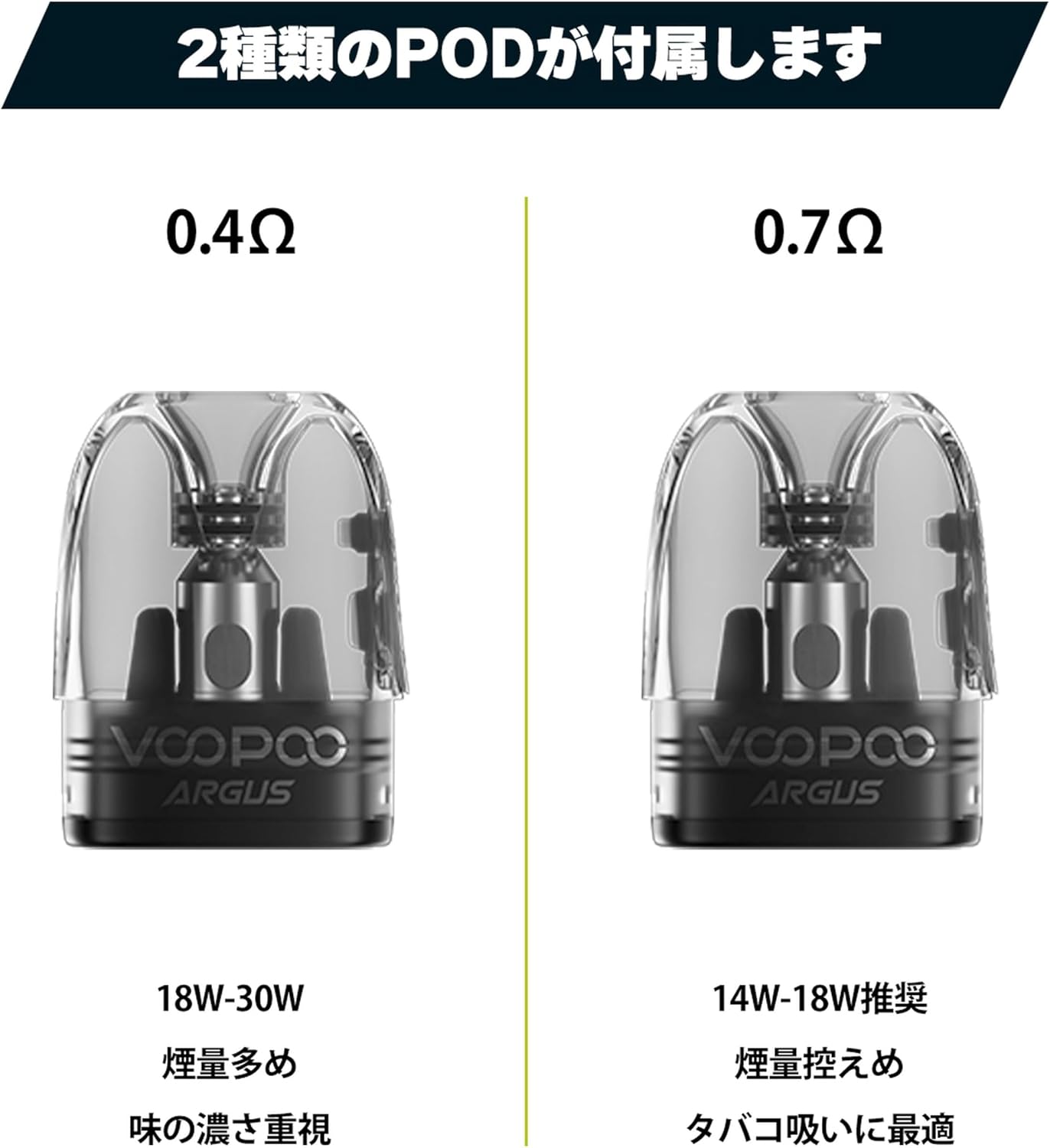
Image 5.3: Comparison of the 0.4Ω and 0.7Ω ARGUS P2 pods.
6. וישאַלט
6.1 רייניקונג די מיטל
Regularly clean the device, especially the pod connection area, with a dry cloth or cotton swab to remove any e-liquid condensation or dust. Keep the charging port free from debris.
6.2 קאַרטרידזש פאַרבייַט
Replace the cartridge when you notice a burnt taste, reduced vapor production, or diminished flavor. The lifespan of a cartridge varies depending on usage and e-liquid type.
6.3 Leak Prevention (iCOSM Code Technology)
The ARGUS P2 utilizes iCOSM code technology, featuring a unique internal capsule structure designed to prevent e-liquid leakage. To ensure optimal performance and minimize leaks, always ensure the silicone plug is securely closed after filling and the cartridge is properly seated in the device.
Video 6.1: This video demonstrates the iCOSM CODE 2.0 technology, which is equipped in the ARGUS P2 for enhanced flavor and leak prevention.

Image 6.1: Illustration of the iCOSM code technology and its leak-proof design.
7. טראָובלעשאָאָטינג
7.1 No Vapor or Weak Vapor
- קאָנטראָלירן די באַטאַרייע מדרגה: זיכער מאַכן אַז די דעווייס איז גענוג אָפּגעלאָדן.
- Cartridge Connection: Verify that the cartridge is properly installed and making good contact with the device.
- E-liquid Level: Ensure there is enough e-liquid in the cartridge.
- Coil Condition: If the flavor is burnt or vapor is consistently weak, the coil inside the cartridge may need to be replaced. Install a new cartridge.
7.2 ליקינג
- Proper Filling: Ensure the cartridge is not overfilled and the silicone plug is securely closed after filling.
- Cartridge Seating: Make sure the cartridge is firmly seated in the device.
- קאַנדאַנסיישאַן: A small amount of condensation can accumulate. Regularly clean the inside of the device where the pod sits.
7.3 אַפּאַראַט טוט זיך נישט אָן
- באַטאַרייע אָפּצאָל: Connect the device to a charger to confirm it has power.
- מאַכט אויף סיקוואַנס: Press the power button five times rapidly to ensure it is being turned on correctly.
8. וואָראַנטי און שטיצן
This product comes with a standard manufacturer's warranty. Please refer to the warranty card included in your package for specific terms and conditions. For technical support, troubleshooting assistance, or warranty claims, please contact the retailer where you purchased the product or visit the official VOOPOO webוועבזייטל פֿאַר קונה סערוויס אינפֿאָרמאַציע.
האַלט אייער קויף קוויטל ווי אַ באַווייַז פון קויפן פֿאַר גאַראַנטיע צוועקן.