
Cello C2224WSF TRAV
Cello C2224WSF Traveller Smart/DVD TV User Manual
Model: C2224WSF TRAV
פּראָדוקט איבערview
The Cello C2224WSF Traveller Smart/DVD TV is a versatile entertainment solution designed for travel, including caravans, motorhomes, boats, and trucks. It combines a Full HD Smart TV powered by LG's WebOS Hub with an integrated DVD player, offering entertainment options even without a stable internet connection. This model features Pitch Perfect Sound technology for enhanced audio and flexible power options (12V DC and mains AC).
Its lightweight and frameless design makes it ideal for space-constrained environments and wall mounting.

Figure 1: Cello C2224WSF Traveller Smart/DVD TV with WebOS Hub interface and integrated DVD player.
שליסל פֿעיִקייטן
- Integrated Smart TV & DVD Player: Combines LG WebOS Hub for streaming apps (Netflix, Prime Video, Disney+, YouTube, BBC iPlayer, ITVX) with a built-in DVD player for offline entertainment.
- Pitch Perfect Sound: Patented Cello technology with a speaker enclosure below the TV for enhanced bass, clearer mids, and defined highs, providing an immersive audio experience.

Figure 2: Illustration of Cello's Pitch Perfect Sound technology, highlighting the speaker enclosure for improved audio.
- דרייַיק טונער: Built-in DVB-C/-S2/-T2 tuner for crystal-clear HD resolution and access to digital channels. Supports USB recording (DVR) and media playback.
- וניווערסאַל קאַמפּאַטאַבילאַטי: Designed for 12V operation in caravans, motorhomes, boats, and trucks, with an integrated regulator for 10V to 27V DC input. Also operates on mains AC power.
- בלועטאָאָטה קאַנעקטיוויטי: Allows easy connection to Bluetooth soundbars for enhanced audio without cables.
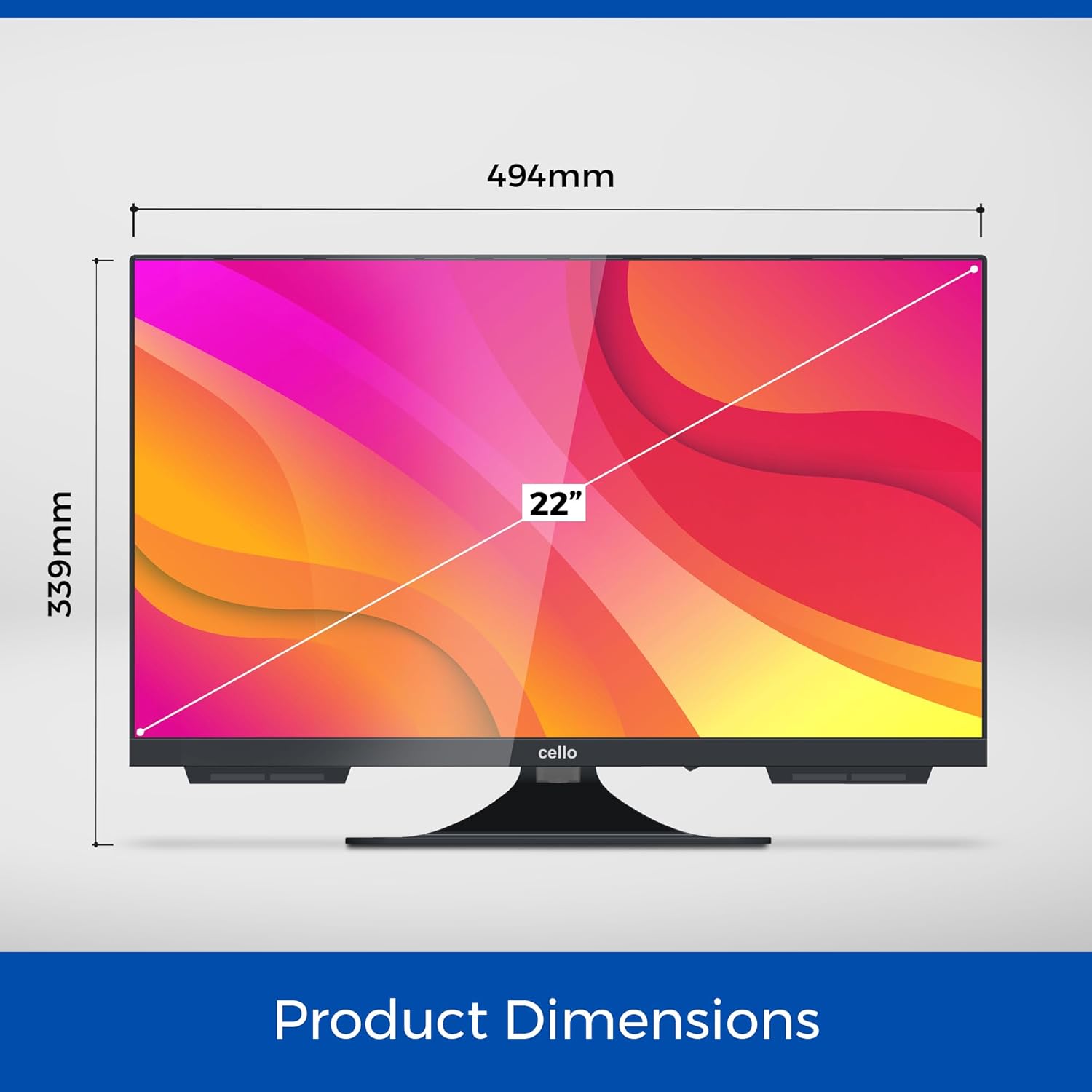
- Lightweight and Frameless Design: Compact dimensions (49 x 30 x 8 cm, 2.4 kg) and ultra-thin bezel for seamless integration and wall mounting in small spaces.

Figure 3: The Cello C2224WSF TV seamlessly integrated into a small living space, highlighting its compact design.
סעטאַפּ גייד
1. אַנפּאַקקינג און ערשט דורכקוק
Carefully remove the TV and all accessories from the packaging. Check for any signs of damage. Retain the packaging for future transport or service.
2. מאַונטינג אָפּציעס
The TV can be placed on its included stand or wall-mounted. Ensure the mounting surface is stable and can support the TV's weight (2.4 kg).
- סטאַנדאַרט ינסטאַלירונג: Attach the stand securely to the base of the TV using the provided screws.
- וואַנט מאָונטינג: Use a VESA-compatible wall mount (not included). Refer to the wall mount's instructions for proper installation. Ensure adequate ventilation around the TV.
3. מאַכט קאַנעקשאַן
The TV supports both 12V DC and mains AC power.
- 12V DC Power: Connect the supplied 12V power adapter cable to the TV's 12V input port and to your vehicle's 12V power source. The integrated regulator handles voltage fluctuations (10V to 27V DC).
- Mains AC Power: Connect the supplied AC power cable to the TV's AC input and then to a standard wall outlet.
4. אַנטענע/קאַבל פֿאַרבינדונג
Connect your antenna or cable source to the RF input port on the TV for digital terrestrial (DVB-T2), satellite (DVB-S2), or cable (DVB-C) reception.
5. ערשט סעטאַפּ וויזערד
ביים ערשטן מאָל אנצינדן, וועט דער טעלעוויזיע אייך פירן דורך אַן ערשטן סעטאַפּ וויזאַרד. דאָס נעמט אַרײַן:
- שפּראַך סעלעקציע
- נעץ פֿאַרבינדונג (Wi-Fi אָדער עטהערנעט)
- Channel scanning for DVB-T2/S2/C
- צייט און דאַטע סעטטינגס
אַפּערייטינג ינסטראַקשאַנז
1. רימאָוט קאָנטראָל פאַנגקשאַנז
Familiarize yourself with the provided remote control. Key buttons include Power, Volume Up/Down, Channel Up/Down, Source, Home (for WebOS), Navigation (arrows, OK), and specific app buttons.
2. Smart TV (WebOS Hub) Usage
דרוק די היים button on the remote to access the WebOS Hub. This interface provides quick access to:
- סטרימינג אַפּפּס: Netflix, Prime Video, Disney+, YouTube, etc. (requires internet connection).
- נאכפאלג טעלעוויזיע: BBC iPlayer, ITVX (UK specific, requires internet connection).
- Web בלעטערער: For general internet browsing.
- אַרייַנשרייַב סעלעקציע: Switch between TV, HDMI, USB, and DVD inputs.
- סעטטינגס: Configure picture, sound, network, and system settings.
פיגור 4: די WebOS Hub interface, showcasing available streaming applications and smart features.
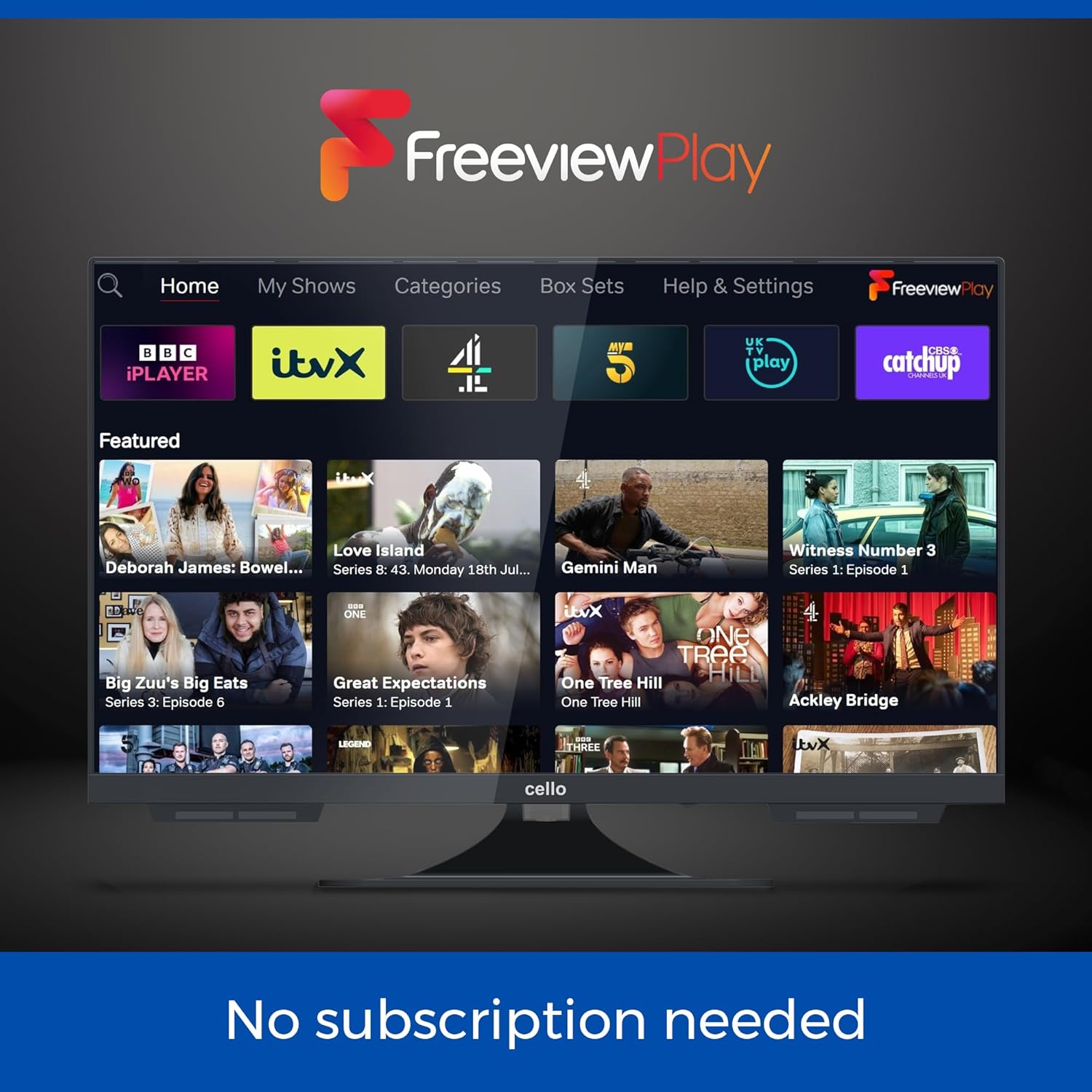
Figure 5: The Freeview Play interface, providing access to catch-up TV services without subscription.
3. די-ווי-די שפּילער אָפּעראַציע
Insert a DVD disc into the slot on the side of the TV. The TV will automatically switch to the DVD input or prompt you to do so. Use the remote control for playback functions (Play, Pause, Stop, Skip, Fast Forward/Rewind).
4. קאַנעקטינג פונדרויסנדיק דעוויסעס
The TV is equipped with multiple ports:
- הדמי: 1 port for connecting devices like gaming consoles, set-top boxes, or laptops.
- וסב: 2 ports for media playback (photos, videos, music) or USB recording (DVR).
- אָפּטיש: 1 port for digital audio output to a sound system.
- רף: פֿאַר אַנטענע/קאַבל פֿאַרבינדונג.
- עטהערנעט: פֿאַר אַ דראָטיקער אינטערנעט פֿאַרבינדונג.
To switch inputs, press the מקור button on the remote and select the desired input.
5. בלועטאָאָטה אַודיאָ
To connect a Bluetooth soundbar or headphones:
- גיין צו סעטטינגס > געזונט > בלועטאָאָטה.
- Enable Bluetooth and put your audio device into pairing mode.
- אויסקלייבן אייער דעווייס פון דער ליסטע צו פארבינדן.
וישאַלט
1. רייניקן דעם טעלעוויזאר
Use a soft, dry cloth to clean the screen and cabinet. For stubborn marks, slightly dampen the cloth with water or a mild, non-abrasive screen cleaner. Do not use alcohol, benzene, thinners, or other volatile substances.
2. ווייכווארג דערהייַנטיקונגען
די WebOS system may receive software updates. It is recommended to keep the TV connected to the internet to receive these updates, which can improve performance and add new features. You can check for updates in the סעטטינגס מעניו.
3. די-ווי-די שפּילער זאָרג
Only insert clean, undamaged discs into the DVD player. Avoid touching the disc's playback surface. If the player experiences issues, try cleaning the disc or using a dedicated DVD lens cleaner disc.
טראָובלעשאָאָטינג
| פּראָבלעם | מעגלעך סיבה | לייזונג |
|---|---|---|
| קיין מאַכט | Power cable not connected; no power from outlet/12V source. | Check power connections. Ensure outlet/12V source is active. |
| קיין בילד/קלאַנג פֿון טעלעוויזיע קאַנאַלן | Antenna/cable not connected; incorrect input selected; no channels scanned. | Check antenna/cable connection. Select correct input. Perform channel scan. |
| קיין אינטערנעט פֿאַרבינדונג | Wi-Fi signal weak; incorrect Wi-Fi password; router issue. | Check Wi-Fi signal strength. Re-enter password. Restart router. Try wired Ethernet connection. |
| די-ווי-די שפּילט נישט | Disc dirty/damaged; incorrect input selected. | Clean disc. Try another disc. Select DVD input. |
| נעבעך געזונט קוואַליטעט | Volume too low; sound settings incorrect; external speakers not connected properly. | Adjust volume. Check sound settings (e.g., EQ, balance). Ensure external speakers/soundbar are connected and selected. |
| ווייַט קאָנטראָל נישט ארבעטן | Batteries dead/incorrectly inserted; obstruction between remote and TV. | Replace batteries. Remove obstructions. Point remote directly at TV. |
ספּעסאַפאַקיישאַנז
- מאָדעל: C2224WSF TRAV
- פאַרשטעלן גרייס: 22 אינטשעס
- ווייַז טעכנאָלאָגיע: געפירט
- רעזאלוציע: 1080p (פול HD)
- דערפרישן קורס: 60 הז
- אַפּערייטינג סיסטעם: WebOS Hub (by LG)
- אינטעגרירטע פֿעיִקייטן: DVD Player, Triple Tuner (DVB-C/-S2/-T2)
- אַודיאָ: Pitch Perfect Sound, Integrated Speaker
- קאַנעקטיוויטי:
- 1 רענטגענ הדמי פּאָרט
- 2 רענטגענ וסב פּאָרץ
- 1 x Optical Port
- 1 x RF Port (Antenna/Cable)
- עטהערנעט
- בלועטאָאָטה
- ווי-פי
- מאַכט אַרייַנשרייַב: 12V DC (10V-27V range) / Mains AC
- דימענשאַנז (W x H x D): Approximately 49 cm x 30 cm x 8 cm (excluding stand)
- וואָג: בעערעך 2.4 קג
- ספּעציעלע פֿעיִקייטן: Frameless Design, USB Recording (DVR), Miracast, Web בלעטערער
- לאַנד פון אָריגין: פֿאַראייניקטע מלכות

Figure 6: Product dimensions of the Cello C2224WSF TV.
וואָראַנטי און שטיצן
This product comes with a standard manufacturer's warranty. For specific warranty terms and conditions, please refer to the warranty card included with your product or visit the official Cello webפּלאַץ.
For technical support, troubleshooting assistance beyond this manual, or warranty claims, please contact Cello customer service. Contact details can typically be found on the manufacturer's webפּלאַץ אָדער אין די פּראָדוקט פּאַקקאַגינג.
Please have your model number (C2224WSF TRAV) and purchase date available when contacting support.
Ask a question about this manual
Ask about setup, troubleshooting, compatibility, parts, safety, or missing instructions. Manuals+ will review the question and use this page’s manual context to help answer it.