
הקדמה
Thank you for choosing the XGP Bluetooth 5.2 Motorcycle Intercom. This device is designed to enhance your riding experience by providing clear communication, music playback, and navigation audio. Please read this manual carefully to ensure proper installation and operation.

Image: The XGP Bluetooth 5.2 Motorcycle Intercom main unit, showcasinג זײַן גלאַטן דיזײַן.
פּעקל אינהאַלט
באַשטעטיקן אַז אַלע זאכן זענען פאַראַן אין דיין פּעקל:
- XGP Intercom Main Unit
- וסב- C דאַטאַ קאַבלע
- 40mm Hi-Fi Speakers
- בום מיקראָפאָן
- ווייך ווירע מיקראָפאָן
- Metal Clip Bracket
- Adhesive Mount Bracket
- Speaker Sponges
- באַניצער מאַנואַל
פּראָדוקט איבערview
The XGP intercom unit is designed for ease of use and integration with most helmets. It features a lightweight and slim profile, weighing approximately 39g and measuring 15mm in thickness, ensuring minimal impact on helmet comfort.
שליסל פֿעיִקייטן:
- בלועטאָאָטה 5.2 טעכנאָלאָגיע: פֿאַר סטאַבילע און עפֿעקטיווע וויירלעס פֿאַרבינדונגען.
- Long-Range Intercom: Up to 1200 meters for 2-person communication.
- הויך-קאַפּאַציטעט באַטערי: 1000mAh, offering up to 35 hours of talk time or 30 hours of music playback.
- IP67 וואָטערפּרוף: דיזיינד צו וויטסטאַנד פאַרשידן וועטער טנאָים.
- CVC/DSP Noise Cancellation: Reduces engine and wind noise for clear audio.
- 40mm Hi-Fi Speakers: גיט רייכע באַס און קלאָרע אַודיאָ.
- Voice Command Support: Compatible with Google Assistant and Apple Siri.
- מוזיק ייַנטיילונג: Share music with another XGP intercom user.
- צווייענדיקע מיקראָפאָן אָפּציעס: Includes both boom and soft wire microphones for different helmet types.

Image: The XGP intercom highlighting its thin (0.51 inches) and light (0.08 lbs) design, improving wearing comfort.
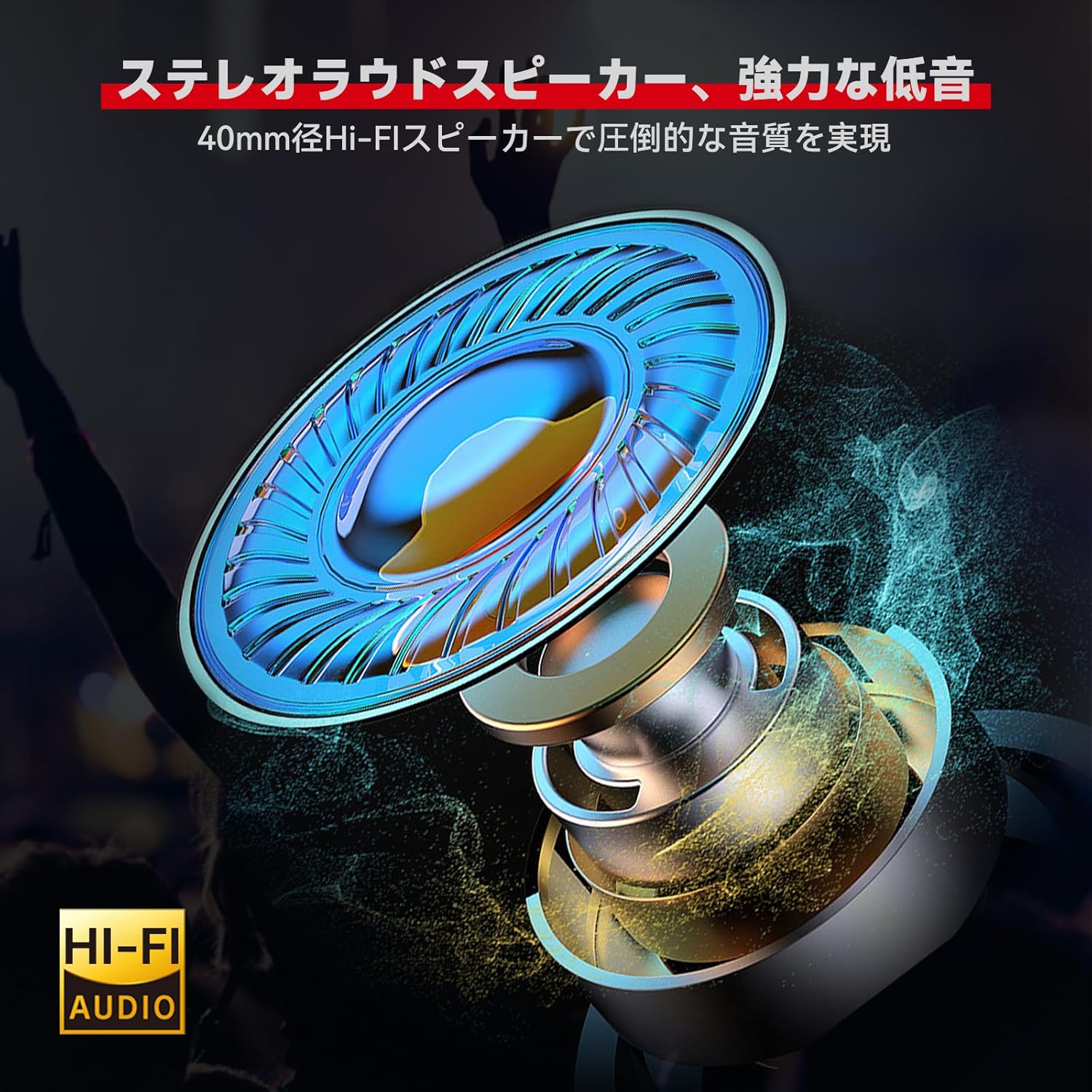
בילד: דעטאַלירט view of the 40mm Hi-Fi speaker, designed for high-quality audio output.

Image: Illustration of the XGP intercom's CVC/DSP noise cancellation technology reducing engine and wind noise for clear vocals.
ייַנמאָנטירונג
The XGP intercom offers simple and secure installation without the need for complex tools. Two types of mounting brackets are provided: a metal clip bracket and an adhesive mount bracket.
1. Choosing a Mounting Location:
Select a flat surface on the side of your helmet where the intercom unit will not obstruct your vision or movement. Ensure the chosen location allows for easy access to the control buttons.
2. אַטאַטשינג די בראַקאַץ:
- Metal Clip Bracket: Slide the metal clip between the helmet shell and the inner padding. Ensure it is securely fastened.
- Adhesive Mount Bracket: Clean the chosen helmet surface thoroughly. Peel off the protective film from the adhesive pad and firmly press the bracket onto the helmet for at least 30 seconds. Allow the adhesive to cure for several hours before attaching the intercom unit.
3. Installing Speakers and Microphone:
- Place the 40mm Hi-Fi speakers inside the helmet's ear pockets. Use the provided speaker sponges to adjust the distance for optimal audio quality and comfort.
- Choose between the boom microphone (for open-face helmets) or the soft wire microphone (for full-face helmets). Attach the microphone close to your mouth for clear voice pickup, ensuring it does not interfere with your helmet's visor.
- Route all cables neatly under the helmet padding to avoid discomfort and ensure they are not exposed to wind or moisture.

Image: The XGP intercom unit securely mounted on the side of a motorcycle helmet.
אַפּערייטינג ינסטראַקשאַנז
1. מאַכט אויף / אַוועק:
- מאַכט אויף: דריק און האלט דעם פּאַוער קנעפּל פֿאַר אַרום 3 סעקונדעס ביז די אינדיקאַטאָר ליכט בלינקט.
- מאַכט אַוועק: דריק און האלט דעם פּאַוער קנעפּל פֿאַר אַרום 3 סעקונדעס ביז די אינדיקאַטאָר ליכט גייט אויס.
2. Bluetooth Pairing with Smartphone:
The XGP intercom can connect to two smartphones simultaneously.
- Ensure the intercom is powered off.
- דריק און האלט דעם פּאַוער קנעפּל פֿאַר אַרום 5-7 סעקונדעס ביז די אינדיקאַטאָר ליכט בלינקט אָלטערנאַטיוו רויט און בלוי, וואָס ווײַזט אויף פּערינג מאָדע.
- On your smartphone, enable Bluetooth and search for "XGP Intercom".
- Select "XGP Intercom" from the list of available devices to connect. A voice prompt will confirm successful pairing.
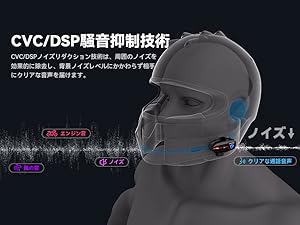
Image: The XGP intercom illustrating its ability to connect to two smartphones simultaneously for navigation, music, and calls.
3. Intercom Pairing (Rider-to-Rider):
The XGP intercom supports 2-person intercom communication up to 1200 meters.
- Ensure both XGP intercom units are powered off.
- On both units, press and hold the Intercom button (often the same as the Power button, refer to specific button layout) for approximately 5-7 seconds until the indicator lights flash red and blue alternately.
- Briefly press the Intercom button on one of the units. The units will search for each other and connect automatically. A voice prompt will confirm successful intercom connection.

Image: Two riders on motorcycles, demonstrating the simple pairing process for the XGP intercom.
4. מוזיק פּלייבאַק:
- שפּיל / פּויזע: דרוק אַ מאָל אויף די מולטי-פונקציאָנירן.
- ווייַטער שפּור: Press the Volume Up button for 2 seconds.
- פֿריִערדיקע שפּור: דריקן די באַנד אַראָפּ קנעפּל פֿאַר 2 סעקונדעס.
- באַנד אַדזשאַסטמאַנט: Briefly press the Volume Up or Volume Down buttons.
5. מוזיק טיילן:
With two XGP intercoms connected, you can share music. Ensure both units are paired via intercom mode.
- Start music playback on the primary intercom unit (connected to the smartphone).
- On the primary unit, press and hold the Music Sharing button (refer to button layout) for 2 seconds to initiate music sharing.
- The secondary unit will automatically receive and play the shared music.

Image: Two riders enjoying shared music through their XGP intercoms, enhancing the riding experience.
6. טעלעפאָן רופן:
- ענטפער רופן: דרוק אַ מאָל אויף די מולטי-פונקציאָנירן.
- סוף רופן: דריק דעם מולטי-פונקציע קנעפּל איין מאָל בעת אַ רוף.
- אָפּוואַרפן רופן: דריקן און האַלטן די מולטי-פונקציע קנעפּל פֿאַר 2 סעקונדעס.
- ריאַל די לעצטע נומער: טאָפּל דריקן די מולטי-פונקציע קנעפּל.
7. Voice Commands:
Activate your smartphone's voice assistant (Google Assistant or Apple Siri) directly from the intercom.
- אַקטאַווייט קול אַססיסטאַנט: Press the Voice Command button (refer to button layout) once.
- You can then issue commands such as "What's the weather today?", "Start navigation to [destination]", or "Call [contact name]".

Image: A rider using voice commands with the XGP intercom to control navigation, music, and calls.
וישאַלט
1. טשאַרדזשינג:
Connect the XGP intercom to a 5V/1A (5W) power adapter using the provided USB-C cable. Charging takes approximately 2 hours for a full charge. Using an adapter with higher wattage may damage the battery or shorten its lifespan.

Image: The XGP intercom connected to a USB-C charger, illustrating its 1000mAh battery capacity and charging time.

Image: An illustration showing the XGP intercom being charged via USB-C, with a note on using a 5W adapter.
2. רייניקונג:
ווישט אָפּ דעם אינטערקאָם אַפּאַראַט מיט אַ ווייכן, טרוקענעם שטאָף.amp cloth. Do not use harsh chemicals or abrasive cleaners. Ensure the USB-C port cover is securely closed to maintain IP67 waterproof rating.
3. סטאָרידזש:
Store the intercom in a cool, dry place when not in use. Avoid extreme temperatures and direct sunlight.
טראָובלעשאָאָטינג
| פּראָבלעם | מעגלעך סיבה | לייזונג |
|---|---|---|
| די מיטל טוט נישט מאַכט אויף. | נידעריק באַטאַרייע. | טשאַרדזש די מיטל פֿאַר בייַ מינדסטער 30 מינוט. |
| קען נישט פאַרבינדן מיטן סמאַרטפאָן. | דעווייס נישט אין פּערינג מאָדע; בלועטוט אויסגעלאָשן אויף טעלעפאָן. | Ensure device is in pairing mode (red/blue flashing light). Enable Bluetooth on your phone. |
| Intercom connection unstable or not connecting. | Distance too far; interference; not in intercom pairing mode. | Ensure units are within 1200M range. Re-initiate intercom pairing. Avoid obstacles. |
| קיין געזונט פון ספּיקערז. | Volume too low; speakers disconnected; incorrect installation. | Increase volume. Check speaker connections. Verify speaker placement. |
| Voice unclear during calls/intercom. | Microphone placement; high ambient noise. | Adjust microphone closer to mouth. Ensure CVC/DSP is active. |
ספּעסאַפאַקיישאַנז
| שטריך | דעטאַל |
|---|---|
| מאָדעל | XGP |
| בלועטאָאָטה ווערסיע | 5.2 (קוואַלקאָם טשיפּ) |
| אַפּערייטינג אָפטקייַט | 2402MHz - 2480MHz |
| Max Intercom Range | 1200 מעטער (2 רייטער) |
| באַטאַרייע קאַפּאַציטעט | 1000 מאַה ליטהיום באַטערי |
| טשאַרדזשינג צייט | בעערעך. 2 שעה |
| מוזיק פּלייַבאַקק צייט | אַרויף צו 30 שעה |
| רעדן צייט | אַרויף צו 35 שעה |
| סטאַנדביי צייט | אַרויף צו 360 שעה |
| וואָטערפּרוף רייטינג | IP67 |
| רעדנער דיאַמעטער | 40 מם |
| ראַש קאַנסאַליישאַן | CVC/DSP Technology |
| פּראָדוקט דימענשאַנז | 8.3 X 4.2 X 1.3 סענטימעטער |
| פּראָדוקט וואָג | 39g (main unit) / 350g (package) |
וואָראַנטי און שטיצן
The XGP Motorcycle Intercom comes with a 2 יאָר וואָראַנטי from the date of purchase. If you encounter any issues or have questions regarding your product, please contact our customer support. We are committed to providing service until you are satisfied.

Image: A shield icon indicating a 2-year warranty for the XGP product, with text encouraging customers to contact support for any questions.
For support, please refer to the contact information provided with your purchase or visit the official XGP webפּלאַץ.