
1. הקדמה
This manual provides detailed instructions for the installation, operation, and maintenance of your Stetsom 4in1 Universal Bass Knob, Model GAINCTL. This device integrates four essential functions for your car audio system: a bass knob gain control, a built-in voltmeter, an amplifier on/off switch, and a high-to-RCA input converter. Please read this manual thoroughly before use to ensure proper functionality and safety.
2. פּראָדוקט פֿעיִקייטן
- Bass Knob Gain Control: Allows precise adjustment of audio signal gain.
- Built-in Voltmeter: דיספּלייז סיסטעם וואָלtage with a blue LED, featuring a one-touch on/off display function.
- אויף / אַוועק Ampליפיער סוויטש: Provides convenient remote control to power your ampליפער אויף אָדער אַוועק.
- High to RCA Input Converter: Converts high-level speaker outputs from factory head units to RCA signals for ampלייכטער איינטיילונג.
3. פּעקל אינהאַלט
- Stetsom 4in1 Gain Control Unit
- מאַכט האַרנעסס
- Audio Harness (High Input)
4. פּראָדוקט איבערview
Familiarize yourself with the components and connections of the Stetsom 4in1 Universal Bass Knob.
בילד באַשרייַבונג: This diagram illustrates the front and rear components of the Stetsom Gain Control unit. The front features the digital display and the rotary control knob. The rear panel shows the RCA audio output, RCA audio input, and power/remote connections. A separate diagram details the wiring for the power harness (red for +12V, black for negative, green for remote input, blue for remote output) and the audio harness (blue for positive signal, gray for negative signal).

בילד באַשרייַבונג: א הינטן view of the Stetsom Gain Control unit, clearly showing the RCA input and output ports, as well as the power and remote wire terminals. Labels indicate 'POWER', 'REM IN', 'REM OUT', 'AUDIO IN', and 'AUDIO OUT' for proper connection identification.
5. ינסטאַלירונג
Proper installation is crucial for optimal performance. If you are unsure about any steps, consult a professional car audio installer.
5.1 וויירינג קאַנעקשאַנז
- מאַכט קשר: Connect the red wire from the power harness to a +12V constant power source. Connect the black wire to a reliable ground point in your vehicle.
- ווייַט אַרייַנשרייַב (REM IN): Connect the green wire to the remote output of your head unit or another switched +12V source that turns on with your vehicle's ignition.
- ווייַט רעזולטאַט (REM OUT): Connect the blue wire to the remote input of your amplifier(s). This allows the Stetsom unit to control your amplifier's power state.
- אַודיאָ אַרייַנגאַנג (RCA אָדער הויך-לעוועל):
- RCA אַרייַנשרייַב: If your head unit has RCA outputs, connect them directly to the 'IN AUDIO' RCA ports on the Stetsom unit.
- הויך-מדרגה אַרייַנשרייַב: If your head unit only has speaker wire outputs, use the provided audio harness. Connect the blue wire of the audio harness to the positive (+) speaker wire and the gray wire to the negative (-) speaker wire from your head unit. These high-level inputs will be converted to RCA signals by the Stetsom unit.
- אַודיאָ אַרויסגאַנג (RCA): Connect RCA cables from the 'OUT AUDIO' ports on the Stetsom unit to the RCA inputs of your ampליפער.

בילד באַשרייַבונג: This diagram illustrates the complete wiring setup for the Stetsom Gain Control. It shows connections from the player (head unit) to the Stetsom unit via high-level audio input (blue and gray wires) or RCA input. The power harness connects to the car battery (ground, +12V, remote input, remote output). The remote output from the Stetsom unit connects to the amplifier's remote input, and the audio output RCAs connect to the amplifier's audio input.
5.2 מאַונטינג
Choose a convenient and accessible location for mounting the Stetsom 4in1 unit, such as under the dashboard or in the center console. Ensure the location allows for easy access to the control knob and clear visibility of the voltmeter display. Secure the unit using appropriate fasteners (not included) through the mounting tabs.
6. אָפּעראַציע
The Stetsom 4in1 unit offers intuitive control over your audio system.

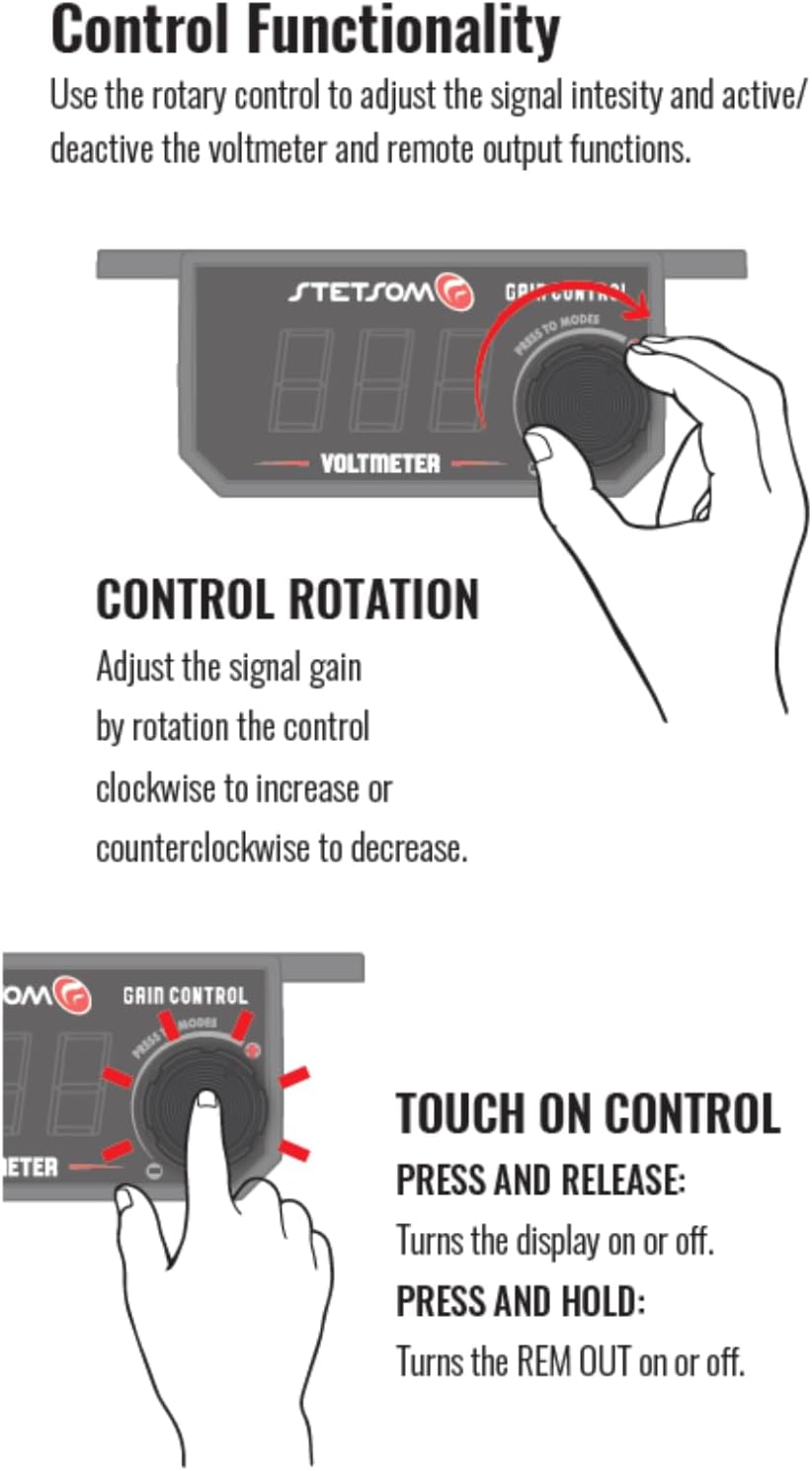
בילד באַשרייַבונג: This diagram details the control functionality of the Stetsom Gain Control knob. It shows how rotating the knob adjusts the signal gain (clockwise to increase, counter-clockwise to decrease). It also illustrates the touch functions: a quick press and release turns the display on or off, while a continuous press and hold turns the remote output (REM OUT) for the ampליפער אויף אָדער אַוועק.
6.1 געווינען קאָנטראָל
Rotate the central knob to adjust the signal gain. Turning the knob clockwise will increase the audio signal intensity, while turning it counter-clockwise will decrease it. Adjust this to achieve your desired bass level without distortion.
6.2 Voltmeter Display
The blue LED display shows the current system voltage. To turn the display on or off, simply דריקן און מעלדונג the control knob once.
6.3 Amplifier On/Off Switch
To remotely turn your connected amplifier(s) on or off, דריקן און האַלטן the control knob for a few seconds. This will activate or deactivate the remote output (REM OUT) signal.
7. טראָובלעשאָאָטינג
- קיין מאַכט/דיספּליי אויסגעלאָשן:
- Check all power and ground connections for secure contact.
- Ensure the +12V constant power source is active.
- Verify the remote input (green wire) is receiving a +12V signal when the vehicle is on.
- Press and release the control knob to ensure the display is not simply turned off.
- קיין אַודיאָ רעזולטאַט:
- Confirm all RCA audio input and output cables are securely connected.
- If using high-level input, ensure the audio harness wires are correctly connected to the speaker outputs of your head unit (positive to positive, negative to negative).
- טשעק אַז די amplifier is powered on (verify remote output signal).
- Ensure the gain knob is not set to minimum.
- Popping Sound When Vehicle Turns Off:
- This can sometimes occur due to the order of power-down. Try pressing and holding the control knob to turn off the amplifier (via REM OUT) before turning off your vehicle's ignition.
- פאַרזיכערן amplifier gains are set appropriately and not excessively high.
- Incorrect Voltmeter Reading:
- Verify the power and ground connections are solid and free from corrosion.
- Compare the reading with a separate multimeter to confirm accuracy.
8. ספּעסאַפאַקיישאַנז
| שטריך | באַשרייַבונג |
|---|---|
| פּראָדוקט דימענשאַנז | 2.5 X 3.8 X 1.4 אינטשעס |
| פּונקט וואָג | 2.75 אונסעס |
| מאָדעל נומער | GAINCTL |
| קאָליר | שוואַרץ |
| קאַנעקטער טיפּ | RCA |
| טיפּ קאַבלע | RCA |
| קאַמפּאַטאַבאַל דעוויסעס | Car Audio System, Gaming Console, Personal Computer |
9. וישאַלט
The Stetsom 4in1 Universal Bass Knob requires minimal maintenance. Keep the unit clean by wiping it with a soft, dry cloth. Avoid using harsh chemicals or abrasive cleaners. Ensure all connections remain secure and free from corrosion. Do not expose the unit to excessive moisture or extreme temperatures.
10. וואָראַנטי און שטיצן
For warranty information and technical support, please refer to the documentation included with your purchase or visit the official Stetsom webזייטל. האַלט דיין קויפן באַווייַז פֿאַר קיין וואָראַנטי קליימז.