
1. הקדמה און סאַפעטי אינפֿאָרמאַציע
This manual provides essential instructions for the installation, operation, and maintenance of your GAMEMAX GX-850 80 Plus Gold Fully Modular Power Supply. Please read this manual thoroughly before installation and retain it for future reference.
1.1 וויכטיק זיכערקייַט וואָרנינגז
- ריזיקירן פון עלעקטריקאַל קלאַפּ: מאַכט סאַפּלייז אַנטהאַלטן הויך וואָלומעןtage components. Do not open the power supply unit. There are no user-serviceable parts inside. Opening the unit will void the warranty.
- געהעריק גראָונדינג: Ensure your computer system is properly grounded to prevent electrical hazards.
- דיסקאַנעקט מאַכט: Always disconnect the AC power cord from the wall outlet before installing, removing, or servicing the power supply or any other computer components.
- ווענטילאַטיאָן: Ensure adequate ventilation around the power supply. Do not block any ventilation openings.
- Moisture and Temperature: Do not operate the power supply in high humidity or high-temperature environments. Keep it away from water and heat sources.
- פאַכמאַן ינסטאַלירונג: אויב איר זענט נישט זיכער וועגן קיין איינע פון די אינסטאַלאַציע טריט, זוכט הילף פון אַ קוואַליפֿיצירטן טעכניקער.
2. פּעקל אינהאַלט
Verify that all items are present in your GAMEMAX GX-850 package:
- GAMEMAX GX-850 80 Plus Gold Fully Modular Power Supply
- Modular Cable Set (including ATX 24-pin, CPU 8-pin, PCIe 6+2-pin, SATA, Peripheral 4-pin cables)
- אַק מאַכט שנור
- מאַונטינג סקרוז
- באַניצער מאַנואַל (דעם דאָקומענט)
3. פּראָדוקט איבערview
The GAMEMAX GX-850 is an 850-watt 80 Plus Gold certified fully modular power supply designed for desktop computers. It features an LLC and DC-DC circuit design for high efficiency and stable power delivery, along with an ultra-quiet FDB (Fluid Dynamic Bearing) fan for optimal cooling and low noise.
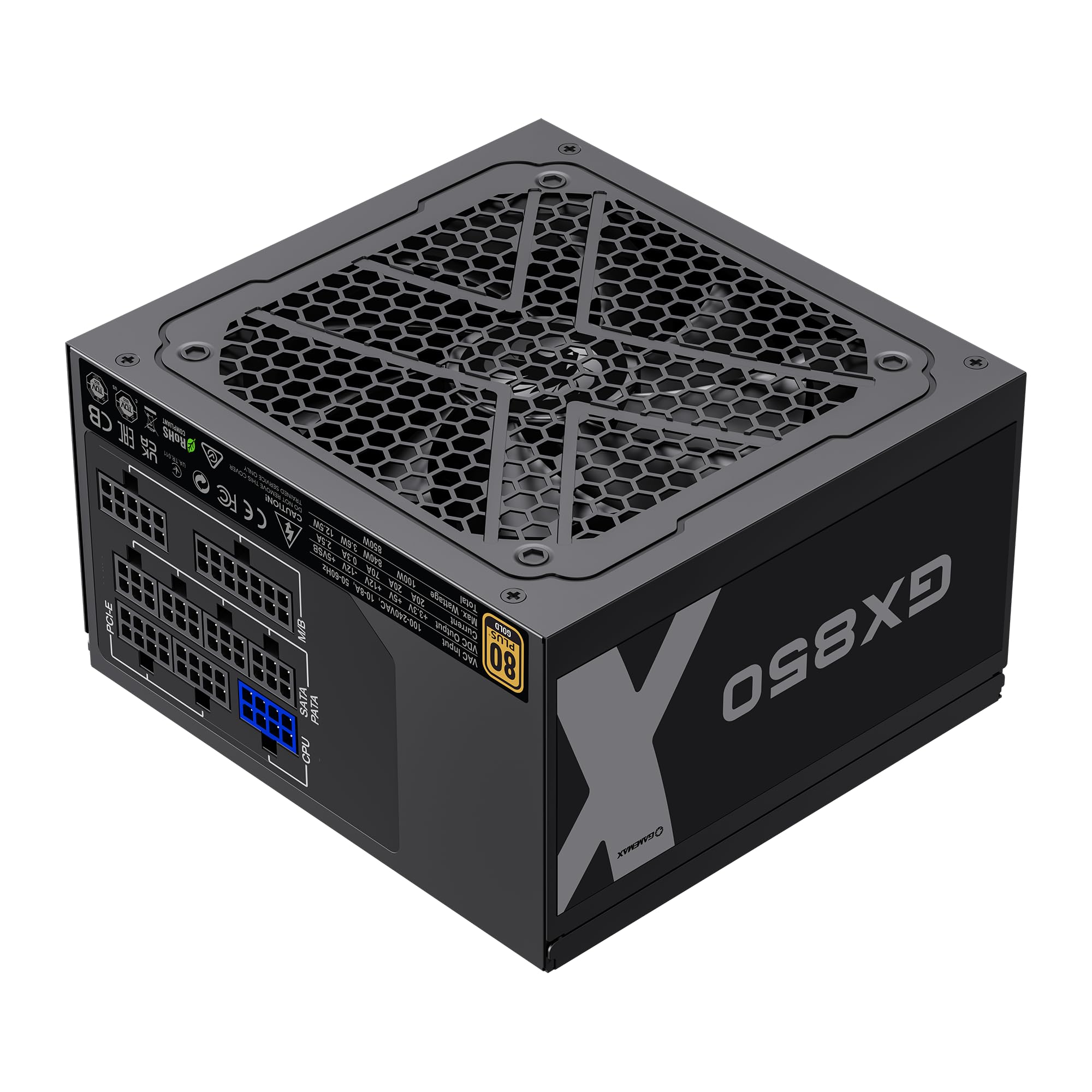
Image: The GAMEMAX GX-850 80 Plus Gold Fully Modular Power Supply, showcasinג זײַן שוואַרצע ענדיקן און מאָדולאַרן פּלאַן.
3.1 שליסל פֿעיִקייטן
- 80 פּלוס גאָלד סערטיפיצירט: Ensures high power efficiency, reducing heat and operating costs.
- LLC+DC-DC Circuit: Advanced circuit design for stable voltage output and improved efficiency.
- גאָר מאָדולאַר פּלאַן: Allows for custom cable management, reducing clutter and improving airflow.
- FDB Fan: Ultra-quiet temperature-controlled Fluid Dynamic Bearing fan for silent operation and extended lifespan.
- 105℃ Mainstream Capacitor: High-quality capacitors ensure long life and smooth power output.
- פולשטענדיק שוץ: Features SIX levels of protection: Over Temperature Protection (OTP), Over Current Protection (OCP), Short Circuit Protection (SCP), Over VoltagE פּראַטעקשאַן (אָוופּ), אונטער חלקtage Protection (UVP), and Over Power Protection (OPP).
4. סעטאַפּ און ייַנמאָנטירונג
Follow these steps to properly install your GAMEMAX GX-850 power supply into your computer system.
4.1 ינסטאַללאַטיאָן סטעפּס
- צוגרייטן אייער סיסטעם: זיכער מאַכן אַז אייער קאָמפּיוטער איז גאָר אויסגעלאָשן און אַרויסגעצויגן פֿון דער וואַנט־אַויטלעט. עפֿנט אייער קאָמפּיוטער־קעסטל.
- אַראָפּנעמען אַלטע PSU (אויב אָנווענדלעך): דיסקאָנעקט אַלע קייבלס פון דיין אַלטן מאַכט צושטעל און אַרויסנעמען עס פון דעם קעסטל.
- מאָנטירן די נייע PSU: Carefully place the GAMEMAX GX-850 into the power supply bay of your computer case. Secure it with the provided mounting screws. Ensure the fan is facing the correct direction for optimal airflow (typically facing down if your case has a bottom vent, or up if it's a top-mounted PSU).
- פֿאַרבינדן מאָדולאַרע קאַבלען: Identify the necessary cables for your components. Connect the modular cables to the corresponding ports on the power supply first, then route them to your components.
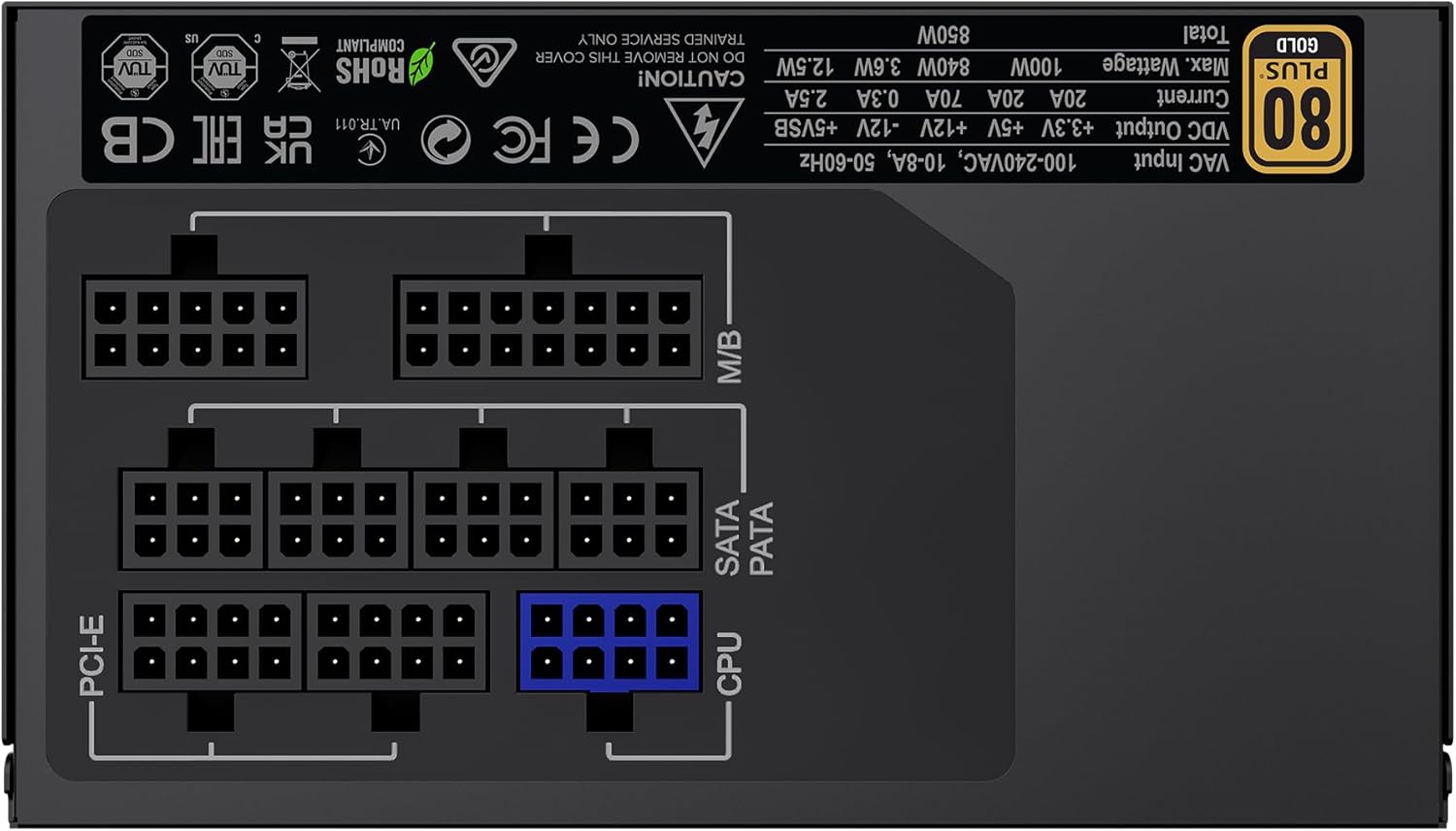
בילד: הינטערשטע view of the GAMEMAX GX-850 showing the fully modular cable connection ports for PCI-e, M/B (Motherboard), SATA/PATA, and CPU cables.
- Motherboard (M/B): פאַרבינדן די 24-שפּילקע אַטקס קאַבלע צו די מאָטהערבאָאַרד.
- CPU: Connect the 8-pin (or 4+4-pin) CPU power cable to the CPU power connector on your motherboard.
- Graphics Cards (PCI-e): Connect the 6+2-pin PCIe power cables to your graphics card(s). Use separate cables for each connector if your GPU requires multiple.
- Storage Devices (SATA): פֿאַרבינדט SATA מאַכט קייבאַלז צו אייערע SSDs, HDDs און אָפּטישע דרייווז.
- Peripherals (PATA/Molex): Connect peripheral power cables to any other devices requiring them (e.g., fan controllers, older drives).
- קאַבלע פאַרוואַלטונג: לייגט די קאַבלען אָרדנטלעך צו פֿאַרבעסערן די לופֿטפֿלוס און עסטעטיק.
- פֿאַרמאַכן דעם קעסטל און פֿאַרבינדן וועקסלשטראָם: Close your computer case. Connect the AC power cord to the power supply and then to a grounded wall outlet.
5. אַפּערייטינג ינסטרוקטיאָנס
After successful installation, follow these steps to operate your system.
- מאַכט סוויטש: זיכער מאַכן אַז דער מאַכט קנעפּל אויף דער צוריק פון דער מאַכט צושטעלן איז אין דער 'ON' (I) פּאָזיציע.
- סיסטעם מאַכט אויף: דריק דעם מאַכט קנעפּל אויף אייער קאָמפּיוטער קעסטל צו אנצינדן די סיסטעם.
- System Power Off: To turn off your system, use the operating system's shutdown procedure. For a hard shutdown, hold the case power button for several seconds. For complete power disconnection, switch the PSU's power switch to 'OFF' (O) and unplug the AC cord.
6. וישאַלט
Regular maintenance helps ensure the longevity and optimal performance of your power supply.
- שטויב רייניקונג: Periodically clean the power supply's fan and ventilation grilles using compressed air to prevent dust buildup, which can impede cooling. Ensure the system is powered off and unplugged before cleaning.
- קאַבלע טשעק: Occasionally check all modular cable connections to ensure they are securely seated.
- ינווייראַנמענאַל טנאָים: Maintain a clean, dry, and well-ventilated environment for your computer.
7. טראָובלעשאָאָטינג
אויב איר טרעפט פּראָבלעמען מיט אייער מאַכט צושטעל, זעט די פאלגענדע געוויינטלעכע טראָובלעשווטינג טריט:
- קיין מאַכט:
- Ensure the AC power cord is securely plugged into both the wall outlet and the power supply.
- קאָנטראָלירט אַז דער מאַכט קנעפּל אויף דער הינטערשטער זייט פון די PSU איז אין דער 'ON' (I) פּאָזיציע.
- Verify that the 24-pin ATX and 8-pin CPU power cables are correctly and firmly connected to the motherboard.
- פּרובירט די וואַנט אַוטלעט מיט אַן אַנדער דעווייס צו באַשטעטיקן אַז עס האָט שטראָם.
- סיסטעם אינסטאביליטעט/רענדאם אפשטעלונגען:
- Ensure all modular cables are fully seated at both the PSU and component ends.
- Check for proper ventilation and ensure the PSU fan is spinning. Overheating can cause shutdowns.
- If you have recently added new components, ensure your 850W power supply is sufficient for the total system wattage.
- פען דרייט זיך נישט:
- The GX-850 features a temperature-controlled fan. It may not spin at low loads or temperatures. This is normal operation.
- If the fan does not spin under load and the PSU feels hot, ensure there are no obstructions and consider contacting support.
If problems persist after performing these steps, contact GAMEMAX customer support or your retailer for further assistance.
8. ספּעסאַפאַקיישאַנז
Detailed technical specifications for the GAMEMAX GX-850 80 Plus Gold Power Supply:
| שטריך | באַשרייַבונג |
|---|---|
| מאָדעל נאָמען | GX-850 Modular |
| סאָרט | GAMEMAX |
| רעזולטאַט וואָסtage | 850 וואטס |
| פאָרם פאַקטאָר | אַטקס |
| עפעקטיווקייט סערטיפיקאציע | 80 פּלוס גאָלד |
| מאַכט סופּפּלי פּלאַן | גאַנץ מאָדולאַר |
| קאָאָלינג אופֿן | Air (FDB Fan) |
| נומער פון פאַנס | 1 |
| מינימום אַרייַנשרייַב וואָלtage | 115 וואלטס |
| מאַקסימום אַרייַנשרייַב וואָלtage | 240 וואלטס (AC) |
| אויבערשטער טעמפּעראַטור רייטינג | 105 Degrees Celsius (Capacitors) |
| קאַמפּאַטאַבאַל דעוויסעס | דעסקטאָפּ קאָמפּיוטער |
| קאַנעקטער טייפּס | ATX, PCI-e, SATA |
9. וואָראַנטי און שטיצן
GAMEMAX products are manufactured to high-quality standards. For warranty information, please refer to the warranty card included with your product or visit the official GAMEMAX webזייטל. גאַראַנטיע טערמינען קענען זיין אַנדערש לויט געגנט און הענדלער.
For technical support or further inquiries, please contact GAMEMAX customer service through their official webוועבזייטל אדער די קאָנטאַקט אינפֿאָרמאַציע וואָס אייער הענדלער האָט צוגעשטעלט.