
הקדמה
The Science Can Speed Number Games is a versatile 3-in-1 handheld console designed to enhance cognitive skills through engaging play. This STEM toy offers 100 challenges across three distinct modes: Schulte Mode, Memory Mode, and Graphic Mode. It is suitable for children aged 5 and up, providing an interactive way to improve concentration, memory, and observation skills. Its compact and portable design makes it an ideal companion for both indoor play and travel.

וואָס איז אין די קעסטל
Your Science Can Speed Number Games package includes:
- 1 x Speed Number Games Handheld Console
- 40 x Game Cards (ranging from basic to advanced levels)

סעטאַפּ
ייַנמאָנטירונג פון באַטאַרייע
The Speed Number Games console requires 3 AAA batteries (not included). To install the batteries:
- געפֿינען די באַטאַרייע אָפּטייל אויף די צוריק פון די מיטל.
- ניצנדיק אַ קליינעם שרויפנציהער, עפֿנט דעם דעקל פֿון דער באַטעריע־אָפּטיילונג.
- Insert 3 fresh AAA batteries, ensuring correct polarity (+/-).
- פאַרבייַטן די דעקן פון די באַטאַרייע אָפּטייל און באַוואָרענען עס מיט די שרויף.
מאַכט אויף / אַוועק
To power on the device, slide the ON/OFF switch located on the side of the console to the 'ON' position. To power off, slide the switch to the 'OFF' position.
אַפּערייטינג מאָדעס
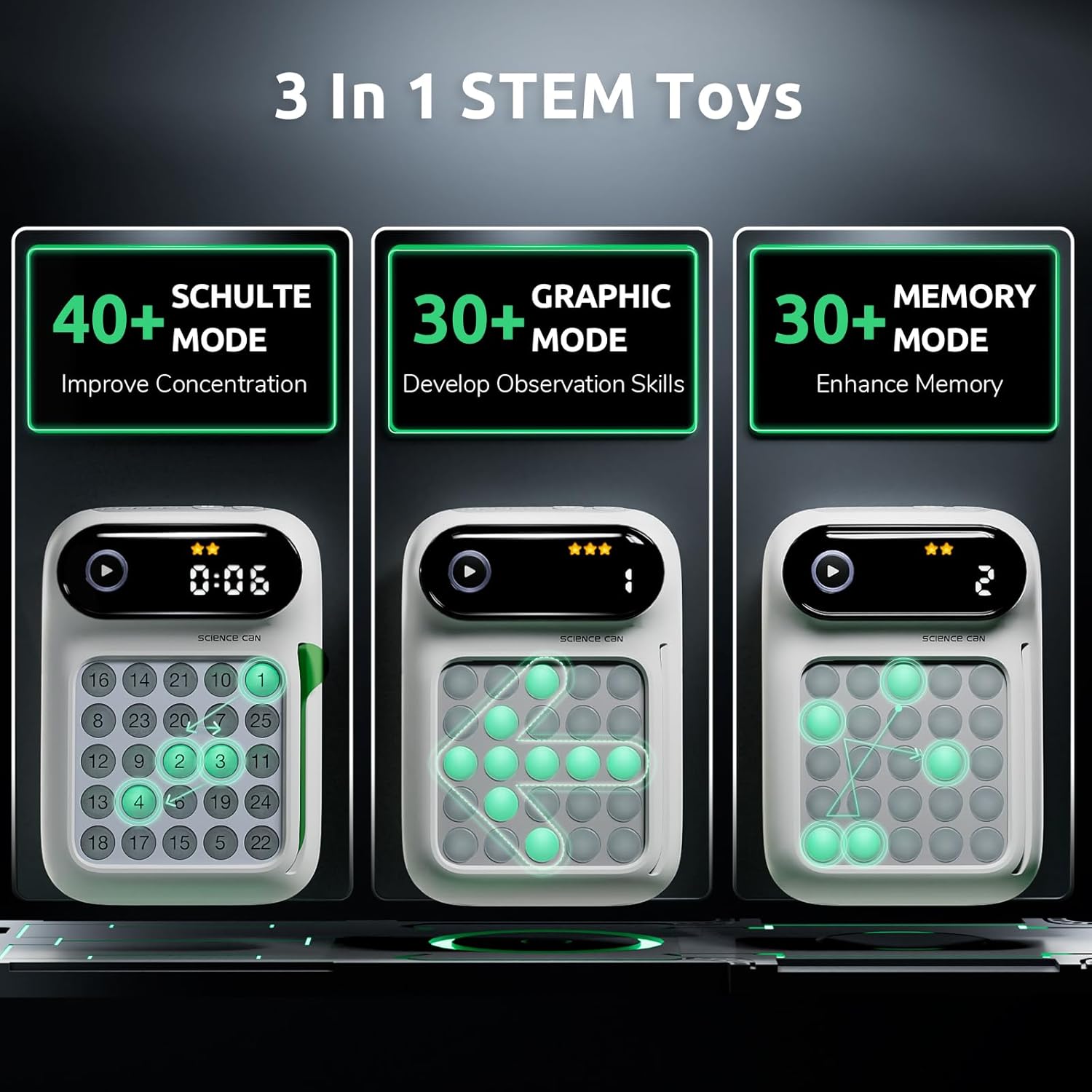
The Science Can Speed Number Games offers three engaging modes to challenge and educate:
-
1. Schulte Mode
This mode is designed to improve concentration. Players are challenged to press numbered buttons in sequential order (e.g., 1 to 25) as quickly as possible within a 5x5 grid. The faster the completion, the higher the attention level achieved.
-
2. זכּרון מאָדע
Memory Mode enhances children's memory by presenting a sequence of randomly illuminated buttons. Players must remember and replicate the sequence accurately.
-
3. גראַפיק מאָדע
This mode helps develop observation skills through interactive graphic challenges. Players identify patterns or specific button arrangements.
Gameplay Instructions
אַלגעמיינע אָפּעראַציע
- אויסקלייַבן אַ מאָדע: Use the mode select button to choose between Schulte, Memory, or Graphic modes.
- אַרײַנשטעלן אַ קאַרטל: For modes requiring specific challenges, insert the appropriate game card into the card slot.
- אָנהייבן שפּיל: Press the Start button to begin the selected game.
- אינטעראַקטיווע פֿידבעק: The console provides interactive sound effects and illuminated buttons. Correct presses are typically indicated by a green light, while incorrect presses may show a red light momentarily, guiding the child in real-time.
- אַוטאָ-טיימער: Many challenges include an auto-timer to track performance and encourage speed.
- Bright Level Stars: Progress and achievements are often displayed using bright level stars on the console's screen.

Using Game Cards
The game includes 40 cards that range from basic to advanced. These cards define the specific challenges for each mode. Ensure the correct card is inserted for the desired game difficulty and type.
פּראָדוקט דעמאַנסטריישאַנז
Video: Science Can Handheld Game Console Overview
דאס ווידעא גיט אן אלגעמיינע איבערבליקview of the Science Can Handheld Game Console, showcasing its design and basic functionalities. It highlights the interactive elements and the overall user experience.
Video: Share the Joy of Receiving a Speed Number
This short video captures the excitement of unboxing and the initial reaction to the Speed Number Games console, demonstrating its appeal as a gift.
Video: STEM Toy from Science Can
A brief demonstration highlighting the educational aspects of the Science Can handheld game as a STEM toy, emphasizing its learning benefits.
Video: Need to Get This for Our Travels!
This video showcases the portability of the game, illustrating its suitability for keeping children entertained during travel and on the go.
ספּעסאַפאַקיישאַנז
| שטריך | דעטאַל |
|---|---|
| סאָרט נאָמען | וויסנשאַפֿט קענען |
| מאָדעל נאָמען | Schulte Grid |
| מאָדעל נומער | 1602062023ig0001 |
| עלטער ראַנגע באַשרייַבונג | 5 יאר און העכער |
| מאַטעריאַל טיפּ | פּלאַסטיק |
| נומער פון פּלייַערס | Single player |
| בילדונגקרייז אָביעקטיוו | Concentration Skills |
| אָפּעראַציע מאָדע | Manual with automatic assistance |
| מאַכט מקור | באַטאַרייע פּאַוערד (3 אַאַאַ באַטעריז פארלאנגט, ניט אַרייַנגערעכנט) |
| נומער דימענשאַנז | 5.35 X 1.77 X 3.86 אינטשעס |
| קאָליר | ווייַס |
| אַרייַנגערעכנט קאַמפּאָונאַנץ | קאַרדס |

וישאַלט
- רייניקונג: ווישט אָפּ דאָס אַפּאַראַט מיט אַ ווייכן, טרוקענעם שטאָף. פֿאַרמייַדט ניצן שאַרפע כעמיקאַלן אָדער אַברייסיוו רייניקונגסמיטלען.
- סטאָרידזש: Store the console and game cards in a cool, dry place away from direct sunlight and extreme temperatures.
- באַטערי זאָרגן: אַרויסנעמען באַטעריעס אויב די דעוויס וועט נישט ווערן גענוצט פֿאַר אַ לענגערע צייט צו פאַרמייַדן ליקאַדזש.
טראָובלעשאָאָטינג
- מיטל נישט קער אויף: Check if the batteries are correctly installed and are not depleted. Replace with fresh batteries if necessary. Ensure the ON/OFF switch is in the 'ON' position.
- קיין קלאַנג/נידעריק באַנד: Adjust the volume settings on the device. If still no sound, check batteries.
- קנעפּלעך ניט ריספּאַנדאַבאַל: Ensure the device is powered on and batteries are sufficient. If a game card is used, ensure it is properly inserted.
- Game Malfunction: Try turning the device off and then on again to reset it.