
Elektron Digitakt II
Elektron Digitakt II User Manual
Model: Digitakt II
פּראָדוקט איבערview
The Elektron Digitakt II is a powerful 16-track drum computer and sampler designed for music production and live performance. It offers extensive sound manipulation capabilities, a robust sequencer, and a compact, durable design, making it suitable for both studio and on-the-go creative work.

פיגורע 1: פראָנט view of the Elektron Digitakt II, showing the display, knobs, and performance pads.
פּעקל אינהאַלט
זייט זיכער אז אלע זאכן זענען פאראן אין דער קעסטל:
- Elektron Digitakt II Unit
- מאַכט אַדאַפּטער
- וסב קאַבלע
ערשט סעטאַפּ
Follow these steps to set up your Digitakt II for the first time:
- פאַרבינדן מאַכט: Plug the included power adapter into the 12V DC IN port on the rear of the unit and then into a wall outlet.
- פאַרבינדן אַודיאָ: Connect your audio output cables from the L/R OUT ports to your mixer, audio interface, or headphones. If using external audio sources, connect them to the L/R IN ports.
- פאַרבינדן USB (אפציאָנעל): For computer integration and use with Elektron's Overbridge software, connect a USB cable from the Digitakt II's USB port to your computer.
- מאַכט אויף: Press the Power button on the rear of the unit to turn on the Digitakt II.
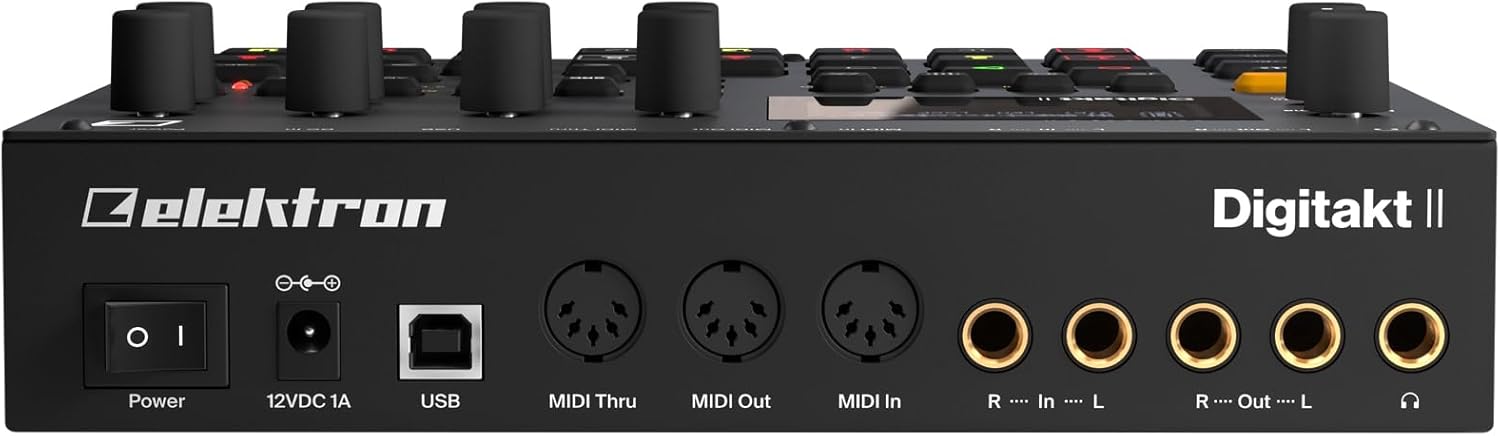
פיגורע 2: דערציען view of the Elektron Digitakt II, showing power, USB, MIDI, and audio connections.
Operating Your Digitakt II
The Digitakt II features an intuitive interface with dedicated buttons and encoders for efficient workflow. Familiarize yourself with the main display and control layout.
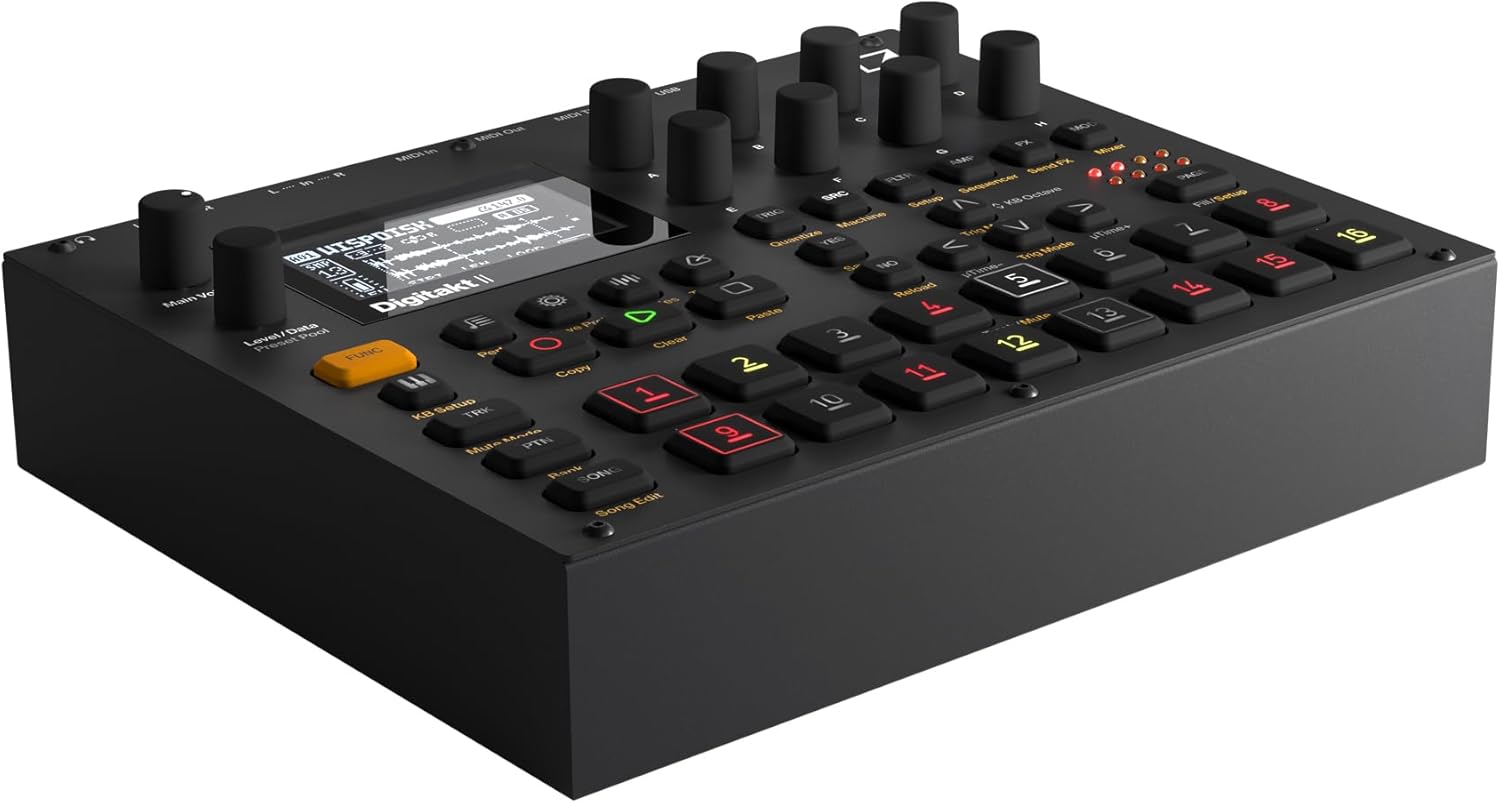
פיגור 3: ווינקלדיק view of the Elektron Digitakt II, highlighting the control surface and display.
שליסל פֿעיִקייטן
- 16 Audio Tracks: Each track supports stereo or mono samples, or MIDI data.
- 128-Step Elektron Sequencer: Program intricate patterns with precise control.
- 3 Assignable LFOs per Track: Modulate various parameters for dynamic sound design.
- Per-Track Effects: Apply Delay, Reverb, Chorus, Bit Reduction, Sample Reduction, and Overdrive to individual tracks.
- Euclidean Sequence Generator: Explore complex rhythmic possibilities.
- Swappable Filters: Utilize a Base-width filter and choose from Multi-mode, Low Pass 4, Comb, EQ, or Legacy LP/HP filters.
- 4 Trig Modes: Enhance sequencing with various trigger behaviors.
- ליד מאָדע: Create, edit, and play full compositions with ease.
יקערדיק אָפּעראַציע
Loading Samples: Use the 'Samples' button and the data encoders to browse and load samples into your project. Samples can be imported via USB using Elektron's software.
סיקוואַנסינג: Select a track using the numbered pads. Enter notes and parameter locks by holding a trig button and adjusting parameters. The 128-step sequencer allows for detailed pattern creation.
עפעקטן: Access the FX section to apply and adjust the built-in effects for each track. Experiment with different effect types and parameters to shape your sound.
שפּאָרן פּראָיעקטן: Regularly save your work by pressing the 'Save Proj' button to prevent data loss.
זאָרגן און וישאַלט
To ensure the longevity and optimal performance of your Digitakt II, follow these guidelines:
- רייניקונג: ניצט אַ ווייכע, טרוקענע שטאָף צו רייניקן דעם אַפּאַראַט. פֿאַרמייַדט אַברייסיוו רייניגער אָדער סאָלווענטן.
- סטאָרידזש: האַלט דעם אַפּאַראַט אין אַ קיל, טרוקן אָרט אַוועק פון דירעקט זונשייַן און עקסטרעמע טעמפּעראַטורן.
- האַנדלינג: Avoid dropping the unit or exposing it to excessive force.
- ווענטילאַטיאָן: פאַרזיכערן געהעריק ווענאַליישאַן אַרום די אַפּאַראַט צו פאַרמייַדן אָוווערכיטינג.
טראָובלעשאָאָטינג
If you encounter issues with your Digitakt II, refer to the table below for common problems and solutions:
| פּראָבלעם | מעגלעך סיבה | לייזונג |
|---|---|---|
| קיין געזונט רעזולטאַט | Incorrect audio connections, volume too low, muted tracks. | Check audio cables, increase Main Volume, ensure tracks are not muted in Mute Mode. |
| דער אַפּאַראַט טוט נישט מאַכט אויף | Power adapter not connected or faulty, power outlet issue. | Verify power adapter connection, try a different power outlet, ensure power button is pressed. |
| וסב קאַנעקטיוויטי ישוז | Incorrect USB cable, driver not installed, Overbridge not running. | Use the provided USB cable, install the latest Elektron drivers and Overbridge software from the official webפּלאַץ. |
| Pads unresponsive | Unit frozen, calibration issue. | Restart the unit. If the problem persists, consult the full manual for calibration procedures. |
טעכניש ספּעסאַפאַקיישאַנז
| שטריך | דעטאַל |
|---|---|
| מאָדעל נאָמען | Digitakt II |
| פּונקט וואָג | 3.3 פונט (1.5 קג) |
| פּראָדוקט דימענשאַנז (L x W x H) | 8.4 X 6.9 X 2.5 אינטשעס (21.3 X 17.5 X 6.4 סענטימעטער) |
| גוף מאַטעריאַל | וואַרפן אַלומינום |
| קאָליר | שוואַרץ |
| קאַנעקטער טיפּ | USB, Proprietary Power, MIDI In/Out/Thru, Audio In L/R, Audio Out L/R, Headphones |
| אַרייַנגערעכנט קאַמפּאָונאַנץ | מאַכט אַדאַפּטער |
וואָראַנטי און שטיצן
Elektron products are manufactured to high standards and come with a limited warranty. For detailed warranty information, product registration, and technical support, please visit the official Elektron webזייטל אדער קאנטאקט זייער קאסטומער סערוויס. האלט אייער באווייז פון קויפן פאר גאראנטיע טענות.
אָנליין רעסורסן: For the most up-to-date information, firmware updates, and additional resources, please refer to the official Elektron support page.
Ask a question about this manual
Ask about setup, troubleshooting, compatibility, parts, safety, or missing instructions. Manuals+ will review the question and use this page’s manual context to help answer it.