
1. הקדמה
א דאנק פארן קויפןasing the Soundmaster MCD5600 Stereo System. This versatile audio system combines classic and modern audio technologies, including a record player, DAB+ and FM radio, double cassette deck, CD player, USB playback, and Bluetooth connectivity. It also features a digitization function to convert your analog media to MP3 files on a USB drive. This manual provides essential information for safe operation, setup, and maintenance of your device. Please read it thoroughly before use and retain it for future reference.
2. זיכערקייַט אינסטרוקציעס
- מאַכט מקור: פאַרזיכערן די מאַכט צושטעלן שוועבעלעך די וואָלtage specified on the unit. Disconnect from the power outlet during lightning storms or when unused for long periods.
- ווענטילאַטיאָן: בלאָקירט נישט קיין ווענטילאַציע עפענונגען. לאָזט גענוג פּלאַץ אַרום דעם אַפּאַראַט פֿאַר געהעריקן לופטפלוס צו פאַרמייַדן איבערהיצונג.
- וואַסער און נעץ: שטעלט נישט אויס דעם אַפּאַראַט צו רעגן, פייכטקייט, טראָפּן, אדער שפּריצן. שטעלט נישט קיין זאכן אָנגעפילט מיט פליסיקייטן, ווי וואַזעס, אויף דעם אַפּאַראַט.
- היץ: האַלט דעם אַפּאַראַט אַוועק פֿון היץ־קוואַלן ווי ראַדיאַטאָרן, היץ־רעגיסטערס, אויוון, אָדער אַנדערע אַפּאַראַטן (אַרייַנגערעכנט ampליפיערס) וואָס פּראָדוצירן היץ.
- רייניקונג: ריין בלויז מיט אַ טרוקן שטאָף. דו זאלסט נישט נוצן פליסיק קלינערז אָדער אַעראָסאָל קלינערז.
- סערוויס: דו זאלסט נישט פּרווון צו דינען דעם פּראָדוקט זיך. קאָנטאַקט אַלע קוואַלאַפייד סערוויס פּערסאַנעל.
- אָרט: שטעלט דעם אַפּאַראַט אויף אַ סטאַבילער, גלאַטער ייבערפלאַך כּדי צו פאַרהיטן עס פון פאַלן.
3. פּעקל אינהאַלט
ביטע קאָנטראָלירט אַז אַלע זאכן זענען פאַראַן ביים אויספּאַקן:
- Soundmaster MCD5600 Main Unit
- 2 x External Speakers
- ווייַט קאָנטראָל
- ינסטרוקטיאָן מאַנואַל (דעם דאָקומענט)
- FM/DAB+ Antenna
- מאַכט קאַבלע
4. פּראָדוקט איבערview
Familiarize yourself with the main components and controls of your stereo system.
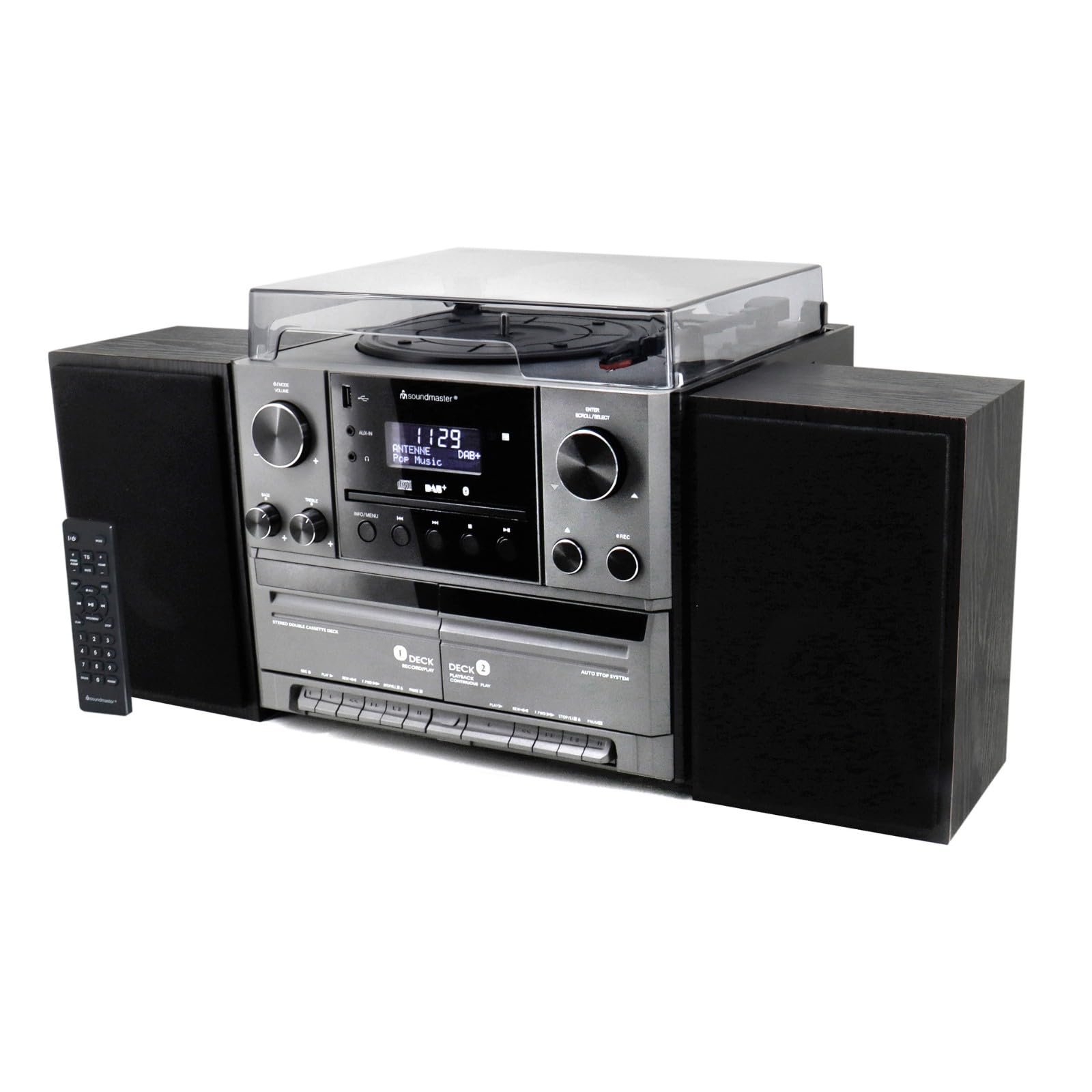
פיגורע 4.1: פראָנט view of the Soundmaster MCD5600 stereo system, showing the main unit flanked by two speakers, with the remote control positioned to the left. The display, control knobs, and various media inputs are visible.

פיגורע 4.2: פראָנט view of the Soundmaster MCD5600 stereo system with the CD tray open and a cassette tape inserted into one of the two cassette decks. This image highlights the multi-media capabilities of the unit.
5. סעטאַפּ
5.1 קאַנעקטינג ספּיקערז
Connect the included speakers to the speaker terminals on the rear of the main unit. Ensure correct polarity (red to red, black to black) for optimal sound quality. Place speakers equidistant from the listening position for the best stereo effect.
5.2 אַנטענע קאַנעקשאַן
Connect the supplied 75 Ohm antenna to the FM/DAB+ antenna input on the rear panel. Extend the antenna fully and position it for the best possible radio reception.
5.3 מאַכט קאַנעקשאַן
Plug the power cable into the AC inlet on the rear of the unit, then connect the other end to a standard wall outlet.
6. אַפּערייטינג ינסטרוקטיאָנס
6.1 אַלגעמיינע קאָנטראָלן
- מאַכט קנעפּל: דרוק צו קער די אַפּאַראַט אויף אָדער אַוועק.
- באַנד קנעפּל: Rotate to adjust the overall sound volume.
- Source/Function Button: Press repeatedly to cycle through available audio sources (CD, Phono, Tape, FM, DAB+, Bluetooth, USB).
- ווייַז: Shows current mode, track information, radio frequency, and time.
6.2 סי-די שפּילער אָפּעראַציע
- דרוק די CD source button.
- דרוק די עפענען / נאָענט קנעפּל צו עפענען די CD טאַץ.
- Place a CD (CD/CD-MP3/CD-R/CD-RW/WMA compatible) with the label side up into the tray.
- דרוק עפענען / נאָענט again to close the tray. The unit will read the disc.
- דרוק שפּיל / פּויזע צו אָנהייבן אָדער פּויזירן ווידערשפּיל.
- ניצן איבערשפרינגען פאָרויס/צוריק קנעפּלעך צו נאַוויגירן טראַקס.
- די פּראָגראַם און איבערחזרן functions allow for customized playback sequences and continuous repetition.
6.3 Record Player Operation
- דרוק די פאָנאָ source button.
- Select the appropriate speed (33, 45, or 78 RPM) using the speed selector switch based on your record type.
- Place a record on the turntable platter. For 45 RPM singles, use the included adapter.
- Carefully lift the tonearm using the cueing lever and position it over the desired track on the record.
- Lower the tonearm gently onto the record. Playback will begin automatically.
- At the end of the record, lift the tonearm and return it to its rest.
6.4 קאַסעטע שפּילער אָפּעראַציע
The unit features two cassette decks: Deck 1 (Record/Play) and Deck 2 (Continuous Play).
- דרוק די טופּען source button.
- דרוק די האַלטן / אַרויסוואַרפן button on the desired deck to open the cassette door.
- Insert a cassette tape with the open edge facing upwards. Close the door.
- דרוק שפּיל צו אָנהייבן פּלייבאַק.
- ניצן שנעל פאָרויס און ריוויינד קנעפּלעך צו נאַוויגירן די טייפּ.
- To record, ensure Deck 1 is selected, insert a blank tape, select your desired input source (e.g., Phono, CD, Radio), and press the רעקאָרד קנעפּל.
6.5 Radio (FM/DAB+) Operation
- דרוק די FM or DAB+ source button.
- For FM radio, use the טונינג knob or buttons to manually tune or auto-scan for stations.
- For DAB+ radio, the unit will automatically scan for available digital stations. Use the מעגילע / אויסקלייַבן knob to browse and select stations.
- To save a station as a preset, refer to the specific instructions in the full manual for your model.
6.6 בלועטאָאָטה אָפּעראַציע
- דרוק די בלועטאָאָטה source button. The display will show "PAIRING" or similar.
- אַקטיווירן בלועטוט אויף אייער פונדרויסנדיק מיטל (סמאַרטפאָן, טאַבלעט, אאז"וו).
- זוכן פֿאַר "MCD5600" (or similar device name) in your device's Bluetooth settings and select it to pair.
- אַמאָל פּערד, קענט איר שפּילן אַודיאָ פֿון אייער מיטל דורך די סטערעאָ סיסטעם.
6.7 יו-עס-בי פּלייבּעק
- אַרײַנשטעלן אַ USB פלאַש דרייוו אין דעם USB פּאָרט אויף דער פראָנט פּאַנעל.
- דרוק די וסב source button.
- The unit will read the contents of the USB drive. Use the navigation buttons to browse folders and select MP3 files פֿאַר פּלייבאַק.
6.8 Digitization (Encoding)
The MCD5600 allows you to convert audio from vinyl records, cassette tapes, or radio broadcasts directly to MP3 fileס אויף אַ קאָננעקטעד וסב פאָר.
- אַרײַנשטעלן אַ USB בליץ דרייוו אין דעם USB פּאָרט.
- Select the desired audio source (Phono, Tape, FM, DAB+).
- Start playback of your chosen source (e.g., start a record, play a cassette, tune to a radio station).
- דרוק די רעקאָרד button on the main unit. The display will indicate recording is in progress.
- דרוק האַלטן when you wish to end the recording. The audio will be saved as an MP3 file אויף אייער USB דרייוו.
7. וישאַלט
- איינהייט רייניקונג: Wipe the exterior surfaces with a soft, dry, lint-free cloth. Do not use abrasive cleaners or solvents.
- Record Player Stylus: Periodically check the stylus for dust and debris. Clean gently with a soft brush designed for styli, brushing from back to front. Replace the stylus if sound quality deteriorates significantly.
- Cassette Heads: After extended use, clean the cassette heads, pinch rollers, and capstans with a cotton swab lightly dampמיט יסאָפּראָפּיל אַלקאָהאָל.
- CD Lens: Avoid touching the CD lens. If cleaning is necessary, use a specialized CD lens cleaner disc.
8. טראָובלעשאָאָטינג
| פּראָבלעם | מעגלעך סיבה | לייזונג |
|---|---|---|
| קיין מאַכט | שטראָם קאַבל נישט פארבונדן; שטראָם אַוטלעט דעפעקט | קאָנטראָלירט די פֿאַרבינדונג פֿון עלעקטרישן קאַבל; פּרוּווט אַן אַנדער אַוטלעט |
| קיין געזונט | Volume too low; Incorrect source selected; Speakers not connected | פֿאַרגרעסערן דעם באַנד; אויסקלײַבן די ריכטיקע מקור; קאָנטראָלירן די פֿאַרבינדונגען פֿון רעדנער |
| סי-די שפּרינגט איבער אָדער שפּילט נישט | CD dirty or scratched; CD inserted incorrectly | Clean CD; Insert CD label-side up |
| נעבעך ראַדיאָ אָפּטראָג | Antenna not extended or positioned correctly | Extend and reposition antenna; Try auto-scan for DAB+ |
| בלועטאָאָטה פּערינג פיילז | Device too far; Bluetooth not enabled on external device | Move device closer; Ensure Bluetooth is enabled and in pairing mode |
9. ספּעסאַפאַקיישאַנז
- מאָדעל נומער: MCD5600SW
- סאָרט: סאָונדמאַסטער
- קאָליר: שוואַרץ
- קאָמפּאַקטדיסק שפּילער: CD, CD-MP3, CD-R, CD-RW, WMA compatible; Program/Repeat functions
- פּלאַטן שפּילער: 33/45/78 RPM speeds
- קאַסעט דעק: Double cassette (Deck 1: Record/Play, Deck 2: Continuous Play)
- ראַדיאָ: FM-PLL with preset stations, DAB+ Digital Radio (75 Ohm antenna connection)
- קאַנעקטיוויטי: USB port, Bluetooth
- ספּעציעלע פֿעיִקייטן: Digitization (CD, cassette, radio to USB-MP3 encoding)
10. וואָראַנטי אינפֿאָרמאַציע
This Soundmaster MCD5600 Stereo System comes with a manufacturer's warranty. Spare parts availability is guaranteed for 1 year from the date of purchase. For detailed warranty terms and conditions, please refer to the warranty card included with your product or contact your retailer. Keep your proof of purchase for any warranty claims.
11. שטיצן
If you encounter any issues not covered in the troubleshooting section or require further assistance, please contact your retailer or the Soundmaster customer support. Contact details can typically be found on the manufacturer's webזייטל אדער אין אייער פּראָדוקט פּאַקאַדזשינג.


