
Angrox NS-RCFNA-21-Upgrade
Angrox Universal TV Remote Control Instruction Manual
Model: NS-RCFNA-21-Upgrade
בראַנד: אַנגראָקס
1. הקדמה
Thank you for choosing the Angrox Universal TV Remote Control. This remote is designed to simplify your entertainment experience by providing a single control solution for a wide range of smart TVs. It offers seamless compatibility and intuitive operation, making it an ideal replacement for lost or broken original remotes.

פיגורע 1.1: פראָנט view of the Angrox Universal TV Remote Control.
2. זיכערקייַט אינפֿאָרמאַציע
- האַלטן באַטעריז אויס פון דערגרייכן פון קינדער. אויב סוואַלאָוד, זוכן באַלדיק מעדיציניש ופמערקזאַמקייַט.
- דו זאלסט נישט מישן אַלט און נייַ באַטעריז, אָדער פאַרשידענע טייפּס פון באַטעריז.
- אַרויסנעמען די באַטעריעס אויב דער ווײַטקאָנטראָל וועט נישט ווערן גענוצט פֿאַר אַ לענגערע צײַט כּדי צו פֿאַרמײַדן ליקאַדזש.
- Avoid exposing the remote to direct sunlight, heat sources, or excessive moisture.
- פרובירט נישט צו צענעמען אדער מאדיפיצירן די ווײַט קאנטראל.
3. פּעקל אינהאַלט
דער פּעקל זאָל אַנטהאַלטן די פאלגענדע זאכן:
- 1 x Angrox Universal TV Remote Control
- 1 x אינסטרוקציע מאַנואַל (דאָס דאָקומענט)
Note: 2 AAA batteries are required for operation and are not included in the package.
4. פּאַרץ און פֿעיִקייטן
Familiarize yourself with the buttons and functions of your new remote control.
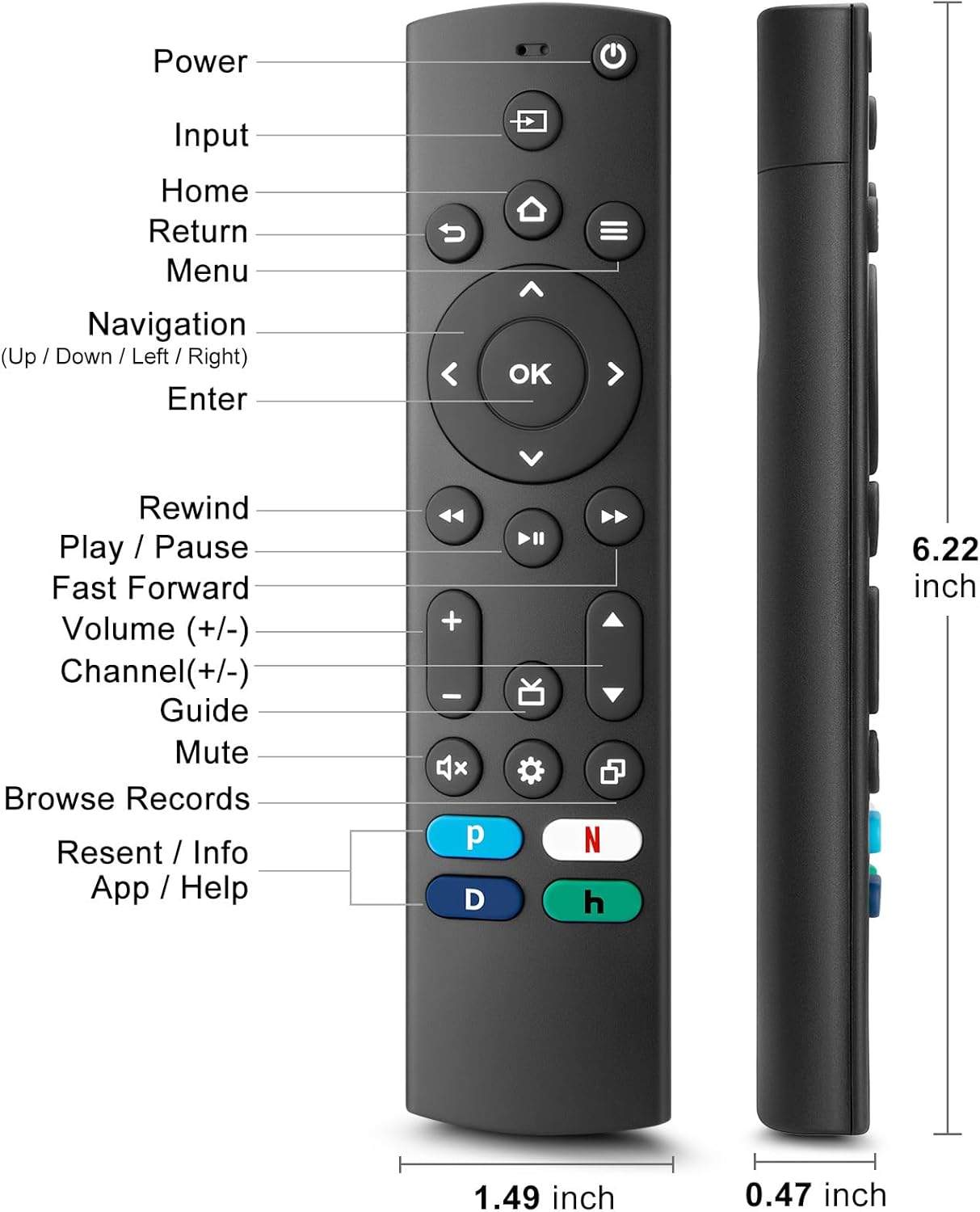
Figure 4.1: Labeled buttons and dimensions of the remote control.
- מאַכט קנעפּל: טורנס די טעלעוויזיע אויף אָדער אַוועק.
- אַרייַנשרייַב קנעפּל: סעלעקטירט אינפוט מקור (HDMI, AV, אאז"וו).
- היים קנעפּל: קערט צוריק צום טעלעוויזיע'ס היים עקראַן.
- Navigation Pad (Up/Down/Left/Right) & OK Button: פֿאַר מעניו נאַוויגאַציע און סעלעקציע.
- צוריקקומען קנעפּל: גייט צוריק צום פריערדיקן עקראַן.
- מעניו קנעפּל: Accesses TV settings or options menu.
- Rewind/Play/Pause/Fast Forward Buttons: מעדיע פּלייבאַק קאָנטראָלס.
- באַנד אַרויף / אַראָפּ: אַדזשאַסץ די טעלעוויזיע באַנד.
- קאַנאַל אַרויף / אַראָפּ: טוישט טעלעוויזיע קאַנאַלן.
- שטיל קנעפּל: שטומט אדער אנשטומט דעם טעלעוויזיע קלאַנג.
- סעטטינגס קנעפּל: Accesses quick settings.
- Dedicated Hotkeys (Netflix, P-Video, Disney+, Hulu): דירעקטער צוטריט צו פּאָפּולערע סטרימינג סערוויסעס.
This remote control utilizes infrared (IR) technology for stable performance and a fast response time of 0.2 seconds, with a control range of up to 40 feet. Please note that this remote does נישט support voice search functions.

Figure 4.2: Remote's stable performance and precise control features.

Figure 4.3: This remote does not include voice search functionality.
5. סעטאַפּ
5.1. באַטאַרייע ייַנמאָנטירונג
- עפענען די באַטאַרייע אָפּטייל דעקן אויף די צוריק פון די ווייַט קאָנטראָל.
- Insert two (2) AAA batteries, ensuring the positive (+) and negative (-) terminals align with the markings inside the compartment.
- פאַרמאַכן די באַטאַרייע אָפּטייל דעקן סיקיורלי.
5.2. Initial Pairing and TV Compatibility
This universal remote is designed for easy setup with most major TV brands. Simply press and hold two specific buttons simultaneously to pair it with your TV.

Figure 5.1: Easy 2-button setup for various TV brands.
| טעלעוויזיע בראַנד | Button Combination (Press & Hold) | הערות |
|---|---|---|
| אינסיגניע טעלעוויזיע | OK + Home Button | |
| טאָשיבאַ טעלעוויזיע | OK + Home Button | |
| ראָקו טעלעוויזיע | OK + Up Arrow | |
| Hisense TV | OK + Down Arrow | Hulu not supported |
| TCLTV | OK + Right Arrow | Hulu not supported |
| סאַמסונג טעלעוויזיע | OK + Return Button | |
| Vizio TV | OK + Menu Button | |
| LG TV | OK + Rewind Button | Hulu not supported |
| פיליפּס טעלעוויזיע | OK + Play/Pause Button | Prime Video, Disney+, Hulu not supported |
| סאָני טעלעוויזיע | OK + Fast Forward Button | Hulu not supported |
Once the remote is paired, it should function immediately. No further programming is typically required.
5.3. קאָמפּאַטאַביליטי הערות
This remote is designed to be a universal replacement for many TV models, including specific Insignia and Toshiba smart TV remotes (e.g., NS-RCFNA-21, NS-RCFNA-19, CT-95018, CT-RC1US-21, CT-RC1US-19). However, it is important to note that it may not be compatible with all specific original remote models or streaming devices, particularly those with unique pairing methods or voice control features.

פיגורע 5.2: עקסamples of remote controls and devices that are NOT compatible with this universal remote.

Figure 5.3: This remote is not compatible with TV Cube or TV Stick streaming devices.
For optimal performance, ensure your TV's infrared receiver is unobstructed.
Video 5.1: An official product video demonstrating the features and ease of use of the Angrox Universal TV Remote. This video highlights the remote's compatibility and quick access buttons for streaming services.
6. אפערירן די ווײַטקאָנטראָל
Once paired, the Angrox Universal TV Remote operates like a standard TV remote. Point the remote directly at your TV's infrared receiver for best results.
6.1. יקערדיק פאַנגקשאַנז
- מאַכט: דרוק די מאַכט קנעפּל איין מאל צו אנצינדן אדער אויסלעשן דעם טעלעוויזאר.
- באַנד: ניצן די באַנד אַרויף (+) און באַנד אַראָפּ (-) קנעפּלעך צו סטרויערן די געזונט מדרגה.
- קאַנאַל: ניצן די Channel Up (▲) און Channel Down (▼) קנעפּלעך צו טוישן טשאַנאַלז.
- נאַוויגאַציע: ניצן די אַרויף, אַראָפּ, לינקס, רעכט arrows to navigate through menus and options. Press OK צו באַשטעטיקן אַ סעלעקציע.
- היים: דרוק די היים button to return to the main smart TV interface.
- צוריקקומען: דרוק די צוריקקומען button to go back to the previous screen or menu.
6.2. Dedicated Hotkeys
The remote features dedicated hotkeys for quick access to popular streaming platforms:
- נעטפליקס: Instantly launch the Netflix application.
- P-Video (Prime Video): Instantly launch the Prime Video application.
- דיסניי +: Instantly launch the Disney+ application.
- Hulu: Instantly launch the Hulu application.

Figure 6.1: Quick access to streaming services with dedicated hotkeys.
7. וישאַלט
- רייניקונג: ווישט אָפּ דעם ווײַטקאָנטראָל מיט אַ ווייכן, טרוקענעם שטאָף. ניצט נישט קיין שרײַבנדיקע רייניגער אָדער סאָלווענטן.
- באַטערי פאַרבייַט: Replace batteries when the remote's response becomes sluggish or it stops functioning. Always replace both batteries at the same time.
- סטאָרידזש: האַלט די ווײַטקאָנטראָלירטע אַפּאַראַטור אין אַ קיל, טרוקן אָרט, ווײַט פֿון דירעקטער זון און עקסטרעמע טעמפּעראַטורן.
8. טראָובלעשאָאָטינג
| פּראָבלעם | מעגלעך סיבה | לייזונג |
|---|---|---|
| ווײַטקאָנטראָל רעאַגירט נישט אויף טעלעוויזיע. | Low or dead batteries. Incorrect pairing. Obstruction between remote and TV. | Replace batteries with new AAA batteries. Re-attempt pairing using the correct button combination for your TV brand (refer to Section 5.2). Ensure no objects are blocking the TV's IR receiver. |
| Specific hotkey (e.g., Hulu) not working. | TV brand incompatibility with specific hotkey functions. | Some TV brands (e.g., Hisense, TCL, LG, Philips, Sony) may not support all dedicated hotkeys. This is a limitation of the TV's software, not the remote. You may need to navigate to these apps manually. |
| No voice control functionality. | This remote does not support voice commands. | The Angrox Universal TV Remote Control is designed for infrared (IR) control and does not include a microphone for voice search. This is an intended feature. |
| Remote feels unresponsive or delayed. | Weak batteries. Remote too far from TV. | Replace batteries. Ensure you are within the effective range (up to 40 feet) and pointing directly at the TV. |
9. ספּעסאַפאַקיישאַנז
| שטריך | דעטאַל |
|---|---|
| מאָדעל נומער | NS-RCFNA-21-Upgrade |
| סאָרט | אַנגראָקס |
| דימענסיעס (L X W X H) | 6.22 X 1.49 X 0.47 אינטשעס |
| פּונקט וואָג | 1.76 אונסעס |
| מאַכט מקור | 2 X AAA באַטעריז (ניט אַרייַנגערעכנט) |
| מאַטעריאַל | הויך-קוואַליטעט אַבס און סיליקאָנע |
| קאָנטראָל טעכנאָלאָגיע | ינפרערעד (IR) |
| ענטפער צייט | 0.2 סעקונדעס |
| קאָנטראָל ראַנגע | אַרויף צו 40 פֿיס |
| ספּעציעלע פֿעיִקייטן | Universal, Ergonomic, Lightweight, Pre-Programmed, No Programming Required (for most TVs) |
| קאָליר | שוואַרץ |
| קאַמפּאַטאַבאַל דעוויסעס | Television (Insignia, Toshiba, Pioneer, Samsung, TCL, LG, Hisense, Vizio, Sony, Philips, Roku TVs) |
10. וואָראַנטי און שטיצן
Angrox products are manufactured with high-quality materials and undergo strict quality control. For information regarding warranty coverage, returns, or technical support, please refer to the product listing page on Amazon or contact Angrox customer service directly through the Amazon platform.
You can visit the official Angrox store on Amazon for more information and contact options: Angrox Store
Ask a question about this manual
Ask about setup, troubleshooting, compatibility, parts, safety, or missing instructions. Manuals+ will review the question and use this page’s manual context to help answer it.