
1. הקדמה
The Portkeys HS8 is an 8-inch high-brightness camera field monitor designed for professional video production. It features an 1100nit display, 3D LUT support, 4K HDMI input, and 3G SDI input/output, all housed in a durable aluminum body. This manual provides detailed instructions for setting up, operating, and maintaining your HS8 monitor.

בילד 1.1: פראָנט view of the Portkeys HS8 Camera Field Monitor.
2. פּעקל אינהאַלט
Please check the package contents upon opening to ensure all items are present.
- Portkeys HS8 Monitor
- ד-טאַפּ ב צו שרויף-אין דק מאַכט קאַבלע
- סקרין רייניקונג ווישן
- קונה באַמערקונגען קאָרט
- M3 Allen Screw*4
- מ 2 עלען שליסל
- גלעזל קאָפּ גאַסקאַט*4
- מיקראָ וסב פלאַש דרייוו

Image 2.1: Visual representation of the Portkeys HS8 package contents.
3. סעטאַפּ גייד
3.1 מאָנטירן דעם מאָניטאָר
The Portkeys HS8 features VESA 100 x 100 mounting points for secure attachment to various camera rigs or stands. It also includes standard 1/4-inch screw threads for flexible mounting options.
בילד 3.1: דערציען view of the monitor highlighting VESA mounting points and dual NP-F battery plates.
3.2 מאַכט די מאָניטאָר
The HS8 monitor offers multiple power options:
- Dual NP-F Battery Plates: Insert two compatible Sony NP-F style batteries into the dedicated slots on the back of the monitor.
- גלייכשטראָם 7-20V אַרייַנגאַנג: Connect an external power source using the provided D-Tap cable to the 5.5mm barrel connector.
- VESA 100 x 100 Mounting Points: These points can be used with V-Mount or Gold-Mount battery plates (sold separately) for extended power.
- NP-F Dummy Battery Plate with Power Passthrough: A built-in dummy battery plate provides 8V/10W power passthrough, allowing you to attach and power a wireless transmitter directly from the monitor.

Image 3.2: Detail of the NP-F battery plates and power passthrough for accessories.

Image 3.3: Illustration of the dual NP-F battery plate configuration.
3.3 פֿאַרבינדן ווידעאָ קוועלער
The HS8 monitor supports both HDMI and SDI video inputs and outputs.
- HDMI אַרייַנשרייַב: Connect your camera or video source to the HDMI IN port. The monitor supports up to 4K HDMI input.
- 3G SDI Input/Output: Use the SDI IN port for SDI video sources. The SDI OUT port can be used to loop out the signal to another monitor or device.
- HDMI רעזולטאַט: The HDMI OUT port allows simultaneous output of the video signal.

בילד 3.4: איבערview פון די מאָניטאָר'ס אַרייַנגאַנג און אַרויסגאַנג פּאָרץ.
4. אַפּערייטינג ינסטרוקטיאָנס
4.1 מאַכט אויף / אַוועק
Locate the power switch on the side of the monitor. Slide it to the "ON" position to power on the device. Slide to "OFF" to power down.
4.2 באַניצער צובינד (UI) נאַוויגאַציע
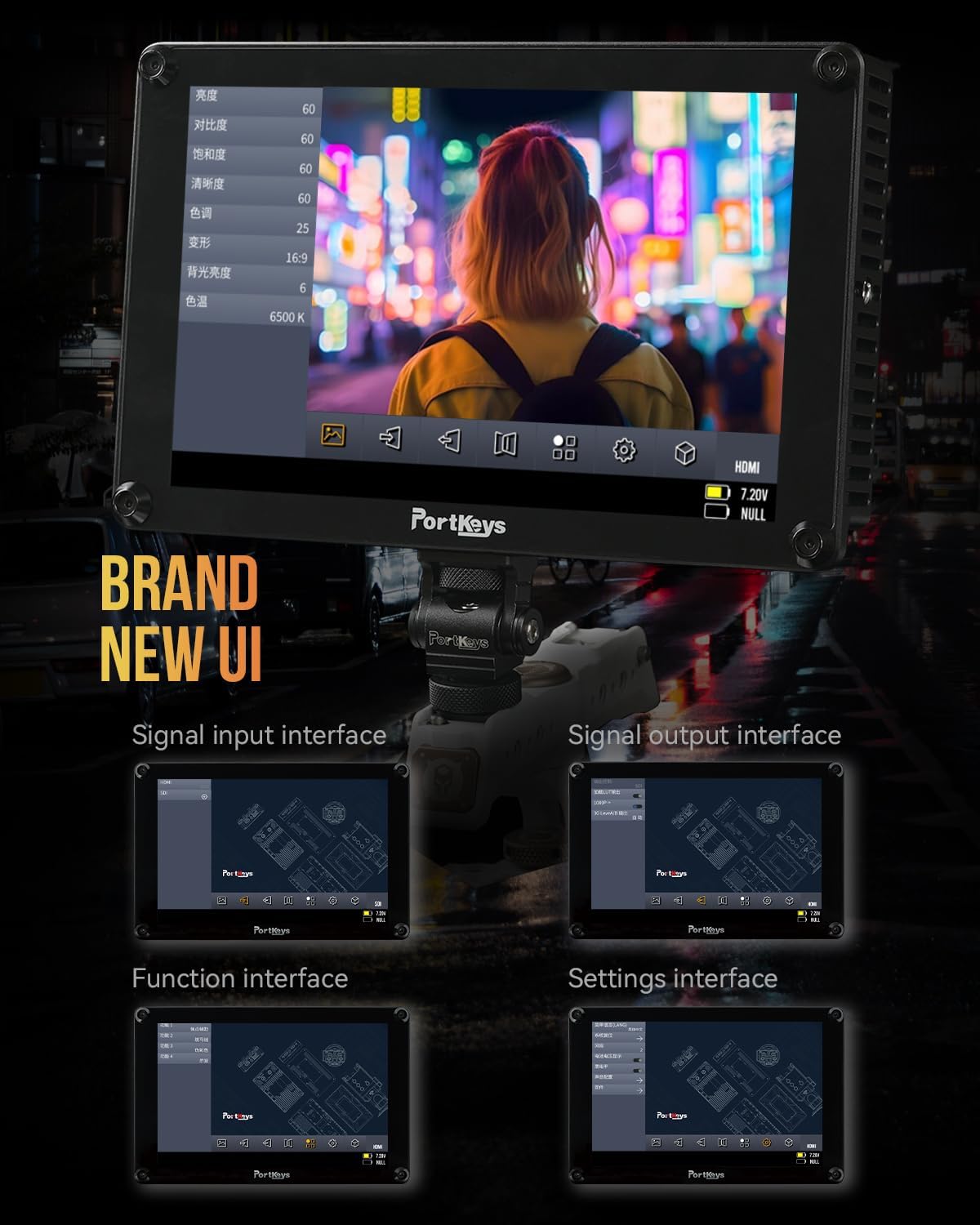
The Portkeys HS8 features a custom operating system with a user-friendly interface. Navigate through menus and settings using the touch screen or the physical buttons.

Image 4.1: The monitor's intuitive user interface for accessing functions and settings.
4.3 Professional Monitoring Tools
The HS8 includes a suite of professional monitoring tools accessible via the UI:
- וואַוועפאָרם: Visualizes the luminance and chrominance levels of your video signal.
- היסטאָגראַם: Displays the distribution of tones in your image.
- זעברע: Highlights overexposed areas to prevent clipping.
- שפּיץ: Assists with focus by highlighting sharp edges.
- פאַלש קאָליר: Uses color overlays to represent exposure levels.
- Anamorphic Image De-squeeze: Corrects the aspect ratio of anamorphic footage.
- אַודיאָ מעטער: Displays audio levels for monitoring sound.
- 3D LUT: Supports loading custom 3D Look-Up Tables for accurate color representation and creative grading.

Image 4.2: The monitor showcasing its professional monitoring features.

בילד 4.3: דעטאַלירט view of waveform and histogram tools on the HS8 monitor.

Image 4.4: False color display on the HS8 for precise exposure control.

Image 4.5: Peaking function in action on the HS8 monitor to aid focusing.

Image 4.6: Key features of the Portkeys HS8 monitor.

Image 4.7: The monitor's display quality with REC.709 color and high brightness.
5. וישאַלט
5.1 רייניקונג די מאָניטאָר
To clean the screen, use the provided screen cleaning wipe or a soft, lint-free cloth. For stubborn smudges, lightly dampווישט דעם שטאָף מיט אַ רייניקונג לייזונג וואָס איז זיכער פֿאַרן עקראַן. פֿאַרמייַדט שטרענגע כעמיקאַלן אָדער אַברייסיוו מאַטעריאַלן.
5.2 סטאָרידזש
When not in use, store the monitor in a dry, cool place, away from direct sunlight and extreme temperatures. It is recommended to use a protective case to prevent damage during transport or storage.
6. טראָובלעשאָאָטינג
6.1 קיין מאַכט
- זיכער מאַכן אַז די באַטעריעס זענען גאָר אויפגעלאָדן און ריכטיק אַרײַנגעשטעלט.
- If using DC power, verify the power cable is securely connected and the power source is active.
- קאָנטראָלירט אַז דער מאַכט סוויטש איז אין דער "ON" פּאָזיציע.
6.2 No Video Signal
- Confirm the video source (camera) is powered on and outputting a signal.
- Check that the HDMI or SDI cables are securely connected to both the monitor and the source.
- Verify the correct input source is selected on the monitor.
- Test with different cables or video sources if possible.
6.3 Image Lag (HDMI)
Some cameras, such as the Canon R5, may experience a delay when switching between playback and shooting modes via HDMI. This is often a characteristic of the camera's HDMI output processing rather than the monitor itself. Ensure your camera's firmware is up to date and check its settings for HDMI output options.
7. ספּעסאַפאַקיישאַנז
| שטריך | באַשרייַבונג |
|---|---|
| סאָרט | פּאָרטקייס |
| מאָדעל נומער | HS8 |
| פאַרשטעלן גרייס | 8 אינטשעס |
| געבוירן האַכלאָטע | 1920 X 1200 |
| ווייַז טיפּ | לקד |
| ברייטנאַס | 1100 ניץ |
| קאַנטראַסט פאַרהעלטעניש | 1000:1 |
| Viewינג אַנגלע | 170 דיגריז |
| קאָליר דעפּט | 10-bit (8+2 FRC) panel |
| קאַנעקטיוויטי | HDMI (4K input), 3G SDI In/Out |
| מאַכט אַרייַנשרייַב | Dual NP-F Battery Plates, DC 7-20V (5.5mm barrel) |
| Power Passthrough | 8V/10W NP-F dummy battery plate |
| מאַונטינג ווייזט | VESA 100 x 100, 1/4-inch screw threads |
| האָוסינג | אַלומינום |
| פּונקט וואָג | 0.68 קילאָגראַמס (1.48 לבס) |
| קאָליר קאַליבראַטיאָן | רעק.709 |

Image 7.1: Visual summary of Portkeys HS8 specifications.
8. אפיציעלע פּראָדוקט ווידעאָ
Video 8.1: Official product video for the Portkeys HS8 Camera Monitor, demonstrating its features and connectivity options.
9. וואָראַנטי און שטיצן
9.1 וואָראַנטי אינפֿאָרמאַציע
The Portkeys HS8 Camera Field Monitor comes with a 1-יאָר פאַבריקאַנט ס וואָראַנטי פֿון דעם קויפֿדאַטום. די וואָראַנטי דעקט חסרונות אין מאַטעריאַלן און אַרבעט אונטער נאָרמאַלן באַנוץ. ביטע באַהאַלטן אייער קויפֿבאַווייַז פֿאַר וואָראַנטי קלאַגעס.
9.2 קונה שטיצן
For technical assistance, troubleshooting, or warranty inquiries, please contact Portkeys Official Store customer support. Refer to the contact information provided with your product or visit the official Portkeys webפּלאַץ.


