
1. הקדמה
Thank you for choosing the Driftalia Full Size Bed Frame. This bed frame is designed to provide both comfort and functionality, featuring an upholstered headboard with integrated LED lighting, a convenient charging station, and four spacious storage drawers. This manual provides detailed instructions for assembly, operation, maintenance, and troubleshooting to ensure a safe and enjoyable experience with your new bed frame.

בילד 1.1: איבערview of the Driftalia Full Size Bed Frame with LED headboard, charging station, and storage drawers.
2. זיכערקייַט אינפֿאָרמאַציע
- לייענען אַלע ינסטראַקשאַנז קערפאַלי איידער פֿאַרזאַמלונג און נוצן.
- האַלט אַלע קליינע טיילן און פּאַקאַדזשינג מאַטעריאַלן אַוועק פון קינדער און ליבלינג חיות צו פאַרמייַדן דערשטיקונג געפאַרן.
- Ensure all connections are securely fastened before use. Periodically check and retighten fasteners.
- נישט איבערשטייגן די מאקסימום וואָג קאַפּאַציטעט פון 1000 פונט (453 ק"ג).
- ניצט נאָר די צוגעשטעלטע קאָמפּאָנענטן. נישט אויסטוישן טיילן.
- שטעלט דעם בעט ראַם אויף אַ גלייכער ייבערפלאַך.
- Avoid exposing the electrical components (LED lights, charging station) to moisture.
- נעמט ארויס דעם בעט ראַם פֿון דער עלעקטרישער אַוטלעט איידער איר רייניקט אָדער דורכפֿירט יעדע אויפֿהאַלטונג.
וויכטיק: Always follow assembly instructions for safe and stable use.
3. פּעקל אינהאַלט
איידער איר הייבט אן צוזאמענשטעלן, זיכערט זיך אז אלע קאמפאנענטן וואס זענען אויסגערעכנט אונטן זענען פאראן און נישט באשעדיגט. אויב עפעס טיילן פעלן אדער זענען באשעדיגט, ביטע קאנטאקטירט קאסטומער סופארט.
| טייל | באַשרייַבונג | קוואַנטיטי |
|---|---|---|
| A | Upholstered Headboard with LED & Charging Station | 1 |
| B | זייט רעלסן (לינקס און רעכטס) | 2 |
| C | פאָאָטבאָרד | 1 |
| D | Metal Slat Frame | 1 set (12 slats, 3 thickened beams) |
| E | סטאָרידזש גאַטקעס | 4 |
| F | שטיצן לעגס | 10 |
| G | Hardware Pack (bolts, screws, Allen wrench, etc.) | 1 |
| H | געפירט רימאָוט קאָנטראָל | 1 |
4. אינסטרוקציעס פֿאַר אויפֿשטעלן און פֿאַרזאַמלען
Assembly typically requires two people and takes approximately 50 minutes. All parts are labeled for easy identification. Please follow these steps carefully.
Step 4.1: Prepare the Headboard and Side Rails
- אויספּאַקן אַלע קאָמפּאָנענטן און לייגן זיי אויס אויף אַ ריינער, ווייכער ייבערפלאַך צו פאַרמייַדן קראַצן.
- Attach the side rails (B) to the upholstered headboard (A) using the provided bolts and Allen wrench. Ensure connections are firm.

Image 4.1: Detail of slat connection mechanism.
Step 4.2: Attach the Footboard
- Connect the footboard (C) to the assembled side rails (B), securing it with the appropriate hardware.
Step 4.3: Install Support Legs and Slat Frame
- Attach the 10 support legs (F) to the designated points on the metal slat frame (D).
- Place the metal slat frame (D) inside the bed frame structure. Secure the slats to the side rails using the provided screws. Ensure all slats are evenly spaced and firmly attached.

Image 4.2: Detail of leg connection to the frame.

Image 4.3: Detail of securing slats with screws.
Step 4.4: Assemble and Insert Storage Drawers
- Assemble the four storage drawers (E) according to the separate instructions provided in the hardware pack.
- Once assembled, slide the drawers into their designated spaces under the bed frame.

בילד 4.4: View of the four storage drawers in place under the bed frame.
Step 4.5: Connect Power for LED and Charging Station
- Locate the power cord for the LED lights and charging station on the headboard.
- צאַפּן די מאַכט שנור אין אַ נאָרמאַל וואַנט ווענטיל.
After completing all steps, ensure the bed frame is stable and all connections are secure before placing your mattress on it.
5. אַפּערייטינג ינסטרוקטיאָנס
5.1 LED לייץ אָפּעראַציע
The integrated LED lights in the headboard can be controlled using the included remote control (H).
- מאַכט אויף / אַוועק: דרוק די מאַכט קנעפּל אויף די ווייַט.
- קאָליר סעלעקציע: Choose from 25 available colors using the color palette on the remote.
- ברייטנאַס אַדזשאַסטמאַנט: Select from 3 brightness modes to suit your preference.
- פלאַשינג מאָדעס: Access 10 different flashing modes for dynamic lighting effects.
- מוזיק סינק: The lights can synchronize with music, creating an immersive atmosphere. Refer to the remote control's specific instructions for music sync activation.

Image 5.1: Headboard LED lights in operation, showing remote control for various settings.
5.2 Charging Station Usage
The headboard features a built-in charging station for your electronic devices.
- וסב פּאָרץ: Two USB ports are available, including one USB-A (5V/3A) and one USB-C (5V/3A). These provide up to 5V/4A max for efficient charging.
- AC אַוטלעץ: Two standard 110V/12A AC outlets are provided for powering other devices.
- Ensure the bed frame's power cord is plugged into a live wall outlet for the charging station to function.

Image 5.2: Detail of the charging station with USB-A, USB-C, and AC outlets.
5.3 סטאָרידזש גאַטקעס
The four storage drawers (E) are designed for easy access and organization.
- Each drawer measures 29.3"L x 15.4"W x 4.7"H, suitable for blankets, clothing, or other personal items.
- The drawers are on wheels for smooth operation.
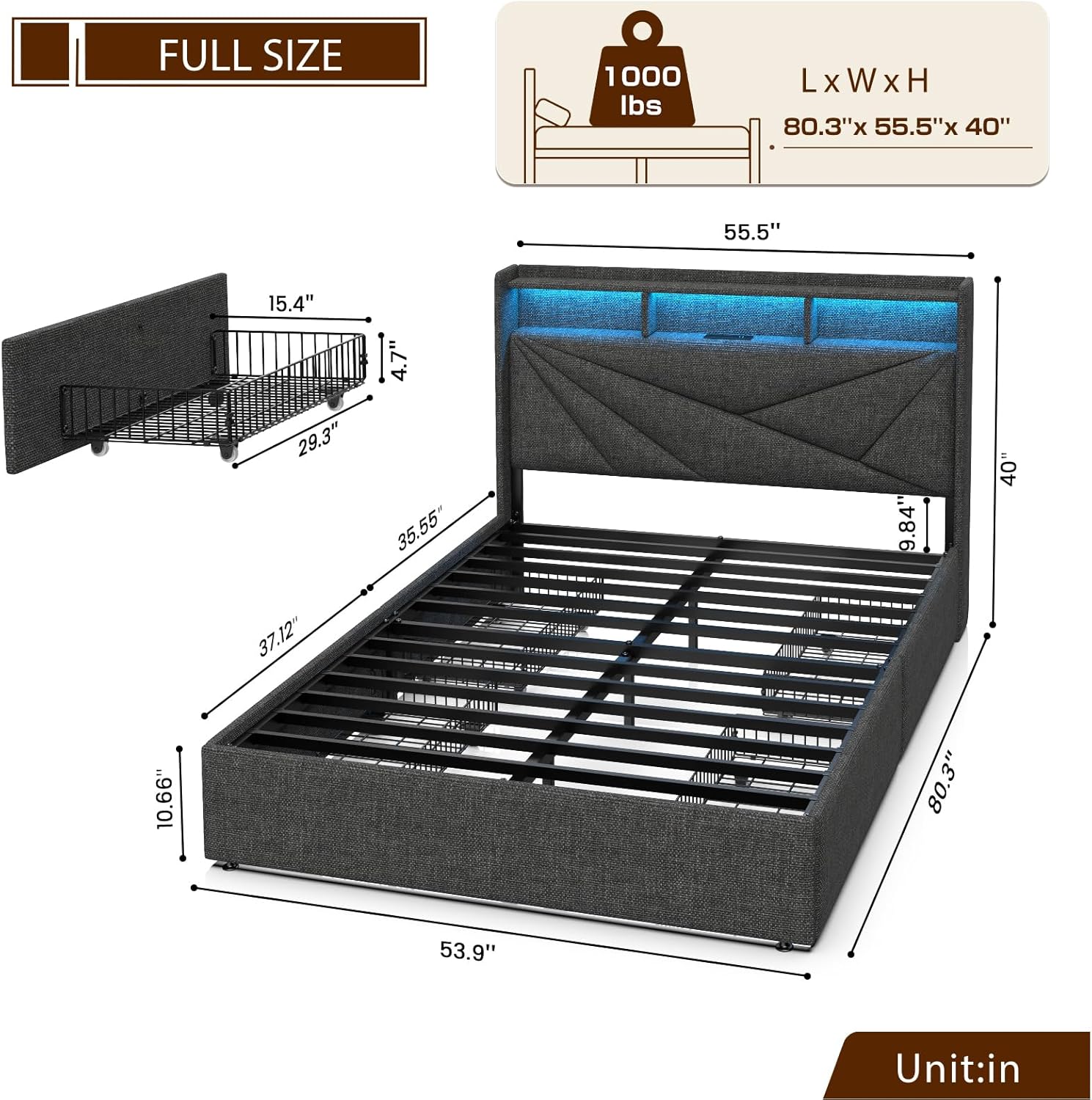
בילד 5.3: דימענסיאָנעל view of the bed frame, including drawer measurements.
6. וישאַלט
- רייניקונג: For the upholstered parts, use a soft, damp cloth and mild soap. Avoid harsh chemicals. For metal parts, wipe with a dry cloth.
- עלעקטריקאַל קאַמפּאָונאַנץ: Keep the LED lights and charging station free from dust. Do not spray liquids directly onto electrical parts.
- פאַסטענערס: Periodically check all bolts and screws to ensure they remain tight. Retighten as necessary to maintain stability and prevent squeaks.
- שופלאָדן: Keep the drawer wheels clean to ensure smooth operation.
7. טראָובלעשאָאָטינג
| פּראָבלעם | מעגלעך סיבה | לייזונג |
|---|---|---|
| געפירט לייץ נישט ארבעטן | Power cord unplugged; remote control battery low; LED strip damaged. | Ensure power cord is securely plugged in. Replace remote control battery. Contact customer support if LED strip is damaged. |
| טשאַרדזשינג סטאַנציע איז נישט ארבעטן | Power cord unplugged; wall outlet not functioning. | Verify power cord connection. Test wall outlet with another device. |
| בעט ראַם קוויטשט | לויזע באָלץ אדער פֿאַרבינדונגען. | Check and tighten all assembly bolts and screws, especially those connecting the slats and frame components. |
| שופלאדן זענען שווער צו עפענען/פארמאכן | Obstruction; dirty wheels; misaligned. | Check for items blocking the drawers. Clean drawer wheels. Ensure drawers are correctly aligned in their tracks. |
8. ספּעסאַפאַקיישאַנז
- מאָדעל: JIF240007
- גרייס: פול
- קאָליר: טונקל גרוי
- פּראָדוקט דימענשאַנז (L x W x H): 80.31" x 55.51" x 45.28"
- וואָג קאַפּאַציטעט: 1000 לבס
- נומער וואָג: 85 פונט
- מאַטעריאַל: Upholstered fabric, metal frame
- טשאַרדזשינג סטאַנציע: 2 USB Ports (1 Type-C, 1 Type-A, 5V/4A max), 2 AC Outlets (110V/12A), 6.5-foot power cord
- LED לייץ: 25 colors, 3 brightness modes, 10 flashing modes, music sync function
- סטאָרידזש שופלאָדן: 4 שופלאדן, יעדע 29.3"ל x 15.4"ברייט x 4.7"ה
- אַסעמבלי פארלאנגט: יא
9. וואָראַנטי און שטיצן
Driftalia products are designed for quality and durability. This product is covered by a standard 30-day return policy from the date of purchase. For specific warranty details, please refer to the terms and conditions provided at the time of purchase or contact your retailer.
For technical assistance, missing parts, or any other inquiries, please contact Driftalia customer support through the retailer's platform or visit the official Driftalia store page: Driftalia Store.