
1. הקדמה
Thank you for choosing the Vortex Powerhub30 Black 30000 mAh External Battery. This device is designed to provide reliable portable power for your electronic devices. Please read this manual carefully before use to ensure proper operation and to maximize the lifespan of your power bank.
2. זיכערקייַט אינפֿאָרמאַציע
- שטעלט נישט אויס די פּאַוער באַנק צו עקסטרעמע טעמפּעראַטורן (העכער 60°C / 140°F אָדער אונטער 0°C / 32°F), דירעקטע זונשייַן, אָדער פייַער.
- Avoid dropping, disassembling, or attempting to repair the device yourself. This may cause damage and void the warranty.
- האַלט די פּאַוער באַנק אַוועק פון וואַסער, נעץ און קעראָוסיוו מאַטעריאַלס.
- ניצט נישט די פּאַוער באַנק אויב זי איז קענטיק געשעדיגט, געשוואָלן, אָדער לעקט.
- האַלטן אויס פון דערגרייכן פון קינדער.
- ניצט נאָר סערטיפיצירטע טשאַרדזשינג קייבלס און אַדאַפּטערס.
- באַזײַטיקן די פּאַוער באַנק פאַראַנטוואָרטלעך לויט די לאָקאַלע רעגולאַציעס.
3. פּעקל אינהאַלט
- Vortex Powerhub30 Black 30000 mAh External Battery
- USB Charging Cable (Micro-USB/Type-C compatible)
- באַניצער מאַנואַל
4. פּראָדוקט איבערview
The Vortex Powerhub30 is equipped with multiple ports and an LED display for convenient charging and monitoring.

בילד 1: פראָנט view of the Vortex Powerhub30 Black external battery, showing its compact design and the Vortex logo. The image also highlights its 30000 mAh capacity and illustrates its use with various devices like smartphones, tablets, and headphones.
קאַמפּאָונאַנץ:
- יו-עס-בי-א ארויסגאַנג פּאָרטן (x2): פֿאַר טשאַרדזשינג עקסטערנע דעוויסעס.
- וסב טיפּ-C פּאָרט: Bidirectional, used for both charging the power bank and charging external devices.
- מיקראָ-USB אַרייַנגאַנג פּאָרט: פֿאַר אָפּלאָדן די פּאַוער באַנק.
- געפֿירט ווייַז: ווייזט די רוען באַטאַרייע פּראָצענטtage.
- מאַכט קנעפּל: אַקטיוויזירט דעם LED דיספּלעי און הייבט אָן אויפלאָדן.
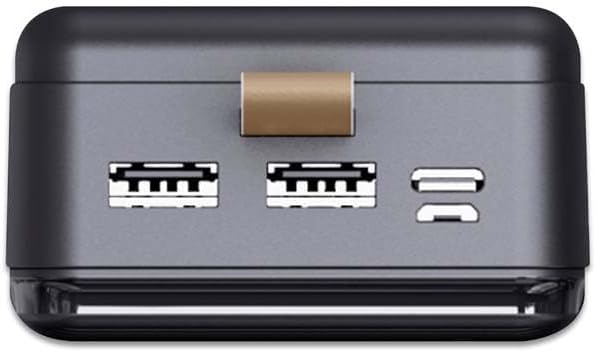
בילד 2: אויבן view of the Vortex Powerhub30, clearly displaying the two USB-A output ports and the single bidirectional USB Type-C port. This view illustrates the multiple connectivity options available.

Image 3: Close-up top view of the Vortex Powerhub30, highlighting the integrated LED indicator which displays the current battery charge level. The power button is also visible next to the indicator.
5. סעטאַפּ
ערשטע אויפלאדונג פון די פאוער באנק:
- Before first use, fully charge your Powerhub30.
- Connect the provided USB charging cable to either the Micro-USB input port or the USB Type-C port on the power bank.
- פֿאַרבינדט דעם אַנדערן עק פֿונעם קאַבל צו אַ USB וואַנט טשאַרדזשער (נישט אַרייַנגערעכנט) אָדער אַ קאָמפּיוטער'ס USB פּאָרט.
- The LED display will show the charging progress. Once 100% is displayed, the power bank is fully charged.
6. אַפּערייטינג ינסטרוקטיאָנס
טשאַרדזשינג פונדרויסנדיק דעוויסעס:
- Connect your device's charging cable to one of the USB-A output ports or the USB Type-C port on the Powerhub30.
- פֿאַרבינדט דעם אַנדערן עק פֿונעם קאַבל צו אייער סמאַרטפֿאָן, טאַבלעט, אָדער אַנדער קאָמפּאַטיבלן מיטל.
- Press the power button on the Powerhub30 to initiate charging. The LED display will show the power bank's remaining charge.
- The Powerhub30 can charge up to three devices simultaneously.
- Once your device is fully charged, disconnect it from the power bank. The power bank will automatically turn off after a period of inactivity.
7. וישאַלט
- רייניקט די פּאַוער באַנק מיט אַ ווייכן, טרוקענעם שטאָף. ניצט נישט קיין שאַרפע כעמיקאַלן אָדער אַברייסיוו רייניגער.
- סטאָר די מאַכט באַנק אין אַ קיל, טרוקן אָרט ווען ניט אין נוצן.
- כּדי צו האַלטן די באַטאַריע געזונט, זאָל מען גאָר אויפלאָדן די פּאַוער באַנק לפּחות איין מאָל יעדע דריי חדשים, אפילו אויב איר ניצט עס נישט רעגולער.
- פֿאַרמײַדט אָפֿט איבערלאָדן אָדער גאָר אויסליידיקן די באַטאַרייע.
8. טראָובלעשאָאָטינג
פּאַוער באַנק לאָדט זיך נישט אויף:
- זיכער מאַכן אַז דער טשאַרדזשינג קאַבל איז זיכער פארבונדן צו ביידע די פּאַוער באַנק און די מאַכט מקור.
- פרובירט אן אנדערן טשאַרדזשינג קאַבל אדער וואַנט אַדאַפּטער.
- באַשטעטיקן אַז די מאַכט מקור איז אַקטיוו.
אפאראט לאדט זיך נישט אויף פון פאוער באנק:
- זיכער מאַכן אַז די פּאַוער באַנק האט גענוג אָפּצאָל (קאָנטראָלירט דעם LED דיספּלעי).
- Press the power button on the power bank to activate output.
- פרובירט אן אנדערן טשאַרדזשינג קאַבל פֿאַר אייער דעווייס.
- זיכער מאַכן אַז אייער דעוויס איז קאָמפּאַטיבל מיט די פּאַוער באַנק'ס אַוטפּוט ספּעסיפיקאַציעס.
פּאַמעלעך טשאַרדזשינג:
- Ensure you are using a high-quality charging cable.
- Some devices may charge slower if multiple devices are connected simultaneously.
- Check if your device supports fast charging and if the cable/port used supports it.
9. ספּעסאַפאַקיישאַנז
| מאָדעל | Powerhub30 |
| באַטאַרייע קאַפּאַציטעט | 30000 מאַה |
| אַרייַנשרייַב פּאָרץ | מיקראָ יו-עס-בי, יו-עס-בי טיפּ-C |
| רעזולטאַט פּאָרץ | 2x USB-A, 1x USB Type-C (bidirectional) |
| ספּעציעלע שטריך | Compact design, LED battery display |
| רעקאַמענדיד נוצן | סמאַרטפאָונז, טאַבלעטן, אַנדערע USB-פּאַוערד דעוויסעס |
| דימענשאַנז | 14.8 × 7 × 2.8 cm (approx.) |
| מאַטעריאַל | ABS Casing |
10. וואָראַנטי און שטיצן
For warranty information and customer support, please refer to the official Vortex website or contact your retailer. You can also visit the Vortex Brand Store פֿאַר מער דעטאַילס.