
1. הקדמה
Welcome to the DITONG HY300 Plus HD Projector user manual. This guide will help you set up, operate, and maintain your new projector. The HY300 Plus is a portable projector equipped with Android 11 and dual-band WiFi 6, offering a seamless and high-quality viewing experience for movies, presentations, and more, both indoors and outdoors.
2. פּראָדוקט איבערview
2.1 קאַמפּאָונאַנץ
The DITONG HY300 Plus projector package typically includes the following items:
- DITONG HY300 Plus Projector
- מאַכט אַדאַפּטער
- ווייַט קאָנטראָל

Image: The DITONG HY300 Plus projector in white, accompanied by its black remote control and a protective cover for the lens.
2.2 שליסל פֿעיִקייטן
- אַנדרויד 11 אַס: Built-in smart operating system for direct access to streaming apps without external devices.
- Dual-band WiFi 6 (5G + 2.4G): Ensures faster and more reliable wireless connectivity for smooth streaming and screen mirroring.
- עלעקטראָניש פאָקוס: Easily adjust image clarity using the remote control.
- 4K Decoding & 720P Native Resolution: Supports 4K video input with a native resolution of 1280x720P for clear images.
- אַוטאָ קיסטאָנע קערעקשאַן: Automatically adjusts image distortion for a perfectly rectangular picture.
- 180° Flexible Projection Angle: ערמעגליכט פּראַיעקציע אויף ווענט, דעקעס, אדער פּאָדלאָגעס.
- נידעריק ראַש אָפּעראַציע: Operates at less than 25dB for a quiet viewינג דערפאַרונג.
- הויך ברייטנאַס: 8000 Lux (250 ANSI lumens) for vivid and bright images.
- קייפל אַספּעקט פאַרהעלטענישן: Supports 16:9, 4:3, and 16:10.
- בלועטאָאָטה קאַנעקטיוויטי: פֿאַר קאַנעקטינג פונדרויסנדיק אַודיאָ דעוויסעס.

בילד: אן איבערview of the DITONG HY300 Plus features, including electronic focus, Bluetooth 5.0, 4K decoding, 720P native resolution, WiFi 5G/2.4G, and auto keystone correction.

Image: A demonstration of the electronic focus feature, showing a clear image projected onto a screen with the projector and remote control in the foreground.

Image: Illustrates the 180-degree flexible projection angle, showing the projector casting an image onto a wall and a ceiling in a bedroom setting.

Image: Depicts the dual-band WiFi 5G/2.4G capability, showing a fast connection for screen mirroring with a projected image of a car chase.

Image: Illustrates the low noise level of the projector, comparing its sound output to common ambient noises like whispering and a motorcycle passing.
3. סעטאַפּ
3.1 ונבאָקסינג און דורכקוק
Carefully remove all components from the packaging. Inspect for any signs of damage. If any items are missing or damaged, contact customer support immediately.
3.2 מאַכט קאַנעקשאַן
- פֿאַרבינדט דעם מאַכט אַדאַפּטער צום פּראָיעקטאָר'ס מאַכט אַרייַנגאַנג פּאָרט.
- צאַפּן די מאַכט אַדאַפּטער אין אַ פּאַסיק עלעקטריקאַל ווענטיל.
3.3 ערשט מאַכט אויף
דריק דעם מאַכט קנעפּל אויף דעם פּראָיעקטאָר אָדער די ווייַט קאָנטראָל צו אַנצינדן דעם מיטל. דער פּראָיעקטאָר וועט זיך אָנהייבן, און וועט ווײַזן דעם אַנדרויד 11 צובינד.
3.4 פּלאַצירונג און פּראָיעקציע דיסטאַנץ
שטעלט דעם פּראָיעקטאָר אויף אַ סטאַבילער, גלאַטער ייבערפלאַך. פֿאַר אָפּטימאַלן viewing, consider the projection distance:
- For a 130-inch display, an optimal projection distance is approximately 1.68 meters.
- The projector supports various screen sizes from 40 inches to 130 inches depending on distance.

Image: A diagram illustrating optimal projection distances for different screen sizes, showing that 1.68 meters is ideal for a 130-inch display.
3.5 מאַונטינג אָפּציעס
The HY300 Plus is designed for versatile placement:
- פּאָרטאַטיוו נוצן: Place it on a table or flat surface.
- Ceiling Mount: The bottom of the projector features a 1/4-inch screw hole, compatible with standard ceiling mounts or camera tripods.
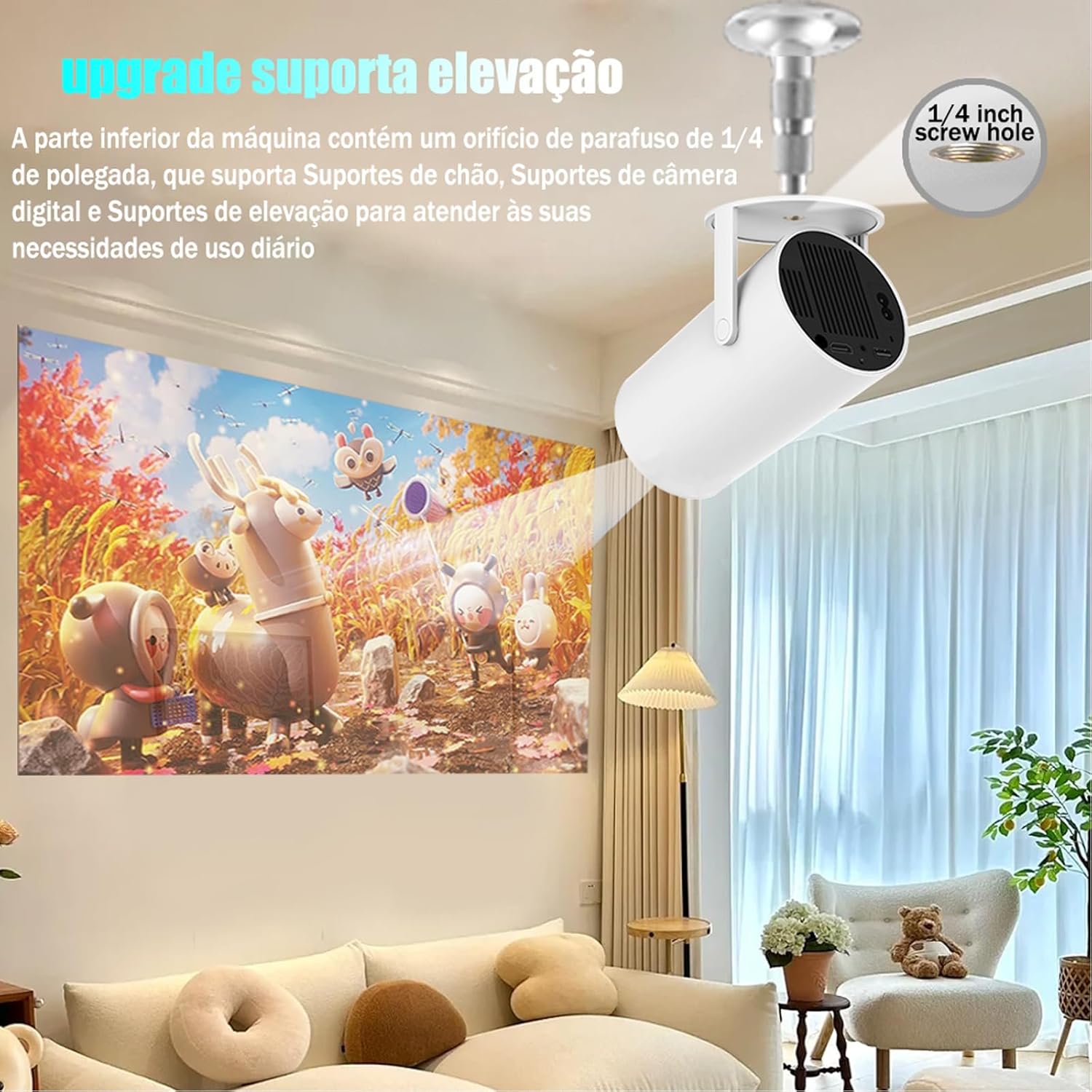
Image: The projector shown mounted to a ceiling, highlighting the 1/4-inch screw hole for various mounting solutions.
4. אַפּערייטינג ינסטרוקטיאָנס
4.1 רימאָוט קאָנטראָל פאַנגקשאַנז
Use the included remote control to navigate the projector's interface. Key functions include:
- מאַכט אויף / אַוועק
- נאַוויגאַציע (אַרויף, אַראָפּ, לינקס, רעכטס, גוט)
- Back/Home buttons
- באַנד קאָנטראָל
- פאָקוס אַדזשאַסטמאַנט

Image: The DITONG HY300 Plus projector with its remote control, demonstrating the electronic focus feature.
4.2 עלעקטראָנישע פאָקוס אַדזשאַסטמענט
To adjust the image clarity:
- Point the remote control at the projector.
- Press the dedicated focus buttons (usually marked with a circle or 'F' icon) on the remote to sharpen the image.
4.3 Automatic Keystone Correction
The HY300 Plus features automatic keystone correction. When the projector is moved or angled, it will automatically adjust the image to maintain a rectangular shape. Manual adjustments are typically not required.
4.4 קאַנעקטינג פונדרויסנדיק דעוויסעס
- הדמי: Connect laptops, gaming consoles, or other HDMI-enabled devices using an HDMI cable.
- Screen Mirroring (WiFi): Connect your smartphone or tablet wirelessly via WiFi for screen mirroring. Ensure both devices are connected to the same WiFi network.
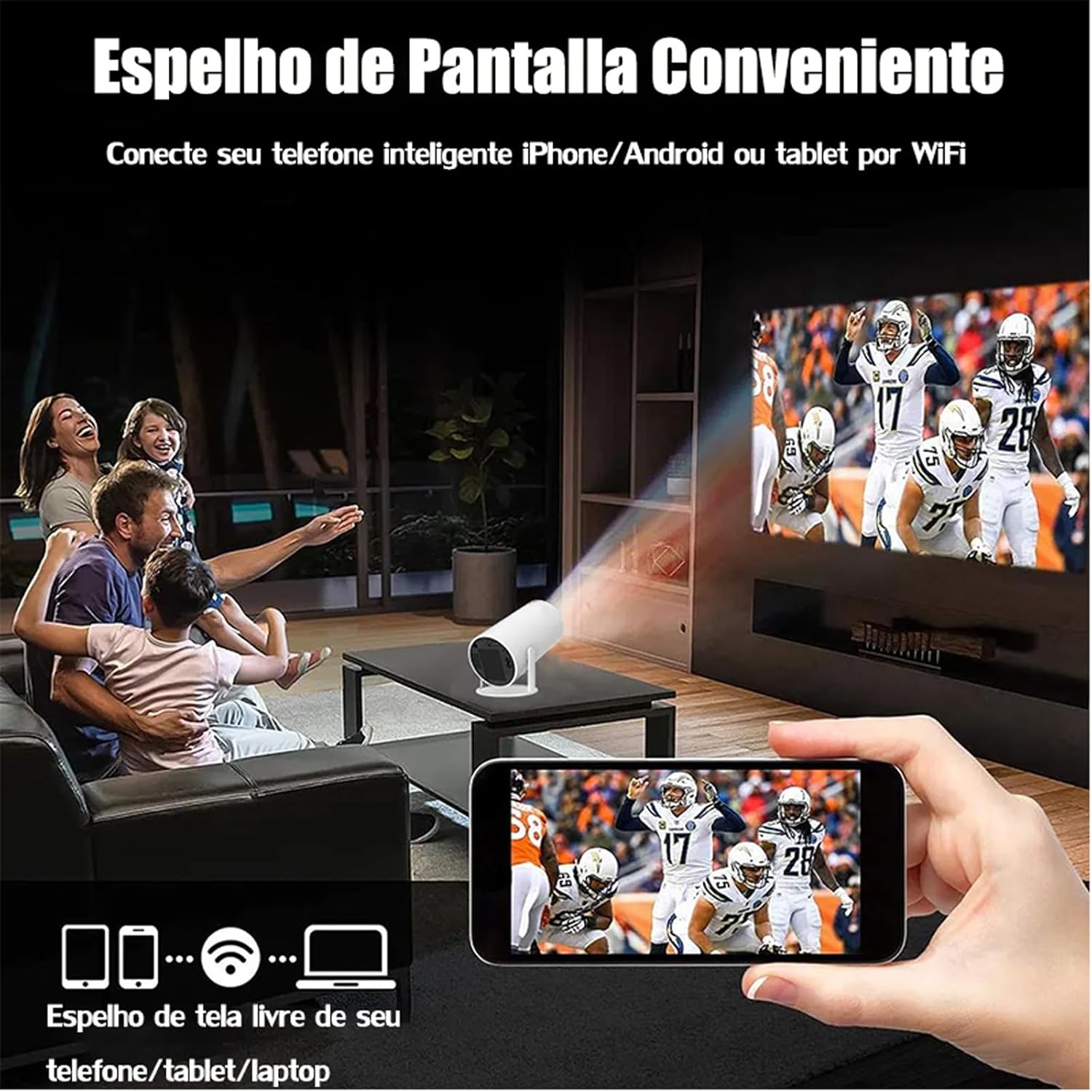
Image: A family watching a football game projected onto a screen, with a smartphone in the foreground demonstrating wireless screen mirroring.
4.5 נאַוויגירן אַנדרויד 11
The projector's smart interface allows you to download and use various applications. Use the remote control to navigate through menus, select apps, and adjust settings. Connect to your home WiFi network to access online content.
4.6 אַודיאָ רעזולטאַט
The projector has built-in speakers. For enhanced audio, you can connect external Bluetooth speakers or headphones via the Bluetooth interface.
5. וישאַלט
געהעריגע אויפהאלטונג גאראנטירט די לאנגעוויטי און אפטימאלע פערפארמאנס פון אייער פראיעקטאר.
- לענס רייניקונג: Gently wipe the projector lens with a soft, lint-free cloth or a lens cleaning brush. Avoid abrasive materials that could scratch the lens.
- ווענטילאַטיאָן: זיכער מאַכן אַז די פּראָיעקטאָר'ס ווענטילאַציע פּאָרץ זענען ריין פון שטויב און שטערונגען צו פאַרמייַדן איבערהיצונג. בלאָקירט נישט די לופט ווענטילאַציעס בעת אָפּעראַציע.
- סטאָרידזש: When not in use, store the projector in a cool, dry place, away from direct sunlight and extreme temperatures. Use the protective cover if provided.
6. טראָובלעשאָאָטינג
If you encounter issues with your DITONG HY300 Plus projector, refer to the following common problems and solutions:
- קיין בילד:
- Ensure the power adapter is securely connected and the projector is powered on.
- Check the input source. Make sure the correct HDMI or mirroring input is selected.
- בלערי בילד:
- Use the remote control to adjust the electronic focus.
- זיכער מאַכן אַז די פּראָיעקציע־איבערפֿלאַך איז גלאַט און דער פּראָיעקטאָר איז סטאַביל.
- קיין קול:
- קאָנטראָלירט דעם וואָלומען לעוועל אויף דעם פּראָיעקטאָר און דעם פֿאַרבונדענעם מיטל.
- If using external speakers, ensure they are properly connected via Bluetooth.
- WiFi קאָנעקטיוויטי פּראָבלעמען:
- Ensure the projector is within range of your WiFi router.
- ריסטאַרט דעם פּראָיעקטאָר און דיין WiFi ראַוטער.
- באַשטעטיקן אַז די WiFi פּאַראָל איז ריכטיק אַרייַנגעגעבן.
If the problem persists, please contact DITONG customer support for further assistance.
7. ספּעסאַפאַקיישאַנז
Below are the detailed specifications for the DITONG HY300 Plus HD Projector:
| שטריך | באַשרייַבונג |
|---|---|
| סאָרט | DITONG |
| מאָדעל | HY300 PLUS |
| אָפּערייטינג סיסטעם | אַנדרויד 11 |
| ווירעלעסס קאַנעקטיוויטי | Dual-band WiFi 6 (5G + 2.4G) |
| בלועטאָאָטה | יא |
| ווייַז טעכנאָלאָגיע | לקד |
| ברייטנאַס | 8000 Lux (250 ANSI lumens) |
| געבוירן האַכלאָטע | 1280 רענטגענ 720 פּ |
| שטיצט רעסאָלוטיאָן | אַרויף צו 4K |
| אַספּעקט פאַרהעלטעניש | 16:9, 4:3, 16:10 |
| דערפרישן קורס | 60 הז |
| פאָקוס | עלעקטראָניש פאָקוס |
| קייסטאָנע קערעקשאַן | אָטאַמאַטיק |
| קאַמפּאַטאַבאַל דעוויסעס | Smartphones, devices with HDMI output |
| קאַנעקטער טיפּ | Bluetooth, HDMI, Wifi |
| פאָרם פאַקטאָר | פּאָרטאַטיוו |
| מאַונטינג טיפּ | סטעליע בארג |
| פּראָדוקט וואָג | 2.27 ג |
| Voltage | 1.2E+2 וואלטס |
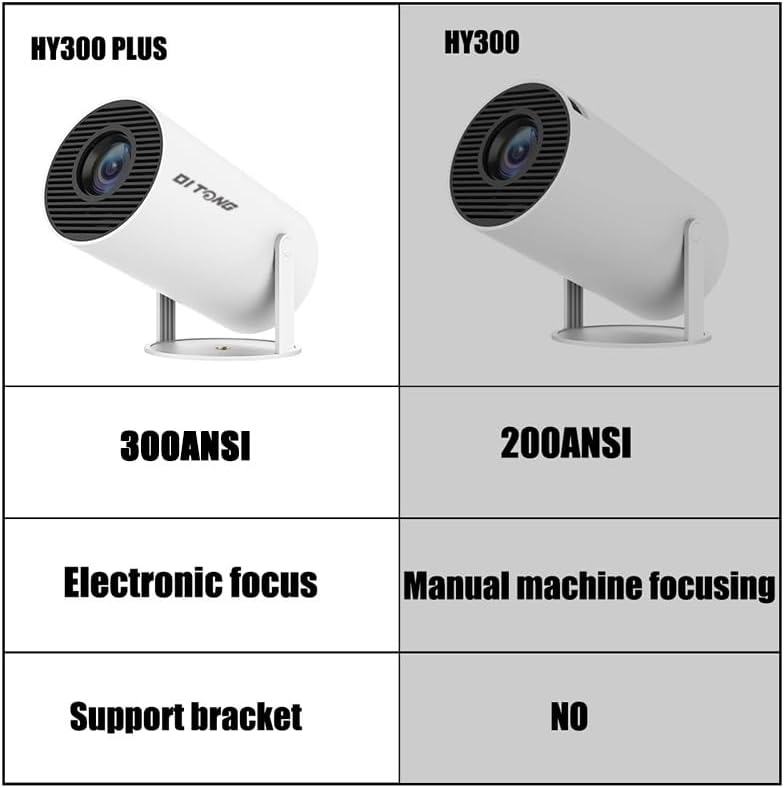
Image: A comparison table highlighting the differences between the HY300 Plus and the original HY300, showing the Plus model has 300 ANSI lumens, electronic focus, and a support bracket.
8. וואָראַנטי און שטיצן
The DITONG HY300 Plus Projector comes with a manufacturer's warranty. Please refer to the product packaging or the official DITONG webזייטל פֿאַר ספּעציפֿישע וואָראַנטי טערמינען און באַדינגונגען.
For technical support, troubleshooting assistance, or warranty claims, please contact DITONG customer service through the contact information provided with your purchase or on the official DITONG support channels.


