
הקדמה
Thank you for choosing the Peski Portable Bluetooth Mini Karaoke Machine. This device is designed to provide an astonishing sound experience with exceptional clarity and zero distortion, perfect for home parties, outdoor events, and family gatherings. It features two wireless microphones, dynamic colorful lights, and multiple connectivity options for endless fun.
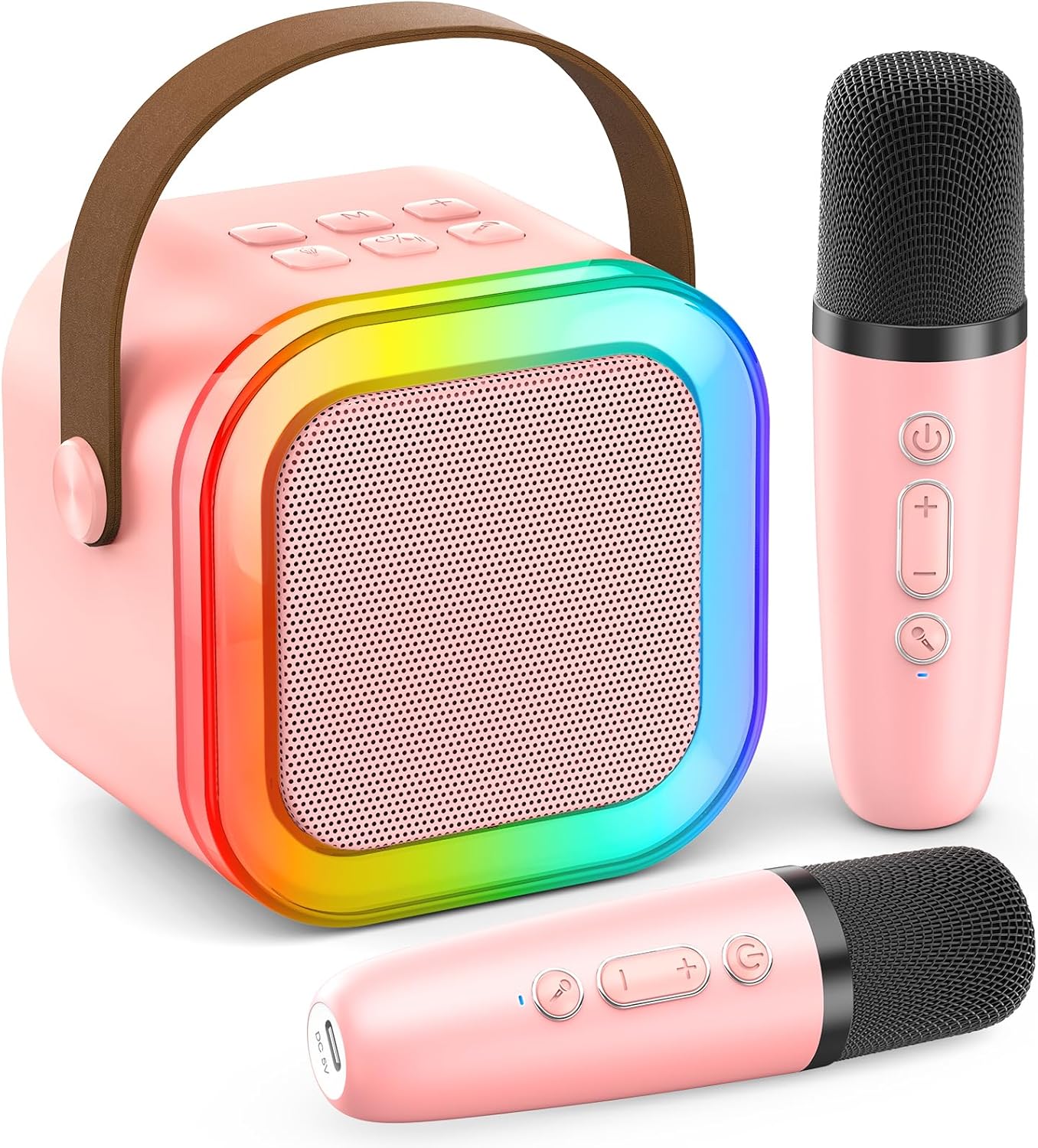
וואָס איז אין די קעסטל
ווען איר עפנט אייער פעקל, ביטע זיכער מאכן אז אלע פאלגנדע זאכן זענען דא:
- Mini Karaoke Machine x1
- ווירעלעסס מיקראָפאָן x2
- וסב קאַבלע x2
- באַניצער מאַנואַל x1

סעטאַפּ גייד
1. טשאַרדזשינג די מיטל
Before first use, fully charge the karaoke machine and both microphones. Use the provided USB Type-C cables. The main unit features a long-life rechargeable battery, offering 6-10 hours of playtime and doubling as a power bank for your smartphone/tablet.

2. בלועטאָאָטה פּערינג
- Turn on the karaoke machine by pressing the power button.
- אַקטיווירן בלועטוט אויף דיין סמאַרטפאָון, טאַבלעט, אָדער אַנדער קאָמפּאַטיבל מיטל.
- זוכן פֿאַר "Peski Karaoke" (or similar name) in your device's Bluetooth settings and select it to pair.
- The microphones will automatically connect to the main unit once powered on.
אַפּערייטינג ינסטראַקשאַנז
קאָנטראָלס איבערview

קול יפעקץ
The PA karaoke system includes 5 magic voice effects to enhance your singing experience:
- פאַרזעעניש קול
- בעיבי קול
- ווייַבלעך קול
- זכר קול
- Original/Accompaniment (to remove/restore music vocals)

Dynamic Colorful Lights
The karaoke machine is equipped with colorful disco lights that can be switched on/off with an independent button, adding a vibrant atmosphere to your party.

קאַנעקטיוויטי אָפּציעס
Beyond Bluetooth 5.0, the karaoke machine supports various input connections:
- TF קאָרט: Insert a TF (Micro SD) card with your favorite music.
- וסב: Connect a USB drive for audio playback.
- AUX אַרייַנשרייַב: Use the AUX port to connect external audio devices.


וישאַלט
To ensure the longevity and optimal performance of your Peski Karaoke Machine, please follow these maintenance guidelines:
- רייניקונג: Use a soft, dry cloth to clean the exterior of the machine and microphones. Do not use abrasive cleaners or solvents.
- סטאָרידזש: האַלט דעם אַפּאַראַט אין אַ קיל, טרוקן אָרט אַוועק פון דירעקט זונשייַן און עקסטרעמע טעמפּעראַטורן.
- באַטערי זאָרגן: For extended periods of non-use, charge the battery at least once every three months to maintain its health.
- שעפּן מיט זאָרג: Avoid dropping the machine or microphones, as this can damage internal components.
טראָובלעשאָאָטינג
If you encounter any issues with your Peski Karaoke Machine, please refer to the following common problems and solutions:
| פּראָבלעם | מעגלעך סיבה | לייזונג |
|---|---|---|
| קיין געזונט פון רעדנער | Volume too low; Device not paired; Incorrect input mode. | Increase volume on both machine and connected device. Re-pair Bluetooth. Check selected input mode (Bluetooth, TF, USB, AUX). |
| מיקראָפאָן טוט נישט אַרבעטן | Microphone not powered on; Battery low; Not paired with speaker. | Ensure microphone is turned on. Charge microphone. Microphones should auto-pair; if not, restart both speaker and microphones. |
| בלועטאָאָטה קשר אַנסטייבאַל | Device too far from speaker; Interference. | Keep devices within 50ft range. Avoid obstacles between devices. Turn off other Bluetooth devices nearby. |
| לייץ נישט ארבעטן | Lights feature turned off. | Press the dedicated LIGHTS button on the main unit to activate or change light modes. |
If the problem persists after trying these solutions, please contact Peski customer support for further assistance.
ספּעסאַפאַקיישאַנז
| שטריך | דעטאַל |
|---|---|
| סאָרט | פּעסקי |
| מאָדעל נומער | MI047AR |
| קאָליר | ראָזעווע |
| פּראָדוקט דימענשאַנז | 5.71 X 3.94 X 4.53 אינטשעס |
| פּונקט וואָג | 12.7 אונסעס (360 גראַם) |
| מאַטעריאַל | פּלאַסטיק |
| מאַכט מקור | באַטאַרייע פּאַוערד |
| רעזולטאַט וואָסtage | 10 וואטס |
| רעדנער גראף | 1 |
| קאַנעקטיוויטי טעכנאָלאָגיע | Bluetooth, USB, Wireless, Portable, SD card, TF Card |
| בלועטאָאָטה ווערסיע | 5.0 |
| ווירעלעסס ראַנגע | אַרויף צו 50 פֿיס (אָן מניעות) |
| קאַמפּאַטאַבאַל דעוויסעס | Headphone, Laptop, PA System, Smartphone, Television |
| אַודיאָ אַרייַנשרייַב | מיקראָפאָן |
| מאַונטינג טיפּ | טאַבלעטאָפּ |
| ערשטער דאַטע בנימצא | 20 מערץ 2024 |
וואָראַנטי און שטיצן
Peski is committed to providing excellent customer service. Your karaoke machine comes with a 365-טאָג וואָראַנטימיר אָפֿערן אויך אַ LIFETIME AFTERSALES and NO REASON REPLACEMENT service. If you have any issues during using the singing machine, we are available to assist you and will resolve any issues within 24 hours. Our 24/7 קונה שטיצע is ready to help.
For support, please refer to the contact information provided with your purchase or visit the official Peski store online.