
1. הקדמה
Thank you for choosing the Peski K-51 Portable Bluetooth Karaoke Machine. This compact and versatile device is designed to provide an enjoyable karaoke experience with its high-quality sound, dynamic lighting, and dual wireless microphones. This manual will guide you through the setup, operation, and maintenance of your new karaoke machine to ensure you get the most out of its features.
2. וואָס איז אין דער קעסטל
- Mini Karaoke Machine (1 unit)
- Wireless Microphone (2 units)
- יו-עס-בי קאַבל (2 איינהייטן)
- באַניצער מאַנואַל (1 אַפּאַראַט)
3. פּראָדוקט איבערview
The Peski K-51 features a compact speaker unit with integrated controls and two wireless microphones for duet performances. The speaker includes a leather handle for portability and dynamic LED lighting for an enhanced experience.
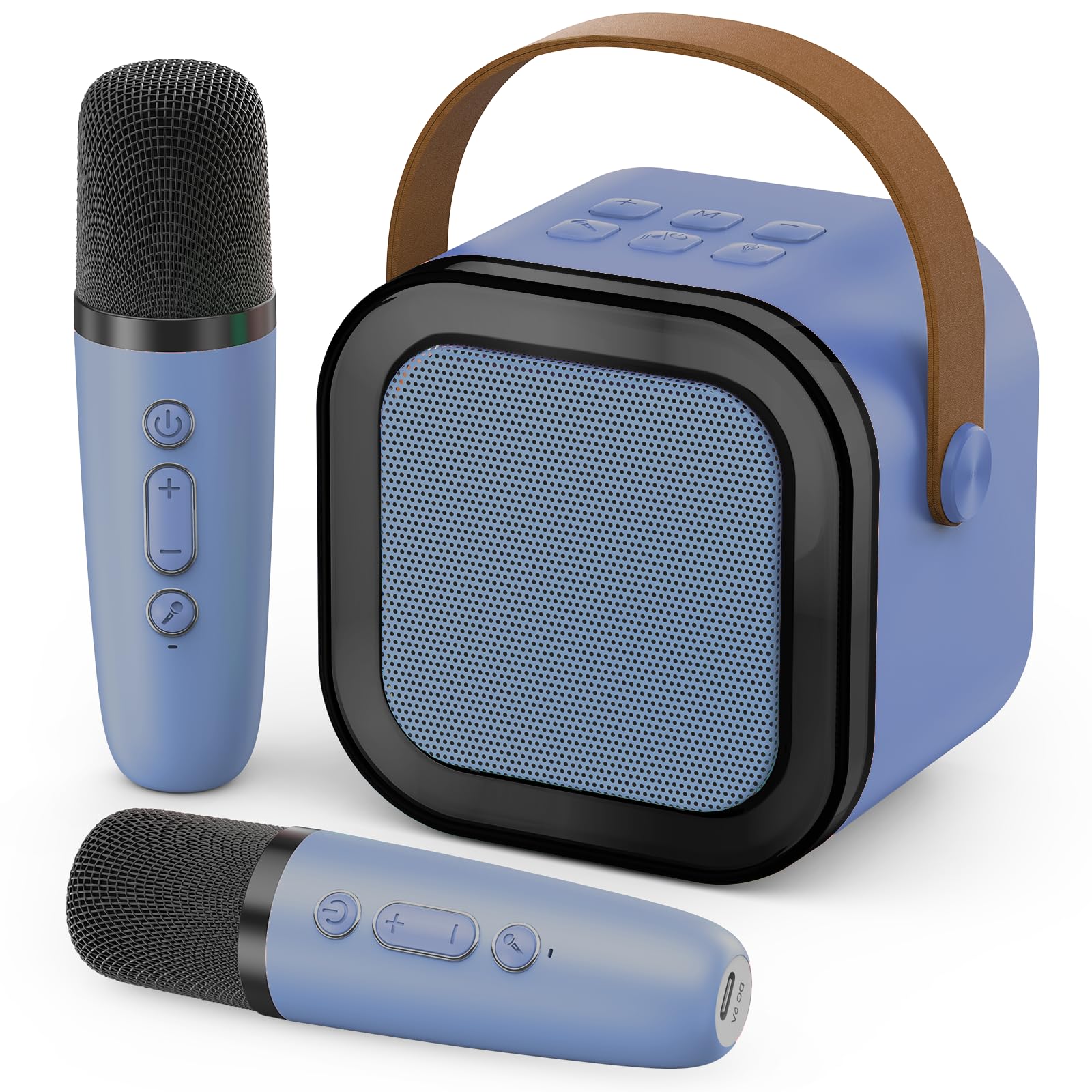
Image: The Peski K-51 Portable Bluetooth Karaoke Machine, showing the main speaker unit with colorful LED lights and two matching wireless microphones.
Speaker Controls and Ports:
- מאַכט קנעפּל: טוט אן/אויסלעשן דעם רעדנער.
- באַנד קנעפּלעך (+/-): אַדזשאַסץ די רעדנער באַנד.
- מאָדע קנעפּל (M): Switches between input modes (e.g., Bluetooth, TF card, USB).
- ליכט קנעפּל: Controls the LED lighting effects.
- שפּיל / פּויזע קנעפּל: קאָנטראָלירט מוזיק ווידערשפּיל.
- מיקראָפאָן קנעפּל: Activates/deactivates microphone input.
- וסב פּאָרט: For USB drive playback and power bank functionality.
- טף קאַרד שפּעלטל: פֿאַר TF קאַרטל ווידערשפּיל.
- USB-C טשאַרדזשינג פּאָרט: פֿאַר טשאַרדזשינג די רעדנער.
- 3.5 מם אַודיאָ דזשאַק: For headphone output.
Microphone Controls and Ports:
- מאַכט קנעפּל: Turns the microphone on/off.
- Volume/Echo Control: Adjusts microphone volume and echo effect.
- USB-C טשאַרדזשינג פּאָרט: פֿאַר אויפֿלאָדן דעם מיקראָפֿאָן.
4. סעטאַפּ
4.1 אויפלאָדן די דעווייסעס
Before first use, fully charge the karaoke machine speaker and both wireless microphones. Use the provided USB cables to connect them to a compatible USB power adapter (not included).
- פֿאַרבינדט דעם USB-C עק פֿונעם קאַבל צום טשאַרדזשינג פּאָרט אויפֿן רעדנער.
- Connect the USB-C end of the other cable to the charging port on each microphone.
- די טשאַרדזשינג אינדיקאַטאָר ליכט וועט זיך אָנצינדן בעת טשאַרדזשינג און וועט זיך אויסלעשן אָדער טוישן קאָליר ווען עס איז גאָר אויפגעלאָדן.
4.2 פּאַוערינג אויף / אַוועק
- רעדנער: Press and hold the Power button on the speaker until the indicator light turns on.
- מיקראָפאָן: Press and hold the Power button on each microphone until the indicator light turns on.
- To power off, repeat the process by pressing and holding the Power button on each device.
4.3 בלועטאָאָטה קאַנעקשאַן
To play music from your smartphone or other Bluetooth-enabled device:
- Ensure the karaoke machine speaker is powered on and in Bluetooth mode (indicated by a flashing blue light or voice prompt). If not, press the 'M' (Mode) button to switch to Bluetooth mode.
- אויף אייער סמאַרטפאָון אָדער מיטל, גייט צו בלועטוט סעטטינגס און זוכט פֿאַר בנימצא דעוויסעס.
- Select "K-51" (or similar name) from the list to pair. A confirmation sound will indicate successful pairing.
- Once connected, you can play music from your device through the karaoke machine speaker.
4.4 מיקראָפאָן פּערינג
The microphones should automatically pair with the speaker when both are powered on. If they do not connect:
- Ensure both the speaker and microphones are powered on and fully charged.
- If a microphone is not connecting, try powering it off and on again.
- If issues persist, consult the troubleshooting section.
5. אַפּערייטינג ינסטרוקטיאָנס
5.1 אַדזשאַסטירן באַנד
- רעדנער באנד: Use the '+' and '-' buttons on the speaker to adjust the overall music volume.
- מיקראָפאָן באַנד: Use the dedicated volume control on each microphone to adjust your singing volume.
5.2 קול עפפעקץ
The microphones feature built-in voice effects to enhance your performance. Press the dedicated button on the microphone to cycle through available voice effects (e.g., echo, robot voice, etc.).
5.3 Dynamic Colorful Lights
The speaker is equipped with dynamic LED lights that create a vibrant atmosphere. Press the light bulb button on the speaker to turn the lights on/off or to cycle through different lighting modes.
Video: Demonstrates the dynamic colorful light show feature of the Peski K-51 karaoke machine, showing various color changes and patterns.
5.4 שפּילן מוזיק פֿון USB/TF קאַרטל
Insert a USB drive or TF card (with music files in MP3 format) into the corresponding port on the speaker. The speaker will automatically switch to USB/TF card mode and begin playing music. Use the Play/Pause button and volume controls as needed.
6. פֿעיִקייטן
- Astonishing Sound: Built-in professional tuning grade speaker delivers clear, loud, and distortion-free stereo sound.
- צווייענדיק ווירעלעסס מיקראָפאָן: Two microphones allow for duets and interactive singing.
- Dynamic Colorful Lights: Integrated LED lights provide a vibrant visual experience, enhancing the party atmosphere.
- פּאָרטאַטיוו פּלאַן: Compact size with a convenient leather handle for easy transport.
- קול עפפעקץ: Microphones offer various voice modulation effects for added fun.
- מולטי-מקור פּלייבאַק: Supports Bluetooth, USB drive, and TF card for versatile music options.
- קריקאָנלאָדלעך באַטערי: Long-lasting internal battery for extended use.
- מאַכט באַנק פאַנגקשאַנאַליטי: The speaker's USB port can be used to charge other devices.
7. וישאַלט
- רייניקונג: Wipe the surfaces of the speaker and microphones with a soft, dry cloth. Do not use harsh chemicals or abrasive cleaners.
- סטאָרידזש: האַלט דעם אַפּאַראַט אין אַ קיל, טרוקן אָרט אַוועק פון דירעקט זונשייַן און עקסטרעמע טעמפּעראַטורן.
- באַטערי זאָרגן: כדי צו פארלענגערן די לעבן פון די באַטעריע, זאָלט איר נישט אָפט אויסלאָדן די באַטעריע. לאָדט דאָס אַפּאַראַט רעגולער אויף, אפילו אויב עס ווערט נישט גענוצט פֿאַר לענגערע צייטן.
- וואַסער קעגנשטעל: די דעווייס איז נישט וואַסערפּרוף. פֿאַרמייַדט אויסשטעלונג צו וואַסער אָדער איבעריקע פֿײַכטקייט.
8. טראָובלעשאָאָטינג
| פּראָבלעם | מעגלעך סיבה | לייזונג |
|---|---|---|
| קיין געזונט פון רעדנער | Speaker is off or low battery. Volume is too low. Incorrect input mode. | Ensure speaker is charged and powered on. Increase speaker volume. Press 'M' button to select correct input mode (Bluetooth, USB, TF). |
| Microphone not working/pairing | Microphone is off or low battery. Not paired correctly. | Ensure microphone is charged and powered on. Power off and on the microphone to re-establish connection. Ensure it's within range of the speaker. |
| בלועטאָאָטה קשר אַנסטייבאַל | דיווייס איז צו ווייט פונעם רעדנער. אריינמישונג. | Move your device closer to the speaker. Avoid obstacles between devices. Disconnect and reconnect Bluetooth. |
| לייץ נישט ארבעטן | ליכטער זענען אויסגעלאָשן. | Press the light bulb button on the speaker to activate or change light modes. |
9. ספּעסאַפאַקיישאַנז
| שטריך | דעטאַל |
|---|---|
| מאָדעל נומער | ק-51 |
| סאָרט | פּעסקי |
| פּונקט וואָג | 360 גראַמז (12.7 אונסעס) |
| פּראָדוקט דימענשאַנז (L x W x H) | 2.7 X 3.5 X 3.5 אינטשעס |
| נומער פון טשאַנאַלז | 1 |
| מאַכט מקור | באַטאַרייע פּאַוערד |
| קאַנעקטיוויטי | Bluetooth, USB, TF Card |
10. וואָראַנטי און שטיצן
For warranty information and customer support, please refer to the contact details provided on the product packaging or visit the official Peski webזייטל. האַלט אייער קויף קוויטל ווי אַ באַווייַז פון קויפן פֿאַר קיין וואָראַנטי קליימז.