
הקדמה
This manual provides detailed instructions for the safe and effective use of your Andoer Portable Digital Camera. Please read this manual thoroughly before operating the device and retain it for future reference.
פּעקל אינהאַלט
באַשטעטיקט אַז אַלע זאכן וואָס זענען אויסגערעכנט אונטן זענען אַרייַנגערעכנט אין אייער פּעקל:
- 1 x Andoer Digital Camera
- 1 X 32GB זיקאָרן קאַרד
- 1 x USB קאַבל (טיפּ-C)
- 1 רענטגענ רייניקונג שטאָף
- 1 X Lanyard
- 1 x סטאָרידזש באַג
- 1 x באַניצער מאַנואַל
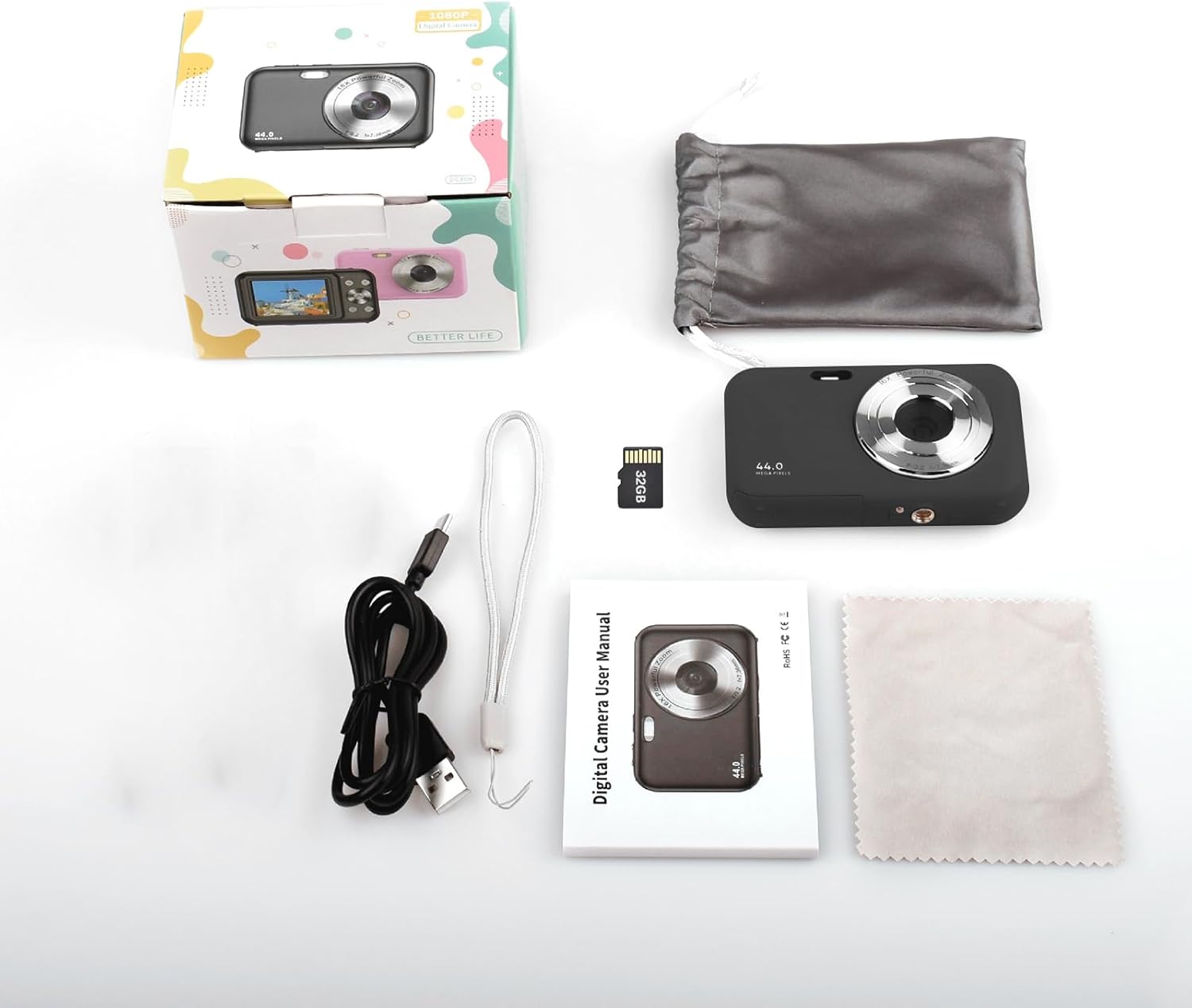
Image: Contents of the Andoer Digital Camera package.
קאַמעראַ איבערview
Familiarize yourself with the various parts of your camera.

Image: Multi-angle view of the Andoer Digital Camera, highlighting its compact design and button layout.
- פראָנט: Lens, Flash, Microphone.
- אויבן: Power Button, Shutter Button.
- צוריק: 2.4-inch IPS Screen, Navigation Buttons (Up, Down, Left, Right, OK), Menu Button, Mode Button, Zoom (W/T).
- זייט: USB Type-C Port.
- דנאָ: Battery/Memory Card Compartment.
סעטאַפּ
1. טשאַרדזשינג די באַטערי
The camera is equipped with a built-in 700mAh rechargeable lithium battery. Before first use, fully charge the battery.
- Connect the included USB Type-C cable to the camera's USB port.
- פֿאַרבינדט דעם אַנדערן עק פֿונעם USB קאַבל צו אַ USB מאַכט אַדאַפּטער (נישט אַרייַנגערעכנט) אָדער אַ קאָמפּיוטער'ס USB פּאָרט.
- די טשאַרדזשינג אינדיקאַטאָר ליכט וועט זיך אָנצינדן. עס וועט זיך אויסלעשן אָדער טוישן קאָליר אַמאָל די טשאַרדזשינג איז פֿאַרטיק.
באַמערקונג: The camera can be used while charging. A full charge provides approximately 150 minutes of continuous shooting or 90 minutes of video recording.

Image: Battery life information for the 700mAh battery.
2. ינסערטינג די זכּרון קאָרט
The camera supports a 32GB memory card (included). Ensure the camera is powered off before inserting or removing the memory card.
- Locate the battery/memory card compartment cover on the bottom of the camera.
- עפענען די דעקל.
- Insert the 32GB memory card into the designated slot with the metal contacts facing the correct direction (refer to the diagram inside the compartment if available) until it clicks into place.
- פאַרמאַכן די אָפּטייל דעקן סיקיורלי.
וויכטיק: Format the memory card in the camera's settings menu before first use to ensure optimal performance.
אַפּערייטינג ינסטראַקשאַנז
1. פּאָווערינג אויף / אויסגעלאשן
- צו אָנפאַנגען, דריקן און האַלטן די מאַכט קנעפּל on the top of the camera.
- צו האַלטן אַוועק, דריקן און האַלטן די מאַכט קנעפּל again. The camera also features an auto power-off function (configurable in settings).
2. גענומען פאָטאָס
The camera captures photos up to 44MP resolution.
- קער אויף די אַפּאַראַט.
- Ensure the camera is in photo mode (indicated on the 2.4-inch IPS screen). If not, press the מאָדע קנעפּל צו באַשטימען.
- Frame your shot using the IPS screen.
- דרוק די לאָדן קנעפּל halfway down to focus, then press it fully to take the picture.

בילד: עקסample of a high-resolution photo taken with the 44MP camera.
3. רעקאָרדינג ווידיאס
The camera records videos in 1080P resolution.
- קער אויף די אַפּאַראַט.
- דרוק די מאָדע קנעפּל to switch to video recording mode.
- דרוק די לאָדן קנעפּל to start recording. A red indicator will typically appear on the screen.
- דרוק די לאָדן קנעפּל ווידער צו האַלטן רעקאָרדינג.

Image: Screen view during 1080P video recording.
4. Using Digital Zoom
The camera features 16X digital zoom.
- In photo or video mode, press the T (Telephoto) button צו פארגרעסער.
- דרוק די W (Wide-angle) button צו פארגרעסערן.

Image: Comparison of 1x and 16x digital zoom effects.
5. אנדערע פאַנגקשאַנז
- Self-Timer: Set a delay (e.g., 2s, 5s, 10s) before a photo is taken. Access this option in the camera's menu.
- קעסיידערדיק שאָס: Take multiple photos in quick succession. This setting is also found in the menu.
- אַנטי-שאַקינג: Digital image stabilization helps reduce blur from camera movement. This feature is typically enabled by default or can be toggled in settings.
- פּלייבאַק: דרוק די פּלייַבאַקק קנעפּל (often indicated by a triangle icon) to view photos and videos. Use the navigation buttons to browse.
- מעניו סעטטינגס: דרוק די מעניו קנעפּל to access various camera settings, including resolution, white balance, exposure, date/time, and formatting the memory card.
טראַנספערינג Files to a Computer or Phone
You can transfer photos and videos from the camera to a computer or a mobile phone.
1. Via USB Cable (to Computer)
- Connect the camera to your computer using the provided USB Type-C cable.
- מאַכט אויף די אַפּאַראַט.
- The camera should appear as a removable disk or media device on your computer.
- Open the camera's folder and copy the desired fileס צו דיין קאָמפּיוטער.
2. Via Memory Card Reader (to Computer/Phone)
For direct transfer from the memory card, you can use a card reader.
- Remove the memory card from the camera.
- Insert the memory card into a compatible card reader.
- Connect the card reader to your computer or mobile phone (via an OTG adapter if necessary).
- אַקסעס די files on the memory card and transfer them.

Image: OTG usage diagram for transferring files from memory card to phone.
וישאַלט
- רייניקונג פון די קאַמעראַ גוף: ניצט אַ ווייכע, טרוקענע שטאָף צו ווישן דעם קאַמעראַ קערפּער. פֿאַר שווערע שמוץ, אַ ביסל טרוקןampשווענק דעם שטאָף מיט וואַסער. פֿאַרמייַדט שאַרפע כעמיקאַליעס.
- רייניקונג די לענס: Use the included cleaning cloth or a specialized lens cleaning cloth. Gently wipe the lens in a circular motion. Do not use abrasive materials.
- סקרין זאָרגן: The 2.4-inch IPS screen can be cleaned with a soft, lint-free cloth. Avoid pressing too hard.
- סטאָרידזש: When not in use for extended periods, store the camera in the provided storage bag in a cool, dry place, away from direct sunlight and extreme temperatures.
- באַטערי זאָרגן: Recharge the battery regularly, even if the camera is not used frequently, to maintain battery health. Avoid fully discharging the battery for long periods.
טראָובלעשאָאָטינג
| פּראָבלעם | מעגלעך סיבה | לייזונג |
|---|---|---|
| די קאַמעראַ גייט נישט אָן. | די באַטעריע איז אויסגעשעפּט אָדער נישט ריכטיק אַרײַנגעשטעלט. | Charge the battery fully. Ensure the battery is correctly inserted. |
| קען נישט נעמען בילדער/רעקארדירן ווידיאס. | די זכּרון קאַרטל איז פול, נישט אַרײַנגעשטעלט, אָדער קאָרומפּירט. | קאָנטראָלירט דעם אַרײַנשטעל פֿון זכּרון קאַרטל. אויסמעקן נישט-נייטיקע זאַכן. files or replace the card. Format the card (this will erase all data). |
| בילדער זענען בלערי. | די לינז איז שמוציק, נישט גענוג ליכט, אדער די קאַמעראַ האט געשאָקלט. | Clean the lens. Ensure adequate lighting. Hold the camera steady or enable anti-shaking. |
| די קאַמעראַ פרירט זיך אָדער ווערט נישט-רעאַגירנדיק. | ווייכווארג גליטש אָדער נידעריק באַטאַרייע. | Remove and reinsert the battery (if possible) or press and hold the power button for 10 seconds to force a shutdown. Recharge the battery. |
| קענען ניט אַריבערפירן fileס צו קאָמפּיוטער. | Incorrect USB connection or driver issue. | Ensure the USB cable is securely connected. Try a different USB port or computer. Check if the camera is recognized as a device. |
ספּעסאַפאַקיישאַנז
| שטריך | דעטאַל |
|---|---|
| ווייַז | 2.4 אינטש IPS פאַרשטעלן |
| ווידעא האַכלאָטע | 1080P/720P/480P |
| בילד האַכלאָטע | 44MP/42MP/36MP/24MP (Effective Still Resolution: 44 MP) |
| File פֿאָרמאַט | JPG (Image), AVI (Video) |
| עלעקטראָניש פארגרעסער | 16X |
| וסב פּאָרט | טיפּ-C |
| באַטערי | 3.7V/ 700mAh Rechargeable Lithium Battery |
| פאָקאַל לענג | f=7.36 מם |
| עפענונג | עף/3.2 |
| מאַכט היט | Auto power off in 1Min/2Mins/3Mins/4Mins/5Mins/10Mins |
| שטיצט סיסטעם | Windows XP, Vista, 7, 8, 10, Mac 10.2 and above |
| זכּרון סטאָרידזש קאַפּאַסיטי | 32 גיגאבייט (אַרייַנגערעכנט) |
| אַוטאָ פאָקוס טעכנאָלאָגיע | קאַנטראַסט דעטעקשאַן |
| בילד סטאַביליזאַטיאָן | דיגיטאַל |
| עלטער ראַנגע באַשרייַבונג | קינד |
וואָראַנטי און שטיצן
For warranty information and technical support, please refer to the contact details provided with your purchase documentation or visit the official Andoer webזייטל. האַלט דיין קויפן באַווייַז פֿאַר וואָראַנטי קליימז.