
הקדמה
This manual provides essential information for the safe and efficient operation of your DATOUBOSS 2000W 24V Pure Sine Wave Power Inverter. Please read these instructions carefully before installation and use. Keep this manual for future reference.
זיכערקייַט פּריקאָשאַנז
- פאַרזיכערן געהעריק ווענאַליישאַן אַרום די ינווערטער צו פאַרמייַדן אָוווערכיטינג.
- שטעלט נישט אויס דעם ינווערטער צו וואַסער, רעגן, אדער איבערגעטריבענע פייכטקייט.
- Avoid operating the inverter near flammable materials or gases.
- פֿאַרבינדט דעם ינווערטער נאָר צו אַ 24V DC מאַכט מקור.
- Always disconnect the power source before performing any maintenance or cleaning.
- עפֿנט נישט דעם אינווערטער גasinג; עס זענען נישטאָ קיין באַניצער-סערוויסאַבאַל טיילן אינעווייניק.
- האַלטן אויס פון דערגרייכן פון קינדער.
פּראָדוקט איבערview
The DATOUBOSS 2000W 24V Pure Sine Wave Power Inverter converts 24V DC battery power to 230V AC household power, suitable for sensitive electronics. It features a continuous output of 2000W and a peak power of 4000W.
שליסל פֿעיִקייטן
- פּורע סינע וואַווע רעזולטאַט: Provides clean, stable power suitable for sensitive electronics, reducing noise and energy consumption.
- פולשטענדיק שוץ: Includes protection against reverse connection, short circuit, undervoltagע, איבערוואָלtage, overheating, overload, and overcurrent.
- אינטעליגענטער קילער ווענטילאַטאָר: Activates automatically when the load exceeds 40% or internal temperature reaches 45°C, ensuring efficient heat dissipation and quiet operation.
- דוראַבאַל קאַנסטראַקשאַן: אַלומינום casing for enhanced heat dissipation.
- רימאָוט קאָנטראָל פיייקייט: Allows for convenient power management from a distance.
קאָמפּאָנענט לעגיטימאַציע

פיגור 1: אינווערטער פראנט און הינטערשטער פאנעל אויסלייג
This image illustrates the various ports and controls on the inverter. The front panel includes AC output sockets, USB and Type-C ports, an ON/OFF switch, and an LCD display. The rear panel shows the DC input terminals (positive and negative) and cooling fans.
- AC רעזולטאַט סאָקקעץ: Two EU standard AC 230V outlets for connecting appliances.
- USB צובינד: פֿאַר טשאַרדזשינג USB-פּאַוערד דעוויסעס.
- טיפּ-C צובינד: For charging Type-C powered devices.
- אויף/אַוועק באַשטימען: הויפּט מאַכט סוויטש פֿאַר די ינווערטער.
- רימאָוט סוויטש קאַנעקשאַן: פּאָרט פֿאַר פֿאַרבינדן די דראָטיקע ווײַטקאָנטראָל.
- LCD ווייַז: ווייזט ארויסגאַנג באַנדtage, power, and error codes.
- גלייכשטראָם אַרייַנגאַנג טערמינאַלן: Red for positive (+), Black for negative (-) connection to the 24V battery.
- קאָאָלינג פאַנס: Two high-speed fans for thermal management.
- ערד טערמינאַל: פֿאַר זיכערהייט גראַונדינג.

Figure 2: Inverter Dimensions and Output Waveform
This image displays the physical dimensions of the inverter (approximately 32.6cm length, 20cm width, 7.9cm height) and a graphical representation of its pure sine wave output, indicating stable and efficient power delivery.

Figure 3: Intelligent Cooling System
This image highlights the inverter's dual high-speed cooling fans and intelligent chip control, which activate based on load and temperature to maintain optimal operating conditions and ensure quiet performance.
סעטאַפּ אינסטרוקציעס
Follow these steps to properly set up your DATOUBOSS power inverter.
1. אויסקלויבן א לאקאציע
- Place the inverter in a dry, well-ventilated area, away from direct sunlight, heat sources, and moisture.
- Ensure there is sufficient space around the inverter for proper airflow, especially around the cooling fans.
- מאָנטירט דעם ינווערטער זיכער אויף אַ סטאַבילער ייבערפלאַך ניצנדיק די אינטעגרירטע מאָנטירונג קלאַמערן.
2. Connecting to a 24V DC Power Source
- זיכער מאַכן אַז דער ינווערטער'ס אָן/אויס קנעפּל איז אין דער "אויס" פּאָזיציע.
- Connect the red battery cable to the positive (+) terminal of your 24V battery bank.
- Connect the other end of the red cable to the positive (+) DC input terminal on the inverter.
- Connect the black battery cable to the negative (-) terminal of your 24V battery bank.
- Connect the other end of the black cable to the negative (-) DC input terminal on the inverter.
- זיכער מאַכן אַז אַלע פֿאַרבינדונגען זענען פֿעסט און זיכער צו פֿאַרמייַדן לויזע פֿאַרבינדונגען און פֿינקען.
- Connect the ground terminal of the inverter to a proper earth ground.
וויכטיק: Always connect the positive (+) terminals first, then the negative (-) terminals. When disconnecting, disconnect the negative (-) terminals first.
3. Connecting the Remote Control (Optional)
- If using the remote control, plug its cable into the "Remote Switch Connection" port on the inverter.
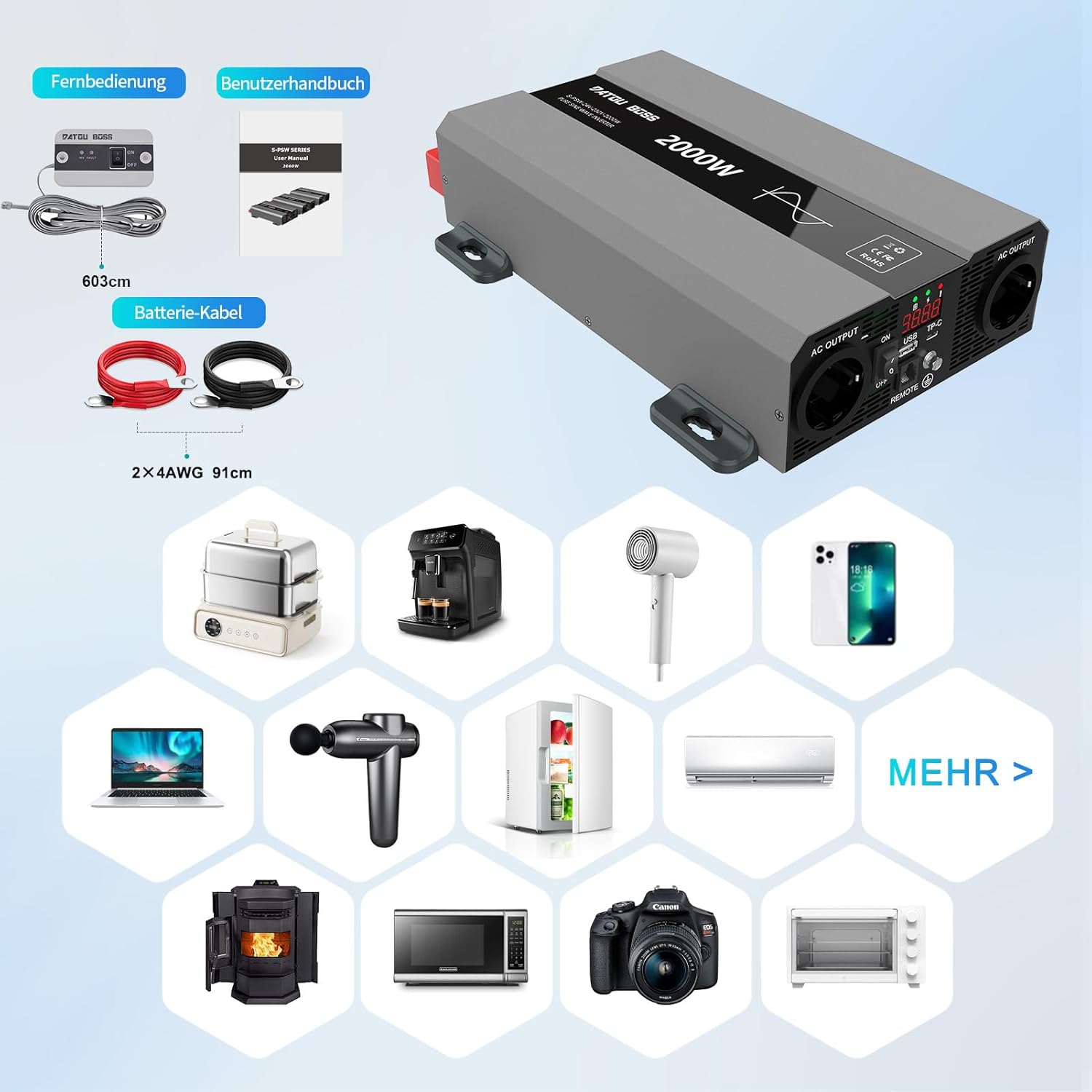
פיגורע 4: אַרייַנגערעכנט קאַמפּאָונאַנץ
This image shows the items typically included with the inverter: the inverter unit, battery connection cables (red and black), and a remote control unit with its cable. A user manual is also included.
אַפּערייטינג ינסטראַקשאַנז
1. אנשטעלן דעם אינווערטער
- After ensuring all DC connections are secure, switch the inverter's ON/OFF switch to the "ON" position.
- The LCD display will illuminate, showing the output voltagE און מאַכט.
- The cooling fans may briefly spin up during startup.
2. Connecting AC Appliances
- Plug your 230V AC appliances into the AC output sockets on the inverter.
- פאַרזיכערן די גאַנץ וואַסערtage of all connected appliances does not exceed the inverter's continuous power rating (2000W).
- For inductive loads (e.g., motors, refrigerators), consider their startup surge power, which can be several times their running wattage.
3. Using USB and Type-C Ports
- Connect your USB or Type-C compatible devices to the respective ports for charging.
4. אויסלעשן דעם אינווערטער
- Disconnect all AC appliances from the inverter.
- Switch the inverter's ON/OFF switch to the "OFF" position.

Figure 5: Inverter in an Outdoor Application
This image demonstrates the inverter being used outdoors to power a laptop, highlighting its portability and utility for various scenarios like camping or remote work.
וישאַלט
רעגולערע אויפהאלטונג גאראנטירט די לאנגעוויטי און אפטימאלע פאָרשטעלונג פון אייער ינווערטער.
רייניקונג
- Periodically clean the exterior of the inverter with a soft, dry cloth.
- Ensure the cooling vents and fans are free from dust and debris. Use compressed air if necessary to clear blockages.
- ניצט נישט פליסיקע רייניגער אדער סאָלווענטן.
קאַנעקשאַן דורכקוק
- Regularly check all DC and AC connections for tightness and signs of corrosion.
- Loose connections can cause overheating and damage to the inverter or battery.
סטאָרידזש
- When not in use for extended periods, store the inverter in a cool, dry place.
- Ensure the battery connected to the inverter is properly maintained and charged according to its manufacturer's instructions.
טראָובלעשאָאָטינג
This section addresses common issues you might encounter with your inverter. The inverter is equipped with multiple protection functions, and an alarm will sound with an LED flashing to indicate a protection state.

פיגור 6: אינווערטער שוץ אייגנשאפטן
This diagram illustrates the internal components and various protection mechanisms of the inverter, including reverse polarity, over-temperature, overload, over-voltagE, אונטער-וואָלtagE, און קורץ-קרייַז שוץ.
| פּראָבלעם | מעגלעך סיבה | לייזונג |
|---|---|---|
| קיין רעזולטאַט וואָלtage / ינווערטער טוט זיך נישט אן |
|
|
| Inverter shuts down with alarm / LED flashing |
|
|
| Low output power / Appliances not working correctly |
|
|
ספּעסאַפאַקיישאַנז
| שטריך | דעטאַל |
|---|---|
| סאָרט | DATOUBOSS |
| מאָדעל נומער | SAK-2000W24V |
| קעסיידערדיק מאַכט | 2000 וואטס |
| שפּיץ מאַכט | 4000 וואטס |
| אַרייַנשרייַב וואָלtage | 24 וואלטס דק |
| רעזולטאַט חלקtage | 230 וואלטס אַק |
| רעזולטאַט וואַוועפאָרם | ריין סיין וואַווע |
| עפעקטיווקייַט | > 95% |
| פּראָדוקט דימענשאַנז | 32.6 ל רענטגענ 20 וו רענטגענ 7.9 ה סענטימעטער |
| קאָליר | גרוי |
| רעקאָממענדעד ניצט | Office, Home, Vehicle (RV, Campינג) |
| אַרייַנגערעכנט קאַמפּאָונאַנץ | 1 Pure Sine Wave Inverter, 2 Connection Cables, 1 Remote Control, 1 User Manual |
וואָראַנטי אינפֿאָרמאַציע
This product is typically covered by a return policy that allows for refund or replacement within 30 days of purchase, as per standard retail terms. For specific warranty details, including duration and coverage, please refer to the documentation provided with your purchase or contact the seller directly.
האַלט אייער קויפן-באַווייַז פֿאַר יעדע וואָראַנטי-פאָדערונג.
קונה שטיצן
If you encounter any issues or have questions regarding the DATOUBOSS 2000W 24V Pure Sine Wave Power Inverter that are not covered in this manual, please contact the seller or manufacturer for assistance.
פארקויפער : Henan Zhongri New Energy Co., Ltd.