
PECSU G5
PECSU G5 32GB MP3 שפּילער מיט בלועטוט און WiFi באַניצער מאַנואַל
מאָדעל: G5
1. הקדמה
This manual provides detailed instructions for the operation and maintenance of your PECSU G5 32GB MP3 Player. Please read this manual thoroughly before using the device to ensure proper functionality and to maximize your user experience. The PECSU G5 is an Android-based music player designed for versatile media consumption, featuring parental controls, extensive app support, and robust connectivity.
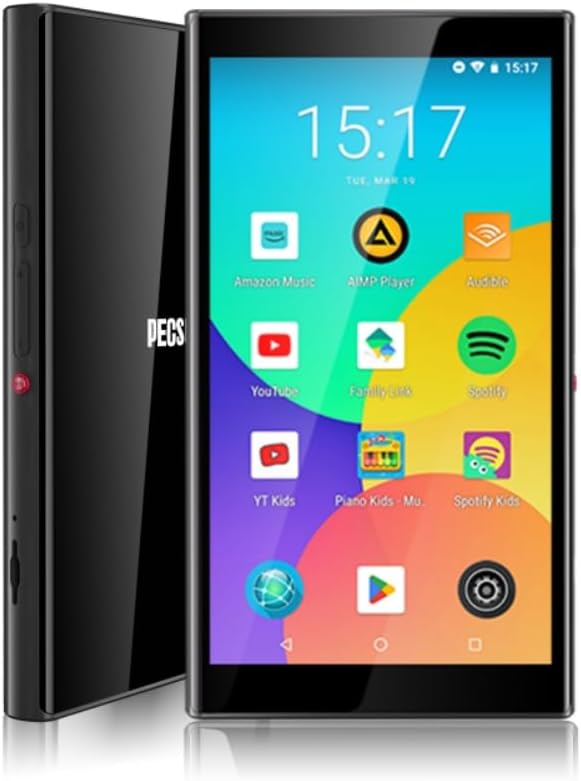
בילד 1.1: פראָנט און זייט view of the PECSU G5 MP3 Player, displaying its user interface with various application icons.
2. וואָס איז אין דער קעסטל
באַשטעטיקן אַז אַלע זאכן זענען פאַראַן אין פּעקל:
- 1 × PECSU G5 Music Player
- 1 × באַניצער מאַנואַל
- 1 × Extra Screen Protector
- 1 × טיפּ-C טשאַרדזשינג קאַבלע
3. פּראָדוקט איבערview
3.1 פיזיש פֿעיִקייטן

Image 3.1: A diagram illustrating the dimensions (5.24" height, 2.89" width, 0.47" thickness) and button layout of the PECSU G5. Labels indicate the On/Off button, Volume Up/Down, Recording Key, TF Card Port, Type-C Port, and 3.5mm Port.
The PECSU G5 features a sleek design with a 5-inch full touch screen. Key physical components include:
- אויף / אַוועק קנעפּל: Located on the side for powering the device on or off.
- באַנד קנעפּלעך: Separate buttons for increasinג און דעקרעasinג באַנד.
- רעקאָרדינג שליסל: A dedicated button for one-touch voice recording.
- TF קאַרד פּאָרט: Slot for inserting a Micro SD card to expand storage.
- טיפּ-C פּאָרט: פֿאַר טשאַרדזשינג און דאַטן אַריבערפירן.
- 3.5 מם אַודיאָ דזשאַק: פֿאַר פֿאַרבינדן דראָטיקע קאָפּהערער.
3.2 שליסל פֿעיִקייטן
- פּאַרענטאַל קאָנטראָלס: Pre-installed Family Link application allows monitoring, setting usage times, and disabling apps. All app downloads require parental permission.
- אַפּערייטינג סיסטעם: Android 8.1 system with an Octa-core 64-bit MTK chipset.
- Google פּלייַ סטאָר: Pre-installed for downloading popular music, video, and reading applications such as Spotify, YouTube, Amazon Music, Audible, and Libby.
- ווייַז: 5-inch HD IPS full touchscreen with 1080P video playback (720*1280 PX resolution).
- קאַנעקטיוויטי: Bluetooth 5.0 for stable connections to speakers, earphones, and car audio systems. Dual-band Wi-Fi (2.4G & 5G) for fast data transfer and online streaming.
- באַטערי: Built-in 3000mAh LCO Battery, providing approximately 15 hours of continuous music playback or 6 hours of video playback.
- סטאָרידזש: 32GB internal ROM and 3GB RAM, expandable up to 1TB via Micro SD card (FAT32 format).
- אַודיאָ קוואַליטי: Supports HiFi lossless music playback.
- קול רעקאָרדער: One-touch recording function.

Image 3.2: The PECSU G5 screen highlighting its 5-inch 1080P HD IPS display, emphasizing fast response, 720x1280 pixel resolution, and wider viewינג אַנגלעס.

Image 3.3: The PECSU G5 displaying its storage capabilities, including 3GB RAM, 32GB ROM, and support for up to 1TB TF Card expansion.

Image 3.4: An illustration of the PECSU G5's 3000mAh LCO battery, indicating up to 5 hours of video playback and up to 15 hours of music playback.

Image 3.5: A visual representation of the PECSU G5's 2-Way Bluetooth 5.0 feature, showing connections to headphones/earbuds, a portable speaker, and car audio systems.
4. סעטאַפּ
4.1 טשאַרדזשינג די מיטל
- Connect the provided Type-C charging cable to the device's Type-C port.
- שטעקט אריין דעם אנדערן עק פונעם קאבל אין א קאמפאטיבלן USB פאוער אדאפטער (נישט אריינגערעכנט) אדער א קאמפיוטער'ס USB פארט.
- The device will indicate charging status on the screen. A full charge typically takes 2-3 hours.
4.2 פּאַוערינג אויף / אַוועק
- צו מאַכט אויף: Press and hold the On/Off button located on the side of the device until the screen illuminates.
- צו מאַכט אַוועק: Press and hold the On/Off button until a power menu appears on the screen. Select "Power off" and confirm.
- צו ריסטאַרט: From the power menu, select "Restart."
4.3 ערשט קאַנפיגיעריישאַן
Upon first power-on, you will be guided through an initial setup process:
- אויסקלייַבן דיין בילכער שפּראַך.
- Connect to a Wi-Fi network to enable internet access and app downloads.
- Sign in with your Google account. This is necessary for accessing the Google Play Store and utilizing parental controls.
- פֿאָלגן די אינסטרוקציעס אויף דעם עקראַן צו פֿאַרענדיקן די סעטאַפּ.
4.4 ינסערטינג אַ מיקראָ סד קאָרט
To expand the device's storage:
- Locate the TF Card Port on the side of the device (refer to Image 3.1).
- Gently insert a Micro SD card (up to 1TB, FAT32 format recommended) into the slot until it clicks into place.
- The device will detect the new storage. You may need to format the card if prompted.
5. אַפּערייטינג ינסטרוקטיאָנס
5.1 נאַוויגאַציע
The PECSU G5 features a full touchscreen interface. Use standard Android gestures:
- צאַפּן: צו אויסקלײַבן אַן אייטעם אָדער עפֿענען אַן אַפּ.
- לאַקכענען: To scroll through lists or switch between screens.
- קניפּן-צו-זומען: In supported applications like image galleries or web בראַוזערז.
5.2 קאַנעקטינג צו Wi-Fi
- גיין צו סעטטינגס > נעץ און אינטערנעט > ווי-פי.
- טוישן Wi-Fi On.
- אויסקלייבן אייער געוואונטשענע נעץ פון דער ליסטע און אַרייַן די פּאַראָל אויב נייטיק.
5.3 בלועטאָאָטה פּערינג
- גיין צו סעטטינגס > קאָננעקטעד דעוויסעס > בלועטאָאָטה.
- באַשטימען בלועטאָאָטה On.
- זיכער מאַכן אַז אייער בלועטוט אַקסעסאָרי איז אין פּערינג מאָדע.
- צאַפּן פאַרבינדן אַ נייַ מיטל and select your accessory from the list.
5.4 Using Google Play Store
The Google Play Store allows you to download and install a wide variety of applications.

Image 5.1: The PECSU G5 screen displaying the Google Play Store icon prominently, surrounded by various popular app icons like Spotify, YouTube, and Amazon Music, indicating broad app compatibility.
- צאַפּן אויף שפּיל סטאָר בילדל אויף די היים פאַרשטעלן.
- זוכן פֿאַר desired apps (e.g., Spotify, Pandora, Amazon Music, Libby, Audible).
- צאַפּן ינסטאַלירן צו אָפּלאָדירן און ינסטאַלירן די אַפּ.
5.5 Parental Controls (Family Link)
The PECSU G5 is designed with parental controls via the pre-installed Family Link app.

Image 5.2: The PECSU G5 screen showing the Family Link parental control interface, with options for daily limits, downtime, and blocked apps. The image also depicts a child sleeping with the device nearby, suggesting its use for controlled media consumption.
- Ensure Family Link is set up on both the PECSU G5 (for children) and your personal smartphone (for parents).
- From your parent device, you can:
- Monitor app usage and screen time.
- Set daily usage limits and device downtime.
- Block specific applications.
- App downloads from the Play Store will require parental approval.
5.6 מוזיק און ווידעא ווידערשפּיל
- Use pre-installed music/video players or download your preferred apps from the Google Play Store.
- The device supports HiFi lossless audio formats and 1080P video playback.
5.7 קול רעקאָרדינג
To use the voice recorder function:
- דרוק די דעדאַקייטאַד רעקאָרדינג שליסל on the side of the device (refer to Image 3.1).
- Alternatively, open the pre-installed רעקאָרדער אַפּלאַקיישאַן.
- Follow the on-screen prompts to start, pause, and save recordings.
5.8 File אַריבערפירן
איר קענען אַריבערפירן files to and from the PECSU G5 using the Type-C cable or wirelessly.
- דורך וסב קאַבלע: Connect the device to a computer using the Type-C cable. On the device, select "File transfer" when prompted. The device will appear as a removable drive on your computer.
- ווירעלעסס אַריבערפירן: Utilize pre-installed file sharing apps or download third-party apps from the Play Store for wireless file פאַרוואַלטונג.
6. וישאַלט
6.1 רייניקונג
- ניצן אַ ווייך, לינט-פריי שטאָף צו ריין די פאַרשטעלן און גוף פון די מיטל.
- פֿאַרמײַדט די נוצן פֿון שאַרפֿע כעמיקאַלן אָדער אַברייסיוו מאַטעריאַלן, ווײַל זיי קענען שעדיקן דעם עקראַן אָדער ענדיקונג.
6.2 באַטערי קער
- כדי צו פארלענגערן די לעבן פון די באַטעריע, זאָל מען נישט אויסשטעלן דעם מיטל צו עקסטרעמע טעמפּעראַטורן.
- Do not allow the battery to fully discharge frequently. Charge the device when the battery level is low.
- אויב דער מיטל וועט נישט ווערן גענוצט פאר א לענגערע צייט, לאדנט עס אויף צו בערך 50% איידער איר לייגט עס אוועק.
6.3 ווייכווארג דערהייַנטיקונגען
- Periodically check for system updates to ensure optimal performance and security.
- גיין צו סעטטינגס > סיסטעם > סיסטעם דערהייַנטיקן צו קאָנטראָלירן און ינסטאַלירן בנימצא דערהייַנטיקונגען.
7. טראָובלעשאָאָטינג
If you encounter issues with your PECSU G5, refer to the following common problems and solutions:
| פּראָבלעם | מעגלעך לייזונג |
|---|---|
| די מיטל טוט נישט מאַכט אויף | זיכער מאַכן אַז די דעווייס איז אויפגעלאָדן. פֿאַרבינדט זיך צו אַ שטראָם מקור און פּרוּווט ווידער. אויב עס רעאַגירט נישט, דריק און האַלט די מאַכט קנעפּל פֿאַר 10-15 סעקונדעס צו צווינגען אַ ריסטאַרט. |
| דיווייס פרירט זיך אדער רעאגירט נישט | Press and hold the power button for 10-15 seconds to force a restart. If the issue persists, consider performing a factory reset (backup data first). |
| No sound from speaker or headphones | Check the volume level. Ensure headphones are properly connected or Bluetooth device is paired and connected. Test with different headphones or speakers. |
| באַטאַרייע דריינז געשווינד | Reduce screen brightness. Close unused background applications. Disable Wi-Fi and Bluetooth when not in use. Check for power-intensive apps. |
| Cannot connect to Wi-Fi or Bluetooth | Ensure Wi-Fi/Bluetooth is enabled in settings. Restart the device and your router/Bluetooth accessory. Verify network password. |
| App download issues from Play Store | Check Wi-Fi connection. Ensure sufficient storage space. Verify parental permissions if Family Link is active. Clear Play Store cache and data in settings. |
8. ספּעסאַפאַקיישאַנז
| שטריך | דעטאַל |
|---|---|
| מאָדעל נאָמען | G5 |
| סאָרט | PECSU |
| אָפּערייטינג סיסטעם | אַנדרויד 8.1 |
| פּראַסעסער | Octa-core 64-bit MTK chipset |
| אינערלעכער סטאָרידזש (ראַם) | 32 גיגאבייט |
| באַראַן | 3 גיגאבייט |
| יקספּאַנדאַבאַל סטאָרידזש | Up to 1 TB (Micro SD, Micro SDHC, Micro SDXC, FAT32 format) |
| פאַרשטעלן גרייס | 5 אינטשעס |
| פאַרשטעלן האַכלאָטע | 1080P HD IPS (720*1280 PX) |
| קאַנעקטיוויטי | Bluetooth 5.0, Dual-band Wi-Fi (2.4G & 5G) |
| באַטערי | 3000mAh LCO Lithium Polymer |
| באַטעריע לעבן (מוזיק) | Approx. 15 hours (Lab. Data) |
| באַטעריע לעבן (ווידעא) | Approx. 6 hours (Lab. Data) |
| טשאַרדזשינג צייט | 2-3 שעה |
| פּראָדוקט דימענשאַנז | 0.47 X 2.83 X 5.2 אינטשעס (12 X 72 X 133 מם) |
| פּונקט וואָג | 6.5 אונסעס |
| ספּעציעלע פֿעיִקייטן | Metal & Glass Back, One-Key Recording, Parental Controls, Split-screen Mode, App Store Support |
9. וואָראַנטי און שטיצן
The PECSU G5 MP3 Player is covered by a manufacturer's warranty. For specific warranty terms and conditions, please refer to the documentation included with your purchase or contact PECSU customer support.
For technical assistance, troubleshooting, or warranty claims, please contact PECSU customer support through the retailer where the product was purchased or visit the official PECSU webפּלאַץ פֿאַר קאָנטאַקט אינפֿאָרמאַציע.
Ask a question about this manual
Ask about setup, troubleshooting, compatibility, parts, safety, or missing instructions. Manuals+ will review the question and use this page’s manual context to help answer it.