
Yard Force MB400-UK
יאַרד פאָרס MB400 ראָבאָטישע גראָז שניידער באַניצער מאַנואַל
Model: MB400-UK
הקדמה
Thank you for choosing the Yard Force MB400 Robotic Lawnmower. This manual provides essential information for the safe and efficient operation, installation, and maintenance of your new robotic lawnmower. Please read this manual thoroughly before using the product and keep it for future reference. The MB400 is designed to provide effortless lawn care for gardens up to 400m², featuring app control and a durable design.

Image: The Yard Force MB400 Robotic Lawnmower, showcasing its sleek black and orange design with the Yard Force logo visible.
זיכערקייַט אינפֿאָרמאַציע
Always prioritize safety when operating and maintaining the robotic lawnmower. Failure to follow safety instructions can result in serious injury or damage to the product.
- לייענען אַלע ינסטראַקשאַנז קערפאַלי איידער נוצן.
- האַלט הענט און פֿיס אַוועק פֿון די שניידנדיקע בליידז.
- ניצט נישט דעם גראז-שניידער אין נאַסע באדינגונגען אדער בעת רעגן.
- Ensure the boundary wire is correctly installed to prevent the mower from leaving the designated area.
- אויסלעשן דעם מאָדעראַטאָר און אַרויסנעמען דעם זיכערהייט שליסל איידער איר דורכפירט קיין וישאַלט אָדער רייניקונג.
- האַלט קינדער און חיות אַוועק פון דער אַרבעט געגנט פון דעם שניידער.
- נאָר נוצן אָריגינעל ספּער טיילן און אַקסעסעריז.
- Do not lift or carry the mower while it is operating.
פּעקל אינהאַלט
באַשטעטיקן אַז אַלע זאכן זענען פאַראַן אין פּעקל איידער איר הייבט אָן די אינסטאַלאַציע.
- Yard Force MB400 Robotic Lawnmower
- טשאַרדזשינג סטאַנציע
- טשאַרדזשינג סטאַנציע קאָווער
- מאַכט אַדאַפּטער
- Boundary Wire
- Pegs for Boundary Wire
- ספּער בלאַדעס
- באַניצער מאַנואַל (דעם דאָקומענט)
- זיכערקייַט שליסל
סעטאַפּ
1. Charging Station Installation
Select a flat, level area near an outdoor power outlet for the charging station. Ensure there is enough clear space around the station for the mower to dock easily.
- Place the charging station on a firm, level surface.
- Connect the power adapter to the charging station and plug it into a suitable outdoor power outlet.
- Ensure the power cable is routed safely to avoid tripping hazards or damage.
- Install the provided charging station cover to protect it from weather elements.
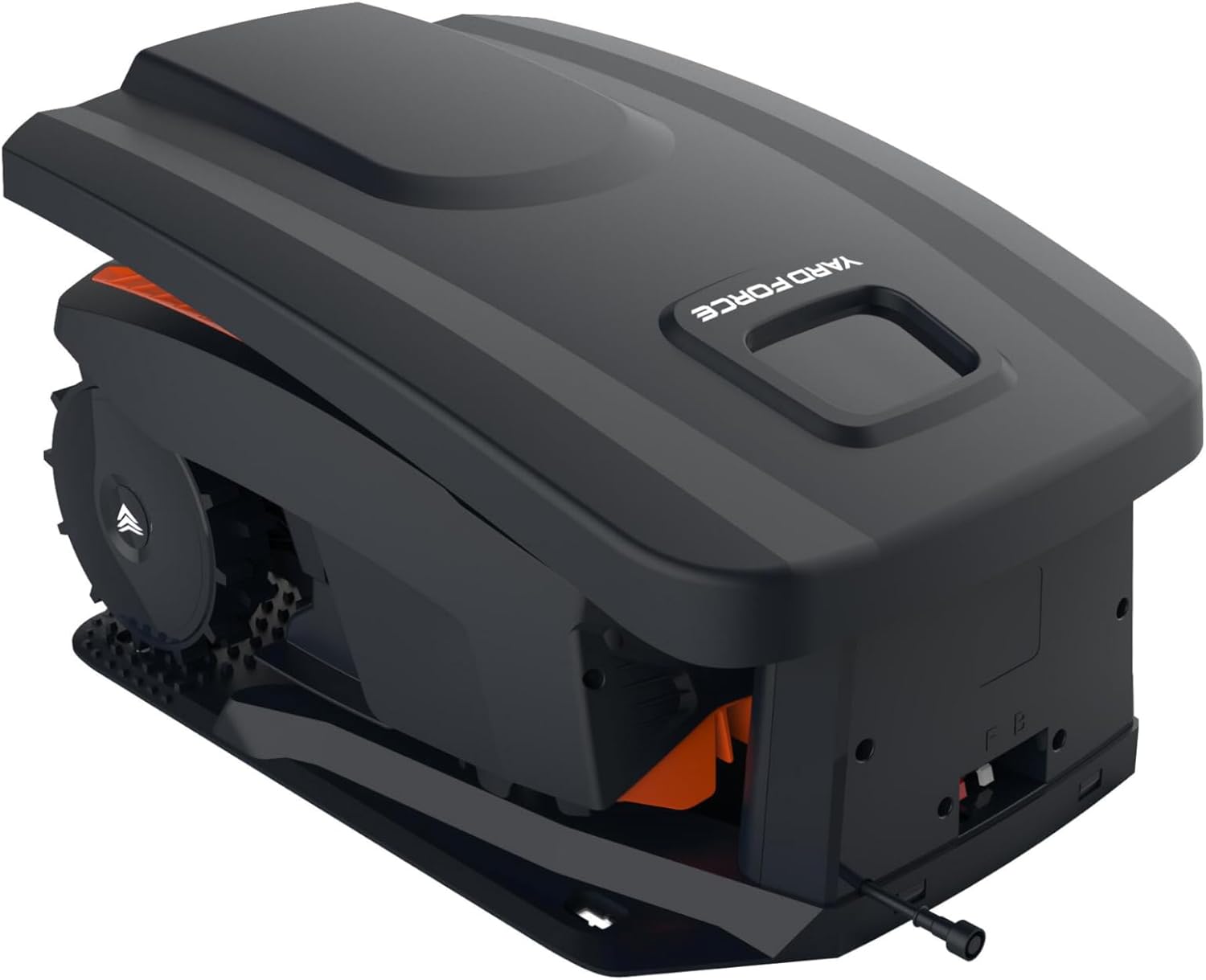
Image: The Yard Force MB400 Robotic Lawnmower positioned within its charging station, demonstrating how it docks for power.
2. אינסטאַלאַציע פון גרענעץ דראָט
The boundary wire defines the mowing area. It must be installed correctly for the mower to operate within the desired boundaries.
- Lay the boundary wire around the perimeter of your lawn, ensuring it is taut and free of kinks.
- Use the provided pegs to secure the wire to the ground every 80-100 cm.
- Maintain a minimum distance of 30 cm from obstacles such as walls, fences, and ponds.
- Connect both ends of the boundary wire to the designated terminals on the charging station.
- Ensure the indicator light on the charging station is green, indicating a successful wire connection.
3. ערשטע אויפלאָדונג
Before first use, fully charge the robotic lawnmower.
- Place the mower manually into the charging station.
- Ensure the mower makes proper contact with the charging pins.
- The charging indicator on the mower will illuminate. Allow several hours for a full charge.
4. App Setup (Bluetooth)
The Yard Force MB400 can be controlled via a Bluetooth app for convenient scheduling and settings adjustments.
- Download the "Yard Force" app from your smartphone's app store.
- געבן בלועטאָאָטה אויף דיין סמאַרטפאָנע.
- Open the app and follow the on-screen instructions to pair with your MB400 robotic lawnmower.
- Once paired, you can set mowing schedules, adjust settings, and monitor the mower's status.
אַפּערייטינג
1. אָנהייבן און אָפּשטעלן דעם שניידער
- צו אָנהייבן: Insert the safety key, press the START button, and close the cover. The mower will begin its mowing cycle or return to the charging station if scheduled.
- אויף הערן: Press the large STOP button on top of the mower. The mower will immediately cease operation.

בילד: פראָנט view of the Yard Force MB400 Robotic Lawnmower, showing the front bumper and cutting deck area.
2. אַדזשאַסטירן שנייד הייך
The cutting height can be adjusted to suit your lawn's needs, ranging from 20mm to 55mm.
- Locate the cutting height adjustment knob on the top of the mower.
- Rotate the knob clockwise to decrease the cutting height (shorter grass) or counter-clockwise to increase it (longer grass).
- Adjust the height gradually to avoid stressing the lawn.
3. Scheduling (via App)
Use the Yard Force app to set up a mowing schedule that fits your lifestyle.
- Open the Yard Force app on your paired smartphone.
- Navigate to the "Schedule" or "Timer" section.
- Set desired mowing times and days. The mower will automatically start and return to the charging station as programmed.
4. רעגן סענסאָר
The MB400 is equipped with a rain sensor that detects precipitation.
- If rain is detected, the mower will pause its operation and return to the charging station.
- Mowing will resume automatically after the rain stops and the sensor dries, or at the next scheduled time.
וישאַלט
Regular maintenance ensures optimal performance and extends the lifespan of your robotic lawnmower. Always turn off the mower and remove the safety key before any maintenance.
1. Cleaning the Mower
- אונטער: Regularly clean grass clippings from the cutting deck and wheels using a brush or damp שטאָף. ניצט נישט קיין הויך-דרוק וואַשער.
- גוף: ווישן די יקסטיריער מיט אַ ווייך, דamp שטאָף.
- טשאַרדזשינג קאָנטאַקטן: Clean the charging contacts on both the mower and the charging station with a dry cloth to ensure good connection.

בילד: זייט view of the Yard Force MB400 Robotic Lawnmower, highlighting its large wheels and compact design.
2. בלייד פאַרבייַט
Blades should be replaced regularly (e.g., every 1-3 months, depending on usage) to maintain cutting efficiency.
- Turn off the mower and remove the safety key.
- קערפאַלי קער די מאָוער קאַפּויער.
- Using a screwdriver, remove the screws holding the old blades in place.
- Replace with new blades and screws, ensuring they are securely fastened.
- Always replace all blades at the same time for balanced cutting.
3. באַטערי קער
The MB400 is equipped with a 20V/2.0Ah lithium-ion battery.
- Always store the mower in a cool, dry place when not in use for extended periods.
- For winter storage, ensure the battery is fully charged before storing. Recharge every 3-4 months if stored for longer periods.
- דו זאלסט נישט ויסשטעלן די באַטאַרייע צו עקסטרעם טעמפּעראַטורעס.
4. ווינטער סטאָרידזש
Prepare your mower for winter to protect it from cold temperatures and ensure longevity.
- Thoroughly clean the mower and charging station.
- גאָר באַשולדיקן די באַטאַרייע.
- Store the mower and charging station in a dry, frost-free environment.
- Disconnect the boundary wire from the charging station and store it if desired, or leave it buried/pegged.
טראָובלעשאָאָטינג
This section addresses common issues you might encounter with your Yard Force MB400.
| פּראָבלעם | מעגלעך סיבה | לייזונג |
|---|---|---|
| מאָוער טוט נישט אָנהייבן. | Safety key not inserted; Battery low; STOP button pressed. | Insert safety key; Charge battery; Release STOP button. |
| דער שניידער בלייבט אין דער טשאַרדזשינג סטאַנציע. | No schedule set; Boundary wire issue; Rain sensor active. | Set schedule via app; Check boundary wire connection/integrity; Wait for rain sensor to dry. |
| מאָוער שנייַדן אַניוואַנלי. | Dull blades; Uneven terrain. | Replace blades; Ensure lawn is relatively level. |
| Mower gets stuck frequently. | Obstacles in mowing area; Steep slopes. | Clear obstacles; Adjust boundary wire to exclude problematic areas. |
| אַפּ קאַנעקשאַן פּראָבלעמען. | Bluetooth off; Mower out of range; App not updated. | Ensure Bluetooth is on; Move closer to mower; Update app to latest version. |
ספּעסאַפאַקיישאַנז
Technical details for the Yard Force MB400 Robotic Lawnmower.
- מאָדעל: MB400-UK
- פּראָדוקט דימענשאַנז: 38.4D x 20.6W x 44H cm
- נומער וואָג: 8.2 קג
- מאַכט מקור: Battery Powered (20V/2.0Ah Lithium-Ion)
- קאַטינג ברייט: 16 סענטימעטער
- קאַטינג הייך: 20-55 mm (Adjustable)
- רעקאָמענדירטע גראָז גרייס: אַרויף צו 400 מ ²
- מאַטעריאַל: פּלאַסטיק
- אָפּעראַציע מאָדע: אָטאַמאַטיק
- קאַנעקטיוויטי: בלועטאָאָטה אַפּ קאָנטראָל
- פֿעיִקייטן: Rain Sensor, Charging Station Cover
וואָראַנטי און שטיצן
Yard Force products are manufactured to high quality standards. For warranty information, technical support, or to purchase spare parts, please refer to the official Yard Force webפּלאַץ אָדער קאָנטאַקט זייער קונה דינסט.
אָנליין רעסורסן: באַזוכן די Yard Force Store on Amazon פֿאַר פּראָדוקט אינפֿאָרמאַציע און שטיצע.
קונה סערוויס: For direct assistance, please consult the contact details provided on the official Yard Force webזייטל אדער אין אייערע פּראָדוקט רעגיסטראַציע מאַטעריאַלן.
Ask a question about this manual
Ask about setup, troubleshooting, compatibility, parts, safety, or missing instructions. Manuals+ will review the question and use this page’s manual context to help answer it.