
Horokarda LP45
Horokarda LP45 Belt-Driven Turntable User Manual
מאָדעל: לפּ 45
1. הקדמה
א דאנק פארן קויפןasing the Horokarda LP45 Belt-Driven Turntable. This manual provides essential information for the proper setup, operation, and maintenance of your record player. Please read these instructions thoroughly before use to ensure optimal performance and longevity of your device.
The Horokarda LP45 is designed to deliver high-quality audio playback from your vinyl records, featuring a belt-driven system, an integrated preamplifier, and an Audio Technica AT3600 cartridge. It supports both 33 and 45 RPM speeds and includes modern connectivity options such as USB for digital conversion and Bluetooth for wireless audio streaming.
2. וויכטיק סאַפעטי אינסטרוקציעס
כדי צו רעדוצירן דעם ריזיקע פון עלעקטרישן שאק, פייער, אדער שאדן, פאלגט שטענדיג די גרונטלעכע זיכערהייט מיטלען:
- לייענען אַלע ינסטראַקשאַנז איידער אַפּערייטינג די פּראָדוקט.
- האַלטן די ינסטראַקשאַנז פֿאַר צוקונפֿט רעפֿערענץ.
- דו זאלסט נישט נוצן דעם אַפּאַראַט לעבן וואַסער.
- ריין בלויז מיט אַ טרוקן שטאָף.
- בלאָקירט נישט קיין ווענטילאַציע עפענונגען. אינסטאַלירט לויט די אינסטרוקציעס פונעם פאַבריקאַנט.
- דו זאלסט נישט ינסטאַלירן לעבן קיין היץ קוואלן אַזאַ ווי ראַדיאַטאָרס, היץ רעדזשיסטערז, סטאָוווז אָדער אנדערע אַפּאַראַט (אַרייַנגערעכנט ampליפיערס) וואָס פּראָדוצירן היץ.
- באַשיצן די מאַכט שנור פון גיין אויף אָדער פּינטשט, ספּעציעל אין די פּלאַגז, קאַנוויניאַנס רעסאַפּיז און די פונט ווו זיי אַרויסגיין פון די אַפּאַראַט.
- נאָר נוצן אַטאַטשמאַנץ / אַקסעסעריז ספּעסיפיעד דורך דער פאַבריקאַנט.
- אָפּשטויסן דעם אַפּאַראַט בעשאַס בליץ סטאָרמז אָדער ווען אַניוזד פֿאַר לאַנג פּיריאַדז.
- אָפּשיקן אַלע סערוויסעס צו קוואַלאַפייד סערוויס פּערסאַנעל. סערוויס איז פארלאנגט ווען דער אַפּאַראַט איז דאַמידזשד אין קיין וועג, אַזאַ ווי מאַכט צושטעלן שנור אָדער צאַפּן איז דאַמידזשד, פליסיק איז ספּילד אָדער אַבדזשעקץ זענען געפאלן אין די אַפּאַראַט, דער אַפּאַראַט איז יקספּאָוזד צו רעגן אָדער נעץ, אַרבעט נישט נאָרמאַלי , אָדער האט שוין דראַפּט.
3. פּעקל אינהאַלט
פּאַקט פֿאָרזיכטיק אויס אַלע זאַכן און מאַכט זיכער אַז איר האָט באַקומען די פֿאָלגנדיקע:
- Horokarda LP45 Turntable Unit
- שטויב קאָווער
- פּלאַטטער
- Drive Belt (often pre-installed or located under the platter)
- אַק מאַכט אַדאַפּטער
- וסב קאַבלע
- רקאַ אַודיאָ קאַבלע
- 45 רפּם אַדאַפּטער
- באַניצער מאַנואַל (דעם דאָקומענט)

Image: Horokarda LP45 Turntable and its accessories, including the AC adapter, USB cable, and 45 RPM adapter.
4. פּראָדוקט איבערview
Familiarize yourself with the various components of your Horokarda LP45 turntable.
4.1 Front/Top Panel Controls

בילד: דעטאַלירט view of the turntable's control panel, highlighting the Pitch Control Knob, Return Switch, 33/45 RPM Speed Selector, and Play/Stop Switch.
- Pitch Control Knob: Adjusts the playback speed fine-tuning.
- Return Switch: Initiates the auto-return function for the tonearm.
- 33/45 RPM Speed Selector: Switches between 33 1/3 and 45 revolutions per minute playback speeds.
- Play/Stop Switch: Starts or stops the platter rotation.
4.2 דערציען פּאַנעל קאַנעקשאַנז

Image: Rear panel connections of the turntable, indicating the Phono-Line Out Switch, RCA (R&L) Jacks for audio output, and a USB port for digital conversion.
- Phono-Line Out Switch: Selects between Phono (for external phono preamps) and Line (for built-in preamplifier) output.
- RCA (R&L) Jacks: פאַרבינדן צו אַן amplifier, powered speakers, or receiver using the RCA audio cable.
- וסב פּאָרט: Connects to a computer for converting vinyl to digital audio files.
- DC 12V מאַכט אַרייַנשרייַב: קאַנעקץ די אַק מאַכט אַדאַפּטער.
- מאַכט סוויטש: טורנס די אַפּאַראַט אויף אָדער אַוועק.
5. סעטאַפּ אינסטרוקציעס
Follow these steps to set up your Horokarda LP45 turntable:
5.1 ערשטע פֿאַרזאַמלונג
- שטעלט דעם דריי־טיש: Position the turntable on a stable, level surface away from direct sunlight, heat sources, and excessive vibration.
- Install the Platter: Carefully place the platter onto the center spindle. Ensure it sits securely.
- Attach the Drive Belt: The drive belt is typically located under the platter or may be pre-installed. If not pre-installed, gently stretch the belt around the inner rim of the platter and then around the motor pulley. Ensure the belt is not twisted.
- אינסטאַלירן דעם שטויב דעקל: Attach the dust cover hinges to the corresponding slots on the rear of the turntable.
- ייַנמאָנטירונג פון קאַרטראַדזשאַז: The Horokarda LP45 comes with a pre-installed Audio Technica AT3600 cartridge. Ensure it is securely mounted and the stylus guard is removed before playback.

Image: The pre-installed Audio Technica cartridge on the tonearm, ready for use.
5.2 פֿאַרבינדן זיך צום אַודיאָ סיסטעם
- RCA קשר: Connect the RCA audio cable from the RCA (R&L) Jacks on the rear of the turntable to the audio input (e.g., AUX IN, LINE IN) of your amplifier, powered speakers, or receiver.
- פאָנאָ / שורה סוויטש:
- אויב קאַנעקטינג צו אַן amplifier/receiver with a dedicated PHONO אַרייַנשרייַב, set the Phono-Line Out Switch on the turntable to פאָנאָ.
- אויב קאַנעקטינג צו אַן amplifier/receiver with a standard LINE/AUX input (or directly to powered speakers), set the Phono-Line Out Switch on the turntable to LINE to utilize the turntable's built-in preampליפער.
- מאַכט קשר: Connect the AC power adapter to the DC 12V Power Input on the turntable, then plug the adapter into a wall outlet.
6. אַפּערייטינג ינסטרוקטיאָנס
6.1 גרונטלעכע ווידערשפּיל
- מאַכט אויף: Turn on the turntable using the Power Switch on the rear panel.
- אויסקלייַבן גיכקייַט: Choose the appropriate speed (33 or 45 RPM) using the 33/45 RPM Speed Selector based on the record you are playing. Use the 45 RPM adapter for singles if needed.
- אָרט רעקאָרד: Carefully place a vinyl record on the platter.
- Remove Stylus Guard: Gently remove the clear stylus guard from the cartridge.
- Start Platter: Press the Play/Stop Switch to start the platter rotation.
- פאזיציע טאן-ארעם: Lift the tonearm using the cueing lever and carefully position the stylus over the desired track on the record. Lower the cueing lever to gently drop the stylus onto the record.
- סטרויערן באַנד: אַדזשאַסטירן די באַנד אויף דיין פארבונדן ampליפיער אָדער פּאַוערד ספּיקערז.
- Auto-Return: When the record finishes, the auto-return function will lift the tonearm and return it to its resting position. You can also manually initiate this by pressing the Return Switch.
- האַלטן פּלייבאַק: To stop playback mid-record, lift the tonearm using the cueing lever, return it to its rest, and press the Play/Stop Switch.
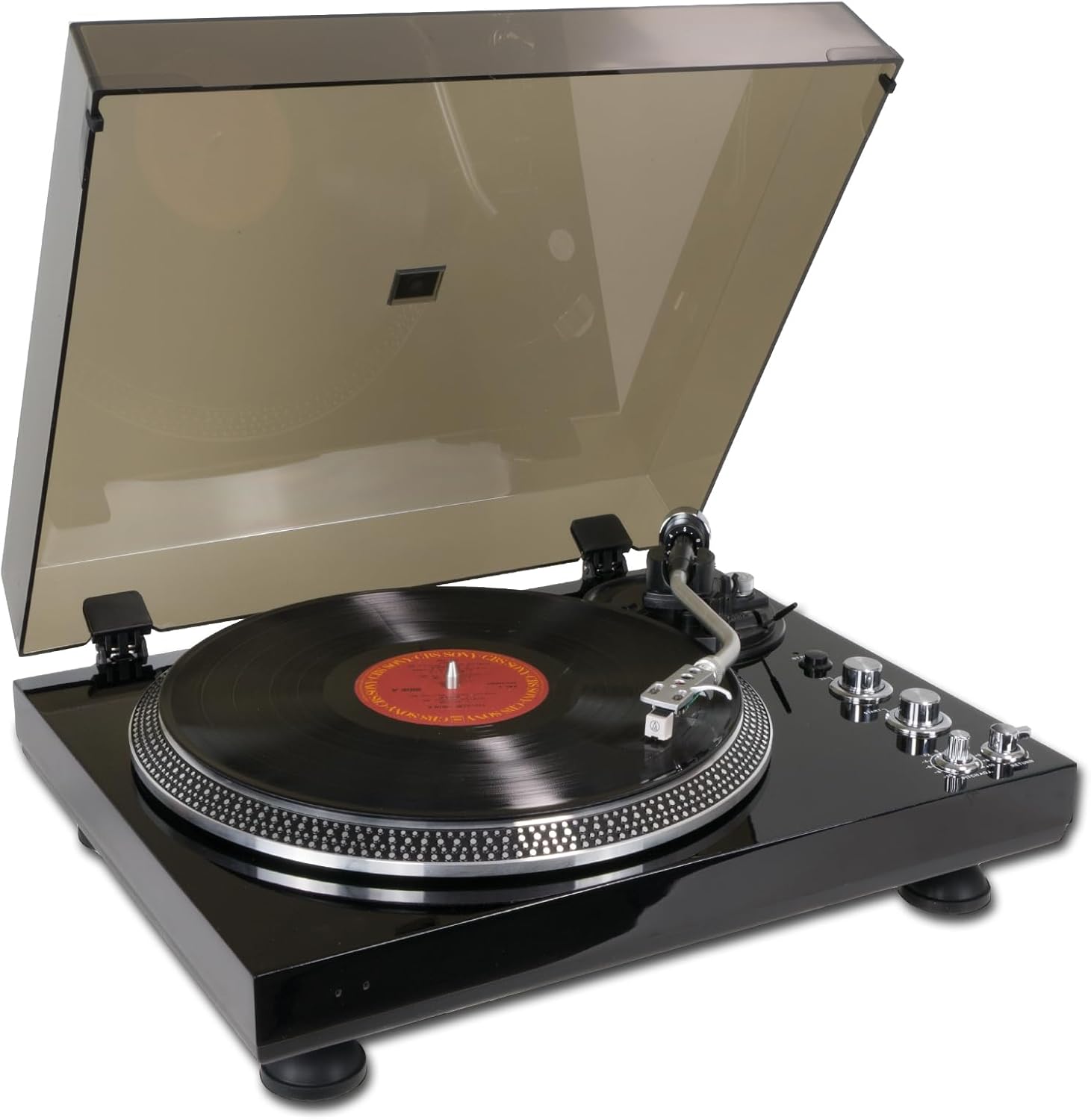
Image: The Horokarda LP45 turntable in operation, playing a vinyl record with the dust cover open.
6.2 פּיטש אַדזשאַסטמענט
The Pitch Control Knob allows for fine adjustment of the playback speed. Rotate the knob to slightly increase or decrease the speed to match the original recording or for creative effects.
6.3 Anti-Skating Adjustment
The anti-skating mechanism helps to balance the inward force on the tonearm, ensuring the stylus tracks evenly in the record groove. Adjust the anti-skating dial (if present, typically a small knob near the tonearm base) to match the tracking force setting of your cartridge. For the pre-installed AT3600 cartridge, a setting between 1.5 and 2.5 is generally appropriate, but refer to the cartridge manufacturer's specifications for precise recommendations.
7. USB Recording (Vinyl to Digital)
The Horokarda LP45 allows you to convert your vinyl records into digital audio files (MP3/WAV) using a computer and appropriate software.
- פאַרבינדן צו קאָמפּיוטער: Use the supplied USB cable to connect the turntable's USB port to an available USB port on your computer.
- ינסטאַלירן ווייכווארג: Install audio recording software on your computer (e.g., Audacity, a free and open-source audio editor).
- קאַנפיגיער ווייכווארג: In your recording software, select the turntable as the input device (it may appear as "USB Audio CODEC" or similar). Adjust recording levels to avoid clipping.
- אָנהייב רעקאָרדינג: Begin playback of your vinyl record on the turntable and simultaneously start recording in your software.
- היט Files: Once recording is complete, stop playback and recording. Edit and save your digital audio files in your preferred format (MP3, WAV, etc.).
8. בלועטאָאָטה קאַנעקטיוויטי
The Horokarda LP45 features a Bluetooth transmitter, allowing you to stream audio wirelessly to compatible Bluetooth speakers or headphones.
- Enable Bluetooth on Receiver: Put your Bluetooth speaker or headphones into pairing mode. Refer to your speaker/headphone manual for specific instructions.
- Activate Turntable Bluetooth: The turntable's Bluetooth function is typically activated automatically when powered on, or via a dedicated button (refer to your specific model's controls if a button is present). An indicator light may flash to show it's searching for devices.
- פּאָרינג: The turntable will automatically search for and attempt to pair with nearby Bluetooth devices in pairing mode. Once connected, the indicator light will usually become solid.
- אָנהייב פּלייַבאַק: Begin playing a record on the turntable. Audio should now stream wirelessly to your connected Bluetooth device.

Image: The Horokarda LP45 turntable streaming music wirelessly to a Bluetooth speaker.
באַמערקונג: Bluetooth connectivity can sometimes be affected by distance, obstacles, and interference from other wireless devices. Ensure your Bluetooth speaker/headphones are within range and there are no major obstructions.
9. וישאַלט
9.1 רייניקן דעם דריי־טיש
- Wipe the dust cover and cabinet with a soft, dry cloth.
- Do not use harsh chemicals, waxes, or abrasive cleaners.
- האַלט דעם שטויב דעקל פֿאַרמאַכט ווען נישט אין באַנוץ צו פֿאַרמייַדן שטויב אָנזאַמלונג.
9.2 סטילוס זאָרג
- דער סטילוס איז דעליקאַט. באַהאַנדלט עס מיט גרויס פֿאָרזיכטיקייט.
- רייניקט דעם סטיילוס רעגולער מיט אַ ווייכן באַרשט, באַרשטנדיק לײַכט פֿון הינטן צו פֿאָרנט.
- A worn stylus can damage records and degrade sound quality. Replace the stylus after approximately 300-500 hours of playback, or if you notice a significant drop in sound quality.
9.3 רעקאָרד זאָרג
- האַלט אָן די פּלאַטעס בײַ זייערע עקן כּדי צו פֿאַרמײַדן אָנרירן די רילן.
- האַלט די פּלאַטעס ווערטיקאַל אין זייערע אַרבל אין אַ קיל, טרוקן אָרט.
- רייניקט רעגלמעסיג די פּלאַטעס מיט אַ ספּעציעלן פּלאַטעס-רייניקונג באַרשט אָדער לייזונג צו באַזײַטיקן שטויב און סטאַטיק.
10. טראָובלעשאָאָטינג
If you experience issues with your turntable, refer to the following common problems and solutions:
| פּראָבלעם | מעגלעך סיבה | לייזונג |
|---|---|---|
| קיין מאַכט | Power adapter not connected; Power outlet not working; Power switch off. | Ensure power adapter is securely connected to turntable and a working outlet. Turn on the power switch. |
| ניט געזונט אָדער נידעריק געזונט | RCA cables not connected correctly; Phono/Line switch incorrect; Amplifier/speakers off or volume low; Stylus guard still on. | Check RCA connections. Set Phono/Line switch correctly (LINE for most setups, PHONO if using external phono preamp). Turn on amplifier/speakers and increase volume. Remove stylus guard. |
| Sound distortion or skipping | Dirty record/stylus; Worn stylus; Incorrect tracking force/anti-skating; Turntable not level. | Clean record and stylus. Replace stylus if worn. Adjust tracking force and anti-skating. Ensure turntable is on a level surface. |
| טעלער דרייט זיך נישט | Drive belt dislodged or broken; Play/Stop switch off. | Check and re-seat the drive belt around the platter and motor pulley. Press the Play/Stop switch. |
| כאַמינג ראַש | Grounding issue; Interference from other electronics; Loose connections. | Ensure all connections are secure. Try moving the turntable away from other electronic devices. If your system has a ground terminal, ensure it's connected (though this model may not have a dedicated ground wire). |
| בלועטאָאָטה איז נישט קאַנעקטינג | Bluetooth speaker/headphones not in pairing mode; Out of range; Interference. | Ensure your Bluetooth receiving device is in pairing mode. Move devices closer. Reduce interference from other wireless devices. |
11. ספּעסאַפאַקיישאַנז
| שטריך | דעטאַל |
|---|---|
| סאָרט | האָראָקאַרדאַ |
| מאָדעל נומער | LP45 |
| דרייוו טיפּ | גאַרטל-דרייוו |
| מאָטאָר טיפּ | אַק מאָטאָר |
| ספּידז | 33 1/3 רפּם, 45 רפּם |
| פּאַטראָן | Audio Technica AT3600 (pre-installed) |
| Preampליפער | Built-in (switchable Phono/Line Out) |
| ספּעציעלע פֿעיִקייטן | Auto Return, Anti-Skating, Strobe Light, USB Output, Bluetooth Transmitter |
| מאַטעריאַל | האלץ |
| קאָליר | Walnut (as per product description, though main image is black) |
| דימענסיעס (בעערעך) | 17.72 X 13.78 X 6.3 אינטשעס (45 X 35 X 16 סענטימעטער) |
| פּונקט וואָג | 12.13 פונט (5.51 קג) |
| אַרייַנגערעכנט קאַמפּאָונאַנץ | Record Player, AC adapter, USB cable, RCA cable, 45 RPM adapter |
12. וואָראַנטי און שטיצן
For warranty information and technical support, please refer to the documentation provided with your purchase or contact Horokarda customer service. Keep your proof of purchase for warranty claims.
פֿאַר ווייטערדיקע הילף, קענט איר באַזוכן דעם פאַבריקאַנט'ס webזייטל אדער קאנטאקט זייערע שטיצע קאנאלן.
Ask a question about this manual
Ask about setup, troubleshooting, compatibility, parts, safety, or missing instructions. Manuals+ will review the question and use this page’s manual context to help answer it.