
1. הקדמה
Thank you for choosing the KEJOG Mini Portable Projector. This manual provides essential information for setting up, operating, and maintaining your projector to ensure optimal performance and longevity. Please read this manual thoroughly before use and retain it for future reference.
2. פּעקל אינהאַלט
באַשטעטיקן אַז אַלע זאכן זענען פאַראַן אין דיין פּעקל:
- 1x KEJOG Mini Portable Projector
- 1x רימאָוט קאָנטראָל
- 1 קס מאַכט שנור
- 1x HDMI קאַבלע
- 1x באַניצער מאַנואַל
Note: Additional accessories such as an HDMI adapter for smartphones may be required and are not included.
3. פּראָדוקט איבערview
Familiarize yourself with the components of your KEJOG Mini Portable Projector.

בילד: פראָנט view of the KEJOG Mini Portable Projector, showing the lens, control panel, and included remote control and mini tripod.
בילד: זייט view of the projector highlighting various input/output ports such as HDMI, USB, and audio jack.
שליסל קאַמפּאָונאַנץ:
- פּרויעקציע לענס: שיקט דאָס בילד אויף דעם עקראַן.
- פאָקוס רינג: אַדזשאַסטירט בילד קלעריטי.
- קאָנטראָל פּאַנעל: Manual buttons for basic operations.
- אַרייַנשרייַב פּאָרץ: HDMI, USB, AV, 3.5mm Audio Out.
- געבויט-אין רעדנער: גיט אַודיאָ רעזולטאַט.
- מאַכט אַרייַנשרייַב: קאַנעקץ צו די מאַכט אַדאַפּטער.
4. סעטאַפּ
4.1 פּלייסמאַנט
Position the projector on a stable, flat surface. The projector supports various placements:
- דעסקטאַפּ פּלייסמאַנט: Place on a table in front of the projection surface.
- Overhead Ceiling Mount: Mount to the ceiling (mounting hardware not included).
- דרייפּאָד ינסטאַלירונג: Use the included mini tripod or a compatible tripod for flexible positioning.

Image: Illustration demonstrating ceiling mount, table placement, and tripod installation options for the projector.
The optimal projection distance ranges from 4.9 feet to 18.4 feet, allowing for screen sizes from 40 inches to 200 inches. Adjust the distance to achieve your desired screen size.

Image: Visual representation of how projection distance affects screen size, from 2.6ft to 12.5ft.
4.2 מאַכט קאַנעקשאַן
- פֿאַרבינדט דעם מאַכט שנור צום פּראָיעקטאָר'ס מאַכט אַרייַנגאַנג פּאָרט.
- צאַפּן די אנדערע סוף פון די מאַכט שנור אין אַ מאַכט ווענטיל.
4.3 פאָקוס אַדזשאַסטמאַנט
After powering on the projector, rotate the focus ring located near the lens until the projected image appears clear and sharp.
5. אַפּערייטינג ינסטרוקטיאָנס
5.1 מאַכט אויף / אַוועק
- מאַכט אויף: דרוק די מאַכט קנעפּל אויף די פּראַדזשעקטער אָדער די ווייַט קאָנטראָל.
- מאַכט אַוועק: דרוק די מאַכט קנעפּל ווידער.
5.2 מקור סעלעקציע
Use the 'Source' button on the remote control or projector to cycle through available input sources (HDMI, USB, AV).
5.3 קאַנעקטינג דעוויסעס
דער פּראָיעקטאָר אָפפערט קייפל קאָנעקטיוויטי אָפּציעס:
- הדמי: Connect devices like laptops, PCs, TV boxes, Fire TV Stick, Roku, Chromecast, or gaming consoles (e.g., PS5) using an HDMI cable.
- וסב: אַרײַנשטעלן אַ USB דרייוו צו שפּילן מעדיע files גלייַך.
- פון: פֿאַרבינדט עלטערע דעווייסעס מיט אַן AV קאַבל.
- סמאַרטפאָנע / טאַבלעט: To connect smartphones or tablets, an HDMI adapter (not included) is required. Connect your smartphone to the adapter, then the adapter to the projector's HDMI port.

Image: Visual guide for connecting Apple and Android phones to the projector using a data cable or HDMI adapter (adapter not included).
Important Note on Streaming Services:
Due to copyright restrictions, direct mirroring from certain streaming services like Netflix, Amazon Prime Video, and Hulu is not supported. To watch content from these platforms, use an external device such as an Amazon Fire Stick or Roku Stick connected via HDMI.
5.4 בלועטאָאָטה אַודיאָ
The projector features a built-in Bluetooth 5.2 chip and speakers. You can connect external Bluetooth audio devices for enhanced sound.
- זיכער מאַכן אַז אייער בלוטוט רעדנער אָדער כעדפאָונז זענען אין פּערינג מאָדע.
- Navigate to the Bluetooth settings on the projector's menu.
- אויסקלייבן אייער דעווייס פון דער ליסטע צו פארבינדן.

Image: A KEJOG projector wirelessly connected to an external Bluetooth speaker, projecting a movie scene.
Note: Bluetooth does not support direct connection with smartphones for audio output from the projector.
6. וישאַלט
6.1 רייניקן די לינז
Use a soft, lint-free cloth or lens cleaning paper to gently wipe the projector lens. Avoid using abrasive materials or harsh chemicals, which can damage the lens coating.
6.2 לamp לעבן
די פּראַדזשעקטער לamp is designed for extended use, with a lifespan of up to 70,000 hours, which is significantly longer than conventional lamps. This reduces the need for frequent lamp פאַרבייַט.

Image: Graphic indicating a projector lamp lifespan of up to 100,000 hours, emphasizing durability.
6.3 סטאָרידזש
When not in use, store the projector in a cool, dry place, away from direct sunlight and extreme temperatures. Use the original packaging or a protective case to prevent dust accumulation and physical damage.
7. טראָובלעשאָאָטינג
אויב איר טרעפט פּראָבלעמען מיט אייער פּראָיעקטאָר, זעט די פאלגענדע געוויינטלעכע פּראָבלעמען און לייזונגען:
| פּראָבלעם | מעגלעך סיבה | לייזונג |
|---|---|---|
| קיין בילד | Loose cable connection, incorrect input source, projector off. | Check all cable connections. Select the correct input source. Ensure the projector is powered on. |
| בלערי בילד | נישט אין פאָקוס, פאַלשע פּראָיעקציע דיסטאַנץ. | Adjust the focus ring. Ensure the projector is within the recommended projection distance. |
| קיין געזונט | Volume too low, external audio device not connected, incorrect audio settings. | Increase volume. Check external audio device connection or Bluetooth pairing. Verify audio output settings. |
| Bluetooth not connecting to smartphone | פֿעיִטשער לימיטאַציע. | The projector's Bluetooth is for connecting to external speakers/headphones, not for receiving audio from smartphones. Use an HDMI adapter for smartphone video/audio output. |
| Cannot play Netflix/Hulu/Prime Video | Copyright restrictions. | Use an external streaming device (e.g., Fire Stick, Roku) connected via HDMI. |
אויב די פראבלעם בלייבט נאך פרובירן די לייזונגען, ביטע קאנטאקטירט קאסטומער סופארט.
8. ספּעסאַפאַקיישאַנז
| שטריך | דעטאַל |
|---|---|
| סאָרט | KEJOG |
| מאָדעל נומער | מיני פּאָרטאַטיוו פּראַדזשעקטער |
| ווייַז האַכלאָטע | Native 1920 x 1080 (Full HD), 4K Supported |
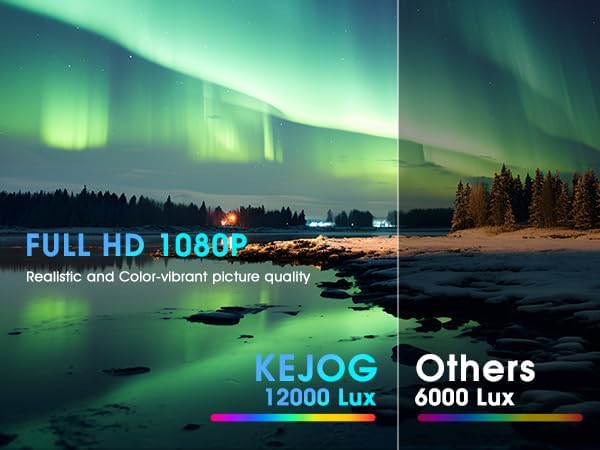
| ברייטנאַס | 12,000 לומענס |
| קאַנטראַסט פאַרהעלטעניש | 10,000:1 |
| קאַנעקטיוויטי טעכנאָלאָגיע | 3.5mm Jack, Bluetooth 5.2, HDMI, USB |
| ספּעציעלע פֿעיִקייטן | Built-In Speaker, Lightweight, Portable |
| רעקאָממענדעד ניצט | געשעפט, בילדונג, גיימינג, היים קינאָ |
| פּונקט וואָג | 2.42 פונט |
| פּראָדוקט דימענשאַנז | 8.15 X 7.2 X 3.94 אינטשעס |
| קענטיק סקרין דיאַגאָנאַל | 150" / 381 ס״מ |
9. וואָראַנטי און שטיצן
KEJOG provides reliable after-sales service and lifelong technical support for this product. If you have any questions, require assistance, or encounter any issues not covered in this manual, please do not hesitate to contact our customer support team.
For support, please refer to the contact information provided with your purchase or visit the official KEJOG webפּלאַץ.