
1. הקדמה
The Garosa PH-803W is a dual-measurement PH and ORP controller designed for continuous water quality monitoring. This device provides real-time readings of both pH and Oxidation-Reduction Potential (ORP) values, making it suitable for various applications such as aquariums, hydroponics, laboratories, and industrial water treatment. It features BNC socket electrodes for easy connection and two output power sockets for controlling external devices.
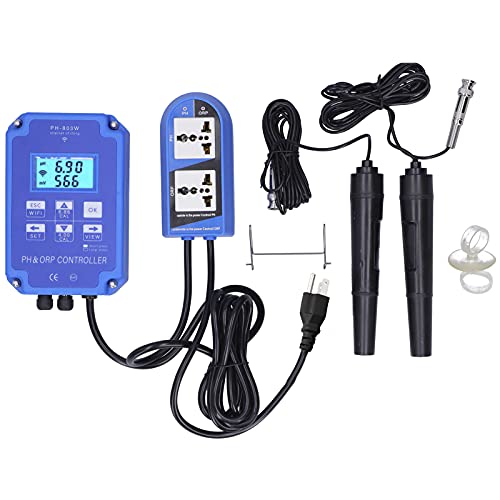
פיגורע 1: איבערview of the PH-803W PH ORP Controller, including the main unit, electrodes, and power outlet.
2. פּראָדוקט פֿעיִקייטן
- Dual Measurement Display: Simultaneously measures and displays PH value (0.00 to 14.00) and ORP value (-1999 to 1999 mV).
- פאַקטיש-צייט מאָניטאָרינג: Adopts a real-time measurement method for continuous data display.
- גרינג אָפּעראַציע: No need to press buttons to switch between PH and ORP measurement values.
- ינטעגראַטעד קאָנטראָל: 2-in-1 PH and ORP controller with BNC socket electrodes and two output power sockets for external device control.
- דוראַבאַל קאַנסטראַקשאַן: Made from high-quality ABS material for longevity.
- אַק מאַכט: Designed for long-term, continuous water quality monitoring and control.
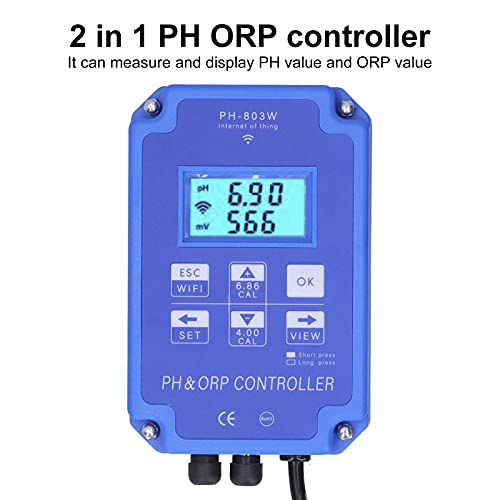
Figure 2: The controller's display shows both PH and ORP values simultaneously.
3. פּעקל אינהאַלט
באַשטעטיקן אַז אַלע זאכן זענען פאַראַן אין פּעקל:
- 1 x ORP/PH Water Quality Detector (Main Unit)
- 1 x ORP Pole Test Pen (Electrode)
- 1 x PH Pole Test Pen (Electrode)
- 2 רענטגענ סאַקשאַן קאַפּס
- 1 רענטגענ קרוק
- 1 x באַניצער מאַנואַל
4. ספּעסאַפאַקיישאַנז
| פּאַראַמעטער | ווערט |
|---|---|
| מאָדעל | PH-803W |
| מאַטעריאַל | ABS |
| Measuring Range (ORP) | -1999~1999מוו |
| Measuring Range (PH) | 0.00~14.00PH |
| Accuracy (ORP) | ±5mV |
| Accuracy (PH) | 0.05PH |
| Resolution (ORP) | קסנומקסמוו |
| Resolution (PH) | 0.01PH |
| Setting Control Range (ORP) | -1999~1999מוו |
| Setting Control Range (PH) | 0.00~19.99PH |
| אַפּערייטינג סוויווע טעמפּעראַטור | 0-50℃ |
| אַפּערייטינג סוויווע הומידיטי | <95% רה |
| ווייַז | 4-ציפֿער לקד אַרויסווייַזן |
| מאַכט צושטעלן | AC 110V (US Plug) |
| פּראָדוקט דימענשאַנז | 35 X 23 X 7 סענטימעטער |
| פּונקט וואָג | 1.35 קג |
5. סעטאַפּ אינסטרוקציעס
- מאַכט קשר: Plug the controller into a standard 110V AC power outlet. Turn on the device.
- עלעקטראָדע קשר: Connect the PH electrode and the ORP electrode to their respective BNC sockets on the controller. Ensure connections are secure.
- Remove Protective Covers: Carefully remove the protective covers from both the PH and ORP electrodes. וואָרענען: Avoid touching the glass bulb of the electrode with bare hands, as it is fragile and can be damaged by impact or contamination.
- Initial Electrode Cleaning: Before first use, or if the electrodes have been stored dry, rinse them with distilled water or alcohol. Gently wipe the plastic shell and shake off any small water droplets from the electrode tip to prevent interference with test results.
- WiFi Configuration (Optional): The device supports WiFi connectivity for real-time monitoring via a mobile application. Long press the 'ESC WIFI' button to enter WiFi network configuration mode. Follow the instructions in the mobile application to connect the device to your network. באַמערקונג: The mobile application is compatible with Android devices only.
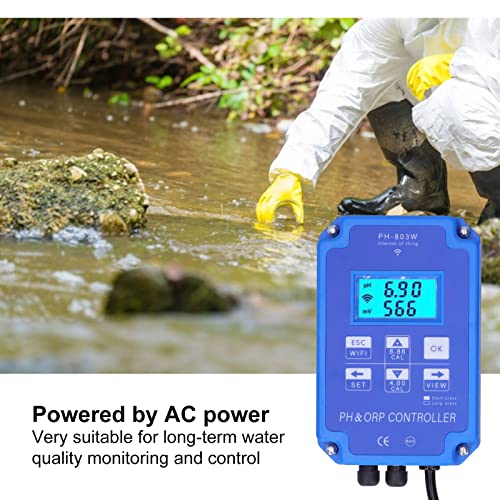
Figure 3: The controller is powered by an AC outlet for continuous operation.
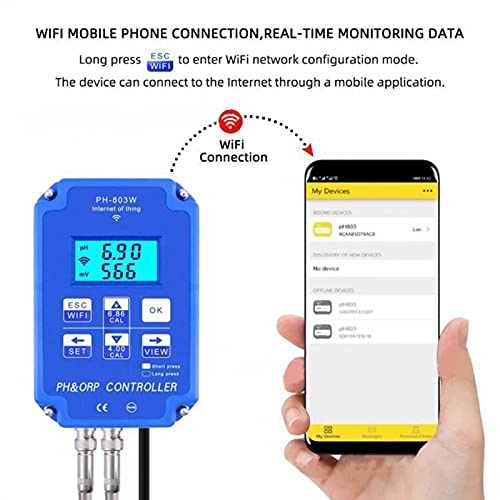
Figure 4: The controller can connect to a mobile application via WiFi for remote monitoring (Android only).
6. אַפּערייטינג ינסטרוקטיאָנס
- טבילה: Insert the electrodes into the solution to be measured, ensuring that the measuring electrodes are fully immersed.
- מעזשערמאַנט: Gently shake the electrodes to dislodge any small air bubbles that may be clinging to the electrode surface. Wait for the display numbers to stabilize before taking a reading. The PH and ORP values will be displayed simultaneously.
- פאַקטיש-צייט מאָניטאָרינג: The device continuously displays the PH and ORP values. No button presses are required to switch between measurements.
- Mobile App Monitoring: If configured, use the dedicated mobile application on your Android device to view real-time data and water quality changes remotely.
- רעזולטאַט קאָנטראָל: The two output power sockets can be used to connect and control external devices (e.g., solenoid valves, pumps) based on the measured PH and ORP values, according to your configured settings.
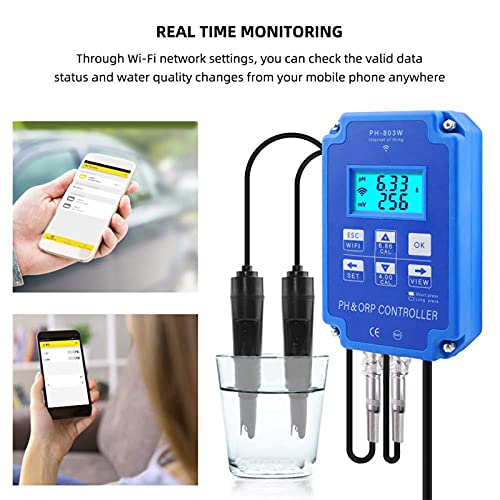
Figure 5: Real-time monitoring of water quality data is available on the device and via a mobile application.
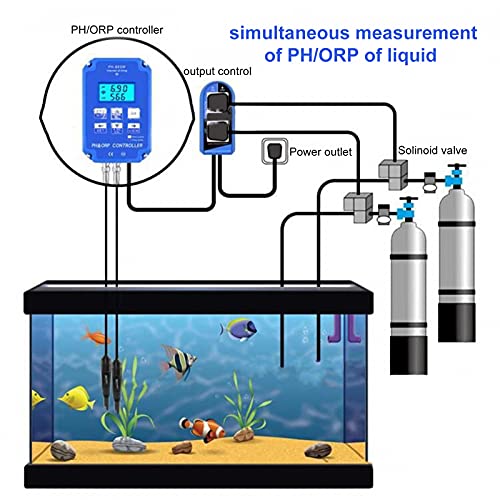
פיגורע 6: עקסample setup demonstrating simultaneous PH/ORP measurement and output control in an aquarium environment.
7. וישאַלט
- נאָך נוצן: After each measurement, unplug the power supply. Clean the electrodes thoroughly with clean water (preferably distilled water) and replace their protective covers.
- עלעקטראָדע סטאָרידזש: Store electrodes with their protective caps filled with a suitable storage solution (e.g., KCL solution) or distilled water to prevent drying out. Never store electrodes dry.
- לאנג-טערמין נוצן: For continuous, long-term monitoring, ensure the instrument and electrodes are securely fixed in place to prevent accidental damage or displacement.
- קאליבראציע: Regular calibration of the PH and ORP electrodes is essential for maintaining accuracy. Refer to the calibration section (if available in a separate guide) or the device's on-screen prompts for calibration procedures.
8. טראָובלעשאָאָטינג
- ומפּינקטלעך רידינגז: Ensure electrodes are clean and properly calibrated. Check for air bubbles on the electrode surface during measurement.
- קיין ווייַז: Verify the power supply is connected and the device is turned on. Check for any loose connections.
- אַנסטייבאַל רידינגז: Ensure the electrodes are fully immersed and the solution is not agitated excessively. Allow sufficient time for readings to stabilize.
- WiFi קשר ישוז: Confirm your WiFi network is active and the password is correct. Ensure the device is within range of the WiFi router. Remember the mobile app is for Android devices only.
- Electrode Damage: If readings remain erratic or impossible to calibrate, the electrodes may be damaged or have reached the end of their lifespan and require replacement.
9. וואָראַנטי אינפֿאָרמאַציע
דאס פּראָדוקט איז באדעקט מיט אַ נאָרמאַלער פאַבריקאַנט'ס וואָראַנטי קעגן חסרונות אין מאַטעריאַלן און אַרבעט. די וואָראַנטי פּעריאָד הייבט זיך טיפּיש אָן פֿון דעם קויפֿדאַטום. ביטע באַהאַלטן אייער קויפֿבאַווייַז פֿאַר וואָראַנטי קליימז. פֿאַר ספּעציפֿישע וואָראַנטי טערמינען און באַדינגונגען, זעט די דאָקומענטאַציע וואָס איז צוגעשטעלט געוואָרן מיט אייער קויפֿ אָדער קאָנטאַקטירט קונה שטיצע.
10. קונה שטיצן
For technical assistance, troubleshooting, or inquiries regarding your Garosa PH-803W PH ORP Controller, please contact Garosa customer support. Contact information can typically be found on the product packaging, the official Garosa webוועבזייטל, אדער דורך אייער הענדלער.