
1. הקדמה
This manual provides detailed instructions for the safe and effective operation of your Andoer Mini WiFi Action Camera L11. This compact digital video camera is designed for capturing high-quality 1080P video at 30 frames per second, featuring a 0.96-inch LCD screen, built-in rechargeable battery, motion detection, and versatile mounting options. Please read this manual thoroughly before using the device.
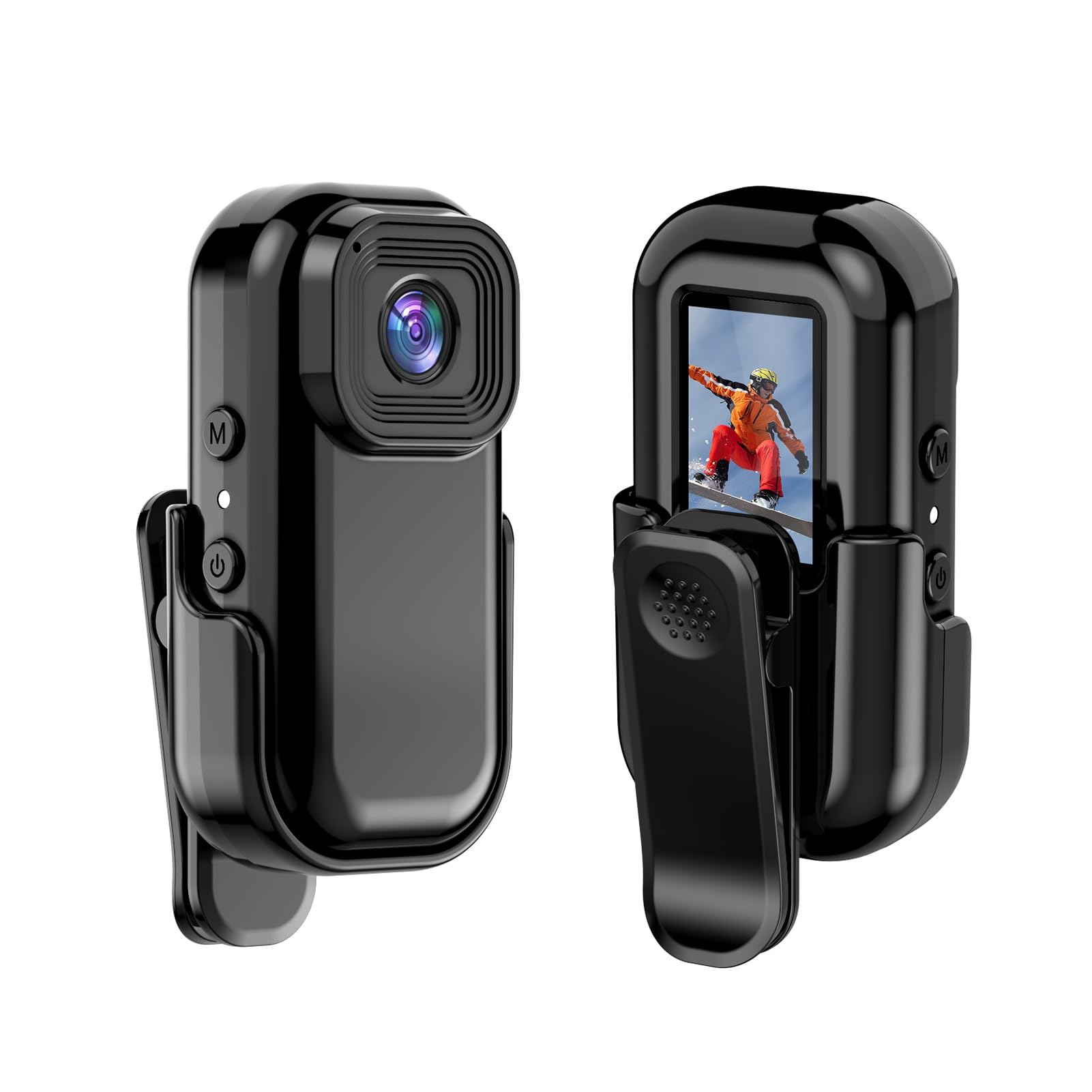
בילד: פאָרנט און הינטן view of the Andoer Mini WiFi Action Camera L11, showing the lens and the 0.96-inch LCD screen.
2. פּעקל אינהאַלט
באַשטעטיקט אַז אַלע זאכן וואָס זענען אויסגערעכנט אונטן זענען אַרייַנגערעכנט אין אייער פּעקל. אויב עפּעס פעלנדיק אָדער צעבראָכן, ביטע קאָנטאַקטירט קונה שטיצע.
- 1 x Andoer Mini WiFi Action Camera L11
- קסנומקס רענטגענ פּראַטעקטיוו קאָווער
- 1 x 1/4in Adapter Mount
- 1 x Back Clip Mount
- קסנומקס רענטגענ קאַרד רידער
- 1 רענטגענ טיפּ-C קאַבלע
- 1 x באַניצער מאַנואַל (דאָס דאָקומענט)
3. פּראָדוקט פֿעיִקייטן
- הויך-קוואַליטעט ווידעא: Records in 1080P at 30 frames per second, suitable for various applications including live broadcasting and video conferencing.
- סאָליד און פּאָרטאַטיוו: Super mini size allows for easy portability and discreet placement.
- Magnetic Body: Features a magnetic base for secure attachment to smooth metal surfaces.
- Seamless WiFi Connectivity: Connects wirelessly to a dedicated app for live view און קאָנטראָל.
- ווערסאַטאַל מאַונטינג: Includes a 1/4-inch adapter mount and a back clip mount for diverse installation options.

בילד: עקסamples of application scenarios for the camera, including parachute jumping, cycling, parent-child activities, and skiing.

Image: The camera being used as a portable video recorder in various outdoor activities like camping, cycling, climbing, and sports.
4. סעטאַפּ
4.1 טשאַרדזשינג די באַטאַרייע
Before first use, fully charge the camera's built-in 400mAh battery. Connect the provided Type-C cable to the camera's USB port and the other end to a standard USB power adapter (5V, ≥1A). The charging indicator light will typically show the charging status and turn off or change color when fully charged.
4.2 אַרייַנלייגן אַ זכּרון קאָרט
The camera supports TF (Micro SD) cards up to 128GB. Ensure the card is formatted to FAT32 for optimal performance. Gently insert the TF card into the designated slot until it clicks into place. To remove, press the card in slightly until it springs out.
Note: A memory card is required for recording video and taking photos.
4.3 פּאַוערינג אויף / אַוועק
- צו מאַכט אויף: Press and hold the Power button (usually marked with a power symbol) for a few seconds until the screen illuminates.
- צו מאַכט אַוועק: Press and hold the Power button again for a few seconds until the screen turns off.
5. אַפּערייטינג ינסטרוקטיאָנס
5.1 יקערדיק אָפּעראַציע
The 0.96-inch color display provides visual feedback for modes and settings. Use the navigation buttons (if present, typically 'M' for Mode and another for selection/shutter) to cycle through options and confirm selections.
5.2 רעקאָרדינג ווידעא
In video mode, press the Shutter/Record button to start recording. Press it again to stop. Videos are saved in AVI format at 1920x1080P resolution. The camera supports loop recording with 3-minute segments.

Image: The camera's screen displaying a family scene, indicating video recording at 1920x1080P resolution.
5.3 נעמען בילדער
Switch to photo mode using the Mode button. Press the Shutter button to capture a still image. Photos are saved in JPG format.

Image: Icons representing photo, video, and audio recording modes, illustrating the camera's ability to capture various moments.
5.4 באַוועגונג דעטעקשאַן
The camera features motion detection capabilities. Refer to the on-screen menu or the dedicated app for instructions on how to activate and configure this feature. When enabled, the camera will automatically begin recording when motion is detected within its field of view.
6. וויפי קאַנעקטיוויטי
The Andoer L11 camera supports wireless WiFi connectivity for remote control and live viewing via a smartphone application. Follow these general steps:
- Download the official Andoer camera app from your device's app store (iOS or Android).
- Power on the camera and activate its WiFi mode (refer to the camera's on-screen menu).
- On your smartphone, go to WiFi settings and connect to the camera's WiFi network (SSID and password will be displayed on the camera screen or in the app).
- Open the Andoer app. You should now see a live view from the camera and be able to control recording and settings remotely.

בילד: א סמאַרטפאָון וואָס ווײַזט אַ לעבעדיקע view from the camera, demonstrating the WiFi connectivity feature.
7. מאַונטינג אָפּציעס
The Andoer L11 offers flexible mounting solutions:
- מאַגנעטיק בארג: The camera body has a magnetic feature, allowing it to be securely attached to smooth metal surfaces like refrigerator doors or metal poles.
- 1/4-inch Adapter Mount: Use the included 1/4-inch adapter mount to attach the camera to standard tripods, monopods, or other accessories with a 1/4-inch screw.
- Back Clip Mount: The back clip mount allows you to attach the camera to clothing, backpacks, or other thin objects for hands-free recording.
8. וישאַלט
- רייניקונג: ניצט אַ ווייכע, טרוקענע שטאָף צו רייניקן די קאַמעראַ קערפּער. פֿאַר די לענס, ניצט אַ ספּעציאַליזירטע לענס רייניקונג שטאָף און לייזונג. פֿאַרמייַדט שטרענגע כעמיקאַלן.
- סטאָרידזש: האַלט די קאַמעראַ אין אַ קיל, טרוקן אָרט אַוועק פון דירעקט זונשייַן און עקסטרעמע טעמפּעראַטורן.
- באַטערי זאָרגן: For long-term storage, charge the battery to about 50% every few months to maintain its health.
- Firmware דערהייַנטיקונגען: Check the official Andoer webזוכט דעם וועבזייטל פון צייט צו צייט פאר אלע פארהאן פירמווער דערהייַנטיקונגען צו זיכער מאכן אפטימאלע פאָרשטעלונג און נייע פֿעיִקייטן.
9. טראָובלעשאָאָטינג
| פּראָבלעם | מעגלעך לייזונג |
|---|---|
| די קאַמעראַ גייט נישט אָן. | Ensure the battery is fully charged. Connect to a power source and try again. |
| קען נישט רעקאָרדירן ווידעא/נעמען פאָטאָס. | Check if a TF card is inserted and properly formatted. Ensure there is sufficient storage space. |
| WiFi פֿאַרבינדונג פּראָבלעמען. | Ensure WiFi is enabled on the camera and your smartphone. Restart both devices. Verify the correct app is installed. |
| Poor video/image quality. | Ensure the lens is clean. Check lighting conditions. Verify camera settings are correct (e.g., resolution). |
| די קאַמעראַ פרירט זיך אָדער ווערט נישט-רעאַגירנדיק. | Perform a soft reset by holding the power button until it turns off, then restart. If persistent, remove and reinsert the memory card. |
10. ספּעסאַפאַקיישאַנז
| שטריך | דעטאַל |
|---|---|
| מאַשין טיפּ | L11 |
| אָביעקטיוו ווינקל | 140 דיגריז |
| TFT ווייַז | 0.96 אינטשעס קאָליר ווייַז |
| ווידעא האַכלאָטע | 1920 * 1080 פּ |
| באַטערי | 400 מאַה |
| ווידעא File פֿאָרמאַט | AVI |
| פאָטאָ פֿאָרמאַט | JPG |
| שלייף ווידעא | קסנומקס מינוט |
| רעקאָרדינג File פֿאָרמאַט | WAV (Audio) |
| ארבעטן הומידיטי | 30% |
| אַפּערייטינג טעמפּעראַטור | -25 צו + 75 ° C (-13 צו + 167 ° F) |
| מאַכט צושטעלן | וסב וואָלtagE 5 וו, קראַנט ≥ 1 אַ |
| זכּרון קאָרט | TF קאָרט, שטיצט אַרויף צו 128 ג |
| קאַנעקטיוויטי טעכנאָלאָגיע | ווי-פי |
| פאָרם פאַקטאָר | סאָליד |
| פּונקט וואָג | 4.2 אונסעס (בעערעך 119 ג) |
| פּעקל דימענשאַנז | 3.94 X 2.36 X 1.97 אינטשעס |
11. זיכערקייַט אינפֿאָרמאַציע
- Do not expose the camera to extreme temperatures outside the specified operating range (-25°C to +75°C).
- Avoid operating the camera in humidity levels exceeding 30%.
- Keep the device away from water and other liquids unless explicitly stated as waterproof.
- פּרוּווט נישט צו צענעמען אָדער מאָדיפֿיצירן די קאַמעראַ, ווײַל דאָס וועט בטל מאַכן די וואָראַנטי און קען פאַראורזאַכן שאָדן.
- Use only the specified power supply (USB 5V, ≥1A) for charging.
- האַלטן אויס פון דערגרייכן פון קינדער.