
1. הקדמה
Thank you for choosing the virtavo Indoor WiFi Security Camera. This manual provides essential information for setting up, operating, and maintaining your camera to ensure optimal performance and home security. Please read this manual thoroughly before using the product and keep it for future reference.
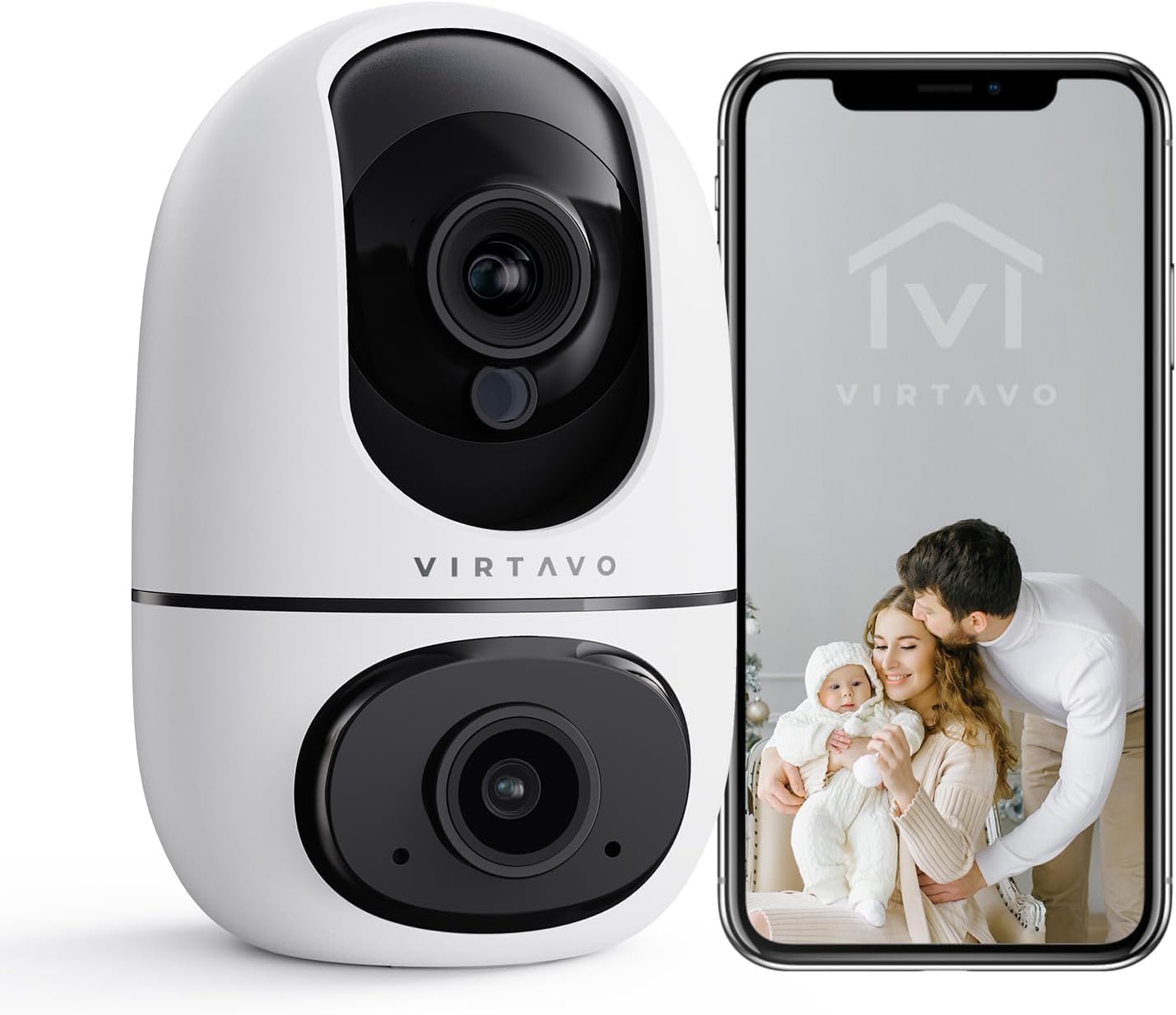
The virtavo Indoor WiFi Security Camera, shown alongside a smartphone displaying its live view, is designed for comprehensive indoor surveillance, offering peace of mind for your home, baby, or pets.
2. פּעקל אינהאַלט
ביטע קאָנטראָלירט די אינהאַלט פון דער פּאַקעט ווען איר נעמט עס אויס. אויב עס פעלט עפּעס אָדער עס זענען צעבראָכן, קאָנטאַקטירט קונה סערוויס.
- virtavo Indoor WiFi Security Camera (Model XD1-V124)
- מאַכט אַדאַפּטער
- וסב מאַכט קאַבלע
- Mounting Accessories (Screws, Wall Plugs)
- באַניצער מאַנואַל (דעם דאָקומענט)
3. פּראָדוקט איבערview
The virtavo Indoor WiFi Security Camera features a dual-lens design, providing enhanced monitoring capabilities. It supports 1080p resolution, pan and tilt functionality for 360-degree coverage, two-way audio, and advanced detection features.

This image highlights the key features of the virtavo camera, including its dual-lens design, 2.4GHz WiFi connectivity, 1080p resolution, extensive pan and tilt range, two-way audio, AI detection, motion tracking, night vision, and video storage capabilities.
שליסל פֿעיִקייטן:
- צוויי-לינז פּלאַן: For comprehensive monitoring.
- 1080 פּ גאַנץ הד האַכלאָטע: Provides clear and detailed video.
- 360° פּאַן און טילט: אָפפערט אַ ברייט viewing angle for complete room coverage.
- צוויי-וועג אַודיאָ: Communicate with family or pets remotely.
- AI Detection & Motion Tracking: Intelligently identifies and follows movement.
- נאַכט זעאונג: Clear visibility even in low light or complete darkness.
- 2.4GHz WiFi קאָנעקטיוויטי: Stable wireless connection.
- לאקאלע און וואָלקן סטאָרידזש: Options for video recording.
4. סעטאַפּ
4.1 מאַכט אויף
- Connect the USB power cable to the camera's power port.
- צאַפּן די מאַכט אַדאַפּטער אין אַ נאָרמאַל עלעקטריקאַל ווענטיל.
- The camera will power on and initiate its self-check sequence. Wait for the indicator light to flash, indicating it's ready for connection.
4.2 אַפּ אינסטאַלאַציע און אַקאַונט שאַפונג
- Download the official virtavo app from your smartphone's app store (iOS App Store or Google Play Store).
- עפֿנט די אַפּ און פֿאָלגט די אינסטרוקציעס אויף דעם עקראַן צו שאַפֿן אַ נײַעם חשבון אָדער לאָגט זיך אײַן אויב איר האָט שוין אײנס.
4.3 Connecting the Camera to WiFi
- In the virtavo app, tap the "+" icon to add a new device.
- Select "Security Camera" or the specific model if prompted.
- Follow the in-app instructions to connect the camera to your 2.4GHz WiFi network. This typically involves scanning a QR code generated by the app with the camera's lens or entering your WiFi password.
- Once connected, the camera's indicator light will turn solid, and you will hear a confirmation sound.
4.4 מאָנטירן די קאַמעראַ (אָפּציאָנאַל)
The camera can be placed on a flat surface (tabletop mounting) or mounted to a wall or ceiling using the provided accessories.
- טאַבלעטאָפּ אָרט: Simply place the camera on a stable, flat surface within range of your WiFi network and a power outlet.
- וואַנט/דעקע מאָונטינג:
- Choose a suitable location, ensuring a clear view און צוטריט צו מאַכט.
- Use the mounting template (if provided) or mark the screw holes on the desired surface.
- Drill pilot holes and insert wall plugs if mounting on drywall or masonry.
- Secure the mounting bracket (if applicable) with screws.
- Attach the camera to the mounting bracket, ensuring it is securely locked in place.
5. אַפּערייטינג די קאַמעראַ
5.1 לעבן View און פּאַן/טילט קאָנטראָל
Open the virtavo app and select your camera to access the live view. Use the on-screen controls to pan (horizontal) and tilt (vertical) the camera lens to adjust the viewינג ווינקל.

The virtavo camera supports dual-view monitoring, allowing you to see multiple camera feeds or different perspectives from the dual-lens on a single screen for an enhanced split-screen experience.
5.2 צוויי-וועג אַודיאָ
דריקט דעם מיקראָפאָן בילדל אין דער לייוו view צו רעדן דורך די קאַמעראַ'ס רעדנער. צאַפּן די רעדנער בילדל צו הערן צו אַודיאָ פֿון די קאַמעראַ'ס סביבה.
5.3 באַוועגונג דעטעקציע און וואָרענונגען
Enable motion detection in the app settings to receive instant alerts on your smartphone when movement is detected. You can adjust sensitivity levels and set specific activity zones to reduce false alarms.

This feature allows users to define specific activity zones within the camera's view, ensuring that alerts are only triggered by motion in designated areas, reducing unnecessary notifications.
5.4 נאַכט זעאונג
The camera automatically switches to night vision mode in low-light conditions. It features powerful starlight color night vision for clear images even in complete darkness.

The image demonstrates the superior clarity of the virtavo camera's Starlight Color Night Vision, providing detailed and visible footage even in very low light or complete darkness, compared to a traditional camera.
5.5 דיגיטאַל פארגרעסער
Pinch to zoom on the live view to digitally magnify the image up to 8 times, allowing for closer inspection of details.

This visual illustrates the 8X digital zoom capability of the camera, allowing users to zoom in on specific areas of interest within the live feed for clearer and more detailed viewing.
5.6 מולטי-באַניצער ייַנטיילונג
Share access to your camera's live feed and recordings with family members or trusted individuals through the app. Each user can have their own account and access permissions.

The multi-user sharing feature enables you to securely share your camera's feed with family members, allowing everyone to monitor the home together for enhanced safety and convenience.
5.7 Preset Positions
Save specific camera angles as preset positions for quick navigation. This allows you to instantly move the camera to a predefined view מיט איין צאַפּן.

This image illustrates the "My Collections" feature, which allows users to save and quickly recall specific camera positions (presets) within the app, making it easy to monitor different areas of a room.
6. וישאַלט
- רייניקונג: ווישט אָפּ די קאַמעראַ לינז און קערפּער מיט אַ ווייכן, טרוקענעם שטאָף. ניצט נישט קיין שטרענגע כעמיקאַלן אָדער שרײַבנדיקע רייניקונגסמיטלען.
- Firmware דערהייַנטיקונגען: Regularly check the virtavo app for available firmware updates. Keeping your camera's firmware up-to-date ensures optimal performance, security, and access to new features.
- נעץ פעסטקייַט: Ensure your WiFi network is stable and strong where the camera is located to prevent connectivity issues.
7. טראָובלעשאָאָטינג
| פּראָבלעם | מעגלעך סיבה | לייזונג |
|---|---|---|
| Camera offline/Cannot connect to WiFi | Weak WiFi signal, incorrect WiFi password, camera too far from router, 5GHz WiFi network. | Ensure camera is within 2.4GHz WiFi range. Verify WiFi password. Restart camera and router. Re-add camera in the app. |
| קיין באַוועגונג דיטעקשאַן אַלערץ | Motion detection disabled, sensitivity too low, activity zones not set correctly, app notifications off. | Enable motion detection in app. Adjust sensitivity. Configure activity zones. Check phone notification settings for the app. |
| נעבעך ווידעא קוואַליטעט | נישט גענוג באַנדברייט, שמוציקע לענס, שוואַכע ליכט באדינגונגען. | Ensure stable internet connection. Clean the camera lens. Verify night vision is active in low light. |
| צוויי-וועג אַודיאָ איז נישט ארבעטן | Microphone/speaker muted in app, app permissions not granted. | Check audio settings in the app. Grant microphone permissions to the app in your phone settings. |
8. ספּעסאַפאַקיישאַנז
| שטריך | דעטאַל |
|---|---|
| מאָדעל נומער | XD1-V124 |
| ווידעא האַכלאָטע | 1080 פּ גאַנץ הד |
| קאַנעקטיוויטי | 2.4 גהז ווי-פי |
| פּאַן / טילט קייט | 350° Horizontal, 70° Vertical (approx.) |
| אַודיאָ | צוויי-וועג אַודיאָ |
| נאַכט זעאונג | Infrared, Starlight Color Night Vision |
| ספּעציעלע פֿעיִקייטן | AI Detection, Motion Tracking, Digital Zoom (8X), Multi-User Sharing, Preset Positions, Activity Zones |
| מאַכט מקור | Electric Cable (10 Watts) |
| דימענסיעס (L X W X H) | 14.3 x 6.6 x 11.91 ס״מ (אומגעפער) |
| וואָג | 158.76 גראַם (אומגעפער) |
| מאַטעריאַל | פּלאַסטיק |
| דרינענדיק / דרויסנדיק נוצן | דרינענדיק |
| קאַמפּאַטאַבאַל דעוויסעס | Smartphone, Tablet (Android) |
9. וואָראַנטי און שטיצן
9.1 וואָראַנטי אינפֿאָרמאַציע
The virtavo Indoor WiFi Security Camera comes with a standard manufacturer's warranty. Please refer to the product packaging or the official virtavo webזייטל פֿאַר ספּעציפֿישע וואָראַנטי טערמינען און באַדינגונגען. האַלט דיין קויף קוויטל ווי אַ באַווייַז פון קויפן פֿאַר וואָראַנטי קליימז.
9.2 קונה שטיצן
For technical assistance, troubleshooting, or warranty inquiries, please contact virtavo customer support through the following channels:
- בליצפּאָסט: Refer to the virtavo official webזייטל פֿאַר שטיצע אימעיל אַדרעס.
- Webפּלאַץ: Visit the official virtavo webזייטל פֿאַר אָפֿט געשטעלטע פֿראַגעס, שטיצע אַרטיקלען, און קאָנטאַקט פֿאָרמען.
- אין-אַפּ שטיצע: Some issues can be resolved directly through the support section within the virtavo mobile application.
Please have your model number (XD1-V124) and purchase details ready when contacting support.