
1. הקדמה
This manual provides detailed instructions for the setup, operation, and maintenance of your Yinker Streaming Audio Mixer, Model LHY1. Please read this manual thoroughly before using the device to ensure proper functionality and to maximize your experience.

בילד 1.1: אויבן און אונטן view of the Yinker Streaming Audio Mixer.
2. שליסל פֿעיִקייטן
- Integrated 48V phantom power for XLR condenser microphones.
- Support for 1/4" dynamic microphones and instrument inputs.
- Two 3.5mm audio interfaces for 1/8" TRS and TRRS headset microphones.
- Four customizable sound effect buttons for user-recorded audio.
- Built-in 12 default sound effects, 4 voice changing effects, and 12 tune changing effects.
- Independent volume control for Microphone, Line IN, Headphone, and Line OUT.
- Adjustable high, mid, and low pitch for microphone input.
- Dodge and Noise Reduction functions for clear audio.
- Built-in 3000mAh battery providing approximately 7 hours of operation.
- USB-C power interface for charging.
- 2.25-inch LCD color display for visual monitoring of music volume and power status.
3. פּעקל אינהאַלט
באַשטעטיקן אַז אַלע זאכן זענען פאַראַן אין פּעקל:
- Yinker Audio Mixer (Model LHY1) x 1
- וסב-C צו וסב-C טשאַרדזשינג קאַבלע x 1
- USB-A צו וסב-C טשאַרדזשינג קאַבלע X 1
- 3.5mm TRRS Cable x 1
- באַניצער מאַנואַל x 1
4. פּראָדוקט איבערview
Familiarize yourself with the various ports and controls on your Yinker Streaming Audio Mixer.

Image 4.1: Rear and front panel connections of the Yinker Streaming Audio Mixer.
- ריר פּאַנעל:
- TYPE-C Power (5V/1A): פֿאַר טשאַרדזשינג די מיטל.
- TYPE-C OTG (Digital Audio): For digital audio connection to computers/tablets.
- Live Broadcast Interface (2-1): 3.5mm ports for smartphone connection.
- באַגלייטונג: 3.5mm input for external audio sources (e.g., music player).
- העאַדסעט: 3.5 מ״מ אַרויסגאַנג פֿאַר כעדפאָונז.
- מיקראָפאָן: 3.5mm input for TRS/TRRS microphones.
- Instrument Interface: 1/4" input for dynamic microphones or instruments (e.g., guitar/bass).
- XLR צובינד: XLR input for condenser or dynamic microphones, with 48V phantom power switch.
- פראָנט פּאַנעל:
- Earphone 1 & 2: 3.5mm outputs for monitoring headphones.
- מאַכט סוויטש: אויף / אַוועק קנעפּל.
- 48V פאַנטאָם מאַכט סוויטש: Activates 48V power for compatible microphones.
- שפּיץ פּאַנעל קאָנטראָלס:
- LCD ווייַז: Shows audio levels, battery status, and settings.
- אָפּקלונג קנעפּל: Adjusts reverb effect level.
- מאָניטאָר קנעפּל: Adjusts monitor headphone volume.
- רעקאָרדינג קנעפּל: Adjusts recording output level.
- Accompaniment Knob: Adjusts accompaniment input volume.
- Musical Instrument Knob: Adjusts instrument input volume.
- Mic Total Vol Fader: Master volume control for microphone.
- Mic High, Mic Mid, Mic Low Faders: Equalizer controls for microphone input.
- Customizable Sound Pads (1-4): Buttons for user-recorded sound effects.
- Default Sound Effect Buttons: Pre-loaded sound effects (e.g., RAP, Pop Songs, Kiss, Laughter).
- Voice Changer Buttons: Buttons for voice modulation effects.
- Dodge Button: אויטאָמאַטיש פֿאַרקלענערט הינטערגרונט מוזיק ווען מען רעדט.
- ראַש רעדוקציע קנעפּל: Activates noise reduction feature.
- Bluetooth Control Buttons: Play/Pause, Previous, Next for Bluetooth audio.
5. סעטאַפּ
5.1 אײַנצושאַלטן און אױפֿלאָדן
Connect the mixer to a power source using the provided USB-C to USB-A or USB-C to USB-C cable and a 5V/1A power adapter (not included). The built-in 3000mAh battery provides approximately 7 hours of operation on a full charge. The LCD display will show the charging status.
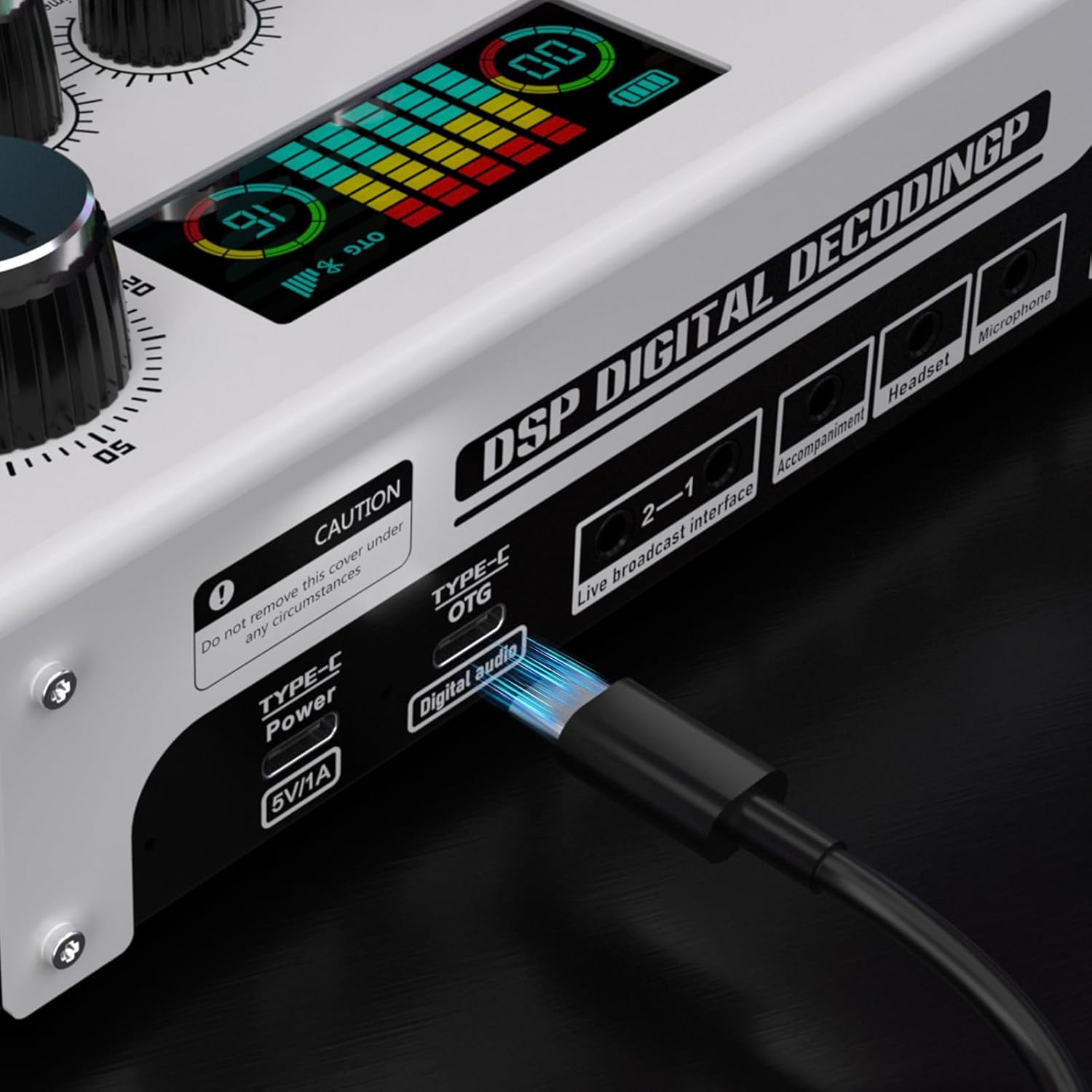
Image 5.1: USB-C Power and OTG ports.
5.2 קאַנעקטינג מייקראָופאָונז
- XLR Condenser Microphone: Connect your XLR condenser microphone to the XLR Interface. Ensure the 48V Phantom Power switch is turned ON if your microphone requires it.
- Dynamic Microphone (XLR or 1/4"): Connect your dynamic microphone to either the XLR Interface or the 1/4" Instrument Interface. 48V phantom power is typically not required for dynamic microphones.
- 3.5mm Microphones: Connect 1/8" TRS or TRRS headset microphones to the 3.5mm Microphone input.

Image 5.2: Connecting an XLR microphone and activating 48V phantom power.
5.3 Connecting to Devices (Computer/Smartphone)
- Computer/Tablet (Digital Audio): Use the USB-C to USB-C cable to connect the mixer's TYPE-C OTG port to your computer or tablet for digital audio transmission.
- Smartphone (Live Broadcast): Use the 3.5mm TRRS cable to connect your smartphone to one of the Live Broadcast Interface ports.
5.4 Connecting Headphones and External Audio
- Monitoring Headphones: Connect your headphones to either Earphone 1 or Earphone 2 ports on the front panel, or the Headset port on the rear panel.
- External Accompaniment: Connect an external audio source (e.g., music player) to the Accompaniment 3.5mm input.
6. אַפּערייטינג ינסטרוקטיאָנס
6.1 גרונטלעכע אַודיאָ קאָנטראָל
- מיקראָפאָן באַנד: Use the "Mic Total Vol" fader to adjust the overall microphone volume.
- Microphone EQ: Use the "Mic High", "Mic Mid", and "Mic Low" faders to adjust the treble, midrange, and bass frequencies of your microphone.
- מאָניטאָר באַנד: Adjust the "Monitor" knob to control the volume in your monitoring headphones.
- רעקאָרדינג באַנד: Adjust the "Recording" knob to control the output level for recording.
- אַקאַמפּנימאַנט באַנד: Adjust the "Accompaniment" knob for external audio input.
- Musical Instrument Volume: Adjust the "Musical Instrument" knob for instrument input.

Image 6.1: Individual volume and EQ controls.
6.2 Sound Effects and Voice Changing
- Default Sound Effects: Press the labeled buttons (e.g., RAP, Pop Songs, Kiss, Laughter) to trigger pre-loaded sound effects.
- קאַסטאַמייזאַבאַל סאַונד פּאַדס: To record your own sound effect, press and hold one of the "Customize 1-4" buttons until it flashes. Speak into your microphone or play audio from an input source. Press the button again to stop recording. Press the button briefly to play the recorded effect.
- קול טשאַנגער: Press the "Voice Changer" buttons to apply different voice modulation effects.
- אָפּקלונג: Use the "Reverberation" knob to add or adjust the reverb effect to your microphone audio.
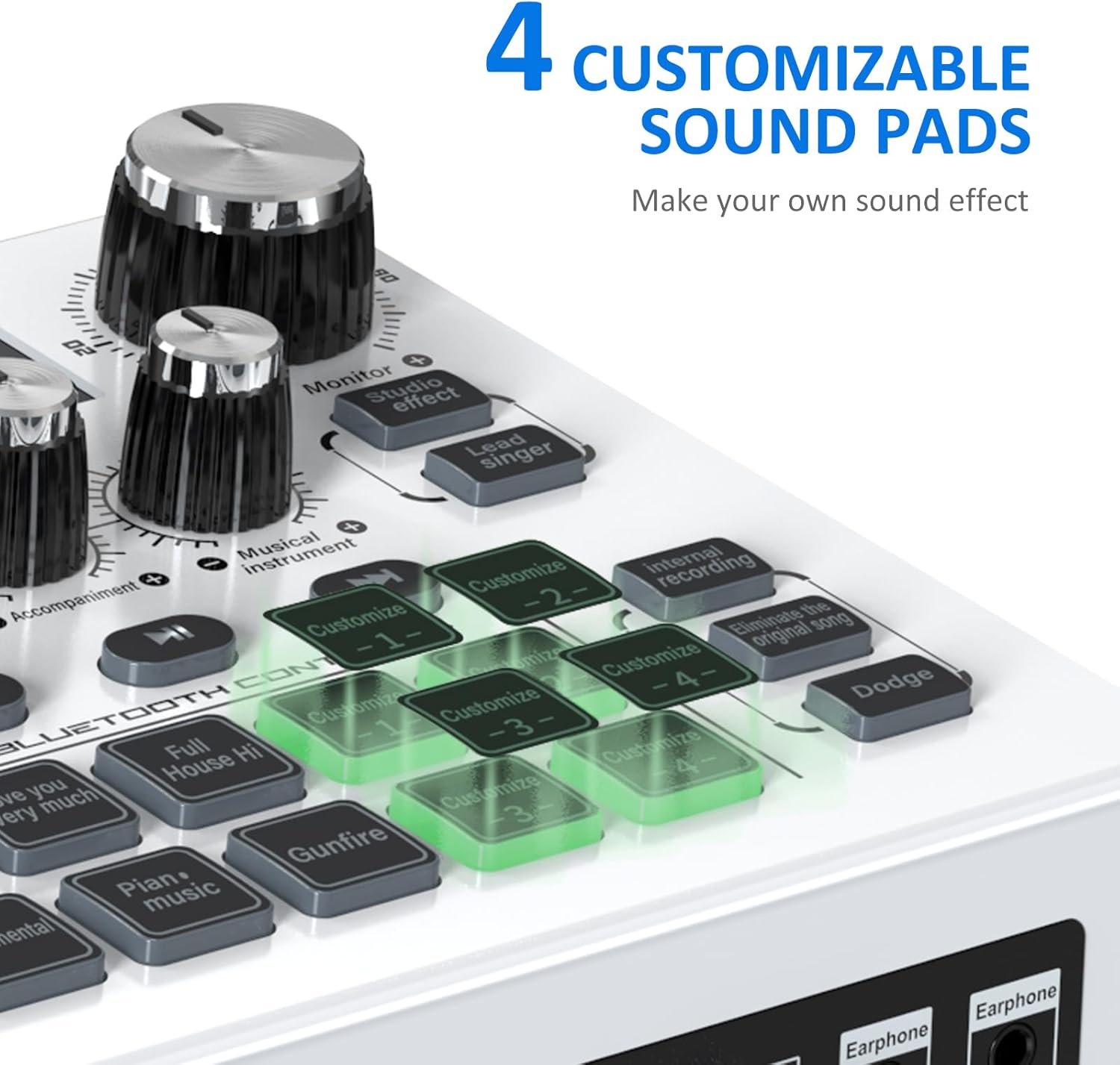
Image 6.2: Customizable sound pads.

Image 6.3: Voice changer and default sound effect buttons.
6.3 ספּעציעלע פאַנגקשאַנז
- דאַדזש: Press the "Dodge" button to activate the ducking feature, which automatically lowers background music volume when you speak into the microphone.
- ראַש רעדוקציע: Press the "Noise Reduction" button to minimize background noise in your microphone input.
- בלועטאָאָטה קאַנעקטיוויטי:
- אַקטיווירן בלועטוט אויף אייער פונדרויסנדיק מיטל (למשל, סמאַרטפאָון).
- זוכן פֿאַר "Yinker Mixer" in your device's Bluetooth settings and pair.
- Use the Bluetooth control buttons on the mixer (Play/Pause, Previous, Next) to manage playback.

Image 6.4: Visual representation of noise reduction.

Image 6.5: Bluetooth control section.
7. וישאַלט
- האַלטן די מיטל ריין דורך ווישן עס מיט אַ ווייך, טרוקן שטאָף.
- Avoid exposing the mixer to extreme temperatures, humidity, or direct sunlight.
- דו זאלסט נישט נוצן אַברייסיוו קלינערז אָדער סאָלוואַנץ.
- סטאָר די מיטל אין אַ קיל, טרוקן אָרט ווען ניט אין נוצן.
- פּרוּווט נישט צו צענעמען אָדער פאַרריכטן דעם אַפּאַראַט אַליין. ווענדט זיך צו קוואַליפֿיצירטע סערוויס פּערסאָנעל.
8. טראָובלעשאָאָטינג
- קיין סאָונד רעזולטאַט:
- Check all cable connections (microphone, headphones, output devices).
- Ensure volume knobs and faders are not set to minimum.
- Verify the mixer is powered on and has sufficient battery charge.
- If using an XLR condenser microphone, ensure 48V phantom power is activated.
- For computer connections, check audio input/output settings in your operating system and software.
- שלעכטע אַודיאָ קוואַליטעט / ראַש:
- Activate the "Noise Reduction" feature.
- Check microphone placement and ensure it's not too far or too close.
- Adjust microphone EQ (High, Mid, Low) to optimize sound.
- זיכער מאַכן אַז די קאַבלען זענען נישט געשעדיגט אָדער דעפעקטיוו.
- Avoid placing the mixer near sources of electromagnetic interference.
- בלועטאָאָטה קאַנעקשאַן ישוז:
- Ensure the mixer is in pairing mode (if applicable, usually automatic when Bluetooth is active).
- Check that Bluetooth is enabled on your external device.
- Move the external device closer to the mixer.
- פּרוּווט אָפּצופּאַרן און ווידער צופּאַרן דעם דעווייס.
- Custom Sound Pad Recording Failure:
- Ensure you are pressing and holding the button until it flashes to initiate recording.
- Verify an audio input source (microphone, accompaniment) is active and providing sound.
9. ספּעסאַפאַקיישאַנז
| שטריך | דעטאַל |
|---|---|
| מאָדעל נומער | LHY1 |
| פּונקט וואָג | 2.25 פונט |
| פּעקל דימענשאַנז | 10.94 X 6.77 X 2.99 אינטשעס |
| מאַכט מקור | באַטאַרייע פּאַוערד |
| Voltage | 48 Volts (DC) for phantom power |
| נומער פון טשאַנאַלז | 7 |
| קאַנעקטיוויטי טעכנאָלאָגיע | Auxiliary, Bluetooth, USB, XLR |
| רעזולטאַט קאַנעקטער טיפּ | וסב-C |
| באַטאַרייע קאַפּאַציטעט | 3000mAh (approx. 7 hours working time) |
| ווייַז | 2.25 אינטש לקד קאָליר אַרויסווייַזן |
10. וואָראַנטי און שטיצן
10.1 וואָראַנטי אינפֿאָרמאַציע
Please refer to the product packaging or the official Yinker website for specific warranty details. Typically, products are covered by a limited manufacturer's warranty against defects in materials and workmanship.
10.2 קונה שטיצן
For any questions, technical assistance, or issues with your Yinker Streaming Audio Mixer, please contact YINKER OFFICIAL support. Contact information can usually be found on the official Yinker webזייטל אדער דורך אייער קויפן פּלאַטפאָרמע.
איר קענט אויך באַזוכן די Yinker Store on Amazon פֿאַר מער אינפֿאָרמאַציע.