
1. הקדמה
This manual provides essential instructions for the safe and effective use of your Fitfiu Fitness MC-100C Folding Treadmill. Please read all instructions carefully before assembly, operation, or maintenance to ensure proper function and user safety. Keep this manual for future reference.

Figure 1: The Fitfiu Fitness MC-100C Treadmill in its operational state.
2. וויכטיק סאַפעטי אינסטרוקציעס
To reduce the risk of serious injury, always follow basic precautions when using this treadmill. Failure to do so may result in personal injury or damage to the equipment.
- לייענען אַלע ינסטראַקשאַנז: Familiarize yourself with the entire manual before use.
- השגחה: Do not leave children or pets unattended near the treadmill.
- Medical consultation: באַראַטנ זיך אַ דאָקטער איידער איר אָנהייבן קיין געניטונג פּראָגראַם.
- Proper attire: Wear appropriate athletic footwear and clothing. Avoid loose clothing that could get caught.
- סטאַביל ייבערפלאַך: שטעלט דעם טרעדמיל אויף א פלאַכער, סטאַבילער ייבערפלאַך מיט גענוג פּלאַץ אַרום אים.
- נויטפאַל האַלטן: Always attach the safety key clip to your clothing before starting. The treadmill will stop if the safety key is dislodged.
- מאַכט שנור: Keep the power cord away from heated surfaces and ensure it is not pinched or damaged.
- וואָג שיעור: דו זאלסט נישט יקסיד די מאַקסימום באַניצער וואָג פון 120 קג.
- וישאַלט: Perform regular maintenance as described in this manual.
3. אַסעמבלי און סעטאַפּ
The Fitfiu Fitness MC-100C Treadmill is designed for straightforward assembly. Most components are pre-assembled. Follow these general steps:
- אויספּאַקן: קערפאַלי באַזייַטיקן אַלע קאַמפּאָונאַנץ פון די פּאַקקאַגינג.
- אַנפאָולדינג: The treadmill arrives in a folded position. Gently lower the running deck until it locks into place. Ensure all locking mechanisms are secure.
- האַנטלבאַר און קאַנסאָול: Raise the handlebar assembly and secure it with the provided pins or bolts. Connect any necessary console cables.
- אָרט: Position the treadmill on a level surface, ensuring at least 0.6 meters (2 feet) of clear space on all sides and 2 meters (6.5 feet) at the rear for safety.
- מאַכט קשר: צאַפּן די מאַכט שנור אין אַ גראָונדעד עלעקטריקאַל ווענטיל.
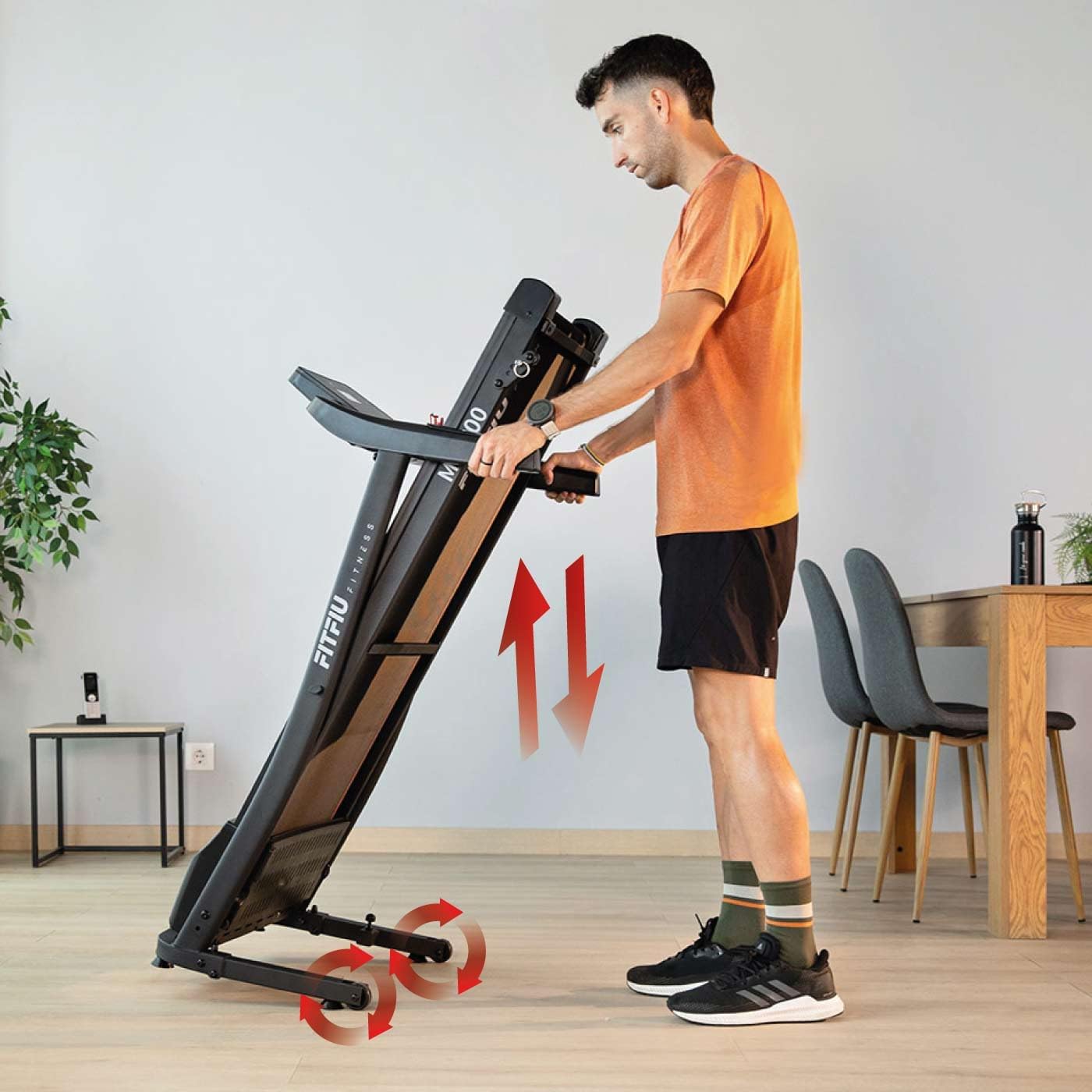
Figure 2: Illustration of the Fitfiu Fitness MC-100C Treadmill's vertical folding mechanism for storage, showing wheels for easy movement.
To fold the treadmill for storage, lift the running deck until it clicks into the vertical storage position. The integrated wheels allow for easy relocation.
4. אַפּערייטינג ינסטרוקטיאָנס
4.1. קאָנטראָל פּאַנעל איבערview

Figure 3: Close-up of the Fitfiu Fitness MC-100C Treadmill control panel, displaying 12 pre-set programs (P1-P12) and the safety key.
The control panel features an LED display and various buttons for controlling your workout. Key functions include:
- ווייַז: Shows speed, time, distance, calories, and pulse.
- אָנהייב / האַלטן: Initiates and pauses/stops the treadmill belt.
- גיכקייַט +/-: אַדזשאַסטירט די לויף גיכקייט.
- פּראָגראַם (P): Selects from 12 pre-set workout programs.
- מאָדע (M): Cycles through display modes or sets target values.
- זיכערהייט שליסל: Magnetic key that must be in place for the treadmill to operate. Pulling it off will stop the belt.
4.2. אָנהייבן אַ וואָרקאַוט
- Ensure the treadmill is plugged in and the safety key is attached to the console and your clothing.
- טרעט אויף די זייט רעלסן פון די טרעדמיל.
- דרוק די אָנהייב button. The belt will begin moving at a low speed.
- Carefully step onto the moving belt and adjust the speed using the Speed +/- buttons to your desired pace.
- צו האַלטן, דריקן די האַלטן קנעפּל אָדער ציען דעם זיכערהייט שליסל.
4.3. Using Pre-set Programs
The MC-100C offers 12 pre-set programs (P1-P12) that automatically adjust speed over time.
- From standby mode, press the פּראָגראַם (פּ) button repeatedly to cycle through the available programs.
- Once your desired program is displayed, press אָנהייב צו אָנהייבן די ווערקאַוט.
4.4. מאַנועלע שפּיצן אַדזשאַסטמענט
The treadmill features 3 levels of manual incline to simulate different terrains.
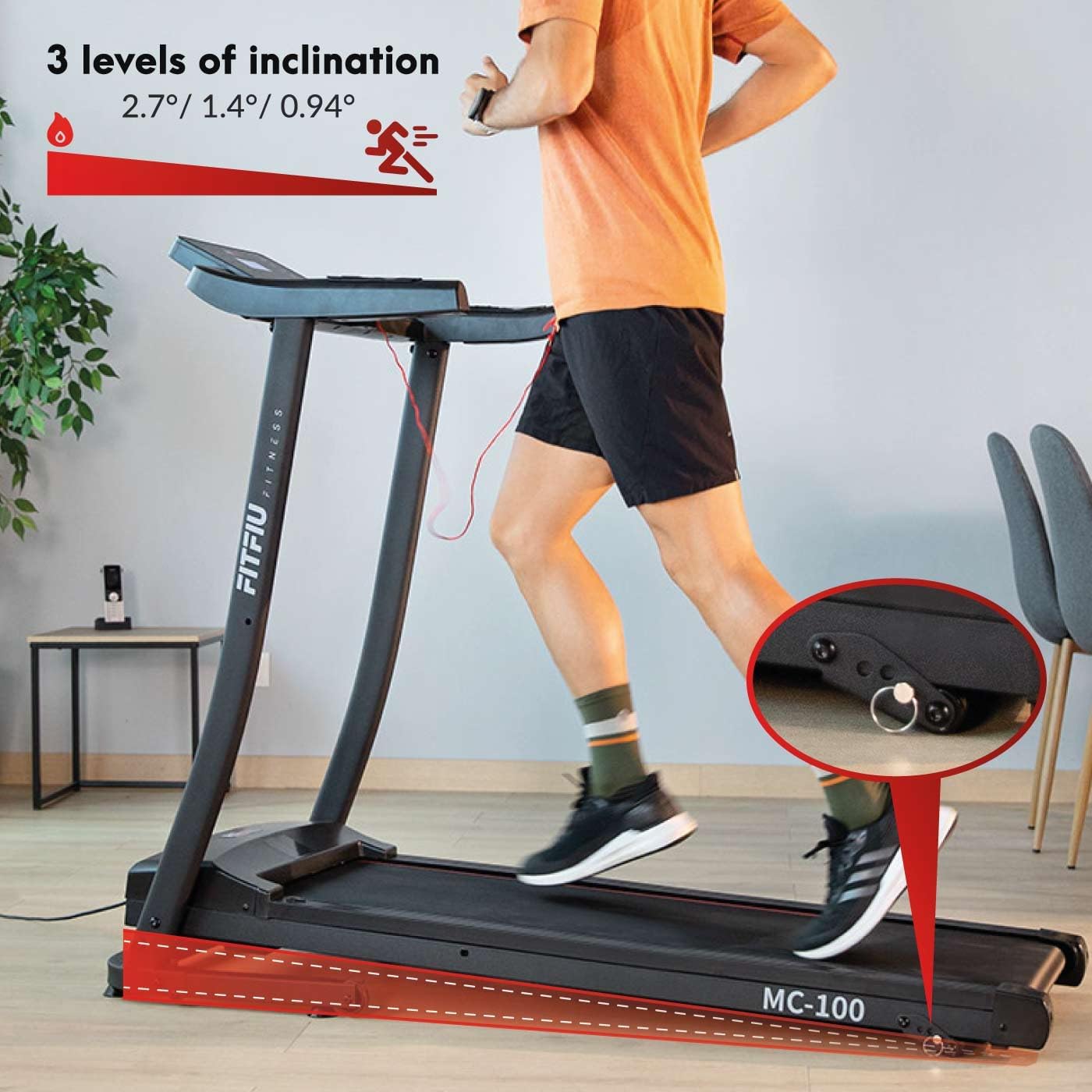
Figure 4: Image demonstrating the 3 manual incline levels (2.7°, 1.4°, 0.94°) of the Fitfiu Fitness MC-100C Treadmill, with a close-up of the adjustment pin.
To adjust the incline:
- Ensure the treadmill is stopped and unplugged for safety.
- Locate the incline adjustment pins at the rear of the treadmill.
- Lift the rear of the treadmill slightly and remove the pins.
- Adjust the support bars to the desired incline level (e.g., 2.7°, 1.4°, or 0.94°).
- Reinsert the pins securely to lock the incline in place.
4.5. Kinomap Compatibility
The MC-100C Treadmill is compatible with the Kinomap application, allowing for interactive training experiences. Place your tablet or smartphone on the integrated holder for easy viewing.

Figure 5: Fitfiu Fitness MC-100C Treadmill with a tablet and smartphone displaying the Kinomap app, illustrating virtual training integration.
5. וישאַלט
רעגולערע אויפהאלטונג גאראנטירט די לאנגעוויטי און אפטימאלע פערפארמאנס פון אייער טרעדמיל.
5.1. רייניקונג
- טעגלעך: Wipe down the console and handlebars with a damp שטאָף נאָך יעדער נוצן.
- וואכנשריפט: Clean the running belt and deck to remove dust and debris. Ensure the treadmill is unplugged before cleaning.
5.2. Running Belt Lubrication
The running belt requires periodic lubrication to reduce friction and wear. The frequency depends on usage.
- אָפטקייַט: Lubricate every 25 hours of use or every 3 months, whichever comes first.
- פּראָצעדור:
- אָפּשטויסן די טרעדמיל.
- Loosen the rear roller bolts to slightly lift the belt.
- Apply a thin line of 100% silicone lubricant (specifically designed for treadmills) under the center of the belt.
- Tighten the rear roller bolts and plug in the treadmill.
- Run the treadmill at a low speed (e.g., 3 km/h) for 5 minutes to distribute the lubricant.
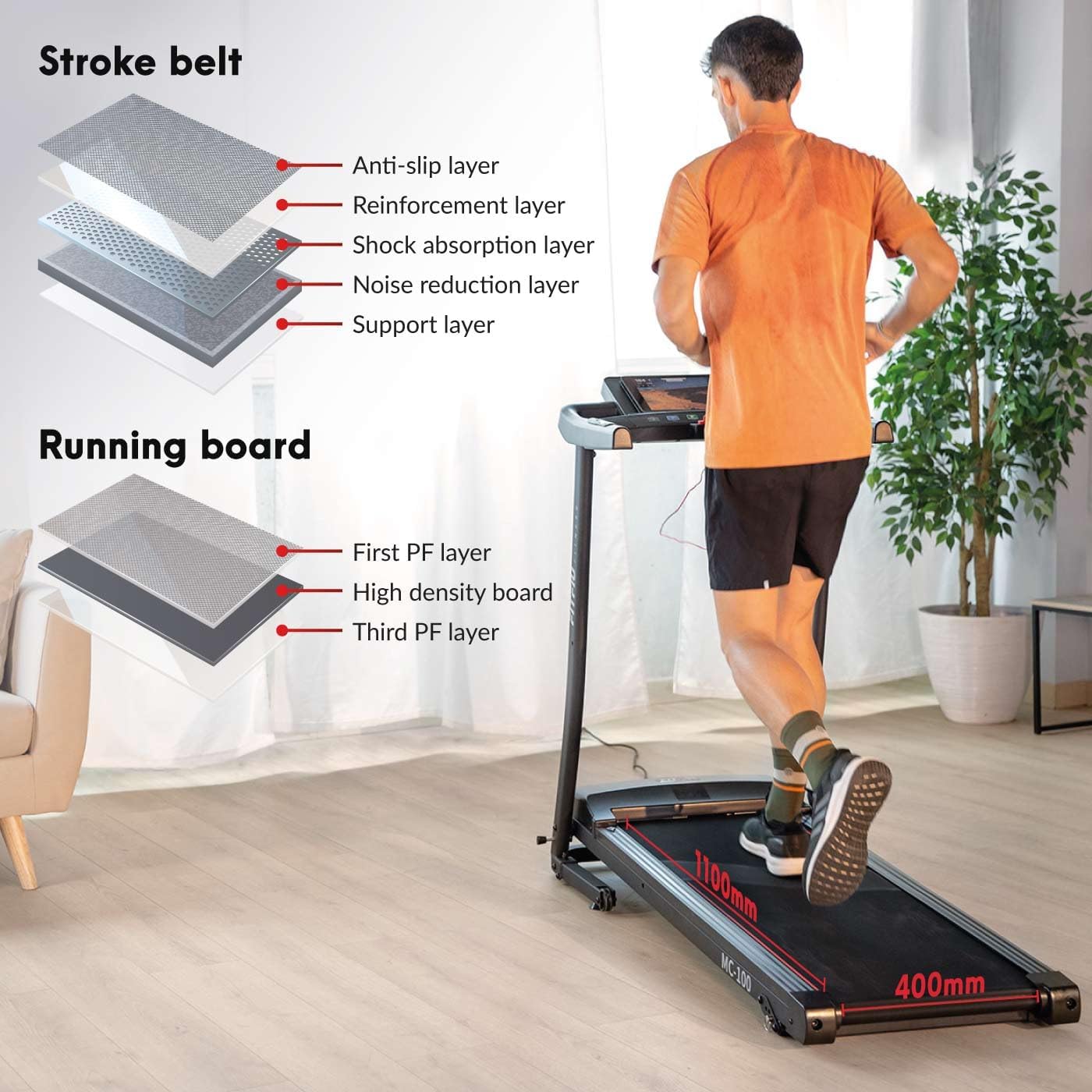
Figure 6: Diagram illustrating the multi-layered structure of the Fitfiu Fitness MC-100C Treadmill's running belt and running board, detailing anti-slip, reinforcement, shock absorption, noise reduction, and support layers.
5.3. Belt Tension and Alignment
If the belt slips or drifts to one side, it may need adjustment. Refer to the detailed instructions in the full product manual for precise belt tensioning and alignment procedures.
6. טראָובלעשאָאָטינג
די סעקציע באהאנדלט אלגעמיינע פראבלעמען וואס איר קענט באגעגענען מיט אייער טרעדמיל.
| פּראָבלעם | מעגלעך סיבה | לייזונג |
|---|---|---|
| טרעדמיל טוט נישט אָנהייבן | Power cord unplugged, safety key not in place, circuit breaker tripped. | Check power connection, ensure safety key is correctly inserted, reset circuit breaker if necessary. |
| פליסנדיק גאַרטל סליפּס | גאַרטל צו לויז, נישט גענוג לובריקאַציע. | Adjust belt tension (refer to full manual), lubricate the running belt. |
| יבעריק ראַש | Loose components, worn belt, motor issue. | Check and tighten all bolts and screws. Lubricate belt. If noise persists, contact customer support. |
| Inaccurate display readings | Sensor issue, loose connection. | Ensure all console connections are secure. If problem persists, contact customer support. |
7. ספּעסאַפאַקיישאַנז
Technical details for the Fitfiu Fitness MC-100C Treadmill:
| שטריך | באַשרייַבונג |
|---|---|
| מאָדעל | MC-100C |
| סאָרט | Fitfiu Fitness |
| מאָטאָר מאַכט | 900 וואט (1.2 הפּ) |
| מאַקסימום גיכקייַט | 10 קילאמעטער/ה |
| פליסנדיק ייבערפלאַך | 32 X 102 סענטימעטער |
| מאַקסימום באַניצער וואָג | 120 קג |
| שפּיצן לעוועלס | 3 manual levels (2.7°, 1.4°, 0.94°) |
| נומער פון מגילה | 12 |
| ווייַז טיפּ | געפירט |
| ווייַז גרייס | 75 מם |
| פּראָדוקט דימענשאַנז (L x W x H) | 130 X 60 X 132 סענטימעטער |
| פאָולדיד דימענשאַנז (L x W x H) | 60 X 132 X 60 סענטימעטער |
| פּונקט וואָג | 23 קג |
| ראַם מאַטעריאַל | אַללוי סטיל |
| הויפּט מאַטעריאַל | ומבאַפלעקט שטאָל |
| קאָליר | גרוי |
| מאַכט טיפּ | עלעקטריק קראַנט |
| אַרייַנגערעכנט קאַמפּאָונאַנץ | 1 MC-100C Treadmill |
| רעקאַמענדיד נוצן | פליסנדיק |
| ציל וילעם | דערוואַקסן |
8. וואָראַנטי און שטיצן
For information regarding warranty coverage, technical support, or replacement parts, please refer to the official Fitfiu Fitness webזייטל אדער קאנטאקט זייער קאסטומער סערוויס דעפארטמענט. האלט אייער קויף קוויטל אלס באווייז פון קויפן.