
1. הקדמה
Thank you for choosing the RIGOL DS1102Z-E Digital Oscilloscope. This manual provides essential information for the safe and efficient use of your device. Please read it thoroughly before operation and keep it for future reference.
The DS1102Z-E is a high-performance digital oscilloscope designed for various applications including research and development, education, maintenance, and industrial testing. It features a 100 MHz bandwidth, 1 GSa/s sample rate, and a 24 Mpts memory depth, enabling precise analysis of complex waveforms.
2. פּראָדוקט איבערview
The RIGOL DS1102Z-E is a versatile measurement instrument integrating a frequency counter and supporting protocol decoding for RS232/UART, I2C, and SPI. It also includes FFT analysis and automatic measurement functions to enhance testing efficiency.
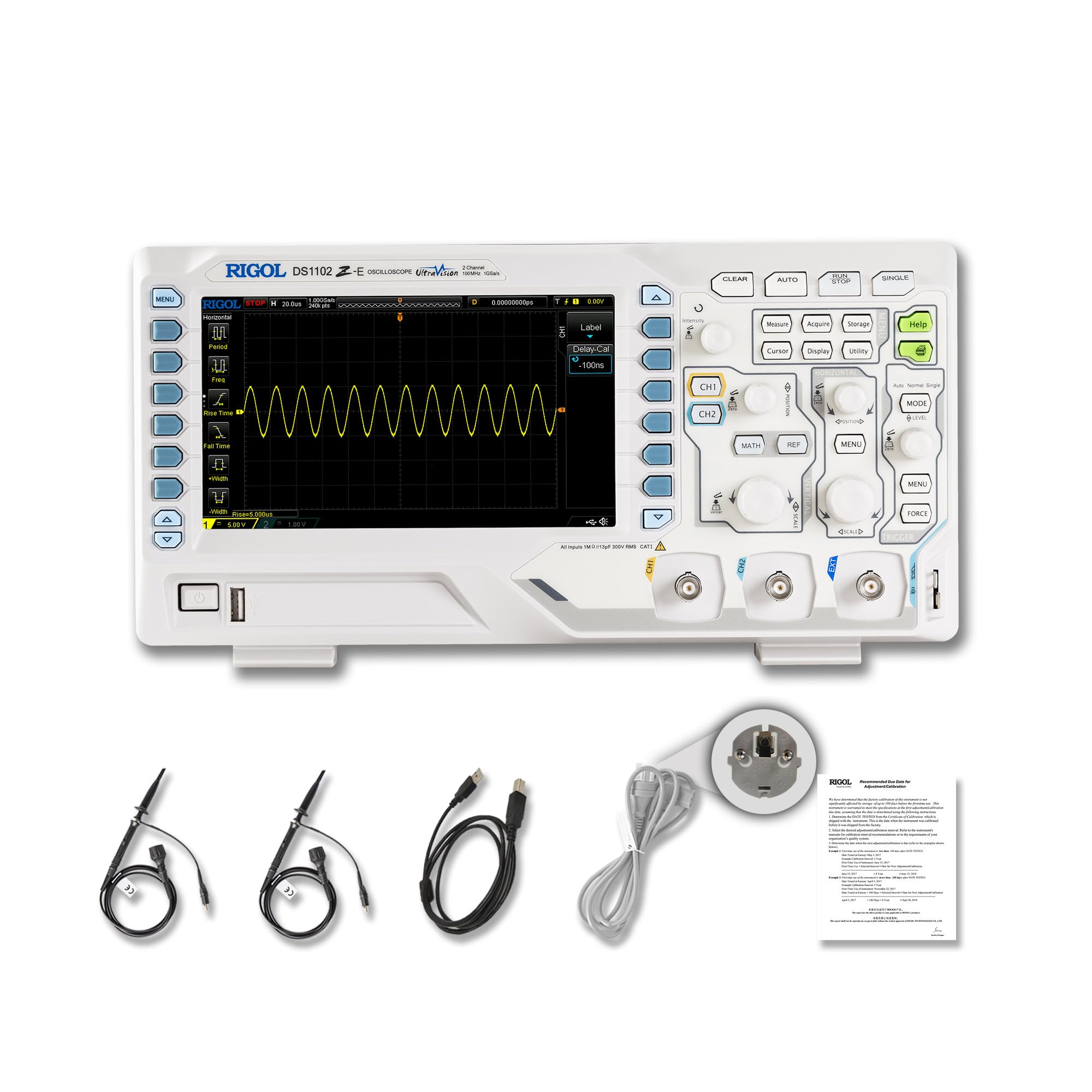
פיגורע 2.1: פראָנט view of the RIGOL DS1102Z-E Digital Oscilloscope.
2.1 שליסל פֿעיִקייטן
- 100 MHz Bandwidth, 1 GSa/s Sampדי קורס: Captures signals with high precision.
- 24 Mpts Memory Depth: Allows for extended signal capture and detailed waveform analysis.
- Multi-function Measurement Device: Includes frequency counter, protocol decoding (RS232/UART, I2C, SPI), FFT analysis, and automatic measurement functions.
- Waveform Recording and Playback: Records signal variations and replays them for fault identification.
- הויך-דעפֿיניציע ווייַז: 7-inch TFT screen with 256-level grayscale, offering a phosphor-like display effect for clear waveform details.
- Remote Control & Secondary Development Support: Equipped with USB and LAN ports for PC remote control, compatible with SCPI commands, LabVIEW, וויזשוואַל בייסיק, און וויזשוואַל C++.
2.2 וואָס איז אין דער קעסטל

Figure 2.2: Contents included with the DS1102Z-E Oscilloscope.
- 1x Main Unit (DS1102Z-E Digital Oscilloscope)
- 2x Passive Probes (150MHz)
- 1x Power Cable (EU plug)
- 1x USB A-B Cable
- 1x וואָראַנטי קאַרד
- 1x Calibration Certificate
- 1x Declaration of Conformity
3. סעטאַפּ
Follow these steps to set up your RIGOL DS1102Z-E oscilloscope:
- אויספּאַקן: Carefully remove all components from the packaging. Inspect the device for any signs of damage.
- מאַכט קשר: Connect the provided power cable to the oscilloscope's power input and then to a suitable AC power outlet.
- פּראָבע קשר: Connect the passive probes to the BNC input connectors (CH1, CH2) on the front panel. Ensure a secure connection.
- גראָונדינג: Always ensure the oscilloscope is properly grounded through the power cable.
- USB/LAN Connection (Optional): If you plan to use remote control or secondary development, connect the USB cable to a PC or the LAN cable to your network.

פיגורע 3.1: איבערview of the oscilloscope's physical dimensions and ports.
4. אַפּערייטינג ינסטרוקטיאָנס
This section covers the basic operation of your oscilloscope.
4.1 פּאַוערינג אויף / אַוועק
- מאַכט אויף: Press the power button located on the front panel. The device will perform a self-test and display the main interface.
- מאַכט אַוועק: דריקן און האַלטן די מאַכט קנעפּל ביז די מיטל פאַרמאַכן אַראָפּ.
4.2 גרונטלעכע כוואַליעפאָרם אַרויסווייַזונג
After powering on, connect a signal to one of the input channels (e.g., CH1). Adjust the vertical scale (Volts/Div) and horizontal scale (Time/Div) knobs to display the waveform clearly. Use the AUTO button for automatic setup of the waveform display.

פיגורע 4.1: עקסample of a waveform displayed on the oscilloscope screen.
4.3 אַוואַנסירטע פאַנגקשאַנז
- מעזשערמאַנט פאַנגקשאַנז: דרוק די מעסטן button to access automatic measurements like frequency, period, peak-to-peak voltage, עטק.
- טריגער סיסטעם: Use the trigger controls to stabilize repetitive waveforms. Adjust the trigger level and mode (Edge, Pulse, Video, Slope, etc.) as needed.
- Waveform Recording: The oscilloscope allows recording and replaying waveforms. Access this feature through the menu to capture transient events.
- Protocol Decoding: For serial bus analysis (RS232/UART, I2C, SPI), configure the decoding settings via the menu.
- FFT אנאליז: Perform Fast Fourier Transform (FFT) to analyze the frequency components of your signal.

Figure 4.2: Complex waveform analysis with measurement data.

Figure 4.3: Multiple waveforms displayed simultaneously for comparison.
5. וישאַלט
Proper maintenance ensures the longevity and accuracy of your oscilloscope.
- רייניקונג: ניצט אַ ווייכע, טרוקענע שטאָף צו רייניקן די אויסערלעכע זייט פון דעם אָסילאָסקאָפּ. פֿאַר שווערע שמוץ, ניצט אַ ביסל טרוקן שטאָף.amp cloth with mild detergent can be used. Avoid abrasive cleaners or solvents.
- סקרין זאָרגן: Clean the display screen with a soft, lint-free cloth. Do not use excessive force or harsh chemicals.
- סטאָרידזש: When not in use, store the oscilloscope in a clean, dry environment, away from direct sunlight, extreme temperatures, and excessive dust.
- פּראָבע באַהאַנדלונג: Handle probes carefully. Avoid bending or stressing the probe tips. Store them properly to prevent damage.
- קאליבראציע: For optimal performance, periodic calibration by qualified personnel is recommended. Refer to the official RIGOL website for calibration services.
6. טראָובלעשאָאָטינג
די סעקציע גיט לייזונגען צו געוויינטלעכע פראבלעמען וואָס איר קענט באַגעגענען.
| פּראָבלעם | מעגלעך סיבה | לייזונג |
|---|---|---|
| No power when turned on. | Power cable not connected, power outlet faulty, or power button issue. | Check power cable connection. Test the power outlet. Ensure the power button is fully pressed. |
| קיין כוואַליעפאָרם ווערט נישט געוויזן. | No signal input, probe not connected correctly, vertical/horizontal scale incorrect, or trigger not set. | Verify signal source. Check probe connections. Adjust Volts/Div and Time/Div. Press AUTO or adjust trigger settings. |
| Waveform is unstable. | אומרעכטע טריגער סעטטינגס. | Adjust trigger level, mode, and source to stabilize the waveform. |
| ווייַט קאָנטראָל נישט ארבעטן. | USB/LAN cable issue, incorrect network settings, or software driver not installed. | Check cable connections. Verify network configuration. Install necessary drivers and software (e.g., UltraScope). |
If the problem persists, please contact RIGOL technical support.
7. ספּעסאַפאַקיישאַנז
Detailed technical specifications for the RIGOL DS1102Z-E Digital Oscilloscope.

Figure 7.1: Visual representation of key technical specifications.
| שטריך | באַשרייַבונג |
|---|---|
| סאָרט | ריגול |
| מאָדעל | DS1102Z-E |
| באַנדווידט | 100 מהז |
| טשאַנאַלז | 2 Channels + EXT |
| Sample קורס | 1 GSa/s |
| זכּרון דעפּט | 24 mpts |
| כוואַליעפאָרם קאַפּטשער ראַטע | 30,000 וופמס / s |
| ווערטיקאַל רעסאָלוטיאָן | 8 ביסל |
| מינימום סענסיטיוויטי | 1 mV/div |
| Minimum Time Base | 2 ns/div |
| דיקאָודינג שטיצן | RS232/UART, I2C, SPI |
| FFT אַנאַליסיס | נאָרמאַל |
| ווייַז | 7-inch TFT (800x480) |
| קאַנעקטיוויטי | USB Host, USB Device, LAN |
| מאַכט מקור | אַק אַדאַפּטער |
| קאָליר | גרוי / ווייסע |
| פּונקט וואָג | 2.9 קילאָגראַמס |
| דימענסיעס (L X W X H) | 31.31 X 16.08 X 12.24 סענטימעטער |
| געהאָרכיק סטאַנדאַרדס | CE, RoHS |
| מאַנופאַקטורער טייל נומער | DS1102Z-E |
| לאַנד פון אָריגין | כינע |
8. וואָראַנטי און שטיצן
RIGOL is committed to providing high-quality products and excellent customer service.
- וואָראַנטי: The RIGOL DS1102Z-E Digital Oscilloscope comes with a 3 יאָר וואָראַנטי פון די דאַטע פון קויפן. די וואָראַנטי קאָווערס חסרונות אין מאַטעריאַלס און ווערקמאַנשיפּ אונטער נאָרמאַל נוצן.
- טעכניש שטיצן: RIGOL offers 24/7 טעכניש שטיצן to assist you with any questions or issues you may encounter. Please refer to the official RIGOL webזייטל פֿאַר קאָנטאַקט אינפֿאָרמאַציע און שטיצע רעסורסן.
- אָנליין רעסורסן: Visit the official RIGOL website for product documentation, software updates (e.g., UltraScope), and additional support materials.

Figure 8.1: RIGOL oscilloscopes support multiple languages for user convenience.