
הקדמה
This manual provides detailed instructions for the HiFuture YACHT Rose Gold earbuds. Please read this manual carefully before using the product to ensure proper operation and to maximize its lifespan. Keep this manual for future reference.
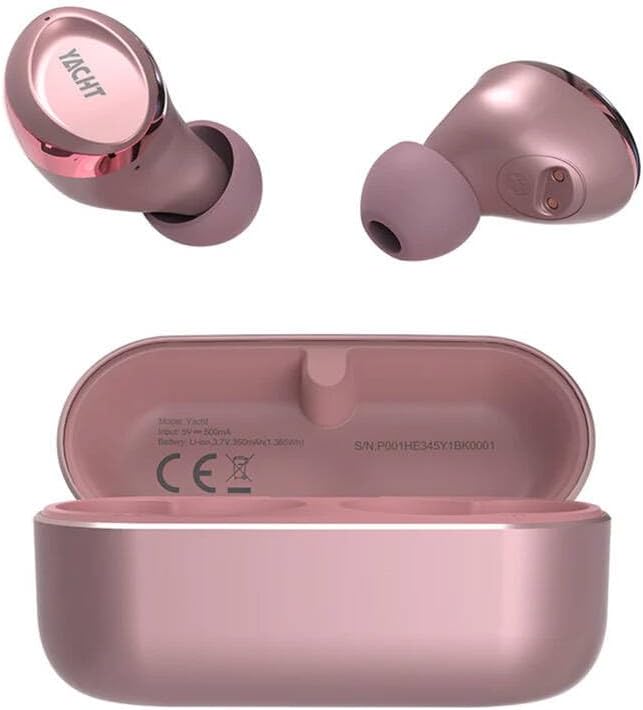
בילד 1: HiFuture YACHT Rose Gold Earbuds and Charging Case. The image displays two rose gold earbuds, one showing the 'YACHT' branding on its outer surface, and the other showing its inner contact points. Below them is the open rose gold charging case, revealing the charging cradles and internal specifications such as 'Model: Yacht', 'Input: 5V ≈ 500mA', 'Battery: Li-ion 3.7V 350mAh/1.36Wh', and 'S/N: P001HE345Y1BK0001'.
פּעקל אינהאַלט
The HiFuture YACHT Earbuds package typically includes:
- HiFuture YACHT Rose Gold Earbuds (Left and Right)
- טשאַרדזשינג קאַסע
- וסב טשאַרדזשינג קאַבלע
- באַניצער מאַנואַל (דעם דאָקומענט)
- Eartips (various sizes, if applicable, though not specified)
סעטאַפּ
1. ערשטע אויפלאָדונג
Before first use, fully charge the earbuds and the charging case. The charging case has an input requirement of 5V at 500mA. The internal battery of the case is a Li-ion 3.7V 350mAh (1.36Wh).
- שטעלן ביידע עאַרבודז אין די טשאַרדזשינג פאַל.
- Connect the USB charging cable to the charging port on the case and to a compatible USB power source (e.g., computer, wall adapter).
- The indicator lights on the case and/or earbuds will show the charging status. Refer to the indicator light section for details (if available, otherwise assume standard behavior).
- אַמאָל גאָר באפוילן, דיסקאַנעקט די טשאַרדזשינג קאַבלע.
2. בלועטאָאָטה פּערינג
To connect your HiFuture YACHT earbuds to a device:
- זיכער מאַכן אַז די אויערקנעפּלעך זענען אויפגעלאָדן און געלייגט אין די טשאַרדזשינג קעסטל.
- Open the charging case lid. The earbuds will automatically enter pairing mode, indicated by a flashing LED light (usually on one earbud).
- אויף אייער דעווייס (סמאַרטפאָן, טאַבלעט, קאָמפּיוטער), גייט צו די בלועטוט סעטטינגס.
- קער אויף בלועטאָאָטה.
- זוכן פֿאַר available devices. You should see "HiFuture YACHT" or a similar name appear in the list.
- Select "HiFuture YACHT" to connect.
- Once connected, the LED indicator on the earbuds will typically stop flashing or change to a solid color.
- די אויערקנעפּלעך זענען איצט גרייט פֿאַר באַנוץ.
באַמערקונג: If pairing fails, place the earbuds back in the case, close the lid, wait a few seconds, then reopen and try again. Ensure no other devices are actively trying to connect to the earbuds.
אַפּערייטינג ינסטראַקשאַנז
1. מאַכט אויף / אויסגעלאשן
- מאַכט אויף: Open the charging case lid, or take the earbuds out of the case. They will automatically power on and attempt to reconnect to the last paired device.
- מאַכט אַוועק: לייגט די אויערקנעפּלעך צוריק אין די טשאַרדזשינג קעסטל און מאַכט צו דעם דעקל. זיי וועלן זיך אויטאָמאַטיש אָפּשטעקן און זיך אויסלעשן.
2. טראָגן די אויערקנעפּלעך
Gently insert each earbud into the corresponding ear canal (L for left, R for right). Rotate them slightly until they fit snugly and comfortably. A proper fit ensures optimal sound quality and secure placement.
3. Basic Controls (Touch/Button)
The HiFuture YACHT earbuds feature touch-sensitive controls. Specific functions may vary slightly, but common operations include:
- שפּיל / פּויזע: איין צאַפּן אויף יעדער עאַרבוד.
- ווייַטער שפּור: צאַפּ צוויי מאָל אויף די רעכטע אויערקנעפּל.
- פֿריִערדיקע שפּור: צאַפּ צוויי מאָל אויף די לינקע אויערקנעפּל.
- ענטפֿערן / סוף רופן: איין צאַפּ אויף יעדן אויערקנעפּל בעת אַן אינקאַמינג רוף.
- אָפּוואַרפן רופן: דריק און האלט איינע פון די אויערקנעפל פאר 2 סעקונדעס בעת אן אנקומענדיקן רוף.
- אַקטאַווייט קול אַססיסטאַנט: דריק דריי מאָל אויף יעדן אויערקנעפּעל (למשל, סירי, גוגל אַסיסטאַנט).
- באַנד קאָנטראָל: (If supported) Tap and hold the right earbud to increase volume, tap and hold the left earbud to decrease volume. Refer to specific product documentation for exact volume control methods.
וישאַלט
1. רייניקונג
רעגולערע רייניקונג העלפט אויפהאלטן קלאַנג קוואַליטעט און היגיענע.
- ניצט אַ ווייכן, טרוקענעם, לינט-פֿרייעם שטאָף צו ווישן די אויערקנעפּלעך און די טשאַרדזשינג קעסטל.
- פֿאַר שווערן שמוץ, אַ ביסל דampen the cloth with water or a mild, non-abrasive cleaner. Avoid getting liquid into openings.
- אַראָפּנעמען פֿאָרזיכטיק יעדן אויערוואַקס אָדער שמוץ פֿון די אויערשפּיצן און רעדנער מעש מיט אַ קליינעם, ווייכן באַרשט אָדער וואַטע שטעכל.
- Ensure all components are completely dry before placing earbuds back in the case or charging.
2. סטאָרידזש
ווען נישט אין באַנוץ, לייגט די אויערקנעפּלעך אין זייער טשאַרדזשינג קעסטל צו באַשיצן זיי פון שטויב, שעדיקן, און צו האַלטן זיי טשאַרדזשד.
3. באַטערי קער
- פֿאַרמײַדט אויסשטעלן די אויערקנעפּלעך און קעסטל צו עקסטרעמע טעמפּעראַטורן (הייס אָדער קאַלט).
- Do not fully deplete the battery for extended periods. Charge regularly.
- ניצט נאָר דעם צוגעשטעלטן טשאַרדזשינג קאַבל אָדער אַ סערטיפיצירטן עקוויוואַלענט.
טראָובלעשאָאָטינג
| פּראָבלעם | מעגלעך לייזונג |
|---|---|
| די אויערקנעפּלעך פאַרבינדן זיך נישט מיטן אַפּאַראַט. |
|
| קיין קלאַנג אָדער נידעריקע וואָלומען. |
|
| די אויערקנעפּלעך לאָדן זיך נישט אויף. |
|
| איין אויערקנעפל ארבעט נישט. |
|
ספּעסאַפאַקיישאַנז
| שטריך | דעטאַל |
|---|---|
| סאָרט | HiFuture |
| מאָדעל נאָמען | יאַכט |
| קאָליר | רויז גאָלד |
| פּונקט וואָג | 80 גראַם (גאַנץ פּאַקעט) |
| נומער פון זאכן | 1 (package) |
| טשאַרדזשינג קאַסע ינפּוט | 5V ≈ 500mA |
| טשאַרדזשינג קאַסע באַטערי | לי-יאָן 3.7 וו 350 מאַה (1.36 ווה) |
| סעריע נומער (למשלampל) | P001HE345Y1BK0001 (may vary by unit) |
וואָראַנטי און שטיצן
HiFuture products are designed for reliability and performance. For warranty information, please refer to the warranty card included with your purchase or visit the official HiFuture website. For technical support or inquiries, please contact HiFuture customer service through their official channels.
- אָנליין שטיצן: Visit the official HiFuture webזייטל פֿאַר אָפֿט געשטעלטע פֿראַגעס, שטיצע רעסורסן, און קאָנטאַקט אָפּציעס.
- E- בריוו שטיצן: זעט אייער פּראָדוקט פּאַקאַדזשינג אָדער די באַאַמטער webזייטל פֿאַר קונה סערוויס אימעיל אַדרעסן.