
1. הקדמה
The M5Stack M5StickC PLUS2 is a compact and versatile IoT development kit, serving as an advanced iteration of the M5StickC PLUS. It integrates the ESP32-PICO-V3-02 main controller, offering robust wireless capabilities. This device is designed for rapid prototyping and development across various applications, featuring a rich set of integrated hardware components within its small form factor.
2. פּראָדוקט איבערview
The M5StickC PLUS2 integrates numerous components into a miniature design. Key features include:
- הויפּט קאָנטראָללער: ESP32-PICO-V3-02 with integrated Wi-Fi.
- ווייַז: 1.14-inch TFT screen with 135x240 resolution, driven by ST7789V2.
- סענסאָרס: 6-axis IMU (MPU6886).
- קאָמוניקאַציע: Infrared (IR) transmitter.
- אַודיאָ: Microphone (SPM1423-PDM) and passive buzzer.
- צייט: Real-Time Clock (RTC) BM8563.
- באַניצער צובינד: Three programmable buttons (A, B, C) and an LED indicator.
- מאַכט: Integrated 200 mAh Lithium Polymer battery, rechargeable via USB-C.
- יקספּאַנשאַן: External 8-pin header and HY2.0-4P connector for M5Stack HAT and Unit series products.
- מאָונטינג: Integrated magnet for easy attachment.
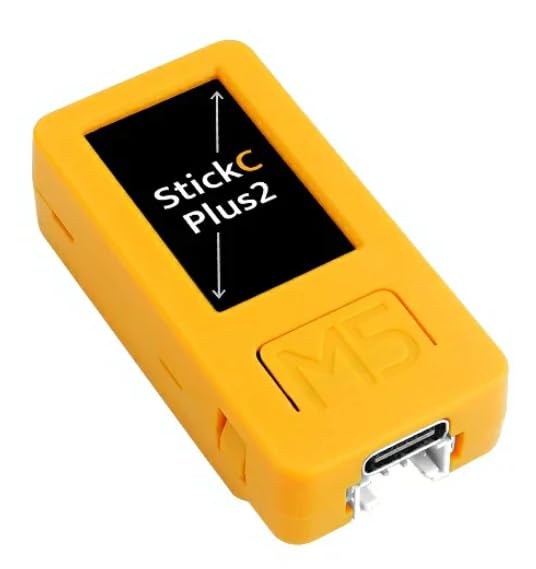
Figure 1: Detailed diagram of the M5StickC PLUS2, highlighting its various components and pin assignments.

פיגורע 2: שפּיץ view of the M5StickC PLUS2, illustrating the pinout for the external header and labels for internal components like the ESP32 chip, display driver, and battery.
3. סעטאַפּ
3.1 ערשט טשאַרדזשינג
Before first use, ensure the M5StickC PLUS2 is fully charged. Connect the device to a standard 5V USB power source using a USB-C cable. The charging indicator (if available) will provide feedback on the charging status.
3.2 קאַנעקטינג צו אַ קאָמפּיוטער
To program or communicate with the M5StickC PLUS2, connect it to your computer using a USB-C data cable. The device will appear as a serial port.

פיגורע 3: דנאָ view of the M5StickC PLUS2, highlighting the USB-C port for charging and programming, and the HY2.0-4P connector.
3.3 ווייכווארג סביבה סעטאַפּ
The M5StickC PLUS2, powered by the ESP32-PICO-V3-02, supports various development environments. Common choices include the Arduino IDE with ESP32 board support or the ESP-IDF (Espressif IoT Development Framework).
- דרייווער ינסטאַלירונג: Your operating system (Windows, MacOS, Linux) may require specific drivers for the USB-to-serial chip (likely CH9102) to recognize the device. These drivers are typically available on the M5Stack official website or from the chip manufacturer.
- IDE Configuration: Follow the official M5Stack documentation or community guides to configure your chosen IDE (e.g., Arduino IDE) to work with ESP32 boards and the M5StickC PLUS2 specifically. This usually involves adding board URLs and installing necessary libraries.
- פירמווער אַפּלאָוד: Once your environment is set up, you can compile and upload your code to the device via the USB-C connection.
4. אַפּערייטינג ינסטרוקטיאָנס
4.1 מאַכט אויף / אַוועק
צו מאַכט אויף the device, briefly press the side button labeled 'C'. To מאַכט אַוועק the device, press and hold Button C for approximately 6 seconds until the screen turns off.
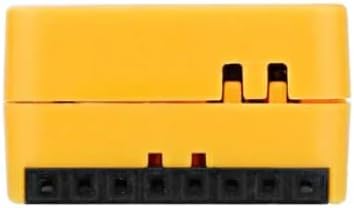
פיגורע 4: זייַט view of the M5StickC PLUS2, indicating the location of the power button (Button C).
4.2 קנעפּל פאַנגקשאַנז
The M5StickC PLUS2 features three programmable buttons:
- קנעפּל א: General purpose button, typically located on the front face below the screen.
- קנעפּל ב: General purpose button, typically located on the front face below the screen, next to Button A.
- קנעפּל C: Located on the side. Primarily functions as the power control button, but can also be programmed for short press actions.
4.3 אויסשטעלונג באַניץ
The 1.14-inch TFT LCD provides a visual interface for displaying information, sensor readings, or custom graphics. Its 135x240 resolution allows for clear text and simple graphical elements. Programming libraries are available to control the display content.
4.4 אינטעגרירטע פּעריפעראַלס
The device includes several integrated peripherals that can be accessed and controlled via programming:
- Infrared (IR) Transmitter: Use for sending IR signals to control compatible devices.
- מיקראָפאָן: Capture audio input for sound detection or voice processing.
- LED: A programmable indicator light for status feedback.
- IMU (Inertial Measurement Unit): Provides 3-axis accelerometer and 3-axis gyroscope data for motion sensing applications.
- באַזאַר: Generate audible tones for alerts or simple sound effects.
- RTC (רעאַל-צייט זייגער): Keep accurate time and date, even when the main power is off.
4.5 יקספּאַנשאַן פּאָרץ
The M5StickC PLUS2 offers several options for expanding its functionality:
- External 8-Pin Header: This header provides access to various GPIO pins and power lines (GND, 5V, G26, G36/G25, G0, BAT, 3V3, 5V) for connecting external sensors, actuators, or custom circuits.
- HY2.0-4P קאַנעקטער: This port is compatible with M5Stack Unit series modules, allowing for easy plug-and-play expansion with a wide range of sensors and accessories.
- HAT Compatibility: The device is designed to work with M5Stack HAT series products, which can be stacked on top to add specific functionalities like LoRa, GPS, or other communication modules.

פיגורע 5: זייַט view of the M5StickC PLUS2, showing the 8-pin external expansion header.

פיגור 6: אן אנדערע זייט view of the M5StickC PLUS2, showing the opposite side.
5. וישאַלט
5.1 באַטערי קער
To prolong the life of the integrated Lithium Polymer battery:
- פֿאַרמײַדט אויסשטעלן דעם אַפּאַראַט צו עקסטרעמע טעמפּעראַטורן (הייס אָדער קאַלט).
- Do not allow the battery to fully discharge for extended periods.
- לאָדט דעם אַפּאַראַט רעגולער אויף, אפילו אויב עס ווערט נישט אָפט גענוצט.
5.2 רייניקונג
Use a soft, dry, anti-static cloth to clean the exterior of the device. Avoid using liquids, solvents, or abrasive cleaners, as these can damage the components or finish.
5.3 סטאָרידזש
When not in use, store the M5StickC PLUS2 in a cool, dry place, away from direct sunlight, excessive heat, and moisture. Ensure the device is powered off before storage.
6. טראָובלעשאָאָטינג
די סעקציע באהאנדלט אלגעמיינע פראבלעמען וואס איר קענט באגעגענען מיט אייער M5StickC PLUS2.
- מיטל נישט פּאַוערינג אויף: Ensure the battery is sufficiently charged. Connect the device to a reliable 5V USB-C power source and allow it to charge for some time before attempting to power it on again.
- USB קאַנעקטיוויטי ישוז: If your computer does not recognize the device or you experience problems uploading firmware, verify that the correct USB-to-serial drivers (e.g., for CH9102) are installed for your operating system. Try using a different USB-C cable or a different USB port on your computer.
- ווייַז ניט ארבעטן: If the screen remains blank, check your code to ensure the ST7789V2 display is correctly initialized and that data is being sent to it.
- פירמווער אַפּלאָוד דורכפאַל: Confirm that the correct board and serial port are selected in your development environment. Ensure the device is not in a state that prevents programming (e.g., a crashed program).
- Peripherals Not Responding: Double-check your wiring for external components and ensure your code correctly initializes and interacts with the specific integrated peripheral (e.g., IMU, IR, Mic).
For more detailed troubleshooting steps and community support, refer to the official M5Stack documentation and online forums.
7. ספּעסאַפאַקיישאַנז
| שטריך | דעטאַל |
|---|---|
| סאָרט | M5Stack |
| מאָדעל נאָמען | M5StickC פּלוס2 |
| הויפּט קאָנטראָללער | ESP32-PICO-V3-02 (Core M Family) |
| קאַנעקטיוויטי טעכנאָלאָגיע | ינפרערעד, ווי-פי |
| ווייַז | 1.14-inch TFT LCD, 135x240 resolution (ST7789V2) |
| IMU | 6-axis MPU6886 |
| מיקראָפאָן | SPM1423-PDM |
| RTC | BM8563 |
| באַטערי | 200 mAh integrated Lithium Polymer |
| וסב פּאָרץ | 1 (USB-C for charging/programming) |
| אַפּערייטינג סיסטעמס | FreeRTOS (compatible with Windows, MacOS, Linux development environments) |
| ראַם זכּרון טעכנאָלאָגיע | LPDDR3 |
| מאַנופאַקטורער טייל נומער | K054 |
7.1 פּעקל אינהאַלט
The M5StickC PLUS2 package typically includes:
- M5StickC PLUS2 device with integrated 200 mAh Lithium Polymer battery
- געבויט-אין 6-אַקס IMU
- RTC
- מיקראָפאָן
- יר טראַנסמיטער
- קנעפּלעך
- 1.14-אינטש לקד
8. וואָראַנטי אינפֿאָרמאַציע
M5Stack products typically come with a limited manufacturer's warranty. For specific warranty terms, conditions, and duration, please refer to the official M5Stack website or the documentation provided at your point of purchase. Keep your proof of purchase for warranty claims.
9. שטיצן
For technical support, detailed documentation, tutorials, and community resources related to the M5StickC PLUS2, please visit the official M5Stack website. Online forums and community groups dedicated to M5Stack products and ESP32 development can also provide valuable assistance for development-related queries and project ideas.