
T10M Pro+
וואָרטעקס T10M פּראָ+ טאַבלעט באַניצער מאַנואַל
Model: T10M Pro+
1. הקדמה
Thank you for choosing the Vortex T10M Pro+ Tablet. This manual will guide you through the features and functions of your new device, ensuring a smooth and enjoyable user experience. Please read this manual carefully before using your tablet.
וואָס איז אין די קעסטל
Upon unboxing your Vortex T10M Pro+ Tablet, please verify that all the following items are present:
- Vortex T10M Pro+ Tablet
- טשאַרדזשער
- סקרין פּראָטעקטאָר
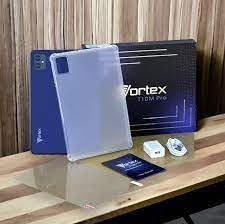
Image: Contents of the Vortex T10M Pro+ Tablet box. This includes the tablet, a clear protective case, the power adapter, and a screen protector, all neatly arranged on a wooden surface.
2. פּראָדוקט איבערview
Familiarize yourself with the physical components and key features of your Vortex T10M Pro+ Tablet.
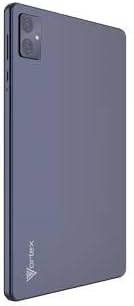
בילד: הינטערשטע view of the Vortex T10M Pro+ Tablet. The tablet has a sleek, dark finish with the 'Vortex' logo subtly placed at the bottom. The camera module is visible in the upper left corner.

בילד: דעטאַלירט view of the back of the Vortex T10M Pro+ Tablet, highlighting its specifications. Printed details include '10.1-inch Brilliant Display', '5MP Front Camera', '8MP Rear Camera', 'MTK6766 Processor', 'Quad-Core, 4GB+64GB', '5000mAh Mega Battery', and 'Android 12'.
3. סעטאַפּ
3.1. טשאַרדזשינג די מיטל
Before first use, fully charge your tablet. Connect the provided charger to the tablet's charging port and plug it into a power outlet. The battery indicator on the screen will show charging progress.
3.2. Inserting SIM/MicroSD Card
The Vortex T10M Pro+ supports 4G LTE connectivity and expandable storage. To insert a SIM card (for mobile data) or a microSD card (for additional storage):
- געפינט די SIM/microSD קאַרטל טאַץ אויף דער זייט פון דער טאַבלעט.
- ניצט דעם צוגעשטעלטן סים ארויסווארפער געצייג צו עפענען דעם טאץ.
- Carefully place the SIM card(s) and/or microSD card into the designated slots, ensuring correct orientation.
- שטופּן דעם טאַץ צוריק אין דער טאַבלעט ביז עס קליקט אַרײַן אין פּלאַץ.
3.3. ערשטע איינשאַלטונג
Press and hold the Power button located on the side of the tablet until the Vortex logo appears. Follow the on-screen prompts to complete the initial setup, including language selection, Wi-Fi connection, and Google account setup.
4. אַפּערייטינג ינסטרוקטיאָנס
4.1. יקערדיק נאַוויגאַציע
Your tablet runs on Android 13.0. Use touch gestures for navigation:
- צאַפּן: אויסקלייבן אַן אייטעם אָדער עפֿענען אַן אַפּ.
- לאַקכענען: סקראָלן דורך סקרינז אדער רשימות.
- קניפּן-צו-זומען: פארגרעסערן אדער פארקלענערן בילדער און web בלעטער.
- לאנג דרוק: צוטריט קאנטעקסטועלע מעניוס אדער באוועג איקאנעס.
4.2. קאַנעקטינג צו ווי-פי
צו פאַרבינדן צו אַ Wi-Fi נעץ:
- גיין צו סעטטינגס > נעץ און אינטערנעט > אינטערנעט.
- קער אויף ווי-פי.
- אויסקלייבן אייער געוואונטשענע נעץ פון דער ליסטע און אַרייַן די פּאַראָל אויב געבעטן.
4.3. Using Mobile Data (4G LTE)
If you have inserted a valid SIM card with an active data plan:
- גיין צו סעטטינגס > נעץ און אינטערנעט > SIMs.
- Ensure Mobile data is enabled for your SIM.
4.4. אַפּאַראַט אָפּעראַציע
די טאַבלעט פֿאַרמאָגט אַ 8MP הינטערשטע קאַמעראַ און אַ 5MP פֿראָנט קאַמעראַ.
- עפֿענען די קאַמעראַ אַפּ.
- צאַפּן דעם שאַטער קנעפּל צו נעמען אַ פאָטאָ.
- טוישט צווישן פראָנט און הינטערשטע קאַמעראַס ניצנדיק די קאַמעראַ טאָגל ייקאַן.
4.5. פאַרוואַלטן סטאָרידזש
Your tablet comes with 64GB of internal storage. You can expand this using a microSD card up to 128GB. To view storage usage, go to סעטטינגס > סטאָרידזש.
5. וישאַלט
5.1. רייניקונג
ניצט אַ ווייכע, לינט-פֿרייע שטאָף צו רייניקן דעם עקראַן און קערפּער פֿון דער טאַבלעט. פֿאַרמייַדט ניצן שטרענגע כעמיקאַלן אָדער אַברייסיוו מאַטעריאַלן.
5.2. ווייכווארג דערהייַנטיקונגען
קוקט פּעריִאָדיש נאָך ווייכווארג דערהייַנטיקונגען צו זיכער מאַכן אַז אייער טאַבלעט האט די לעצטע פֿעיִקייטן און זיכערהייט פּאַטשאַז. גייט צו סעטטינגס > סיסטעם > סיסטעם דערהייַנטיקן.
5.3. באַטערי קער
צו פאַרלענגערן די באַטאַרייע לעבן:
- ויסמיידן עקסטרעם טעמפּעראַטורעס.
- לאָזט נישט די באַטאַרייע זיך אָפט גאָר אויסלאָדן.
- אַרויסנעמען דעם טשאַרדזשער אַמאָל די באַטאַרייע איז פול.
6. טראָובלעשאָאָטינג
די סעקציע באהאנדלט אלגעמיינע פראבלעמען וואס איר קענט באגעגענען מיט אייער טאבלעט.
| אַרויסגעבן | מעגלעך לייזונג |
|---|---|
| טאַבלעט טוט זיך נישט אָן | זיכער מאַכן אַז די באַטאַרייע איז אָנגעלאָדן. דריק און האַלט די פּאַוער קנעפּל פֿאַר לפּחות 10-15 סעקונדעס צו צווינגען אַ ריסטאַרט. |
| ווי-פי קשר ישוז | ריסטאַרט דעם טאַבלעט און דיין Wi-Fi ראַוטער. פֿאַרגעסט וועגן דעם נעץ אין די סעטטינגס און פֿאַרבינדט זיך ווידער. |
| אַפּפּס זענען פּאַמעלעך אָדער קראַשן | Close background apps. Clear app cache (Settings > Apps > [App Name] > Storage > Clear cache). Restart the tablet. |
| מעסעדזש פון פולע סטאָרידזש | ויסמעקן ומנייטיק files or apps. Move media to a microSD card. |
7. ספּעסאַפאַקיישאַנז
Detailed technical specifications for the Vortex T10M Pro+ Tablet.
| שטריך | באַשרייַבונג |
|---|---|
| מאָדעל נאָמען | T10M Pro+ Tablet (Unlocked) Blue 10.1" 64GB 4GB GSM 4G LTE + Wifi 8MP |
| ווייַז גרייס | 10.1 אינטשעס |
| מאַקסימום סקרין האַכלאָטע | 1280 רענטגענ 800 פּיקסעלס |
| דערפרישן קורס | 120 הז |
| פּראַסעסער | MediaTek, 2 GHz |
| באַראַן | 4 גיגאבייט |
| אינערלעכער סטאָרידזש | 64 גיגאבייט |
| יקספּאַנדאַבאַל סטאָרידזש | MicroSD (up to 128GB) |
| אָפּערייטינג סיסטעם | אַנדרויד 13.0 |
| דערציען אַפּאַראַט | 8 מפּ |
| פראָנט אַפּאַראַט | 5 מפּ |
| קאַנעקטיוויטי | 4G LTE, Wi-Fi, בלועטוט, GPS |
| באַטערי טיפּ | ליטהיום-יאָן |
| דורכשניטלעך באַטאַרייע לעבן | 18 שעה |
| פּראָדוקט דימענשאַנז | 10.1 X 5 X 3 אינטשעס |
| קאָליר | שוואַרץ |
8. וואָראַנטי אינפֿאָרמאַציע
This product is covered by a manufacturer's warranty. Please refer to the warranty card included with your purchase or visit the manufacturer's official webזייטל פֿאַר דעטאַלירטע תּנאים און באַדינגונגען וועגן וואָראַנטי קאַווערידזש, געדויער, און פאָדערונג פּראָצעס.
9. שטיצן
For further assistance, technical support, or service inquiries, please contact the manufacturer's customer support. Contact information can typically be found on the product packaging, the manufacturer's website, or the warranty documentation.
Ask a question about this manual
Ask about setup, troubleshooting, compatibility, parts, safety, or missing instructions. Manuals+ will review the question and use this page’s manual context to help answer it.