
1. הקדמה
Thank you for choosing EZVALO Under Cabinet and Puck Lights. This manual provides detailed instructions for the installation, operation, and maintenance of your new lighting system. Please read this manual thoroughly before use to ensure proper function and longevity of the product.
פּראָדוקט קאַמפּאָונאַנץ
- EZVALO Under Cabinet Bar Lights
- EZVALO Puck Lights
- ווייַט קאָנטראָל
- Mounting Hardware (Sticker Mounting Disks, Mounting Strips)
- USB Charging Cable (3-in-1 for Puck Lights)
2. סעטאַפּ און ייַנמאָנטירונג
2.1 טשאַרדזשינג די ליגהץ
Before initial use, fully charge both the bar lights and puck lights.
- Bar Lights: Connect the USB charging cable to the charging port on the bar light and a suitable USB power adapter (not included). A red light indicates charging, and a green light indicates a full charge.
- Puck Lights: Use the provided 3-in-1 USB charging cable to charge multiple puck lights simultaneously. Connect the cable to the charging port on each puck light and a USB power adapter.
Note: The bar lights feature a 1100mAh battery, offering up to 52 hours of continuous lighting or 60 days in Auto mode. Puck lights have a 2000mAh battery, lasting up to 19 hours at maximum brightness.
2.2 ינסטאַלירונג
Both bar lights and puck lights offer wireless installation options.
- מאַגנעטיק אַטאַטשמאַנט: The lights have built-in magnets. They can be directly attached to any magnetic metal surface.
- קלעפּיק מאַונטינג: For non-magnetic surfaces, use the provided mounting hardware.
- רייניקט די געוואונטשענע אינסטאַלאַציע ייבערפלאַך גרינטלעך צו זיכער מאַכן אַז עס איז טרוקן און פריי פון שטויב אָדער פעט.
- Peel off the protective film from the adhesive side of the mounting strips (for bar lights) or sticker mounting disks (for puck lights).
- Firmly press the adhesive side onto the clean surface.
- Attach the light to the magnetic side of the mounting strip/disk. The lights can be easily removed for recharging or repositioning.
3. אָפּעראַציע
3.1 Bar Light Control Options

בילד באַשרייַבונג: This image displays the side of an EZVALO bar light with a toggle switch labeled "ON/OFF/AUTO". Below it, a remote control is shown with buttons for ON, OFF, dimming, and timer functions. The image illustrates the physical controls and remote capabilities for the bar lights.
- באַשטימען באַשטימען: Located on the side of the bar light.
- אויף: Light remains continuously on.
- OFF: ליכט בלייבט אויסגעלאָשן.
- אָטאַמאַטיק: Activates motion sensor mode. The light will turn on automatically when motion is detected in a dark environment.
- ווייַט קאָנטראָל:

בילד באַשרייַבונג: This image shows a hand holding the remote control, pointing towards several EZVALO bar lights installed under kitchen cabinets. The remote has buttons for ON, OFF, timer settings (30s, 60s), and dimming. Icons for Timer, Dimming, and 16ft Distance are displayed below, indicating the remote's capabilities.
- ON/OFF: קער די לייץ אויף אָדער אַוועק.
- דימינג: סטרויערן ברייטנאַס לעוועלס.
- טיימער פֿונקציע: Set the lights to turn off automatically after a specified duration (e.g., 5 min, 15 min, 30 min, 45 min, 60 min). Note: Timer function is disabled in Always On mode.
3.2 Motion Sensor Function (Bar Lights & Puck Lights)
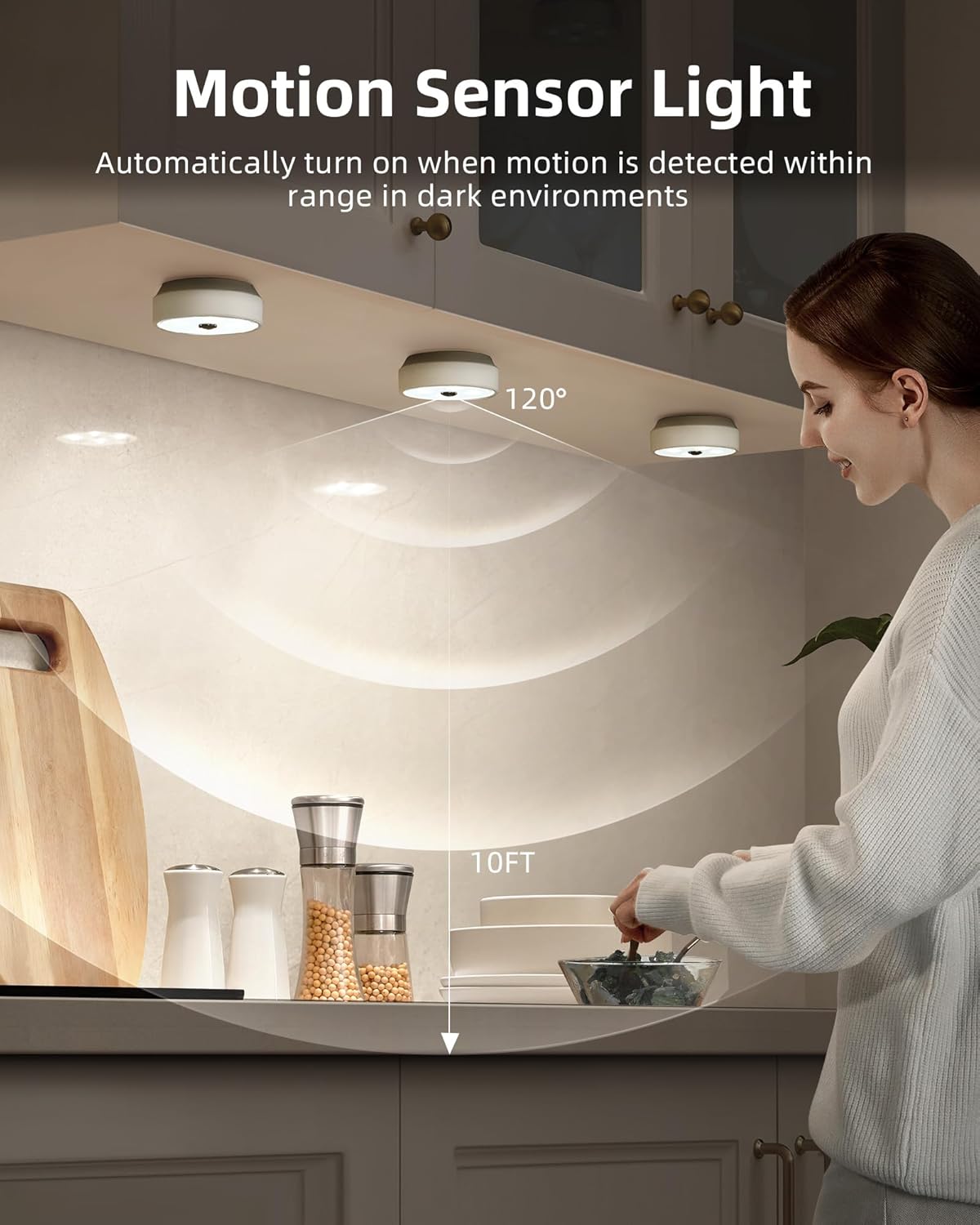
בילד באַשרייַבונג: This image illustrates the motion sensor functionality of the EZVALO puck lights installed under kitchen cabinets. A person is reaching into a cabinet, and the lights are illuminated. A diagram shows a 120° detection angle and a 10ft detection range, indicating how the motion sensor operates.
- The motion sensor activates the light when movement is detected within a 10ft (3 meters) range.
- For puck lights, the detection angle is 120°.
- To conserve energy, the lights will only activate in dark environments. They will not turn on if there is sufficient ambient daylight.
- Puck lights automatically turn off approximately 25 seconds after the last detected movement.
3.3 Puck Light Group Control (with Remote)
The remote control for puck lights allows for grouping and synchronized control.
- Puck lights can be assigned into 2 groups for separate control.
- All puck lights within the same group can be dimmed and turned On/Off in unison using the remote, eliminating the need to adjust each light individually.
3.4 Adjusting Light Temperature (Puck Lights)
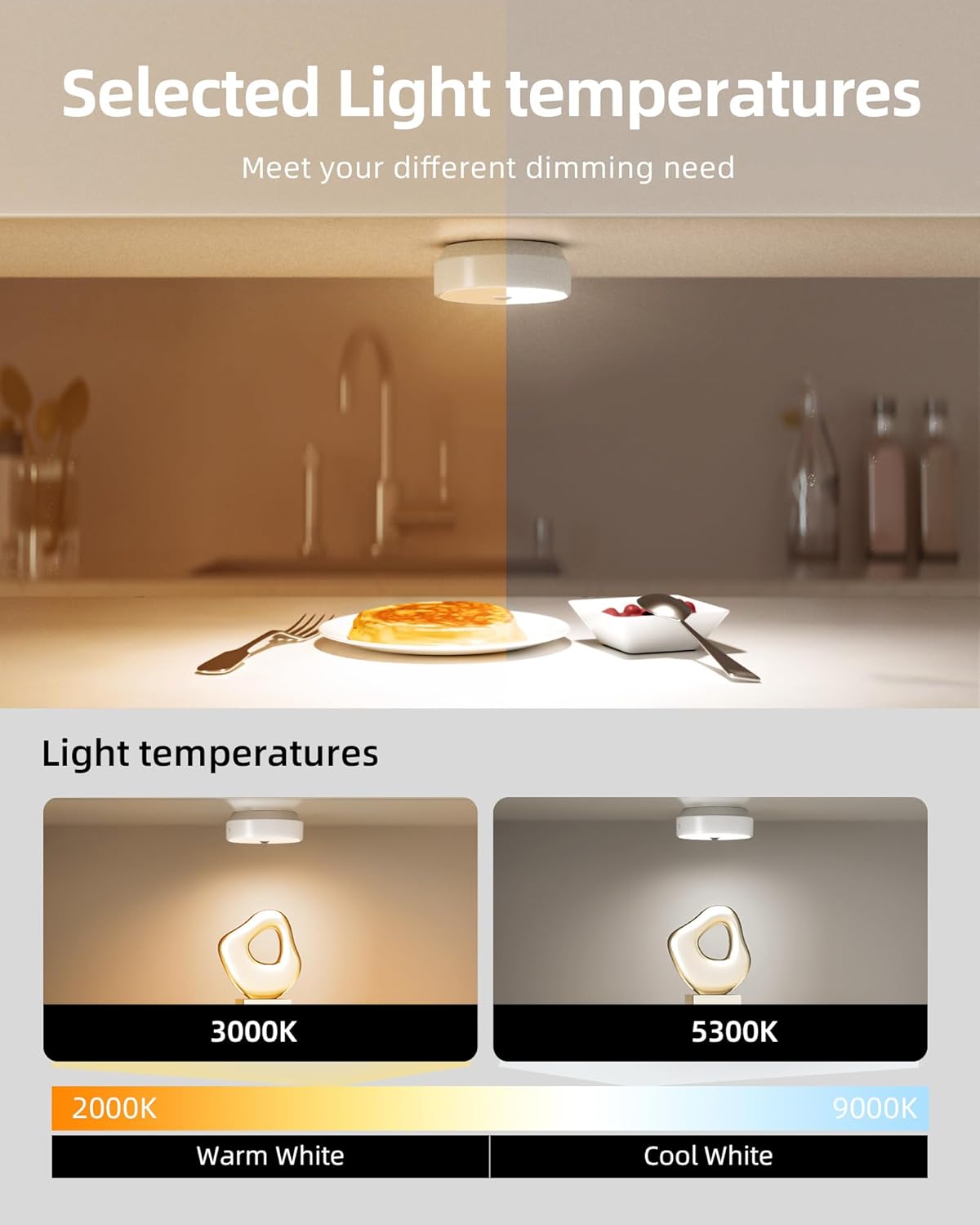
בילד באַשרייַבונג: This image demonstrates the adjustable light temperatures of the EZVALO puck lights. The top half shows a kitchen counter with warm lighting, while the bottom half shows two puck lights illuminating a surface, one at 3000K (Warm White) and another at 5300K (Cool White). A color temperature scale from 2000K to 9000K is also depicted.
Puck lights offer adjustable light temperatures to suit different preferences and environments.
- Use the remote control to cycle through available color temperatures, typically ranging from warm white (e.g., 3000K) to cool white (e.g., 5300K).
4. וישאַלט
4.1 רייניקונג
To maintain the appearance and functionality of your lights:
- Ensure the lights are turned off before cleaning.
- Wipe the surfaces with a soft, dry cloth.
- פֿאַר שווערע מאַרקן, אַ ביסל דamp א שטאָף קען גענוצט ווערן, און דערנאך א טרוקענעם שטאָף.
- Do not use abrasive cleaners, solvents, or harsh chemicals, as these can damage the finish or electronic components.
4.2 באַטערי קער
The lights are equipped with rechargeable lithium-polymer batteries. Follow these guidelines for optimal battery life:
- Recharge the lights when the brightness noticeably diminishes.
- פֿאַרמײַדט אָפֿט גאָר אויסצוליידיקן די באַטעריע.
- If storing the lights for an extended period, charge them to about 50% every few months.
- שטעלט נישט אויס באַטעריעס צו עקסטרעמע טעמפּעראַטורן.
5. טראָובלעשאָאָטינג
| פּראָבלעם | מעגלעך סיבה | לייזונג |
|---|---|---|
| ליכט טוט נישט קער אויף. | באַטערי איז דיפּליטיד. ליכט איז אין אויסגעלאשן מאָדע. Insufficient darkness (in AUTO mode). | ריטשאַרדזש די ליכט. Check the toggle switch/remote to ensure it's in ON or AUTO mode. Ensure the environment is dark enough for the motion sensor to activate. |
| באַוועגונג סענסאָר אַרבעט נישט. | Light is not in AUTO mode. Environment is too bright. Obstruction blocking sensor. | Set the light to AUTO mode using the toggle switch or remote. The sensor only activates in dark conditions. מאַכן זיכער אַז דער סענסער איז קלאָר פון אַבסטראַקשאַנז. |
| די ווײַטקאָנטראָל רעאַגירט נישט. | Remote battery is low/dead. אויס פון קייט. פאַרשטעלונג צווישן ווייַט און ליכט. | Replace remote battery (if applicable) or ensure remote is charged. Move closer to the lights (max 16ft range). זיכער מאַכן אַ קלאָרע ליניע פון זעאונג. |
| Lights dim unexpectedly. | די באַטאַרייע איז נידעריק. | Recharge the lights. |
6. ספּעסאַפאַקיישאַנז
| שטריך | דעטאַל |
|---|---|
| סאָרט | EZVALO |
| מאָדעל נומער | 02.L22.00007 |
| ליכט מקור | געפירט |
| ברייטנאַס | 40 lumen (per light, typical) |
| ליכט קאָליר | White (Adjustable for Puck Lights) |
| מאַכט מקור | Battery Powered (Rechargeable Lithium-Polymer) |
| Bar Light Battery Capacity | 1100 מאַה |
| Puck Light Battery Capacity | 2000 מאַה |
| קאָנטראָל מעטאָד | Remote Control, Toggle Switch (Bar Lights) |
| ספּעציעלע פֿעיִקייטן | Motion Sensor, Dimmable, Timer Function, Group Control (Puck Lights) |
| באַוועגונג סענסאָר ראַנגע | 10 פט (3 מעטער) |
| Puck Light Sensor Angle | 120° |
| ייַנמאָנטירונג טיפּ | Magnetic, Adhesive (Surface Mount) |
| מאַטעריאַל | Iron, Metal, Plastic |
| וואַסער קעגנשטעל מדרגה | Not Water Resistant (Indoor Use Only) |
| אָרט טיפּ | Indoor (Home, Kitchen, Bathroom, Bedroom, Office, Cabinet) |
7. זיכערקייַט אינפֿאָרמאַציע
- דו זאלסט נישט דיסאַסעמבאַל אָדער מאָדיפיצירן די פּראָדוקט.
- Keep away from water and high humidity environments as the product is not water resistant.
- נישט אויסשטעלן צו דירעקט זונשייַן אדער הויכע טעמפּעראַטורן.
- האַלטן אויס פון דערגרייכן פון קינדער.
- Use only the specified charging cables.
8. קונה שטיצן
For any questions, technical support, or warranty inquiries, please contact EZVALO customer service through the retailer's platform or visit the official EZVALO webפּלאַץ.