
1. הקדמה
This manual provides essential information for the safe and efficient operation of your Sharp GX-BT190 Portable Bluetooth Speaker. Please read it thoroughly before using the device and retain it for future reference.
2. זיכערקייַט אינפֿאָרמאַציע
- שטעלט נישט אויס דעם רעדנער צו עקסטרעמע טעמפּעראַטורן, דירעקטע זונשייַן, אדער הויכע פֿײַכטקייט.
- Do not disassemble, repair, or modify the speaker. This may void the warranty and pose safety risks.
- זיכערט זיך אז דער דעקל פונעם טשאַרדזשינג פּאָרט איז זיכער פארמאכט ווען איר ניצט דעם רעדנער לעבן וואַסער כדי צו האַלטן זיין IP67 שאַץ.
- ניצט נאָר דעם צוגעשטעלטן טשאַרדזשינג קאַבל אָדער אַ סערטיפיצירטן עקוויוואַלענט.
- האַלטן די רעדנער אַוועק פון קינדער און פּעץ.
- ויסמיידן צוגעהערט אין הויך באַנד לעוועלס פֿאַר עקסטענדעד פּיריאַדז צו פאַרמייַדן געהער שעדיקן.
3. פּעקל אינהאַלט
- Sharp GX-BT190 Portable Bluetooth Speaker
- וסב טשאַרדזשינג קאַבלע
- לאַניאַרד
- ינסטראַקשאַנז מאַנואַל
4. פּראָדוקט איבערview

פראָנט view of the Sharp GX-BT190 speaker, showing the central speaker grille with the Sharp logo and the LED light ring.

זייַט view of the Sharp GX-BT190 speaker, highlighting the textured speaker grille and the integrated lanyard.
דערציען view of the Sharp GX-BT190 speaker, showing the control buttons and the sealed charging port cover.
קאָנטראָלס און ינדיקאַטאָרס:
- מאַכט קנעפּל: דריקן און האַלטן צו קער אויף / אַוועק.
- באַנד אַרויף / ווייַטער ליד קנעפּל (+): קורץ דריקן צו פארגרעסערן די קול, לאנג דריקן פארן נעקסטן ליד.
- באַנד אַראָפּ / פריערדיקע ליד קנעפּל (-): קורץ דריקן צו פארמינערן די קול, לאנג דריקן פארן פריערדיגן ליד.
- Play/Pause / Call Button (►||): Short press to play/pause, answer/end calls. Long press to reject calls.
- Mode / Light Button (M): Short press to cycle through LED light modes. Long press to turn off LED lights.
- USB-C טשאַרדזשינג פּאָרט: For charging the speaker. Ensure the rubber cover is sealed when not charging.
- LED ינדיקאַטאָר: ווײַזט טשאַרדזשינג סטאַטוס און בלועטוט פּערינג סטאַטוס.
5. סעטאַפּ
5.1 אויפלאָדן דעם רעדנער
- Open the rubber cover on the back of the speaker to access the USB-C charging port.
- Connect the provided USB charging cable to the speaker's USB-C port.
- פֿאַרבינדט דעם אַנדערן עק פֿונעם USB קאַבל צו אַ USB מאַכט אַדאַפּטער (נישט אַרייַנגערעכנט) אָדער אַ קאָמפּיוטער'ס USB פּאָרט.
- The LED indicator will illuminate during charging and turn off once fully charged.
- Close the rubber cover securely after charging to maintain the speaker's waterproof rating.
5.2 פּאַוערינג אויף / אַוועק
- צו מאַכט אויף: Press and hold the Power button for approximately 3 seconds. You will hear an audible prompt, and the LED indicator will flash.
- צו מאַכט אַוועק: Press and hold the Power button for approximately 3 seconds. You will hear an audible prompt, and the LED indicator will turn off.
5.3 בלועטאָאָטה פּערינג
- Ensure the speaker is powered on and the LED indicator is flashing, indicating it is in pairing mode.
- אויף דיין רירעוודיק מיטל, געבן בלועטאָאָטה און זוכן פֿאַר בנימצא דעוויסעס.
- Select "GX-BT190" from the list of devices.
- Once paired, the LED indicator will stop flashing and remain solid, and you will hear a confirmation tone.
- דער רעדנער וועט זיך אויטאָמאַטיש צוריקבינדן צום לעצטן פארבונדענעם אפאראט ווען עס ווערט אנגעצינדן, אויב דער אפאראט איז אין דער געגנט און בלועטוט איז איינגעשטעלט.
5.4 אמתע ווירעלעס סטערעאָ (TWS) פּאָרינג
TWS allows you to pair two GX-BT190 speakers together for a stereo audio experience.

Two Sharp GX-BT190 speakers, one red and one blue, positioned together, illustrating the True Wireless Stereo (TWS) pairing feature.
- Ensure both GX-BT190 speakers are powered on and not connected to any Bluetooth device.
- אויף איינעם פון די רעדנערס (דאָס וועט זיין דער הויפּט רעדנער), דריקט צוויי מאָל דעם פּאַוער קנעפּל. דער רעדנער וועט אַרייַן אין TWS פּערינג מאָדע.
- The two speakers will automatically search for and connect to each other. You will hear a confirmation tone once TWS pairing is successful.
- Once TWS paired, connect your mobile device to the primary speaker via Bluetooth as described in section 5.3.
- צו דיסקאנעקטן TWS, דריקט צוויי מאל דעם Power קנעפל אויף יעדן רעדנער.
6. אָפּערייטינג
6.1 פּלייַינג אַודיאָ
- שפּיל / פּויזע: קורץ דריקן די שפּיל / פּויזע קנעפּל.
- באַנד אַרויף: דריק קורץ דעם '+' קנעפל.
- באַנד אַראָפּ: דריק קורץ דעם '-' קנעפל.
- ווייַטער שפּור: לאַנג דריקן די '+' קנעפּל.
- פֿריִערדיקע שפּור: לאַנג דריקן דעם '-' קנעפּל.
6.2 הענט-פריי רופן
- ענטפער רופן: דריקט קורץ דעם שפּיל/פּויזע קנעפּל ווען אַן אינקאַמינג רוף קלינגט.
- סוף רופן: דריקט קורץ דעם שפּיל/פּויזע קנעפּל בעת אַ רוף.
- אָפּוואַרפן רופן: לאנג דריק דעם שפּיל/פּויזע קנעפּל ווען אַן אינקאַמינג רוף קלינגט.
6.3 LED Mood Lights
- Short press the 'M' (Mode/Light) button to cycle through the 6 available LED mood light modes.
- Long press the 'M' button to turn off the LED lights.
6.4 וואַסערפּרוף און שטויבפּרוף נוצן (IP67)

The Sharp GX-BT190 speaker partially submerged in water, demonstrating its IP67 waterproof and dustproof capabilities.
The GX-BT190 speaker is rated IP67, meaning it is protected from dust ingress and can withstand immersion in water up to 1 meter for 30 minutes. To ensure this protection:
- Always ensure the rubber cover for the charging port is fully and securely sealed before exposing the speaker to water or dust.
- Do not intentionally submerge the speaker for extended periods or beyond the specified depth.
- After exposure to water, wipe the speaker dry with a soft cloth before charging.
7. וישאַלט
7.1 רייניקונג
- ווישן די רעדנער מיט אַ ווייך, דamp שטאָף.
- ניצט נישט קיין שרײַבנדיקע רייניגער, אַלקאָהאָל, אדער כעמישע סאָלווענטן.
- Ensure the speaker is dry before charging or storing.
7.2 סטאָרידזש
- האַלט דעם רעדנער אין אַ קיל, טרוקן אָרט אַוועק פון דירעקט זונשייַן און עקסטרעמע טעמפּעראַטורן.
- אויב איר לייגט עס אויף פאר א לענגערע צייט, לאדט אויף די באטעריע פון צייט צו צייט (למשל, יעדע 3 חדשים) כדי צו אויפהאלטן די באטעריע געזונט.
8. טראָובלעשאָאָטינג
| פּראָבלעם | לייזונג |
|---|---|
| דער רעדנער גייט נישט אן. | זיכער מאַכן אַז די באַטאַרייע איז אָנגעלאָדן. פֿאַרבינדט דעם רעדנער צו אַ מאַכט מקור מיטן USB קאַבל. |
| קען נישט פארבינדן דורך בלוטוט. | Ensure the speaker is in pairing mode (LED flashing). Turn off and on Bluetooth on your device. Move the speaker closer to your device. Clear previous Bluetooth connections on your device. |
| קיין קלאַנג אָדער נידעריקע וואָלומען. | פֿאַרגרעסערט דעם קול אויף ביידע דעם רעדנער און דיין פֿאַרבונדענעם מיטל. זיכערט זיך אַז דער רעדנער איז ריכטיק פֿאַרבונדן. |
| נעבעך געזונט קוואַליטעט. | Move the speaker closer to your device. Ensure there are no obstructions between the speaker and your device. Try playing a different audio source. |
| TWS פּאָרינג פיילז. | Ensure both speakers are GX-BT190 models and are not connected to any other Bluetooth device. Try powering both speakers off and on, then re-attempt TWS pairing. |
9. ספּעסאַפאַקיישאַנז

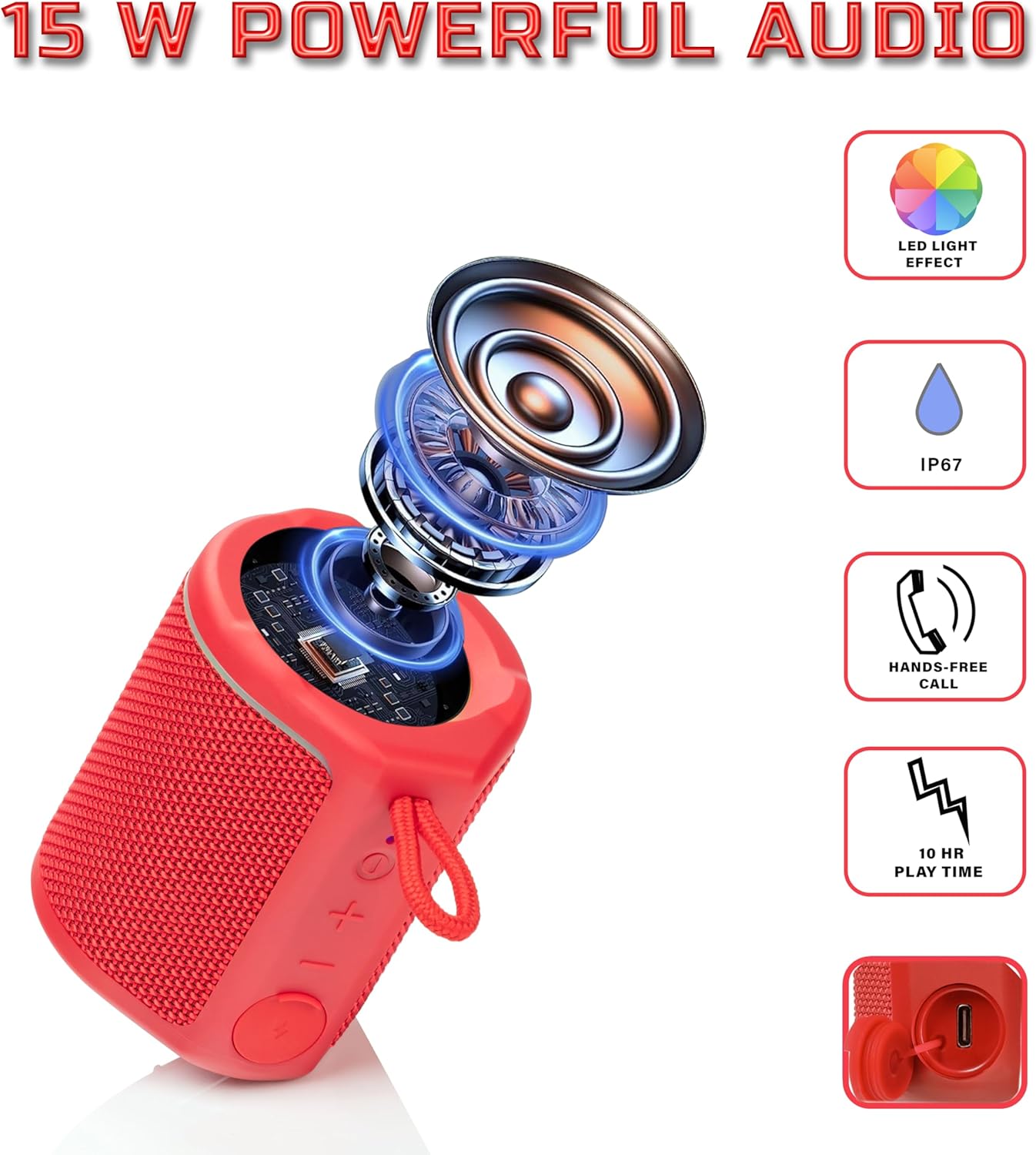
Diagram illustrating the internal components of the Sharp GX-BT190 speaker, including the speaker driver, and highlighting features like LED light effect, IP67 rating, hands-free call function, and battery life.
| שטריך | דעטאַל |
|---|---|
| מאָדעל נומער | GX-BT190 |
| קאַנעקטיוויטי טעכנאָלאָגיע | בלועטאָאָטה |
| רעדנער מאַקסימום רעזולטאַט מאַכט | 10 וואטס |
| וואָטערפּרוף רייטינג | IP67 |
| באַטערי לעבן | אַרויף צו 15 שעה |
| באַטערי טיפּ | 1 ליטהיום יאָן (אַרייַנגערעכנט) |
| באַטאַרייע קאַפּאַציטעט | 1200 מאַה |
| פּראָדוקט דימענשאַנז (ד רענטגענ וו רענטגענ ה) | 7.5 x 7.5 x 7.5 ס״מ (אומגעפער) |
| פּונקט וואָג | 226.8 ג (8 אונסעס) |
| ווירעלעסס ראַנגע | אַרויף צו 33 פֿיס |
| נאָך פֿעיִקייטן | LED Light, True Wireless Stereo (TWS), Hands-Free Calling |
10. וואָראַנטי
The Sharp GX-BT190 Portable Bluetooth Speaker comes with a 1-Year Limited Warranty from the date of purchase. This warranty covers manufacturing defects under normal use. It does not cover damage caused by misuse, accidents, unauthorized modifications, or normal wear and tear. Please retain your proof of purchase for warranty claims.
11. שטיצן
For technical assistance, warranty inquiries, or further information regarding your Sharp GX-BT190 speaker, please contact Sharp Inc. customer support:
- קאָנטאַקט פאַבריקאַנט: Sharp Inc
- טעלעפֿאָן: 1-800-BE-SHARP