
1. הקדמה
א דאנק פארן קויפןasing the Sharp GX-BT390 Crystal Clear Series Bluetooth Speaker. This portable speaker is designed to deliver high-quality audio with enhanced bass, featuring IP67 waterproof and dustproof capabilities, LED light modes, and True Wireless Stereo (TWS) pairing. This manual provides essential information for setup, operation, and maintenance to ensure optimal performance and longevity of your device.
2. פּעקל אינהאַלט
ביטע קאָנטראָלירט אַז אַלע זאכן זענען פאַראַן:
- Sharp GX-BT390 Bluetooth Speaker
- טשאַרדזשינג קאַבל (USB-C)
- באַניצער מאַנואַל
3. פּראָדוקט איבערview
Familiarize yourself with the various parts of your Sharp GX-BT390 speaker.
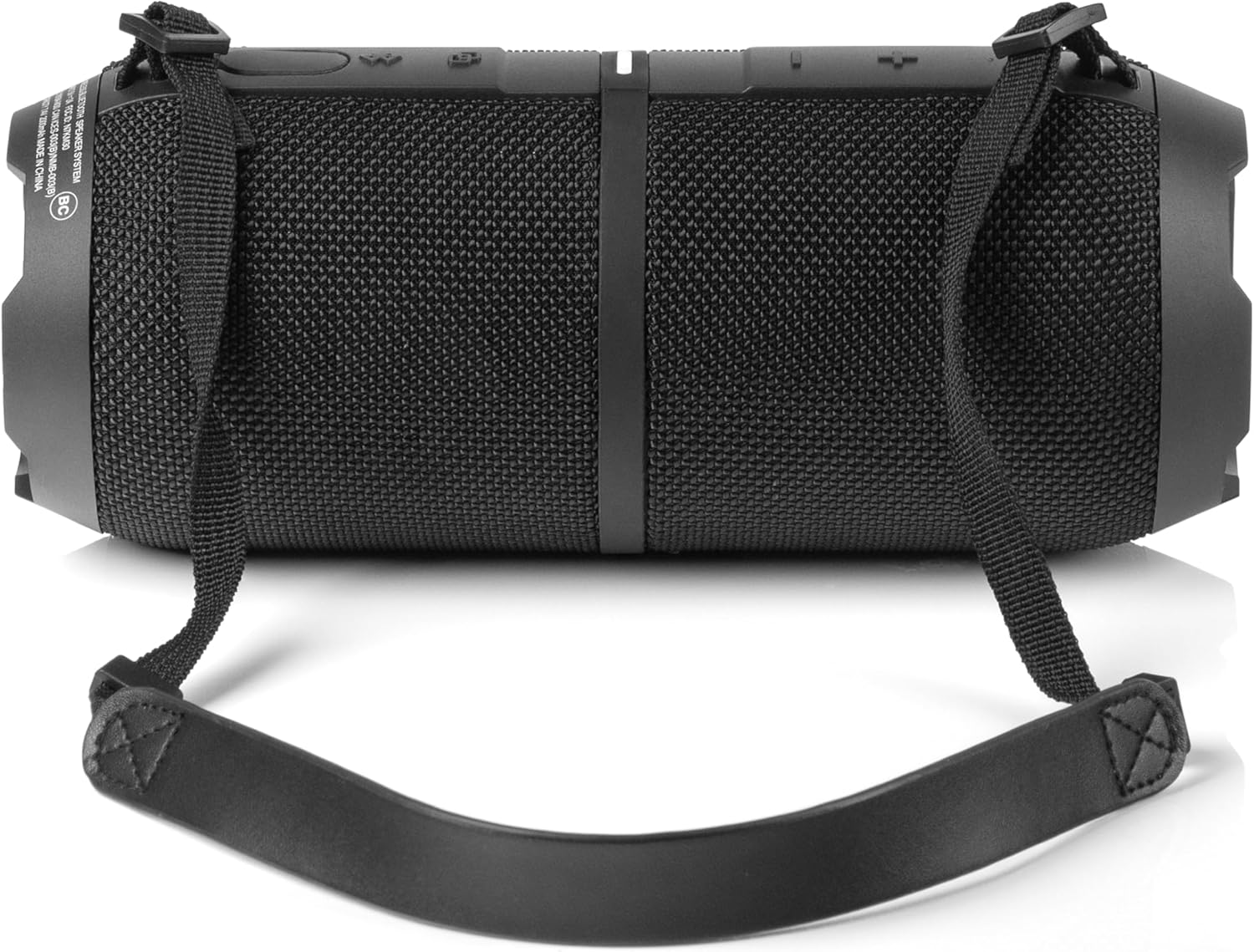
פיגורע 3.1: פראָנט view of the Sharp GX-BT390 speaker, highlighting the control panel with volume buttons, play/pause, and power indicator.

פיגורע 3.2: צוריק view of the Sharp GX-BT390 speaker, illustrating the sealed charging port and attachment points for the carrying strap.

פיגורע 3.3: זייַט view of the Sharp GX-BT390 speaker, showing the textured surface and the adjustable carrying strap.

Figure 3.4: The Sharp GX-BT390 speaker with its end cap illuminated, displaying the Sharp logo and an active LED light mode.
קאָנטראָלס און ינדיקאַטאָרס:
- מאַכט קנעפּל: דריקן און האַלטן צו קער אויף / אַוועק.
- באַנד אַרויף (+): פאַרגרעסערן באַנד.
- באַנד אַראָפּ (-): פאַרמינערן באַנד.
- שפּיל / פּויזע קנעפּל: Play or pause music, answer/end calls.
- בלועטאָאָטה פּערינג קנעפּל: אָנהייבן בלוטוט פּערינג מאָדע.
- LED ינדיקאַטאָר: ווײַזט מאַכט סטאַטוס, טשאַרדזשינג סטאַטוס, און בלועטוט פֿאַרבינדונג סטאַטוס.
- ליכט מאָדע קנעפּל: גיי דורך די LED ליכט מאָדעס.
4. סעטאַפּ
4.1 אויפלאָדן דעם רעדנער
- Open the protective cover on the back of the speaker to access the USB-C charging port.
- פֿאַרבינדט דעם צוגעשטעלטן USB-C קאַבל צום רעדנער'ס טשאַרדזשינג פּאָרט.
- פֿאַרבינדט דעם אַנדערן עק פֿונעם USB-C קאַבל צו אַ קאָמפּאַטיבלע USB מאַכט אַדאַפּטער (נישט אַרייַנגערעכנט).
- דער LED אינדיקאַטאָר וועט ווײַזן דעם טשאַרדזשינג סטאַטוס. א פולע טשאַרדזשינג נעמט טיפּיש אַרום 3-4 שעה.
- Once fully charged, disconnect the cable and securely close the protective cover to maintain IP67 water and dust resistance.
4.2 פּאַוערינג אויף / אַוועק
- צו מאַכט אויף: Press and hold the Power button for approximately 2 seconds until you hear an audible tone and the LED indicator illuminates.
- צו מאַכט אַוועק: Press and hold the Power button for approximately 2 seconds until you hear an audible tone and the LED indicator turns off.
4.3 בלועטאָאָטה פּערינג
- זייט זיכער אז דער רעדנער איז אנגעצונדן און אינערהאלב 1 מעטער פון אייער בלוטוט דעווייס.
- The speaker will automatically enter Bluetooth pairing mode when first powered on, or if no device is connected. The LED indicator will flash rapidly.
- אויף אייער בלוטוט דעווייס (סמאַרטפאָן, טאַבלעט, אאז"וו), אַקטיווירט בלוטוט און זוכט פֿאַר פֿאַראַן דעווייסעס.
- Select "Sharp GX-BT390" from the list of devices.
- Once paired, you will hear a confirmation tone, and the LED indicator will glow solid blue.
- If pairing fails, turn off the speaker and your device, then repeat the steps.
5. אַפּערייטינג ינסטרוקטיאָנס
5.1 מוזיק פּלייבאַק
- שפּיל / פּויזע: דריקן די שפּיל / פּויזע קנעפּל אַמאָל.
- באַנד אַרויף: דריק דעם '+' קנעפל.
- באַנד אַראָפּ: דריק דעם '-' קנעפּל.
- ווייַטער שפּור: דריק און האלט דעם '+' קנעפל.
- פֿריִערדיקע שפּור: דריק און האלט דעם '-' קנעפל.
5.2 הענט-פריי רופן
The Sharp GX-BT390 features a built-in microphone for hands-free calls when connected to your smartphone.
- ענטפער רופן: דריקן די שפּיל / פּויזע קנעפּל אַמאָל.
- סוף רופן: דריק דעם שפּיל/פּויזע קנעפּל איין מאָל בעת אַ רוף.
- אָפּוואַרפן רופן: דריקן און האַלטן די שפּיל / פּויזע קנעפּל פֿאַר 2 סעקונדעס.
5.3 אמתע ווירעלעס סטערעאָ (TWS) פּאָרינג
You can pair two Sharp GX-BT390 speakers together for a stereo sound experience.
- Ensure both GX-BT390 speakers are powered on and not connected to any Bluetooth device.
- On one speaker (this will be the primary speaker), press and hold the Bluetooth pairing button for 3 seconds. You will hear a tone.
- די צוויי רעדנערס וועלן זיך אויטאמאטיש זוכן און זיך פארבינדן איינער מיטן צווייטן. אזוי שנעל ווי זיי זענען פארבונדן, וועט איר הערן א באשטעטיגונגס טאן.
- איצט, פֿאַרבינדט אייער בלוטוט מיטל צום הויפּט רעדנער ווי באַשריבן אין סעקציע 4.3.
5.4 געפירט ליכט מאָדעס
The speaker features two LED mood lighting effects that synchronize with the music.
- Press the Light Mode button to cycle through the available light modes.
- Press the Light Mode button again to select the next mode or turn off the lights.

פיגורע 5.1: איבערview of key features including hands-free calling, LED light effects, IP67 rating, 10-hour playtime, 30W power output, and Bluetooth connectivity.
6. וישאַלט
To ensure the longevity and performance of your Sharp GX-BT390 speaker, follow these maintenance guidelines:
- רייניקונג: ווישן די רעדנער מיט אַ ווייך, דamp שטאָף. דו זאלסט נישט נוצן אַברייסיוו קלינערז אָדער סאָלוואַנץ.
- וואַסער און שטויב קעגנשטעל (IP67): The speaker is rated IP67, meaning it is protected from dust ingress and can withstand immersion in water up to 1 meter for 30 minutes. Ensure the charging port cover is securely closed to maintain this rating. Avoid prolonged exposure to water or extreme conditions.
- סטאָרידזש: האַלט דעם רעדנער אין אַ קיל, טרוקן אָרט אַוועק פון דירעקט זונשייַן און עקסטרעמע טעמפּעראַטורן.
- באַטערי זאָרגן: To preserve battery life, charge the speaker regularly, even if not in use for extended periods. Avoid fully discharging the battery frequently.

Figure 6.1: Visual representation of the speaker's IP67 waterproof and dustproof capabilities.
7. טראָובלעשאָאָטינג
אויב איר טרעפט פּראָבלעמען מיט אייער רעדנער, זעט די פאלגענדע געוויינטלעכע פּראָבלעמען און לייזונגען:
| פּראָבלעם | מעגלעך סיבה | לייזונג |
|---|---|---|
| רעדנער גייט נישט אן | נידעריגע באַטעריע; די מאַכט קנעפּל נישט לאַנג גענוג געדריקט | לאָדנט דעם רעדנער; דריק און האַלט דעם מאַכט קנעפּל פֿאַר 2 סעקונדעס |
| קיין געזונט | Volume too low; Device not paired; Speaker muted | Increase volume on speaker and device; Re-pair Bluetooth; Check device mute settings |
| בלועטאָאָטה פּערינג פיילז | Speaker too far from device; Device Bluetooth off; Interference | Ensure speaker is within 1 meter; Turn device Bluetooth on/off; Move away from other wireless devices |
| נעבעך געזונט קוואַליטעט | Low battery; Device too far; Obstructions | Charge speaker; Move device closer; Remove obstructions between speaker and device |
| TWS פּערינג פיילז | Speakers not in pairing mode; Already connected to another device | זיכער מאַכן אַז ביידע רעדנערס זענען אָפּגעטיילט פֿון אַנדערע דעווייסעס; פֿאָלגן די TWS פּערינג סטעפּס קערפֿול |
8. ספּעסאַפאַקיישאַנז
Detailed technical specifications for the Sharp GX-BT390 Bluetooth Speaker:
| שטריך | באַשרייַבונג |
|---|---|
| מאָדעל נאָמען | GX-BT390(K) |
| רעדנער טיפּ | דרויסנדיקער, פּאָרטאַטיווער בלועטוט רעדנער |
| קאַנעקטיוויטי טעכנאָלאָגיע | בלועטאָאָטה |
| ווירעלעסס קאָמוניקאַציע טעכנאָלאָגיע | בלועטאָאָטה |
| רעדנער מאַקסימום רעזולטאַט מאַכט | 60 Watts (30W RMS) |
| אַודיאָ רעזולטאַט מאָדע | סטערעאָ (מיט TWS פּערינג) |
| ספּעציעלע פֿעיִקייטן | Bass Boost, Built-in Microphone, Dustproof, LED Light, Lightweight |
| וואַסער קעגנשטעל מדרגה | IP67 (וואָטערפּרוף און דוסטפּראָאָף) |
| מאַכט מקור | באַטאַרייע פּאַוערד (1 ליטהיום יאָן באַטאַרייע אַרייַנגערעכנט) |
| באַטערי לעבן | אַרויף צו 10 שעה |
| מאַקסימום קייט | 33 פֿיס (10 מעטער) |
| קאָנטראָל מעטאָד | ריר קנעפּלעך |
| פּראָדוקט דימענשאַנז | 4" ד x 8.5" ב x 4" ה (10.16 ס״מ ד x 21.59 ס״מ ב x 10.16 ס״מ ה) |
| פּונקט וואָג | 1.75 פונט (28 אונסעס) |

Figure 8.1: Internal component diagram illustrating the speaker drivers responsible for 30-watt rich bass and powerful sound.
9. וואָראַנטי און שטיצן
The Sharp GX-BT390 Bluetooth Speaker comes with a Limited Warranty. Please refer to the warranty card included in your package for specific terms and conditions. For technical support or service inquiries, please contact Sharp customer service through their official webזייטל אדער די קאָנטאַקט אינפֿאָרמאַציע וואָס איז צוגעשטעלט מיט אייער פּראָדוקט דאָקומענטאַציע.