
1. הקדמה
Thank you for choosing the EasySMX T37 Wireless Switch Pro Controller. This manual provides detailed instructions for setting up, operating, maintaining, and troubleshooting your controller. Please read this manual carefully before use to ensure optimal performance and longevity of your device. This controller is compatible with Nintendo Switch, Switch Lite, and Switch OLED consoles.
2. פּראָדוקט איבערview
The EasySMX T37 is a wireless gamepad designed for an enhanced gaming experience on Nintendo Switch systems. It features an ergonomic design, dual turbo vibration, and 6-axis gyro motion control.

בילד 2.1: פראָנט view of the EasySMX T37 Wireless Switch Pro Controller, showcasinג זײַן ערגאָנאָמישע פֿאָרעם און קנעפּל אויסלייג.
3. סעטאַפּ
3.1 Pairing with Nintendo Switch
- צינד אן אייער נינטענדאָ סוויטש קאַנסאָול.
- סעלעקטירן פֿון די היים מעניו קאָנטראָללער > טוישן גריפּ / סדר.
- On the EasySMX T37 controller, press and hold the SYNC קנעפּל (located on the top edge of the controller) for 3 seconds until the LED indicators start flashing rapidly.
- Once the controller is successfully paired, the player LED(s) on the bottom of the controller will light up solid.
3.2 טשאַרדזשינג די קאָנטראָללער
Connect the provided USB-C charging cable to the USB-C port on the controller and the other end to a USB power source (e.g., Switch dock, USB wall adapter, computer USB port). The LED indicators will show charging status and turn off when fully charged.
4. אַפּערייטינג ינסטרוקטיאָנס
4.1 יקערדיק קאָנטראָלס
The controller features standard button layouts for Nintendo Switch compatibility:
- A/B/X/Y קנעפּלעך: אַקציע קנעפּלעך.
- ד-פּאַד: ריכטונגס-איינגאב.
- לינקס/רעכטס אנאלאג שטעקנס: באַוועגונג און קאַמעראַ קאָנטראָל.
- L/R/ZL/ZR Buttons: אַקסל און טריגער קנעפּלעך.
- HOME קנעפּל: Returns to the Switch HOME Menu.
- CAPTURE Button: Takes screenshots.
- PLUS (+) / MINUS (-) Buttons: Start/Select functions.

Image 4.1: A user holding the EasySMX T37 controller, demonstrating the comfortable grip and accessible button placement during gameplay.
4.2 טורבאָ פונקציע
The Turbo function allows for rapid, automatic pressing of a button, useful in action or arcade games.
- אַקטיווירן טורבאָ: Press and hold the desired action button (A/B/X/Y/L/R/ZL/ZR), then press the טורבאָ קנעפּל (T button). The button will now auto-fire.
- סטרויערן טורבאָ ספּיד: בשעת האלטן די טורבאָ קנעפּל, מאַך די Right Analog Stick Up or Down to cycle through three speeds: 5 shots/s, 12 shots/s, and 20 shots/s.
- Deactivate Turbo: Repeat the activation step (hold the action button, then press the Turbo button) or press and hold the טורבאָ קנעפּל for 5 seconds to clear all Turbo settings.
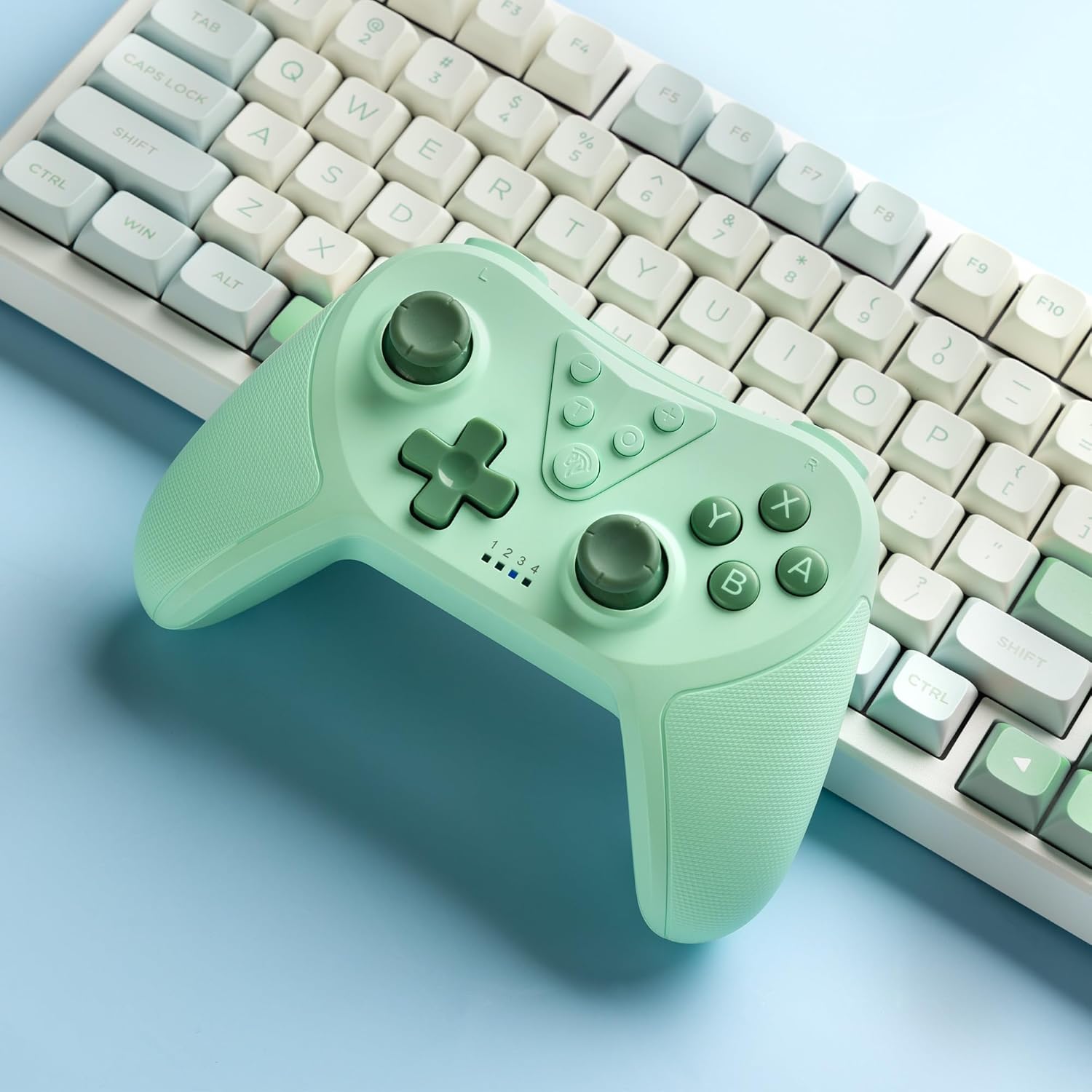
Image 4.2: Illustration of the Turbo function on the EasySMX T37 controller, showing the three adjustable speeds: 5, 12, and 20 shots per second.
4.3 ווייבריישאַן אַדזשאַסטמאַנט
The controller features dual motors for adjustable vibration feedback, enhancing immersion in games.
- סטרויערן ווייבריישאַן ינטענסיטי: דריקן און האַלטן די טורבאָ קנעפּל, דעמאָלט מאַך די Left Analog Stick Up or Down to cycle through four vibration levels: 0% (off), 30%, 70%, and 100%.

Image 4.3: Visual representation of the Dual Vibration feature on the EasySMX T37 controller, indicating four intensity levels from 0% to 100%.
4.4 6-אַקס גיראָ באַוועגונג קאָנטראָל
The built-in 6-axis gyroscope provides precise motion sensing, allowing for intuitive control in games that support motion input.

Image 4.4: Illustration depicting the 6-Axis Gyro Motion Control feature of the EasySMX T37 controller, showing how it interacts with a game on the Nintendo Switch screen.
5. וישאַלט
- רייניקונג: ניצט אַ ווייכע, טרוקענע שטאָף צו רייניקן דעם קאָנטראָללער. פֿאַרמייַדט ניצן שטרענגע כעמיקאַלן אָדער אַברייסיוו מאַטעריאַלן.
- סטאָרידזש: האַלט דעם קאָנטראָללער אין אַ קיל, טרוקן אָרט אַוועק פון דירעקט זונשייַן און עקסטרעמע טעמפּעראַטורן.
- באַטערי זאָרגן: כדי צו פארלענגערן די לעבן פון די באַטעריע, זאָלט איר נישט אָפט אויסלאָדן דעם קאָנטראָללער. לאָדט עס אָפט אויף, אפילו אויב עס ווערט נישט גענוצט פאר לענגערע צייטן.
- ויסמיידן טראפנס: באַשיצן דעם קאָנטראָללער פֿון פֿאַלן און קלאַפּן, וואָס קענען שעדיקן אינעווייניקסטע קאָמפּאָנענטן.
6. טראָובלעשאָאָטינג
6.1 קאָנטראָללער פֿאַרבינדט זיך נישט
- מאַכן זיכער אַז די קאָנטראָללער איז טשאַרדזשינג.
- Verify the Switch console is updated to the latest system version.
- Try re-pairing the controller by following the steps in Section 3.1.
- If issues persist, try resetting the controller by inserting a thin object into the small reset hole (if present, usually on the back) for a few seconds.
6.2 Buttons Unresponsive or Lagging
- זיכער מאַכן אַז דער קאָנטראָללער איז גאָר אויפגעלאָדן.
- Move closer to the Switch console to ensure a strong wireless connection.
- Check for any physical obstructions or debris around the buttons.
- Re-pair the controller.
6.3 Controller Not Charging
- זיכער מאַכן אַז דער USB-C קאַבל איז זיכער פארבונדן צו ביידע דעם קאָנטראָללער און דער מאַכט מקור.
- פּרוּווט ניצן אַ אַנדערש וסב-C קאַבלע אָדער מאַכט אַדאַפּטער.
- זיכער מאַכן אַז די מאַכט מקור איז פאַנגקשאַנאַל.
7. ספּעסאַפאַקיישאַנז
- מאָדעל: T37
- קאַנעקטיוויטי: ווירעלעסס (בלועטאָאָטה)
- קאַמפּאַטאַבילאַטי: נינטענדאָ סוויטש, סוויטש לייט, סוויטש אָלעָלד
- פֿעיִקייטן: Dual Turbo Function, Adjustable Vibration, 6-Axis Gyro Motion Control, Ergonomic Design
- Product Identifier (ASIN): B0CTTWN84L
8. וואָראַנטי און שטיצן
For warranty information, technical support, or further assistance, please refer to the official EasySMX webזייטל אדער קאנטאקט זייער קאסטומער שטיצע גלייך. האלט אייער קויף קוויטל פאר גאראנטיע קליימס.