
SHARP XL-B530(BK)
SHARP XL-B530 מיקראָ קאָמפּאָנענט סיסטעם
באַניצער ינסטרוקטיאָן מאַנואַל
הקדמה
א דאנק פארן קויפןasing the SHARP XL-B530 Micro Component System. This system is designed to provide high-quality audio playback from various sources, including Bluetooth wireless streaming, CD, USB, AM/FM radio, and auxiliary input. This manual provides detailed instructions for setting up, operating, and maintaining your new audio system to ensure optimal performance and longevity.
וויכטיק סאַפעטי אינפֿאָרמאַציע
- לייענען אַלע ינסטראַקשאַנז קערפאַלי איידער נוצן.
- האַלטן דעם מאַנואַל פֿאַר צוקונפֿט רעפֿערענץ.
- דו זאלסט נישט ויסשטעלן די אַפּאַראַט צו רעגן אָדער נעץ.
- זיכער מאַכן אַז די ווענטילאַציע איז געהעריק אַרום דעם אַפּאַראַט. נישט פאַרשפּאַרן די ווענטילאַציע עפענונגען.
- שטעלט נישט דעם אַפּאַראַט לעבן היץ־קוואַלן ווי ראַדיאַטאָרן, היץ־רעגיסטערס, אויוון, אדער אַנדערע אַפּאַראַטן (אַרייַנגערעכנט ampליפיערס) וואָס פּראָדוצירן היץ.
- באַשיצן די מאַכט שנור פון גיין אויף אָדער פּינטשעד.
- נאָר נוצן אַטאַטשמאַנץ / אַקסעסעריז ספּעסיפיעד דורך דער פאַבריקאַנט.
- אָפּשטויסן דעם אַפּאַראַט בעשאַס בליץ סטאָרמז אָדער ווען אַניוזד פֿאַר לאַנג פּיריאַדז.
- אָפּשיקן אַלע סערוויסעס צו קוואַלאַפייד סערוויס פּערסאַנעל.
פּעקל אינהאַלט
ביטע קאָנטראָלירט אַז אַלע די פאלגענדע זאכן זענען אַרייַנגערעכנט אין דיין פּעקל:
- Main Unit (Micro Component System)
- רעדנער איינהייטן (x2)
- ווייַט קאָנטראָל
- מאַכט שנור
- עפעם אַנטענע
- AM שלייף אַנטענע
- באַניצער מאַנואַל (דעם דאָקומענט)
פּראָדוקט איבערview
Familiarize yourself with the components and controls of your SHARP XL-B530 system.
Main Unit and Speakers

קוילעלדיק view of the SHARP XL-B530 Micro Component System, including the main unit, two speakers, and the remote control.
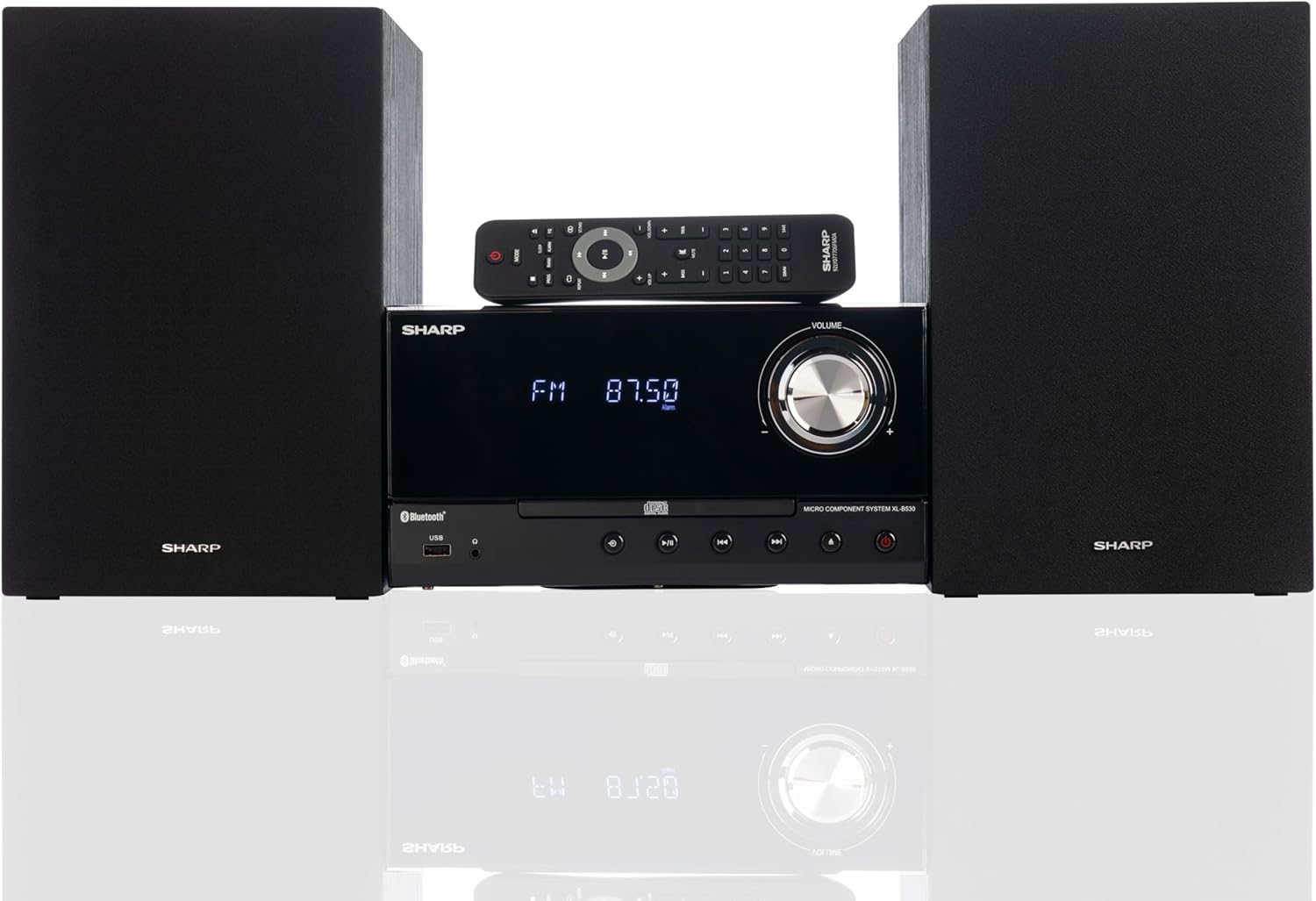
Front panel of the main unit, showing the LCD display, volume knob, CD tray, and control buttons.
דערציען פּאַנעל קאַנעקשאַנז

The rear panel of the main unit, featuring speaker terminals, FM antenna input, AM antenna input, and auxiliary input ports.
ווייַט קאָנטראָל
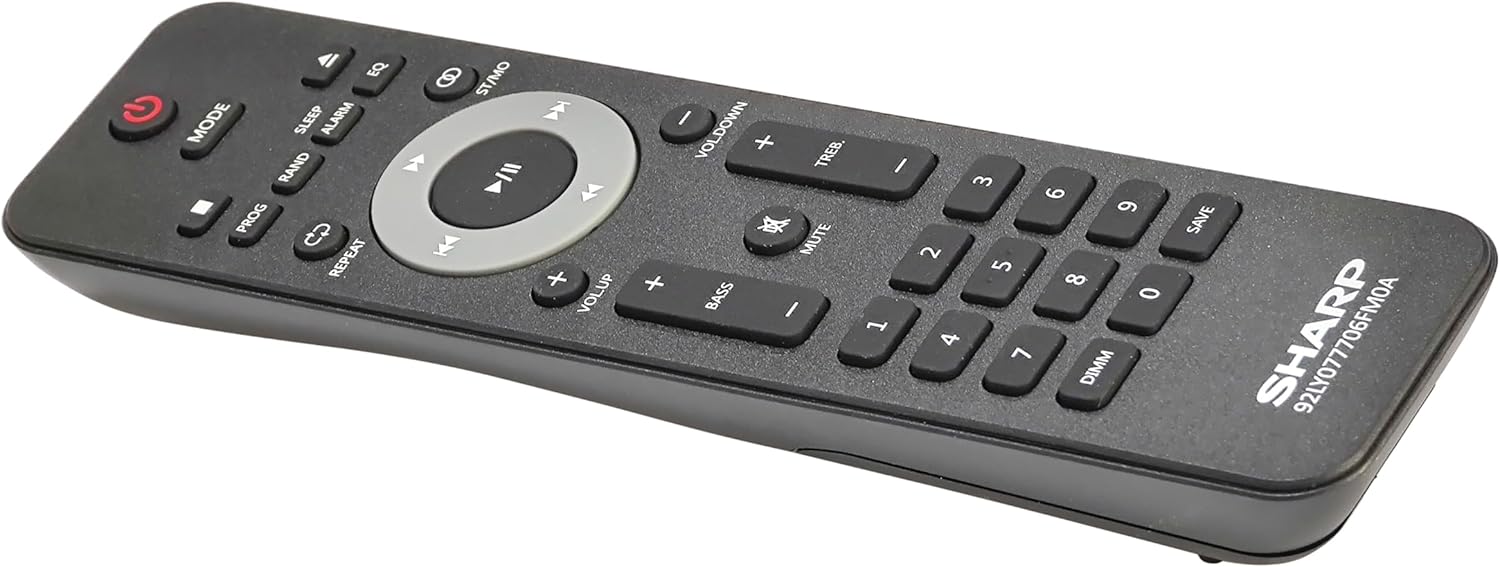
דעטאַילעד view of the remote control, showing various function buttons for power, mode, playback, volume, and sound adjustments.
סעטאַפּ
Follow these steps to set up your micro component system.
1. רעדנער קאַנעקשאַן
- Identify the left and right speaker cables.
- Connect the red (+) wire from each speaker to the red (+) terminal on the main unit's rear panel.
- Connect the black (-) wire from each speaker to the black (-) terminal on the main unit's rear panel.
- Ensure a secure connection for both speakers.
2. אַנטענע קאַנעקשאַן
- FM אַנטענע: Connect the supplied FM wire antenna to the FM antenna jack on the rear panel. Extend the wire fully for best reception.
- AM אַנטענע: Assemble the AM loop antenna and connect its wires to the AM antenna terminals on the rear panel. Rotate the antenna for optimal AM reception.
3. מאַכט קאַנעקשאַן
- Ensure all other connections are made.
- Plug the power cord into the AC IN jack on the rear of the main unit.
- Insert the other end of the power cord into a wall outlet.
אַפּערייטינג ינסטראַקשאַנז
This section details how to use the various functions of your SHARP XL-B530 system.
מאַכט אויף / אַוועק
- דרוק די מאַכט קנעפּל אויף דער הויפּט אַפּאַראַט אָדער ווײַטקאָנטראָל צו דרייען די סיסטעם אָן אָדער אויס.
מקור סעלעקציע
- דרוק די מאָדע button on the main unit or remote control repeatedly to cycle through available sources: CD, Bluetooth, USB, FM, AM, AUX.
קאָמפּאַקטדיסק פּלייַבאַקק
- דרוק די מאָדע button to select 'CD' mode.
- דרוק די עפענען / נאָענט קנעפּל צו עפענען די CD טאַץ.
- Place a CD (CD/MP3/WMA/CD-R/CD-RW) with the label side up into the tray.
- דרוק די עפענען / נאָענט button again to close the tray. Playback will start automatically.
- ניצן שפּיל / פּויזע, האַלטן, SKIP (forward/backward), and זוכן קנעפּלעך פֿאַר קאָנטראָל.
בלועטאָאָטה פּערינג
- דרוק די מאָדע button to select 'Bluetooth' mode. The display will show 'BT' and flash, indicating it's ready for pairing.
- אויף אייער בלוטוט דעווייס (סמאַרטפאָן, טאַבלעט, אאז"וו), אַקטיווירט בלוטוט און זוכט פֿאַר פֿאַראַן דעווייסעס.
- Select 'SHARP XL-B530' from the list.
- Once paired, the display will stop flashing and show 'BT CONNECTED'. You can now stream audio from your device.
וסב פּלייַבאַקק
- אַרײַנשטעלן אַ USB פלאַש דרייוו אין דעם USB פּאָרט אויף דער פראָנט פּאַנעל.
- דרוק די מאָדע button to select 'USB' mode.
- The system will automatically detect and begin playing compatible audio files (MP3/WMA).
- Use playback controls similar to CD mode.
AM / FM ראַדיאָ

The SHARP XL-B530 system displaying an FM radio frequency, highlighting its digital tuner capabilities.
- דרוק די מאָדע button to select 'FM' or 'AM' mode.
- אַוטאָ סקאַן: דריקן און האַלטן די שפּיל / פּויזע button to automatically scan and save available stations.
- מאַנואַל טונינג: ניצן די SKIP קנעפּלעך צו מאַנועל סטון צו די געוואונטשענע פרעקווענצן.
- פּריסעט סטיישאַנז: Use the number buttons on the remote to directly select saved preset stations.
Volume and Sound Adjustment

A close-up of one of the SHARP XL-B530 speakers, illustrating the adjustable bass and treble sound output.
- באַנד: דרייען די באַנד קנעפּל אויף דער הויפּט איינהייט אדער ניצט דעם VOL + / VOL- קנעפּלעך אויף די ווייַט קאָנטראָל.
- באַס / טרעבל: ניצן די BASS+ / BASS- און TREB+ / TREB- buttons on the remote control to adjust sound characteristics.
- הויך דרוק די הויכקייט button on the remote to enhance bass and treble at low volumes.
- EQ: דרוק די EQ button on the remote to cycle through preset equalizer modes.
וישאַלט
Proper care will ensure the longevity of your system.
- רייניקונג: Use a soft, dry cloth to clean the exterior of the unit. For stubborn stains, dampen the cloth lightly with water. Do not use abrasive cleaners or solvents.
- CD באַהאַנדלונג: האַלט אָן סי-דיס ביי די ברעגן. רייניקט שמוציקע סי-דיס מיט אַ ווייכן, לינט-פֿרייעם שטאָף, ווישנדיק פֿון צענטער אַרויס.
- ווענטילאַטיאָן: זיכער מאַכן אַז די ווענטילאַציע עפענונגען זענען נישט פארשטאפט דורך שטויב אָדער שמוץ.
- סטאָרידזש: אויב איר לייגט דאָס אַפּאַראַט אַוועק פֿאַר אַ לענגערע צייט, נעמט עס אַרויס פֿון דער עלעקטרישער אַוטלעט און לייגט עס אַוועק אין אַ קיל, טרוקן אָרט.
טראָובלעשאָאָטינג
If you encounter issues with your system, refer to the following common problems and solutions.
| פּראָבלעם | מעגלעך סיבה | לייזונג |
|---|---|---|
| קיין מאַכט | שטראָם קאַבל נישט פארבונדן; שטראָם אַוטלעט נישט אַקטיוו | זיכער מאַכן אַז די עלעקטרישע שנור איז גוט איינגעשטעקט; פּרוּווט אַן אַנדער אַוטלעט |
| קיין געזונט | Volume too low; Speakers not connected; Incorrect source selected | Increase volume; Check speaker connections; Select correct input source |
| סי-די שפּילט נישט | CD inserted incorrectly; CD is dirty or scratched; Incorrect mode | Insert CD correctly (label side up); Clean or replace CD; Select CD mode |
| בלועטאָאָטה איז נישט פּערינג | Bluetooth mode not selected; Device too far; Device already paired to another unit | Select Bluetooth mode; Move device closer; Disconnect from other devices and try again |
| נעבעך ראַדיאָ אָפּטראָג | Antenna not connected or positioned poorly; Interference | Connect and adjust antenna position; Move unit away from other electronic devices |
| ווייַט קאָנטראָל נישט ארבעטן | Batteries are dead or inserted incorrectly; Obstruction between remote and unit | Replace batteries, check polarity; Remove any obstructions; Ensure remote is pointed at the unit's sensor |
ספּעסאַפאַקיישאַנז
| שטריך | באַשרייַבונג |
|---|---|
| מאָדעל נומער | XL-B530(BK) |
| רעזולטאַט מאַכט | 200 וו מאַקס (100 וו רמס) |
| קאַנעקטיוויטי | Bluetooth, USB, Aux Input |
| דיסק קאַמפּאַטאַבילאַטי | סי-די, סי-די-ר/רוו, מפּ3, וומא |
| טונער | AM/FM Stereo Digital Tuner (50 station presets) |
| רעדנער טיפּ | סטערעאָ |
| פּראָדוקט דימענשאַנז (L x W x H) | 25 X 11 X 9.6 אינטשעס |
| פּונקט וואָג | 18 פונט |
| קאָליר | שוואַרץ אָוק |
וואָראַנטי און שטיצן
For warranty information and technical support, please refer to the warranty card included with your product or visit the official SHARP webזייטל. האַלט אייער קויף קוויטל ווי אַ באַווייַז פון קויפן פֿאַר קיין וואָראַנטי קליימז.
For further assistance, you may contact SHARP customer service through their official channels.
Ask a question about this manual
Ask about setup, troubleshooting, compatibility, parts, safety, or missing instructions. Manuals+ will review the question and use this page’s manual context to help answer it.