
ווירטופיט VF11007
VirtuFit VF11007 Vibration Plate Fitness Instruction Manual
מאָדעל: VF11007
1. הקדמה
Thank you for choosing the VirtuFit VF11007 Vibration Plate Fitness machine. This manual provides essential information for the safe and effective use of your new fitness equipment. Please read it thoroughly before operation and retain it for future reference.

פיגורע 1: The VirtuFit VF11007 Vibration Plate, including the remote control and resistance bands.
2. זיכערקייַט אינפֿאָרמאַציע
Before using the vibration plate, please observe the following safety precautions:
- באַראַט זיך מיט אַ דאָקטער איידער איר הייבט אָן קיין נייע געניטונג פּראָגראַם, ספּעציעל אויב איר האָט שוין פאַר-עקסיסטירנדיקע מעדיצינישע צושטאנדן.
- Ensure the vibration plate is placed on a stable, level surface.
- Do not use the machine if you are pregnant, have a pacemaker, or suffer from severe osteoporosis, epilepsy, or acute thrombosis.
- האַלטן קינדער און פּעץ אַוועק פון די מאַשין בעשאַס אָפּעראַציע.
- שטענדיק טראָגן פּאַסיק אַטלעטישע שיך.
- Stop exercising immediately if you feel dizzy, nauseous, or experience any pain.
- Unplug the machine when not in use and before cleaning.
3. סעטאַפּ
The VirtuFit VF11007 Vibration Plate requires minimal setup. Follow these steps:
- אויספּאַקן: Carefully remove all components from the packaging. Verify that all parts are present: the vibration plate, remote control, power cable, and resistance bands.
- אָרט: Position the vibration plate on a flat, stable, and non-slip surface. Ensure there is enough clear space around the unit for safe operation.
- מאַכט קשר: Plug the power cable into the vibration plate's power input, then into a suitable electrical outlet.
- Resistance Bands (Optional): If desired, attach the resistance bands to the designated attachment points on the sides of the vibration plate.
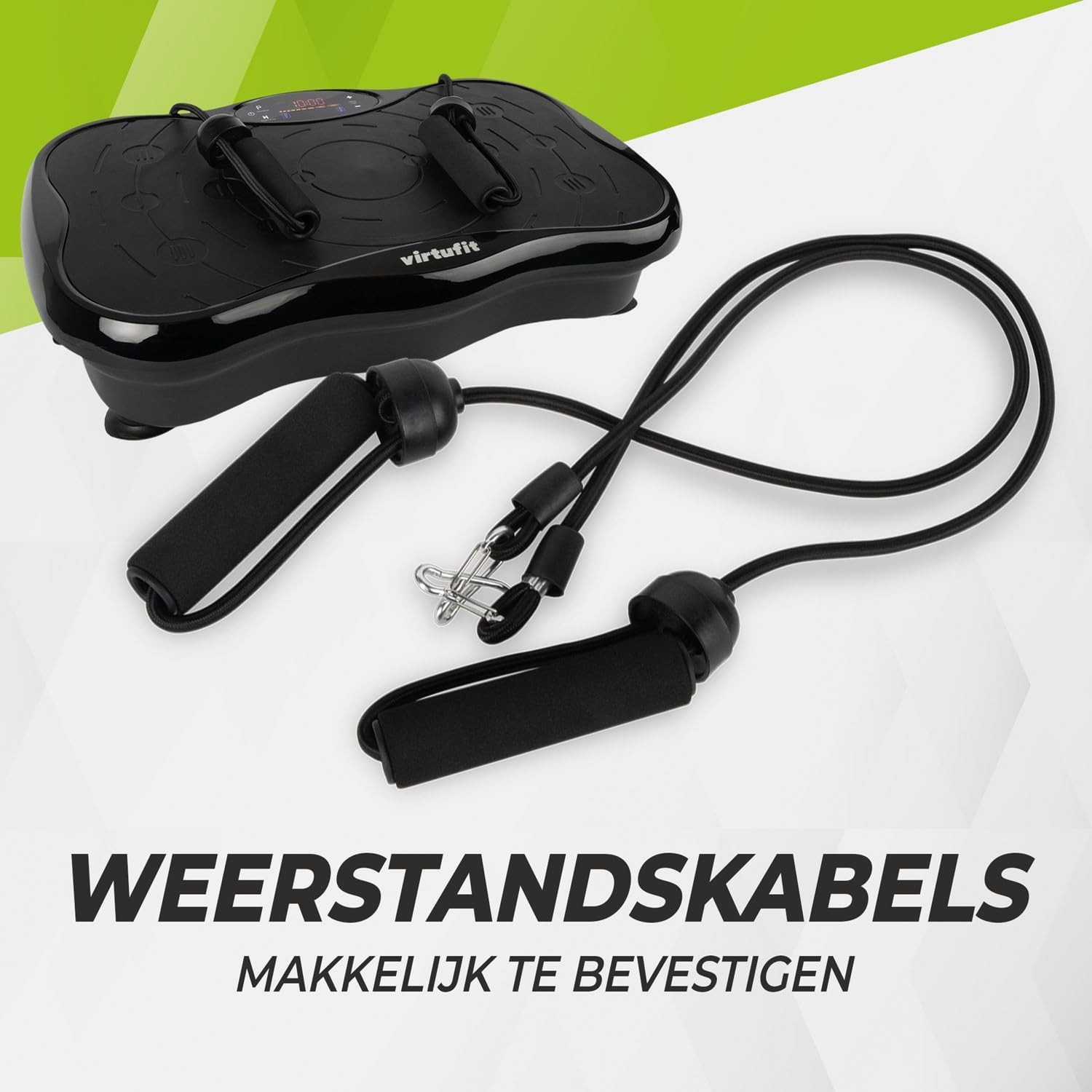
פיגורע 2: Resistance bands ready for attachment to the vibration plate.
4. אַפּערייטינג ינסטרוקטיאָנס
The VirtuFit VF11007 features an intuitive display and a convenient remote control for easy operation.
4.1. קאָנטראָל פּאַנעל און ווייַז
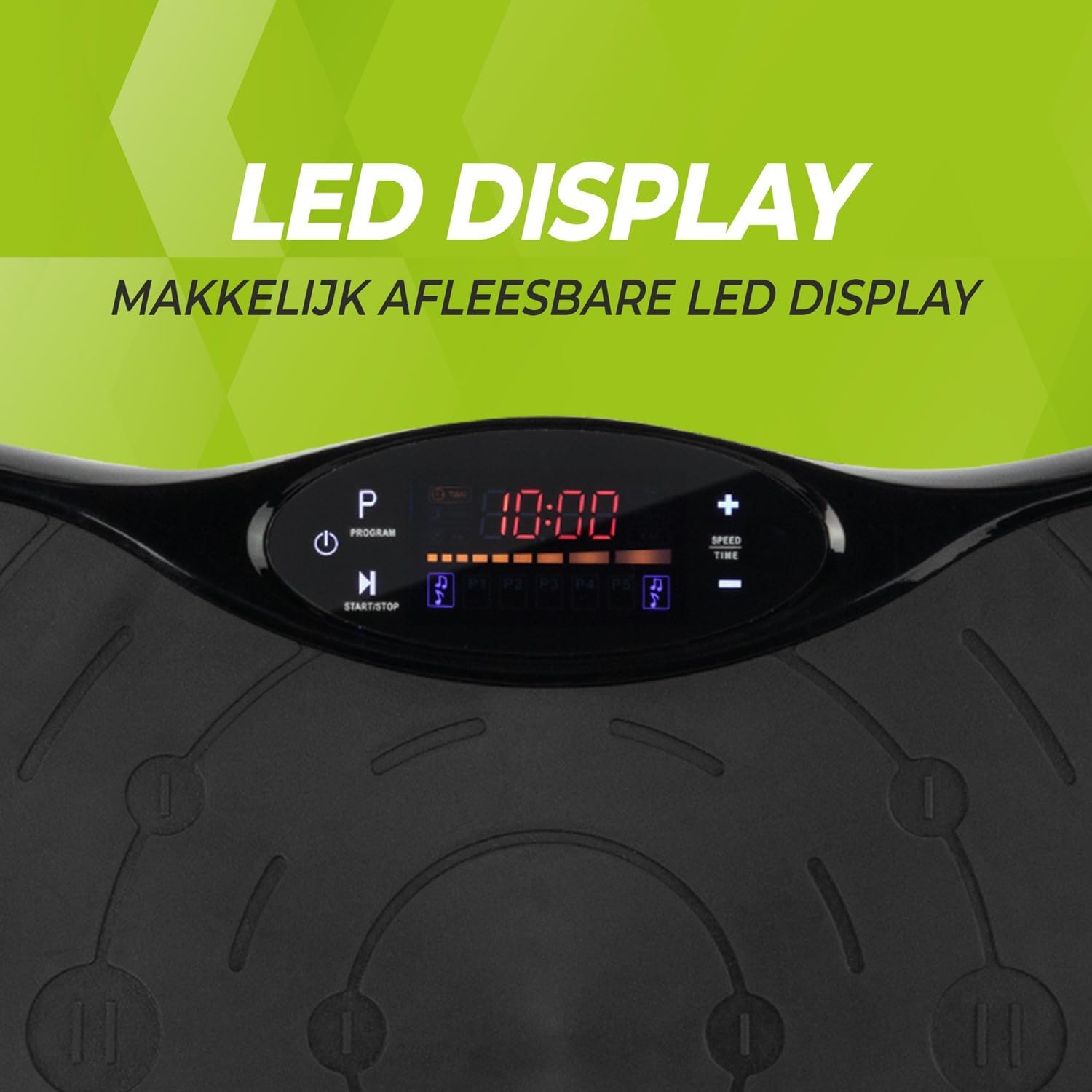
פיגורע 3: דעטאַילעד view of the LED display, showing time, program, and speed settings.
The integrated computer features an LED display showing time, speed, and program information. Buttons on the panel allow for basic control.
- מאַכט קנעפּל: טורנס די אַפּאַראַט אויף/אַוועק.
- אָנהייב/האַלטן קנעפּל: Initiates or pauses manual operation.
- פּראָגראַם קנעפּל (P): Cycles through the pre-set programs.
- גיכקייַט +/- קנעפּלעך: Adjusts the vibration speed in manual mode.
- צייט +/- קנעפּלעך: Adjusts the exercise duration in manual mode.
4.2. רימאָוט קאָנטראָל
The remote control provides full functionality, allowing you to adjust settings without interrupting your workout.

פיגורע 4: The remote control for convenient adjustment of settings.
- מאַכט קנעפּל: טורנס די אַפּאַראַט אויף/אַוועק.
- אָנהייב/האַלטן קנעפּל: Initiates or pauses manual operation.
- פּראָגראַם קנעפּל (P): Selects one of the 5 automatic programs or the manual program.
- גיכקייַט +/- קנעפּלעך: Increases or decreases the vibration speed (99 levels).
- צייט +/- קנעפּלעך: אַדזשאַסטירט די געניטונג געדויער.
- מוזיק קאָנטראָלס: Play/Pause, Next/Previous track, Volume +/- for Bluetooth audio.
4.3. Exercise Programs
The vibration plate offers 10 training programs, including 5 automatic programs (P1-P5) and a manual program.
- Automatic Programs (P1-P5): These programs automatically vary the speed over a 10-minute duration. Select the desired program using the 'P' button on the control panel or remote.
- מאַנואַל פּראָגראַם: Allows you to set your preferred speed (1-99) and duration. Use the Speed +/- and Time +/- buttons to customize your workout.
Program Speed Examples (for a 10-minute duration):
| פּראָגראַם | Speed Progression (Exampל) |
|---|---|
| P1 | 10 - 30 - 40 - 50 |
| P2 | 15 - 25 - 20 - 30 |
| P3 | 20 - 40 - 60 - 80 |
| P4 | 25 - 45 - 50 - 85 |
| P5 | 30 - 50 - 70 - 90 |
Note: These are example speed progressions. Actual speeds may vary slightly.
4.4. Bluetooth Speaker and USB Port
The vibration plate includes an integrated Bluetooth speaker and a USB charging port.

פיגורע 5: Location of the integrated Bluetooth speaker.
- בלועטאָאָטה קאַנעקשאַן: Turn on the vibration plate. Activate Bluetooth on your smartphone or tablet and search for "VirtuFit" or a similar device name. Pair your device.
- מוזיק פּלייבאַק: Once connected, you can play music through the integrated speakers. Use your device or the remote control to manage playback and volume.
- USB טשאַרדזשינג: Connect your phone or tablet to the USB port to charge it during your workout.
5. וישאַלט
Regular maintenance ensures the longevity and optimal performance of your VirtuFit Vibration Plate.
- רייניקונג: Wipe the surface of the vibration plate with a soft, damp טוך נאך יעדן באַניץ. ניצט נישט קיין שרײַבנדיקע רייניגערס אדער סאָלווענטן.
- סטאָרידזש: סטאָר די מאַשין אין אַ קיל, טרוקן אָרט אַוועק פון דירעקט זונשייַן און נעץ.
- דורכקוק: Periodically check the power cord for any damage. Ensure all connections are secure.
- אַנטי-סליפּ ייבערפלאַך: The anti-slip rubber surface is designed for durability. Keep it clean to maintain its grip.

פיגורע 6: The durable anti-slip rubber surface for secure footing.
6. טראָובלעשאָאָטינג
If you encounter any issues with your VirtuFit Vibration Plate, refer to the following common problems and solutions:
| פּראָבלעם | מעגלעך סיבה | לייזונג |
|---|---|---|
| די מאַשין גייט נישט אָן. | Power cord not properly connected; Power outlet not working. | Ensure the power cord is securely plugged into both the machine and the wall outlet. Test the outlet with another device. |
| קיין וויבראַציע. | Machine is paused; Speed setting is too low; Program not started. | Press the Start button. Increase the speed setting. Ensure a program is selected and running. |
| ווייַט קאָנטראָל נישט ארבעטן. | Batteries are dead or incorrectly inserted; Obstruction between remote and sensor. | Replace batteries with new ones, ensuring correct polarity. Remove any obstructions. Point the remote directly at the display sensor. |
| בלועטוט קאנעקט נישט. | Bluetooth on device is off; Incorrect pairing. | Ensure Bluetooth is enabled on your device. Forget the device on your phone/tablet and re-pair. Ensure the vibration plate is powered on. |
אויב די פראבלעם בלייבט, ביטע קאנטאקטירט קאסטומער סופארט.
7. ספּעסאַפאַקיישאַנז
Key technical specifications for the VirtuFit VF11007 Vibration Plate:
- מאָדעל נומער: VF11007
- סאָרט: VirtuFit
- דימענשאַנז (L x W x H): 54 X 12.5 X 32 סענטימעטער
- וואָג: 7.5 קג
- מאַטעריאַל: ABS rubber
- קאָנטראָל טיפּ: ווייַט קאָנטראָל
- ווייַז טיפּ: Graphic display (LED)
- Maximum Speed Levels: 99
- נומער פון מגילה: 10
- אַפּערייטינג מאָדע: אָטאַמאַטיק / מאַנואַל
- מאַכט מקור: עלעקטריק קאַבלע
- אינטעגרירטע פֿעיִקייטן: Bluetooth speaker, USB charging port
8. וואָראַנטי אינפֿאָרמאַציע
VirtuFit products are manufactured to high-quality standards. This product is covered by the standard legal warranty applicable in your region. Please retain your proof of purchase for any warranty claims.
For specific warranty terms and conditions, please refer to the VirtuFit official webפּלאַץ אָדער קאָנטאַקט דיין זיצער.
9. קונה שטיצן
Should you require assistance, have questions, or need to report an issue, please contact VirtuFit customer support or your authorized retailer.
For more information, visit the official VirtuFit webפּלאַץ: ווירטופיט בראַנד קראָם
Ask a question about this manual
Ask about setup, troubleshooting, compatibility, parts, safety, or missing instructions. Manuals+ will review the question and use this page’s manual context to help answer it.