
SGIN SGIN-M17S
SGIN 17 inch Laptop User Manual
Model: SGIN-M17S
1. הקדמה
Welcome to the user manual for your new SGIN 17 inch Laptop. This guide provides essential information to help you set up, operate, maintain, and troubleshoot your device. Please read this manual carefully before using your laptop to ensure proper function and safety.
1.1 זיכערקייַט אינפֿאָרמאַציע
- שטעלט נישט אויס דעם לאַפּטאָפּ צו עקסטרעמע טעמפּעראַטורן, הומידיטי, אדער דירעקטע זונשייַן.
- פֿאַרמײַדט צו לייגן שווערע זאַכן אויף דעם לאַפּטאָפּ.
- האַלט פליסיקייטן אַוועק פון דעם אַפּאַראַט צו פאַרמייַדן עלעקטרישע קלאַפּ אָדער שעדיקן.
- ניצט נאָר דעם אָריגינעלן מאַכט אַדאַפּטער וואָס איז צוגעשטעלט געוואָרן מיט אייער לאַפּטאַפּ.
- פרובירט נישט צו צענעמען אדער פאררעכטן דעם לעפטאפ אליין. ווענדט זיך צו קוואַליפֿיצירטע סערוויס פּערסאָנעל.
- פאַרזיכערן געהעריק ווענאַליישאַן בעשאַס נוצן צו פאַרמייַדן אָוווערכיטינג.
2. פּראָדוקט איבערview
Familiarize yourself with the components and ports of your SGIN 17 inch Laptop.

פיגורע 2.1: פראָנט view of the SGIN 17 inch Laptop, showcasing its large 17.3-inch display, full-size keyboard, and touchpad.
2.1 קאַמפּאָונאַנץ און פּאָרץ
Your laptop is equipped with various ports for connectivity and expansion.
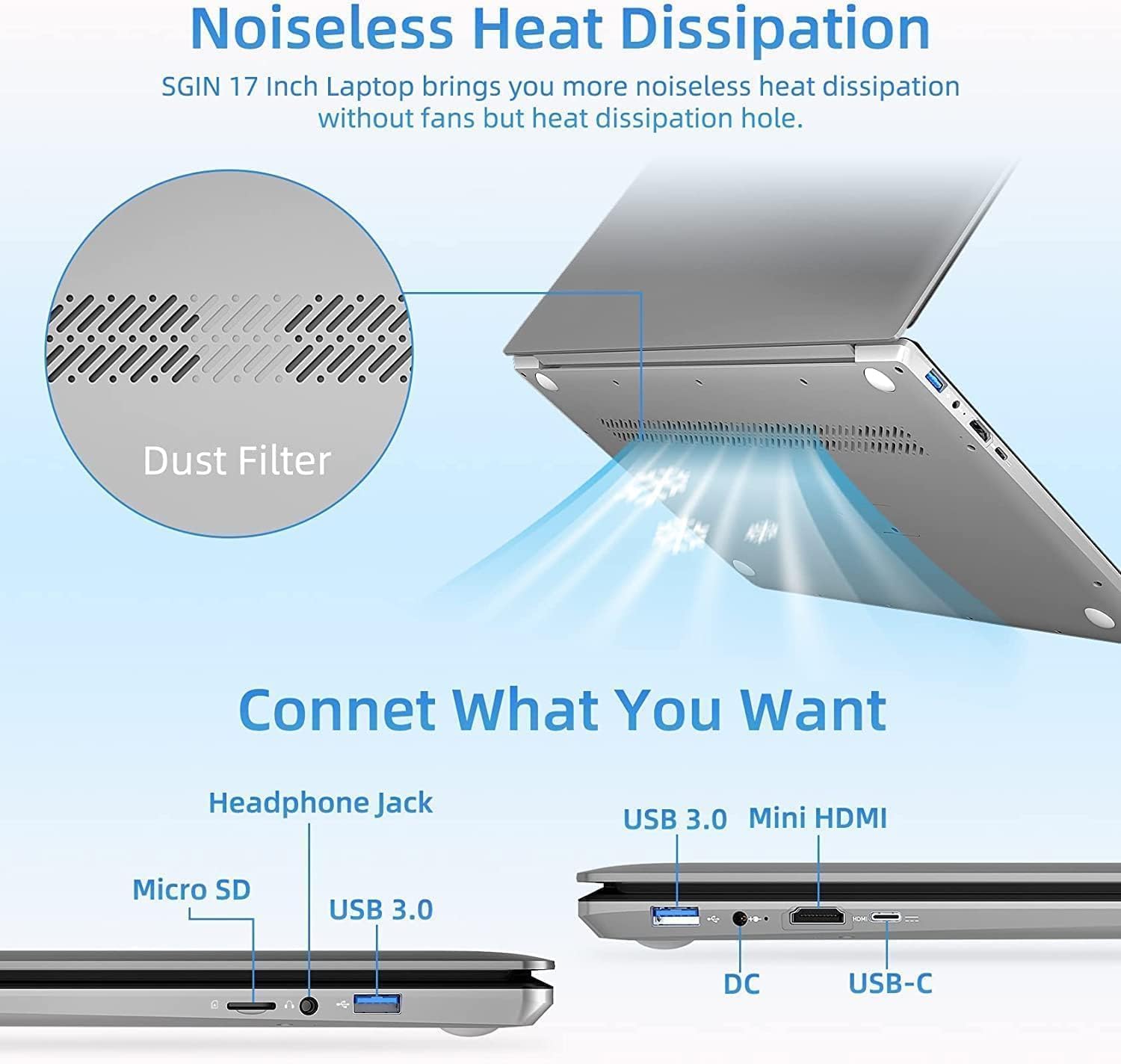
פיגורע 2.2: זייַט view of the SGIN 17 inch Laptop highlighting the various input/output ports including USB 3.0, USB-C, Mini HDMI, Headphone Jack, Micro SD card slot, and DC power input.
- ווייַז: 17.3-inch Full HD (1920x1080) LED screen.
- Webקאַם: ינטעגראַטעד webקאַם פֿאַר ווידעא קאַללס און קאַנפראַנסינג.
- קלאַוויאַטור: Full-size keyboard with numeric keypad for comfortable typing.
- טאָוטשפּאַד: Multi-touch enabled touchpad for precise navigation.
- וסב 3.2 פּאָרץ: For high-speed data transfer and connecting peripherals.
- טיפּ-C פּאָרט: Versatile port for data, display, and power delivery.
- מיני HDMI פּאָרט: פֿאַר פֿאַרבינדן צו עקסטערנע דיספּלייז אָדער פּראָיעקטאָרן.
- כעדפאָון דזשאַק: פֿאַר אַודיאָ אַרויסגאַנג צו כעדפאָונז אָדער עקסטערנע רעדנערס.
- מיקראָ סד קאָרט שפּעלטל: פֿאַר אויסברייטערן סטאָרידזש אָדער טראַנספערירן דאַטן פֿון זכּרון קאַרדס.
- DC-in Port: פֿאַר פֿאַרבינדן דעם מאַכט אַדאַפּטער צו אָפּלאָדן דעם לאַפּטאַפּ.
3. סעטאַפּ
3.1 ערשט טשאַרדזשינג
Before first use, it is recommended to fully charge your laptop's battery. Connect the provided power adapter to the DC-in port on the laptop and then plug it into a power outlet. The charging indicator light will illuminate.
3.2 ערשטער בוט און אָפּערייטינג סיסטעם סעטאַפּ
- דרוק די מאַכט קנעפּל צו קער אויף די לאַפּטאַפּ.
- Follow the on-screen instructions to complete the initial setup of the Windows 8.1 operating system. This includes selecting your language, region, accepting terms, and setting up user accounts.
- Connect to a Wi-Fi network when prompted to enable internet access.
4. אפערירן דיין לאַפּטאָפּ
4.1 מאַכט מאַנאַגעמענט
- קער אויף: דריק דעם מאַכט קנעפּל וואָס געפינט זיך אויף דער קלאַוויאַטור דעק.
- אויסגעלאשן: דריקט דעם אָנהייב קנעפּל, דערנאָך מאַכט > שאַט דאַון.
- שלאָפן מאָדע: דריקט דעם "Start" קנעפל, דערנאך "Power" > "Sleep", אדער מאכט צו דעם דעקל פונעם לעפטאפ.
- ריסטאַרט: דריקט דעם אָנהייב קנעפּל, דערנאָך מאַכט > ריסטאַרט.
4.2 ניצן די קלאַוויאַטור און טאָוטשפּאַד

פיגורע 4.1: נאָענט-אַרויף view of the SGIN 17 inch Laptop's full-size keyboard and integrated numeric keypad, designed for comfortable and efficient typing.
The laptop features a full-size keyboard for comfortable typing and a dedicated numeric keypad for data entry. The touchpad supports multi-touch gestures for intuitive navigation, including scrolling, zooming, and switching applications.
4.3 פֿאַרבינדן זיך צו נעטוואָרקס
צו פאַרבינדן צו אַ Wi-Fi נעץ:
- דריקט דעם Wi-Fi אייקאן אין דער סיסטעם טאַץ (אונטן רעכט ווינקל פון דעם עקראַן).
- אויסקלייבן אייער געוואונטשענע נעץ פון דער ליסטע.
- Enter the network security key (password) if prompted, then click Connect.
4.4 פונדרויסנדיק ווייַז קאַנעקשאַן
Use the Mini HDMI port to connect your laptop to an external monitor or projector. Connect one end of a Mini HDMI cable to your laptop and the other end to the display device. You may need to adjust display settings in Windows to extend or duplicate your screen.
4.5 דאַטאַ אַריבערפירן
Utilize the USB 3.2 ports for connecting external hard drives, USB flash drives, and other peripherals for fast data transfer. The Micro SD card slot allows for easy access to data on compatible memory cards.
5. וישאַלט
5.1 רייניקן דעם לאַפּטאָפּ
- ניצן אַ ווייך, לינט-פֿרייַ שטאָף אַ ביסל דampאָפּגעוואַשן מיט וואַסער אָדער אַ עקראַן רייניגער צו רייניקן דעם עקראַן.
- פֿאַר דער קלאַוויאַטור און שאַסי, ניצט אַ ווייכע, טרוקענע שטאָף. פֿאַרמייַדט אַברייסיוו רייניגער.
- Periodically use compressed air to clear dust from vents to maintain optimal cooling.
5.2 באַטערי קער

Figure 5.1: Illustration of the SGIN 17 inch Laptop's battery capacity (7.6V 8000mAh, 38Wh) and estimated usage time (up to 8 hours of video playback).
- כדי צו פארלענגערן די לעבן פון די באַטעריע, זאָל מען נישט אָפט אויסלאָדן די באַטעריע גאָר.
- האַלט דעם לאַפּטאָפּ אין אַ קיל, טרוקן אָרט אויב עס ווערט נישט גענוצט פֿאַר לענגערע צייטן.
- It is normal for battery capacity to decrease over time with usage.
5.3 סטאָרידזש און האַנדלינג
When transporting your laptop, use a protective sleeve or bag to prevent scratches and impacts. Avoid exposing the laptop to strong magnetic fields.
6. טראָובלעשאָאָטינג
This section addresses common issues you might encounter and provides basic solutions.
| פּראָבלעם | מעגלעך סיבה | לייזונג |
|---|---|---|
| דער לאַפּטאָפּ גייט נישט אָן. | Battery is drained or power adapter is not connected properly. | Connect the power adapter and ensure it's plugged into a working outlet. Allow it to charge for a few minutes before attempting to power on again. |
| דער עקראַן איז ליידיק אָדער פליקערט. | Incorrect display settings, loose cable (if external monitor), or driver issue. | Press Fn + F7 (or similar function key) to cycle through display modes. Restart the laptop. Update graphics drivers if possible. |
| Wi-Fi פֿאַרבינדונג פּראָבלעמען. | Wi-Fi adapter off, incorrect password, or router issue. | Ensure Wi-Fi is enabled (Fn + F5 or check settings). Re-enter Wi-Fi password. Restart your router and laptop. |
| דער לאַפּטאָפּ אַרבעט שטייט. | Too many applications open, low storage space, or malware. | שליסט אומנייטיקע אַפּליקאַציעס. מאַכט פריי דיסק פּלאַץ. לאָזט לויפן אַ ווירוס סקען. |
אויב די פראבלעם בלייבט נאך פרובירן די לייזונגען, ביטע קאנטאקטירט קאסטומער סופארט.
7. טעכניש ספּעסאַפאַקיישאַנז
Detailed specifications for your SGIN 17 inch Laptop (SGIN-M17S).

Figure 7.1: Diagram illustrating the Intel Core i3-5005U Processor, which powers the SGIN 17 inch Laptop, providing efficient performance.
| שטריך | באַשרייַבונג |
|---|---|
| מאָדעל נאָמען | SGIN-M17S |
| פאַרשטעלן גרייס | 17.3 אינטשעס |
| פאַרשטעלן האַכלאָטע | 1920 x 1080 בילדצעלן (פול הד) |
| פּראַסעסער | אינטעל קאָר i3-5005U (2.4 GHz) |
| באַראַן | 4 גיגאבייט DDR4 SDRAM |
| שווער דרייוו | 128 GB SSD (NVMe interface) |
| גראַפיקס קאָופּראַסעסער | Intel HD Graphics 5500 |
| אָפּערייטינג סיסטעם | Windows 8.1 |
| ווירעלעסס טיפּ | 802.11b Wi-Fi |
| באַטערי | 1 Lithium Ion battery (8000Wh, 38Wh, up to 8 hours video play) |
| פּונקט וואָג | 6.34 פונט |
| פּראָדוקט דימענשאַנז | 17.3 X 10 X 0.6 אינטשעס |
8. וואָראַנטי און שטיצן
8.1 וואָראַנטי אינפֿאָרמאַציע
Your SGIN 17 inch Laptop comes with a 1 יאָר וואָראַנטי from the date of purchase. This warranty covers manufacturing defects and malfunctions under normal use. It does not cover damage caused by misuse, accidents, unauthorized repairs, or natural disasters.
ביטע האַלטן דיין דערווייַז פון קויפן פֿאַר וואָראַנטי קליימז.
8.2 קונה שטיצן
For technical assistance, warranty claims, or any other inquiries, please contact SGIN customer support through the official channels provided at the time of purchase or on the SGIN official website. When contacting support, please have your laptop's model number (SGIN-M17S) and purchase details ready.
Ask a question about this manual
Ask about setup, troubleshooting, compatibility, parts, safety, or missing instructions. Manuals+ will review the question and use this page’s manual context to help answer it.