
1. הקדמה
Thank you for choosing the Mcbazel 2 Zone Water Timer. This device is designed to automate your garden and lawn watering, providing efficient and customizable irrigation for two separate zones. Please read this manual carefully before use to ensure proper installation, operation, and maintenance.
שליסל פֿעיִקייטן:
- דואַל-זאָנע קאָנטראָל: Manage two independent watering zones with separate scheduling.
- פלעקסיבלע סקעדזשולינג: Set specific start times, frequencies (hourly, daily, weekly), and durations (1 minute to 4 hours).
- Manual Watering Modes: Provides immediate watering for Zone 1, Zone 2, or both.
- Rain Delay Function: Pause watering for 24, 48, or 72 hours to prevent overwatering.
- דוראַבאַל פּלאַן: IP54 rated high-impact plastic construction with a metal filter for longevity.
- באַניצער-פרייַנדלעך צובינד: 2.5-inch LED display for clear information and low-battery indicator.

Figure 1: Mcbazel 2 Zone Water Timer overview.
2. פּעקל אינהאַלט
באַשטעטיקט אַז אַלע זאכן וואָס זענען אויסגערעכנט אונטן זענען אַרייַנגערעכנט אין אייער פּעקל. אויב עפּעס פעלנדיק אָדער צעבראָכן, ביטע קאָנטאַקטירט קונה שטיצע.
- 1 x 2 Zone Water Timer
- 1 x Accessory Set (includes additional connectors/washers)
- 1 x באַניצער מאַנואַל (דאָס דאָקומענט)

Figure 2: Package contents of the water timer.
3. ספּעסאַפאַקיישאַנז
| שטריך | באַשרייַבונג |
|---|---|
| ארבעטן וואַסער דרוק | 7.25-116 PSI (0.5-8 באַר) |
| מאַקסימום לויפן | 35 L/Min (10 Gal/Min) |
| וואָטערפּרוף גראַדע | IP54 |
| ארבעטן טעמפּעראַטור | 3°C-50°C (37.4°F-122°F) |
| יראַגיישאַן אָפטקייַט | 1-12 hours or 1-7 days |
| Irrigation Duration | 1-240 minutes (4 hours) |
| וואַסער ינלעט | NH (US) for 3/4" thread, BSP (EU) for 3/4" or 1" thread |
| וואַסער אָוטלעט | For 3/4" standard pipe |
| באַטערי | 2 x AA (1.5V) אַלקאַליין באַטעריעס (נישט אַרייַנגערעכנט) |
4. סעטאַפּ
Follow these steps to set up your Mcbazel 2 Zone Water Timer:
- ינסטאַלירן באַטעריז: Open the battery compartment on the back of the timer. Insert two (2) new 1.5V AA alkaline batteries, ensuring correct polarity. Close the compartment securely to maintain the IP54 waterproof rating.
- Attach to Faucet: Screw the water timer onto your outdoor water faucet. Ensure a tight fit to prevent leaks. The inlet fits 3/4" or 1" standard faucets.
- פאַרבינדן כאָוזיז: Screw your garden hoses onto the Zone 1 and Zone 2 outlets at the bottom of the timer. These outlets fit 3/4" standard pipes.
- Turn on Faucet: Once the timer is installed and hoses are connected, fully open your water faucet. The timer will control the water flow.

פיגור 3: שריט-ביי-שריט אינסטאַלאַציע גייד.
5. אַפּערייטינג ינסטרוקטיאָנס
5.1 קאָנטראָלס איבערview
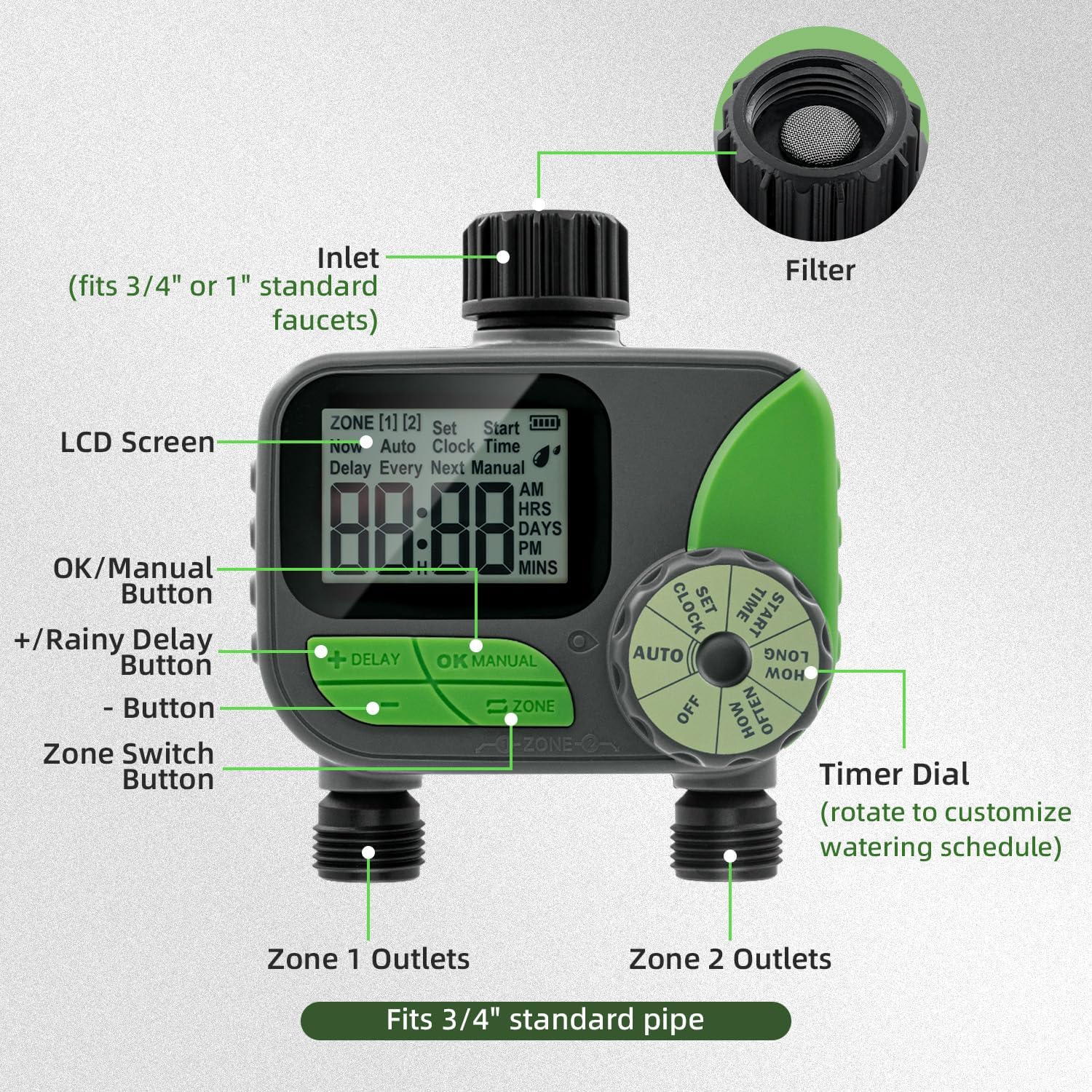
Figure 4: Labeled components of the water timer.
- LCD פאַרשטעלן: Displays current time, watering schedule, battery status, and other information.
- טיימער רעדל: Rotate to select different modes: OFF, AUTO, SET CLOCK, START TIME, HOW LONG, HOW OFTEN.
- +/- קנעפּלעך: צופּאַסן ווערטן (צייט, געדויער, אָפטקייט).
- OK/MANUAL קנעפּל: Confirm settings or initiate manual watering.
- DELAY Button: Activates or deactivates the rain delay function.
- ZONE Button: Switches between Zone 1 and Zone 2 for programming.
5.2 באַשטעטיקן די זייגער
- Rotate the Timer Dial to שטעלן זייגער.
- ניצן די +/- buttons to set the current time (AM/PM).
- דרוק OK / MANUAL to confirm and move to the next setting (e.g., minutes).
- Repeat until the current time is set.
5.3 Programming Automatic Watering (AUTO Mode)
The timer allows independent programming for two zones.
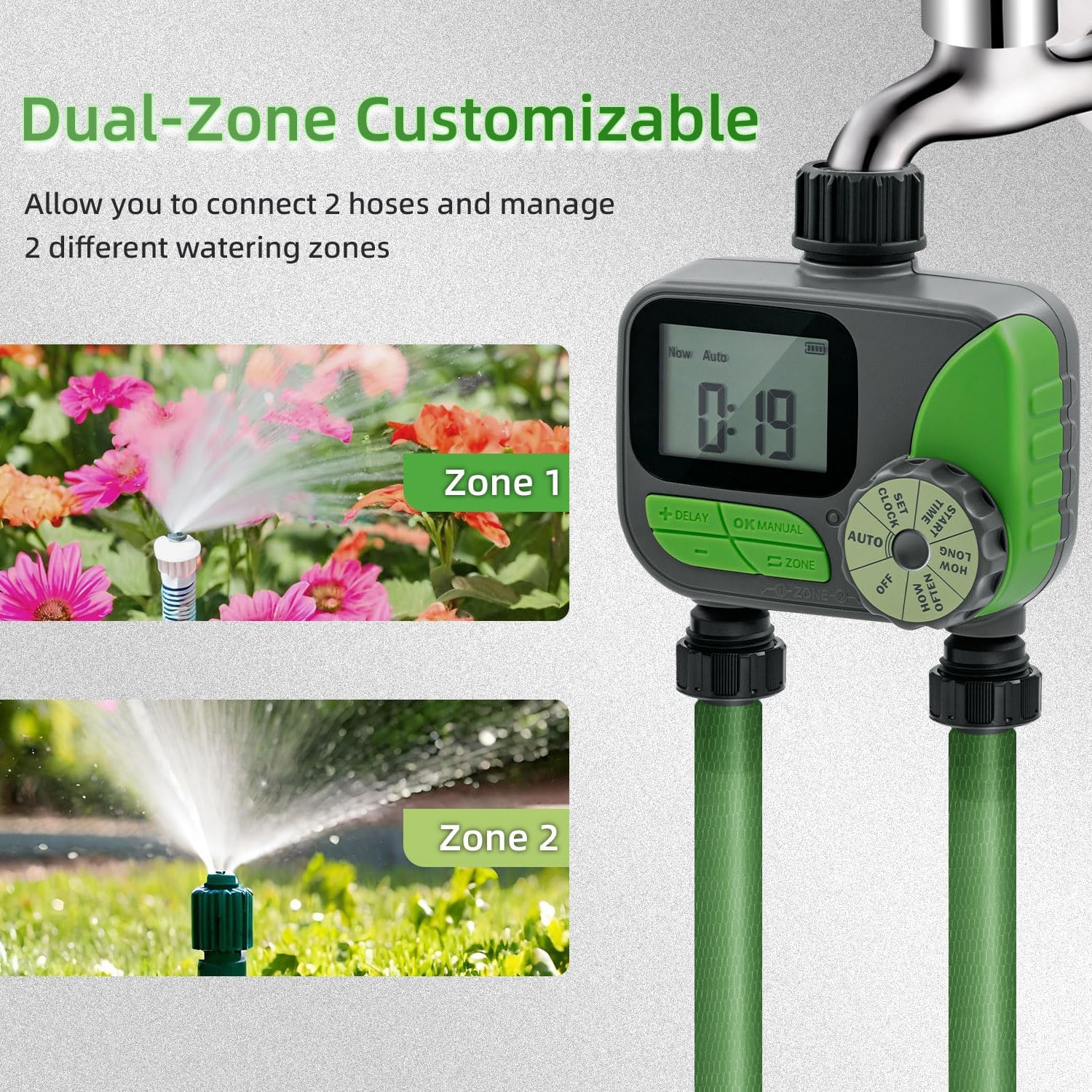
Figure 5: Dual-zone customizable control in action.
- אויסקלייַבן זאָנע: דרוק די זאָנע button to select either Zone 1 or Zone 2. The selected zone will be indicated on the LCD screen.
- Set START TIME:
- Rotate the Timer Dial to אָנהייב צייט.
- ניצן +/- buttons to set the desired watering start time.
- דרוק OK / MANUAL צו באַשטעטיקן.
- Set HOW LONG (Duration):
- Rotate the Timer Dial to ווי לאַנג.
- ניצן +/- buttons to set the watering duration (1 minute to 240 minutes).
- דרוק OK / MANUAL צו באַשטעטיקן.
- Set HOW OFTEN (Frequency):
- Rotate the Timer Dial to ווי אָפט.
- ניצן +/- buttons to set the watering frequency (e.g., every 12 hours, every day, every 2 days, up to 7 days).
- דרוק OK / MANUAL צו באַשטעטיקן.
- אַקטיווירן AUTO מאָדע: After setting all parameters for both zones, rotate the Timer Dial to AUTOדער טייַמער וועט איצט אַרבעטן לויט דיין פּראָגראַמירטן פּלאַן.

פיגורע 6: עקסample of automatic watering schedules for two zones.
5.4 מאַנואַל וואָטערינג
Manual watering allows you to water immediately without affecting your programmed schedule.
- Ensure the Timer Dial is in AUTO מאָדע.
- דרוק די OK / MANUAL קנעפּל.
- ניצן די זאָנע button to select Zone 1, Zone 2, or both.
- ניצן די +/- buttons to set the desired manual watering duration (1 to 240 minutes).
- דרוק OK / MANUAL again to start manual watering.
- צו אפשטעלן די מאנועלע באַוואַסערונג, דריק OK / MANUAL again or rotate the dial to OFF און דעמאָלט צוריק צו AUTO.
5.5 Rain Delay Function
The rain delay function temporarily pauses your watering schedule to prevent overwatering during rainy periods.
- Ensure the Timer Dial is in AUTO מאָדע.
- דריקן און האַלטן די פאַרהאַלטן קנעפּל פֿאַר אַ ביסל סעקונדעס.
- ניצן די +/- buttons to select the desired delay duration: 24 hours, 48 hours, or 72 hours.
- דרוק OK / MANUAL to confirm the rain delay. The display will show the remaining delay time.
- To cancel the rain delay, press and hold the פאַרהאַלטן button again until the delay indicator disappears.

Figure 7: Activating the rain delay mode.
6. וישאַלט
6.1 רייניקונג די פילטער
The water timer includes a built-in metal filter at the inlet to prevent debris from entering and blocking the water pipes. Regularly check and clean this filter to ensure optimal performance.
- Turn off the water faucet and remove the timer.
- Unscrew the inlet connection and carefully remove the metal filter.
- Rinse the filter under running water to remove any accumulated debris.
- Reinsert the clean filter and reattach the timer to the faucet, ensuring a secure fit.

Figure 8: Built-in metal filter and battery compartment.
6.2 באַטערי פאַרבייַט
The timer features a low-battery indicator on the LCD screen. When the battery icon flashes or is low, replace the batteries promptly to avoid interruption of watering schedules. The timer will automatically shut off valves to prevent water wastage if batteries are critically low.
- קער אַוועק די וואַסער קראַן.
- עפענען די באַטאַרייע אָפּטייל אויף די צוריק פון די טייַמער.
- Remove the old AA batteries and insert two new 1.5V AA alkaline batteries, observing correct polarity.
- פאַרמאַכן די באַטאַרייע אָפּטייל סיקיורלי.
6.3 ווינטער סטאָרידזש
To prevent damage from freezing temperatures, remove the water timer from the faucet before the first frost. Drain any remaining water from the timer and store it indoors in a dry, protected location. Remove batteries if storing for extended periods.
7. טראָובלעשאָאָטינג
| פּראָבלעם | מעגלעך סיבה | לייזונג |
|---|---|---|
| Timer does not turn on/LCD is blank. | טויטע אדער נישט ריכטיק אינסטאלירטע באַטעריעס. | טוישט די באַטעריעס מיט נייע 1.5V AA אַלקאַליין באַטעריעס, און זאָרגט אַז די פּאָלאַריטעט איז ריכטיק. |
| קיין וואַסער לויפן. |
|
|
| וואַסער לעקט פֿון פֿאַרבינדונגען. | לויזע פֿאַרבינדונגען אָדער פֿאַרנוצטע וואַשערס. | Tighten all connections. Check and replace rubber washers if necessary. |
| Timer not watering at scheduled times. |
|
|
8. וואָראַנטי און שטיצן
Mcbazel products are designed for reliability and performance. For specific warranty information, please refer to the warranty card included with your purchase or visit the official Mcbazel website. If you encounter any issues or have questions not covered in this manual, please contact Mcbazel customer support for assistance.
קונה שטיצן: Please refer to your purchase documentation or the Mcbazel webפּלאַץ פֿאַר קאָנטאַקט דעטאַילס.
9. וויכטיק סאַפעטי אינפֿאָרמאַציע
- Do not immerse the timer in water. It is IP54 rated for splash resistance, not submersion.
- Use only 1.5V AA alkaline batteries. Do not mix old and new batteries or different types of batteries.
- Remove batteries if the timer will not be used for an extended period.
- Do not expose the timer to extreme temperatures outside its operating range (3°C-50°C / 37.4°F-122°F).
- האַלטן אויס פון דערגרייכן פון קינדער.
- Do not attempt to disassemble or repair the unit yourself. This will void the warranty.