
הקדמה
This manual provides essential information for the installation, operation, and maintenance of your NVIDIA GeForce RTX 4070 Super 12GB GDDR6X Graphics Card. Designed for high-performance gaming and creative applications, this graphics card leverages the NVIDIA Ada Lovelace architecture to deliver advanced features such as fast ray tracing and AI-accelerated performance with DLSS 3. Please read this guide thoroughly before proceeding with installation or use.
סעטאַפּ
1. אויספּאַקן און פּאַקעט אינהאַלט
Carefully open the packaging and ensure all components are present. The package typically includes:
- NVIDIA GeForce RTX 4070 Super Graphics Card
- 16-pin (12VHPWR) to 2x 8-pin PCIe power adapter cable
- שנעל אָנהייב גייד
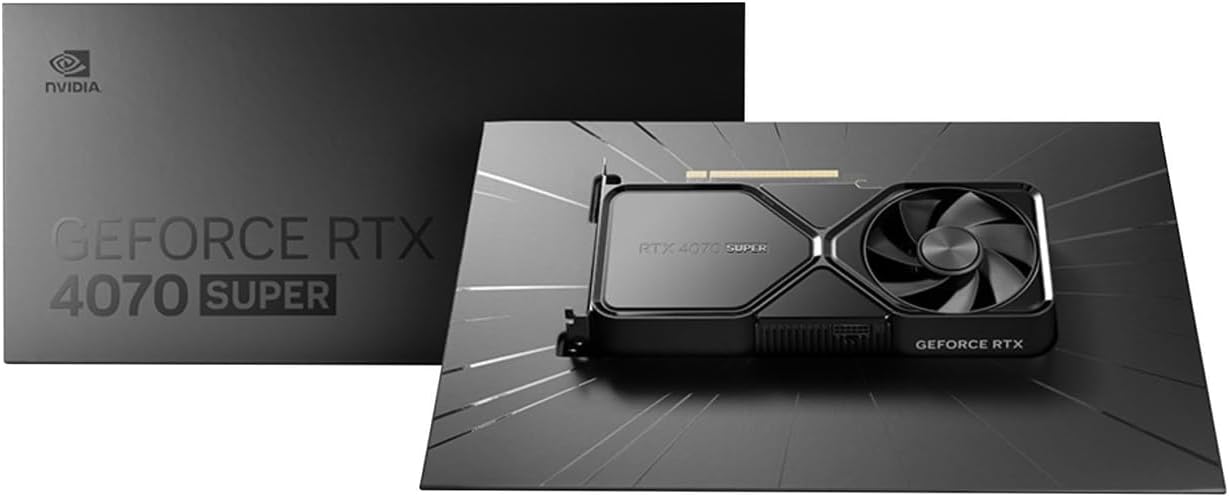
Image: Contents of the NVIDIA GeForce RTX 4070 Super package, including the graphics card and adapter cable.
2. גשמיות ייַנמאָנטירונג
Before installation, ensure your computer is powered off and unplugged from the wall outlet. Ground yourself to prevent electrostatic discharge.
- עפענען דיין קאָמפּיוטער קאַסטן.
- געפינט אַ פאַראַן PCI Express x16 סלאָט אויף אייער מוטערבאָרד.
- Remove the metal slot cover(s) corresponding to the chosen PCIe slot.
- פֿאָרזיכטיק צופּאַסן די גראַפיקס קאַרטל מיטן PCIe סלאָט און דריקן פעסט אַראָפּ ביז עס איז זיכער אײַנגעזעצט. מע קען הערן אַ קליק.
- באַפֿעסטיקן די גראַפיקס קאַרטל צום קעיס מיט די שרויף(ן).

בילד: פראָנט ווינקלעד view of the NVIDIA GeForce RTX 4070 Super Graphics Card, showing its cooling fans and shroud.
3. מאַכט קאַנעקשאַן
The GeForce RTX 4070 Super requires external power. Use the provided 16-pin (12VHPWR) to 2x 8-pin PCIe power adapter cable.
- Connect the 16-pin end of the adapter cable to the power connector on the graphics card. Ensure it is fully seated.
- Connect two separate 8-pin PCIe power cables from your power supply unit (PSU) to the two 8-pin connectors on the adapter cable. Do not use a single PCIe cable with a pigtail connector for both 8-pin inputs, as this may lead to insufficient power delivery and potential system instability or damage.
4. דרייווער ינסטאַלירונג
After physical installation and power connection, close your computer case and reconnect all peripherals. Power on your computer.
- אַמאָל דיין אָפּערייטינג סיסטעם לאָודז, נאַוויגירן צו די באַאַמטער NVIDIA webפּלאַץ (www.nvidia.com/drivers).
- Select your product type (GeForce), product series (GeForce RTX 40 Series), product (GeForce RTX 4070 Super), and your operating system.
- Download the latest recommended drivers.
- Run the installer and follow the on-screen instructions to complete the driver installation. A system restart may be required.
אַפּערייטינג
The NVIDIA GeForce RTX 4070 Super is designed to enhance your computing experience, particularly for gaming, content creation, and professional applications. Once drivers are installed, the card will be fully operational.
- גיימינג: Experience high frame rates and advanced visual fidelity in modern games with features like Ray Tracing and DLSS 3. Ensure your games are updated to support these technologies for optimal performance.
- אינהאַלט שאַפונג: Accelerate video editing, 3D rendering, and graphic design tasks with NVIDIA's powerful GPU architecture and dedicated AI cores.
- אַרויסווייַז קאָנעקטיוויטי: Connect your monitor(s) to the DisplayPort or HDMI outputs on the graphics card. The card supports multiple displays and high resolutions up to 7680x4320.
וישאַלט
1. רייניקונג
רעגולערע רייניקונג העלפט אויפהאלטן די אָפּטימאַלע פאָרשטעלונג און פאַרלענגערט די לעבנסדויער פון אייער גראַפיקס קאַרטל.
- Periodically use compressed air to remove dust from the fans and heatsink fins. Ensure the computer is powered off and unplugged before cleaning.
- האַלט די ווענטילאַטאָר בליידז לײַכט צו פאַרהיטן זיי פון זיך שנעל דרייען בעת רייניקונג, וואָס קען שעדיקן די לאַגערן.
- פֿאַרמײַדט צו ניצן פֿליסיגע רייניקונגס־מיטלען גלייך אויף דער קאַרטל.
2. דרייווער דערהייַנטיקונגען
NVIDIA regularly releases new drivers that include performance optimizations, bug fixes, and support for new games and applications. It is recommended to keep your drivers updated.
- Use the NVIDIA GeForce Experience software (if installed) to automatically check for and install driver updates.
- Alternatively, manually check for updates on the NVIDIA webפּלאַץ (www.nvidia.com/drivers).
טראָובלעשאָאָטינג
אויב איר טרעפט פּראָבלעמען מיט אייער גראַפיקס קאַרטל, באַטראַכט די פאלגענדע געוויינטלעכע טראָובלעשווטינג טריט:
| אַרויסגעבן | מעגלעך לייזונג |
|---|---|
| ניט קיין אַרויסווייַזן רעזולטאַט |
|
| System instability or crashes |
|
| שלעכטע גיימינג פאָרשטעלונג |
|
If issues persist, consult the NVIDIA support webפּלאַץ אָדער קאָנטאַקט זייער קונה דינסט.
ספּעסאַפאַקיישאַנז
Key technical specifications for the NVIDIA GeForce RTX 4070 Super Graphics Card:
- גראַפיקס קאָופּראַסעסער: NVIDIA GeForce RTX 4070 SUPER
- סאָרט: נווידיאַ
- Graphics RAM Size: 12 גיגאבייט
- GPU זייגער גיכקייט: 2.48 גהז
- ווידעא רעזולטאַט צובינד: DisplayPort, HDMI
- Graphics RAM Type: GDDR6X
- קאַמפּאַטאַבאַל דעוויסעס: דעסקטאָפּ, לאַפּטאָפּ
- ווייַז האַכלאָטע מאַקסימום: 7680x4320
- graphics קאָרט צובינד: PCI Express
- זכּרון זייגער גיכקייַט: 21 גהז
- מאָדעל נאָמען: געפאָרסע רטקס קסנומקס יבער
- UPC: 812674025575

בילד: אויבן view of the NVIDIA GeForce RTX 4070 Super Graphics Card, highlighting its cooling design.
וואָראַנטי און שטיצן
וואָראַנטי אינפֿאָרמאַציע
NVIDIA graphics cards typically come with a limited manufacturer's warranty. The duration and terms of the warranty may vary by region and retailer. Please retain your proof of purchase for warranty claims. For detailed warranty information, refer to the official NVIDIA webוועבזייטל אדער די דאקומענטאציע וואס איז אריינגערעכנט מיט אייער פראדוקט.
קונה שטיצן
For technical assistance, driver downloads, or further information, please visit the official NVIDIA support resources:
- NVIDIA Support Webפּלאַץ: www.nvidia.com/support
- דרייווער דאַונלאָודז: www.nvidia.com/drivers