
ליסאָוואָד L01Pro
Lisowod Mini Projector User Manual
Model: L01Pro
פּאָרטאַטיוו סמאַרט פּראַדזשעקטער
1. הקדמה
א דאנק פארן קויפןasing the Lisowod Mini Projector. This compact and powerful device is designed to provide a vivid 1080P FHD viewing experience with advanced features like automatic keystone correction and electric focus. Its portable design, complete with a convenient strap, makes it ideal for travel and various entertainment needs. This manual will guide you through the setup, operation, and maintenance of your new projector.
2. וויכטיק סאַפעטי אינפֿאָרמאַציע
- דו זאלסט נישט ויסשטעלן די פּראַדזשעקטער צו רעגן אָדער נעץ צו פאַרמייַדן פייַער אָדער עלעקטריש קלאַפּ.
- זיכער מאַכן אַז די ווענטילאַציע איז ריכטיק. נישט פאַרשפּאַרן די ווענטילאַציע עפענונגען.
- ניצט נאָר דעם מאַכט אַדאַפּטער וואָס ווערט צוגעשטעלט מיטן פּראָיעקטאָר.
- ויסמיידן קוקן גלייַך אין די פּראַדזשעקטער אָביעקטיוו ווען די לamp is on, as the bright light can damage your eyes.
- האַלט דעם פּראָיעקטאָר אַוועק פון היץ קוועלער און דירעקט זונשייַן.
- פרובירט נישט צו צענעמען אדער פאררעכטן דעם פראיעקטאר אליין. לאָזט איבער אלע סערוויסינג צו קוואַליפֿיצירטע פּערסאָנעל.
3. פּעקל אינהאַלט
ביטע קאָנטראָלירט דעם אינהאַלט פֿון דער פּאַקעט קערפֿול. אויב עס פֿעלן אָדער זענען געשעדיגט, קאָנטאַקטירט אייער הענדלער.
- Lisowod Mini Projector (L01Pro)
- מאַכט אַדאַפּטער
- HDMI קאַבלע
- ווייַט קאָנטראָל
- באַניצער מאַנואַל
4. פּראָדוקט איבערview
פּראַדזשעקטער קאַמפּאָונאַנץ

פיגורע 4.1: פראָנט view of the Lisowod Mini Projector, showcasing its compact design, lens, and key features like 1080P FHD, Auto Keystone, Electric Focus, 2.4+5G Wi-Fi, and Bluetooth connectivity.
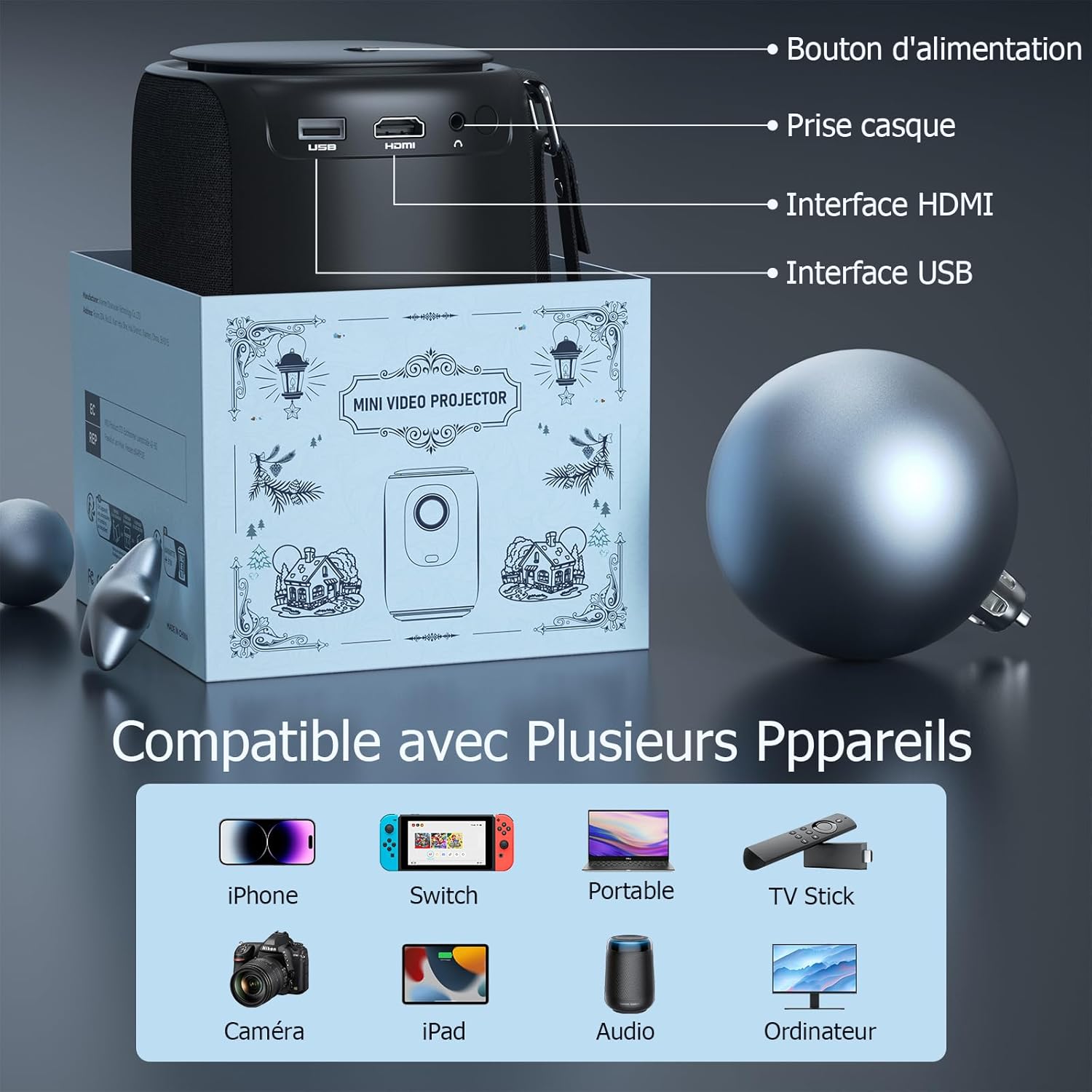
פיגורע 4.2: דערציען view of the projector, indicating the power button, headphone jack, HDMI interface, and USB interface for various connections.
שליסל פֿעיִקייטן
- 1080P FHD Display: Delivers vivid and immersive images.
- Automatic Keystone Correction (±50°): Automatically corrects distorted images vertically for a perfect rectangular display.
- עלעקטריק פאָקוס: Achieve clear images quickly with a single click on the remote control, eliminating manual adjustments.
- Dual-band Wi-Fi (2.4G+5G): Provides smoother and lower latency connectivity for streaming and gaming.
- Bidirectional Bluetooth & Integrated Stereo Speakers: Can be used as a Bluetooth speaker and offers Hi-Fi sound effects.
- Portable Strap Design: Convenient for carrying the projector during travel.
5. סעטאַפּ גייד
5.1 מאַכט אויף
- פֿאַרבינדט דעם מאַכט אַדאַפּטער צום פּראָיעקטאָר'ס מאַכט אַרייַנגאַנג פּאָרט.
- צאַפּן די מאַכט אַדאַפּטער אין אַ וואַנט ווענטיל.
- דרוק די מאַכט קנעפּל אויף די פּראַדזשעקטער אָדער די ווייַט קאָנטראָל צו קער עס אויף.
5.2 ערשטע פּלאַצירונג
Place the projector on a stable, flat surface. Ensure there is adequate space around the projector for ventilation.
5.3 אַדזשאַסטירן פאָקוס און קיסטאָון
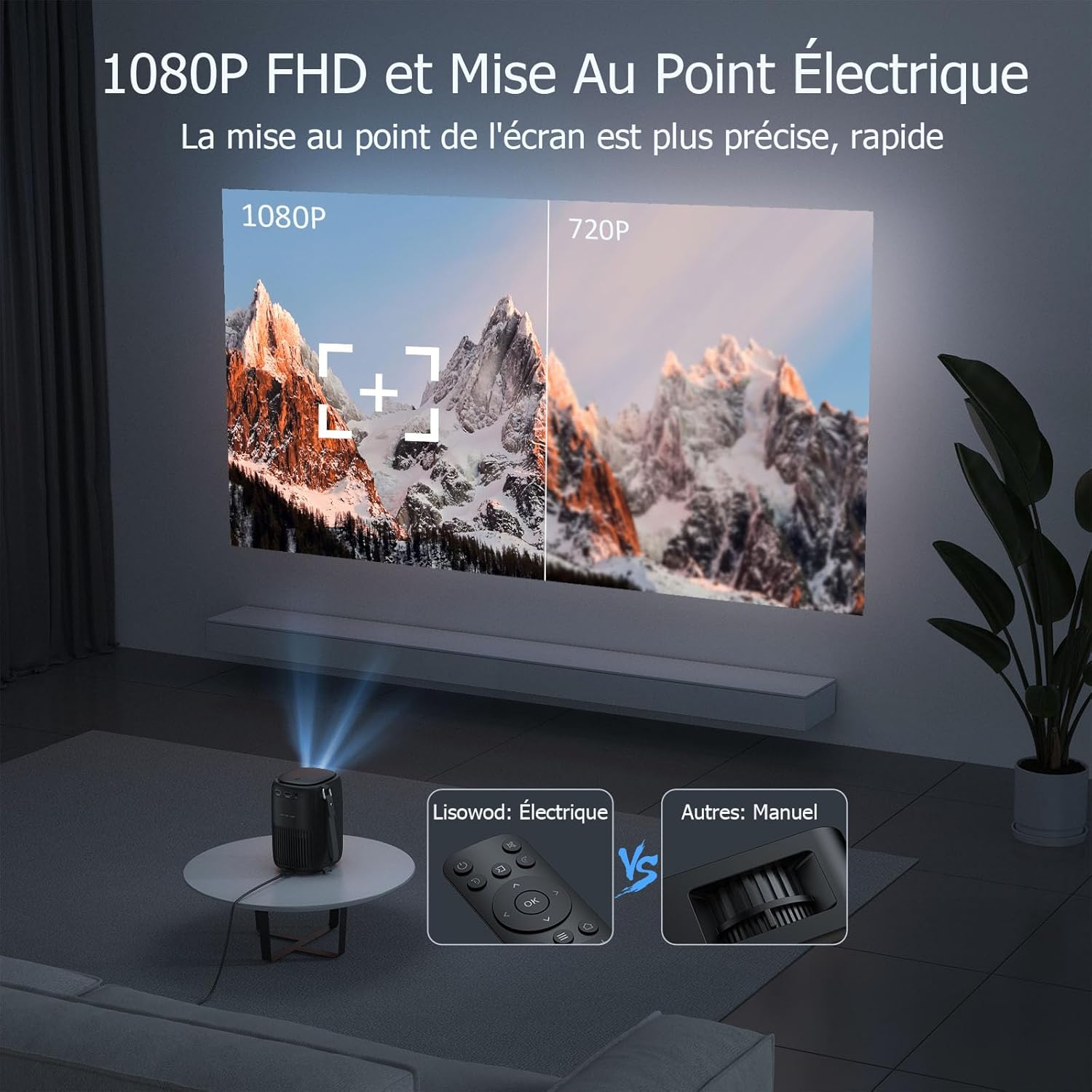
פיגורע 5.1: Illustrates the precision of 1080P FHD and the ease of electric focus compared to manual focus.

פיגורע 5.2: Demonstrates the automatic keystone correction feature, which adjusts the image shape automatically.
- עלעקטריק פאָקוס: Use the remote control to adjust the focus. The built-in high-precision infrared sensor allows for quick and clear image acquisition with a single click.
- אָטאַמאַטיק קייסטאָנע קערעקשאַן: The projector features automatic keystone correction, which automatically adjusts the image vertically (up and down) if the projector is not perfectly aligned with the screen.
6. אַפּערייטינג ינסטרוקטיאָנס
6.1 קאַנעקטינג דעוויסעס
The projector is compatible with a variety of devices:
פיגורע 6.1: The projector supports connections with various devices including iPhone, Switch, Laptops, TV Sticks, Cameras, iPads, Audio devices, and Computers.
- הדמי: Connect laptops, game consoles, TV sticks, or other media players using the provided HDMI cable.
- וסב: אַרײַנשטעלן אַ USB דרייוו צו שפּילן מעדיע files גלייַך.
- סמאַרטפאָנע / טאַבלעט: Connect your smartphone or tablet for screen mirroring (specific adapter or app may be required, refer to device instructions).
- אַודיאָ רעזולטאַט: Connect external speakers or headphones via the headphone jack for enhanced audio.
6.2 ווי-פי קאַנעקשאַן

פיגורע 6.2: Demonstrates the advantage of 2.4G+5G Wi-Fi for smoother and lower latency performance.
- Navigate to the Wi-Fi settings in the projector's menu.
- Select your desired Wi-Fi network (supports both 2.4GHz and 5GHz).
- אַרייַן די פּאַראָל און פאַרבינדן.
6.3 בלועטאָאָטה אַודיאָ

פיגורע 6.3: Highlights the projector's bidirectional Bluetooth and integrated stereo speakers, allowing it to function as a Bluetooth speaker.
- גייט צו די בלועטוט סעטטינגס אין די פּראָיעקטאָר'ס מעניו.
- געבן בלועטאָאָטה און זוכן פֿאַר בנימצא דעוויסעס.
- Select your Bluetooth speaker or headphones to pair.
6.4 Using Streaming Services (Netflix, Amazon Prime, etc.)
Due to copyright restrictions, direct casting or HDMI connection from a phone/tablet for services like Netflix, Amazon Prime, etc., may not display video (only audio). To enjoy videos from these platforms, you must connect a dedicated TV stick (e.g., Amazon Fire TV Stick, Google Chromecast) to the projector's HDMI port.
7. וישאַלט און קער
- רייניקונג די לענס: ניצט אַ ווייכע, לינט-פֿרייע שטאָף ספּעציעל דיזיינד פֿאַר אָפּטישע לענסעס. ניצט נישט קיין שרײַבנדיקע רייניגער אָדער סאָלווענטן.
- רייניקן דעם פּראָיעקטאָר קערפּער: Wipe the surface with a soft, dry cloth. For stubborn stains, use a slightly damp שטאָף און דעמאָלט טרוקן ונ דורך.
- ווענטילאַטיאָן: זיכער מאַכן אַז די ווענטילאַציע עפענונגען זענען ריין פון שטויב און שמוץ. ניצט אַ ווייכע באַרשט אָדער קאָמפּרעסירטע לופט צו זיי לייכט רייניקן.
- סטאָרידזש: ווען נישט אין באַנוץ פֿאַר לענגערע פּעריאָדן, זאָל מען האַלטן דעם פּראָיעקטאָר אין אַ קיל, טרוקן אָרט, בעסער אין זײַן אָריגינעלער פּאַקאַדזשינג אָדער אַ פּראַטעקטיוו קעסטל.
8. טראָובלעשאָאָטינג
| פּראָבלעם | מעגלעך סיבה | לייזונג |
|---|---|---|
| קיין בילד געוויזן | Power cable not connected; Input source incorrect; Device not powered on. | Check power connection; Select correct input source (HDMI, USB); Ensure connected device is on. |
| די בילד איז בלערי | פאָקוס נישט אַדזשאַסטיד; פּראָיעקטאָר צו ווייט/נאָענט צום עקראַן. | Use the remote control to adjust electric focus; Adjust projection distance. |
| בילד איז פארדרייט (טראפעזיום פאָרעם) | פּראָיעקטאָר נישט פּערפּענדיקולאַר צום עקראַן. | The projector has automatic keystone correction. Ensure it's on a stable surface. If manual adjustment is needed, check menu settings. |
| קיין געזונט | Volume too low; Muted; External audio device not connected properly; Source device audio settings. | Increase volume; Unmute; Check external speaker connection; Adjust audio output on source device. |
| Cannot play Netflix/Amazon Prime Video | Copyright restrictions on direct casting/HDMI from phone/tablet. | Connect a dedicated TV stick (e.g., Amazon Fire TV Stick, Google Chromecast) to the projector's HDMI port. |
| ווייַט קאָנטראָל נישט ארבעטן | באַטעריעס נידעריק/טויט; שטערונג צווישן ווייַטקאָנטראָל און פּראָיעקטאָר. | Replace batteries; Remove any obstructions; Point remote directly at the projector's IR receiver. |
9. טעכניש ספּעסאַפאַקיישאַנז
| שטריך | באַשרייַבונג |
|---|---|
| סאָרט | ליסאָוואָד |
| מאָדעל נומער | L01Pro |
| מאַקסימום ווייַז האַכלאָטע | 1920 x 1080 (1080P FHD) |
| קאַנעקטיוויטי טעכנאָלאָגיע | HDMI, USB, Wi-Fi (2.4G+5G), Bluetooth |
| ווייַז טיפּ | לקד |
| בילד קאַנטראַסט פאַרהעלטעניש | 20000:1 |
| ברייטנאַס | 158 לומענס |
| פאָרם פאַקטאָר | פּאָרטאַטיוו |
| מאַונטינג טיפּ | טיש בארג |
| אַרייַנגערעכנט קאַמפּאָונאַנץ | Adapter, HDMI Cable, Remote Control |
| קאַמפּאַטאַבאַל דעוויסעס | Laptop, Game Console, Smartphone, Other Media Players, Speaker |
10. וואָראַנטי און שטיצן
Your Lisowod Mini Projector is covered by a standard manufacturer's warranty. Please refer to the warranty card included in your package for specific terms and conditions, including the warranty period and coverage details.
For technical support, troubleshooting assistance, or warranty claims, please contact Lisowod customer service through the retailer where you purchased the product or visit the official Lisowod webפּלאַץ פֿאַר קאָנטאַקט אינפֿאָרמאַציע.
Please have your model number (L01Pro) and purchase information ready when contacting support.
Ask a question about this manual
Ask about setup, troubleshooting, compatibility, parts, safety, or missing instructions. Manuals+ will review the question and use this page’s manual context to help answer it.