
VCHICS DPS305U 30V 5A
VCHICS DPS305U DC Power Supply User Manual
Model: DPS305U (30V 5A)
1. הקדמה
א דאנק פארן קויפןasing the VCHICS DPS305U Variable DC Regulated Power Supply. This device is designed for laboratory, electronic repair, DIY projects, communication equipment maintenance, product lines, scientific research, and educational units. It offers high precision, low noise, and multiple safety features to ensure reliable and safe operation. Please read this manual thoroughly before use to ensure proper operation and to maximize the lifespan of your power supply.
2. זיכערקייַט פּריקאָשאַנז
To prevent electric shock, fire, or damage to the device, please observe the following safety guidelines:
- שטענדיק פֿאַרבינדן די מאַכט צושטעל צו אַ געערדטער אַוטלעט.
- דו זאלסט נישט אַרבעטן די מיטל אין נאַס אָדער דamp באדינגונגען.
- Ensure proper ventilation. Do not block the cooling fan or vents.
- נישט עפענען דעם סיasinז. עס זענען נישטאָ קיין טיילן וואָס דער באַניצער קען סערוויסן אינעווייניק. לאָזט איבער אַלע סערוויסינג צו קוואַליפֿיצירטע פּערסאָנעל.
- Before connecting or disconnecting loads, ensure the power supply is turned off.
- Avoid short-circuiting the output terminals for extended periods, although the device has short-circuit protection.
- באַשטעטיקן די אַרייַנשרייַב voltage switch (115V/230V) on the back matches your local power supply before connecting.
3. פּעקל אינהאַלט
ביים עפענען דעם פעקל, ביטע זיכער מאכן אז אלע זאכן וואס זענען אויסגערעכנט אונטן זענען אריינגערעכנט און אין גוטן צושטאנד:
- 1 x VCHICS DPS305U DC Power Supply Host
- 1 x Output Power Cord (Alligator clips)
- 1 x Input Power Cord
- 1 x באַניצער מאַנואַל
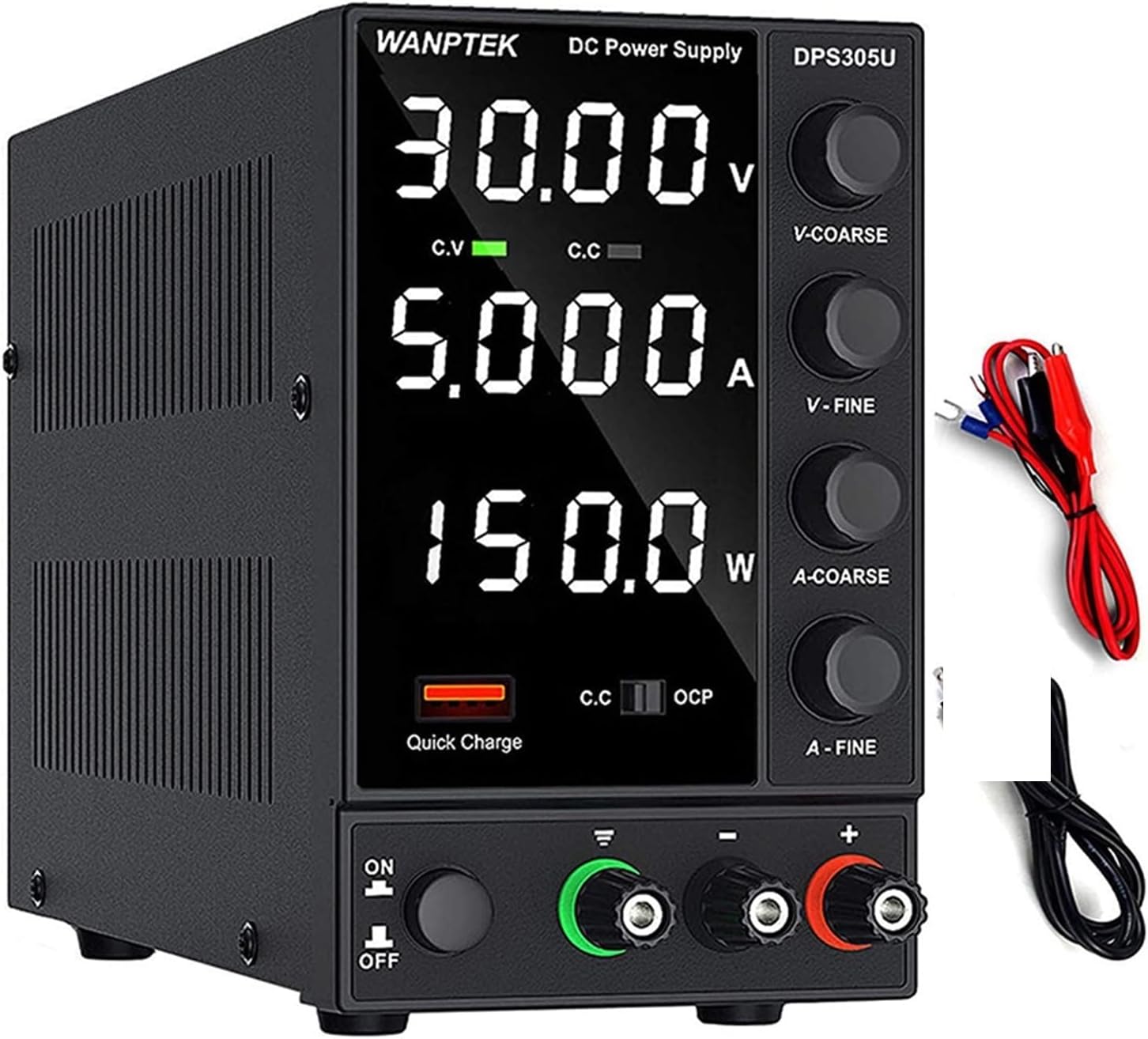
Image: The VCHICS DPS305U DC Power Supply unit shown with its included output power cords (red and black with alligator clips) and input power cord.
4. פּראָדוקט פֿעיִקייטן
- Automatic Power Calculation: Unlike other DC power supplies, the WANPTEK DPS305U automatically calculates the power value. It simultaneously displays voltage, current, and power values with a precision of 0.01V, 0.001A, and 0.001W.
- 5V / 3.6A USB Interface: Equipped with a high-speed charging protocol identification chip, this variable power supply supports USB fast charging. It provides a 5V / 3.6A output, allowing for quick charging of mobile phones and other devices, or for powering devices under repair.
- Short Circuit Alarm: Designed to enhance safety and extend the lifespan of the DC power supply. When a short circuit occurs, the adjustable DC power supply unit stops output and emits an alarm. The bench power supply includes safety protections such as over-voltage, over-current, over-temperature, and overload protection.
- ברייט אַפּלאַקיישאַן: This adjustable power supply features an electrically controlled fan and an excellent heat sink for efficient heat dissipation. It is particularly suitable for laboratories, electronic repair DIY, communication equipment maintenance, product lines, scientific research, and educational units.
- הויך פּינטלעכקייַט: The power supply boasts a high resolution of 0.01V and 0.001A, ensuring accurate and stable output.

בילד: נאָענט-אַרויף view highlighting the Short Circuit Alarm indicator and the USB Quick-Charge Interface on the front panel of the power supply.

בילד: אן אינערליכע view of the power supply, illustrating the cooling fan and heat sink components responsible for intelligent temperature control and heat dissipation.

Image: The power supply unit displayed alongside a digital multimeter, demonstrating its high precision output readings for voltagE און קראַנט.
5. פּראָדוקט איבערview און קאַמפּאָונאַנץ
Familiarize yourself with the various parts and controls of your VCHICS DC Power Supply:

Image: A detailed diagram of the power supply, clearly labeling its front panel controls and rear panel connections.
- ווייַז פאַרשטעלן: שאָוז וואָלtage (V), Current (A), and Power (W) readings.
- שוץ פילם: A film on the display screen to prevent scratches during transport. Remove it for clearer viewing.
- Voltage Coarse Knob (V-COARSE): אַדזשאַסץ וואָלtage in larger increments.
- Voltage Fine Knob (V-FINE): אַדזשאַסץ וואָלtage in smaller, precise increments.
- Current Coarse Knob (A-COARSE): Adjusts current limit in larger increments.
- Current Fine Knob (A-FINE): Adjusts current limit in smaller, precise increments.
- USB Quick Charging Interface: 5V/3.6A output for charging devices.
- Short Circuit Alarm Indicator: Lights up and unit alarms when a short circuit is detected.
- מאַכט אויף / אַוועק סוויטש: טורנס די אַפּאַראַט אויף אָדער אַוועק.
- GND טערמינאַל: ערד וואָקזאַל.
- פּאָזיטיווער טערמינאַל (+): Red output terminal for positive connection.
- נעגאַטיווער טערמינאַל (-): Black output terminal for negative connection.
- קאָאָלינג פאַן: Automatically activates to dissipate heat.
- 230V/115V±10% Switch: Voltage selection switch for input power. Ensure this matches your local voltage.
- אַק מאַכט אַרייַנשרייַב: Connects the input power cord.
- פיוז קעסטל: Contains the protective fuse.
6. סעטאַפּ
- אויספּאַקן: Carefully remove the power supply from its packaging.
- Voltage סעלעקציע: Locate the 230V/115V switch on the rear panel. Ensure it is set to the correct voltage for your region (e.g., 115V for North America, 230V for Europe/Asia). אומרעכט וולtagדי אויסוואל קען שאדן מאכן דעם איינהייט.
- מאַכט קשר: Connect the provided input power cord to the AC Power Input on the rear of the unit and then to a grounded wall outlet.
- רעזולטאַט קשר:
- Connect the red output power cord (alligator clip) to the Positive Terminal (+).
- Connect the black output power cord (alligator clip) to the Negative Terminal (-).
- If grounding is required for your application, connect a separate ground wire to the GND terminal.
- ערשט טשעק: Before connecting any load, ensure all knobs (V-COARSE, V-FINE, A-COARSE, A-FINE) are turned fully counter-clockwise to their minimum settings.
7. אַפּערייטינג ינסטרוקטיאָנס
7.1 יקערדיק אָפּעראַציע
- מאַכט אויף: Flip the Power On/Off switch to the "ON" position. The display will light up.
- אַדזשאַסטינג וואָלtagE (Constant Voltage Mode - CV):
- Turn the V-COARSE knob clockwise to set the approximate desired voltage.
- Use the V-FINE knob to precisely adjust the voltage to the exact desired value.
- The "C.V" indicator on the display will light up when the unit is operating in Constant Voltage מאָדע.
- Adjusting Current Limit (Constant Current Mode - CC):
- To set the current limit, first short-circuit the output terminals (connect the red and black alligator clips together). The "C.C" indicator will light up.
- Turn the A-COARSE knob clockwise to set the approximate desired current limit.
- Use the A-FINE knob to precisely adjust the current limit.
- Remove the short circuit from the output terminals. The unit will return to Constant Voltage mode if no load is connected or if the load draws less current than the set limit.
- The "C.C" indicator will light up when the unit is operating in Constant Current mode (i.e., the load is drawing the maximum set current).
- קאַנעקטינג לאָוד: After setting the desired voltage and current limits, connect your device or circuit to the output terminals. Ensure correct polarity.
- מאָניטאָרינג: Observe the display for real-time voltage, current, and power readings.
7.2 USB Quick Charging Interface
The 5V/3.6A USB port on the front panel can be used to quickly charge compatible devices. Simply connect your device's USB cable to this port. This output is independent of the main DC output settings.
8. וישאַלט
- רייניקונג: Disconnect the power supply from the main power outlet before cleaning. Use a soft, dry cloth to wipe the exterior. Do not use abrasive cleaners or solvents.
- ווענטילאַטיאָן: Ensure the cooling fan and vents are free from dust and obstructions. Periodically check for dust buildup and gently clean with compressed air if necessary.
- סטאָרידזש: ווען נישט אין באַנוץ פֿאַר לענגערע פּעריאָדן, זאָל מען האַלטן די מאַכט-צושטעל אין אַ קיל, טרוקן אָרט, אַוועק פֿון דירעקטער זון און עקסטרעמע טעמפּעראַטורן.
- Fuse Replacement: If the unit does not power on, check the fuse located in the fuse box on the rear panel. Replace it only with a fuse of the same type and rating. Refer to the specifications for fuse details.
9. טראָובלעשאָאָטינג
| פּראָבלעם | מעגלעך סיבה | לייזונג |
|---|---|---|
| דער אַפּאַראַט טוט נישט מאַכט אויף. | No power from outlet; Power cord not connected; Blown fuse; Power switch off. | Check outlet with another device; Ensure power cord is securely connected; Replace fuse (refer to Maintenance); Flip power switch to ON. |
| קיין רעזולטאַט וואָלtagE/קראַנט. | אַרויסגאַנג טערמינאַלן נישט פארבונדן; באַנדtage/Current knobs set to minimum; Overload/Short circuit protection activated. | Ensure load is properly connected; Adjust voltage/current knobs clockwise; Check for short circuit in load, reduce load, or increase current limit. |
| Short Circuit Alarm activates. | Short circuit in the connected load or output cables. | Immediately disconnect the load. Identify and resolve the short circuit in your circuit/cables. Reconnect after resolving. |
| די אויסשטעלונג איז פארשוואומען אדער נישט קלאר. | Protective film still on the display. | Carefully peel off the protective film from the display screen. |
| Unit gets excessively hot. | Blocked ventilation; Overload. | Ensure cooling fan and vents are clear; Reduce load or operating time. |
10. ספּעסאַפאַקיישאַנז
| שטריך | דעטאַל |
|---|---|
| מאָדעל | DPS305U |
| סאָרט | VCHICS |
| רעזולטאַט חלקtage | 0-30V (אַדזשאַסטאַבאַל) |
| רעזולטאַט קראַנט | 0-5A (אַדזשאַסטאַבאַל) |
| רעזולטאַט מאַכט | 150 וו (מאַקסימום) |
| Voltage ווייַז אַקיעראַסי | 0.01V |
| Current Display Accuracy | 0.001 א |
| Power Display Accuracy | 0.001 וו |
| וסב רעזולטאַט | 5V / 3.6A |
| קאָאָלינג אופֿן | Air Cooling (Intelligent Fan) |
| פּראָדוקט וואָג | בעערעך. 2 קג (4.4 לבס) |
| אַרייַנשרייַב וואָלtage סוויטש | 115V/230V ±10% (selectable) |

Image: A visual comparison illustrating the compact and lightweight design of the switching power supply (DPS3010U model shown) compared to a traditional linear power supply, highlighting its space-saving benefits.
11. וואָראַנטי און שטיצן
VCHICS products are manufactured to high quality standards. This product comes with a standard manufacturer's warranty against defects in materials and workmanship. For specific warranty terms and conditions, please refer to the warranty card included in your package or contact your point of purchase.
For technical support, troubleshooting assistance, or warranty claims, please contact VCHICS customer service through the retailer where you purchased the product.
Ask a question about this manual
Ask about setup, troubleshooting, compatibility, parts, safety, or missing instructions. Manuals+ will review the question and use this page’s manual context to help answer it.