
פּריטעטש פּר-2888
PRITECH Hair Trimmer User Manual
סאָרט: PRITECH | מאָדעל: PR-2888
הקדמה
Thank you for choosing the PRITECH Hair Trimmer. This manual provides essential information for the safe and effective operation, maintenance, and troubleshooting of your new grooming device. Please read it thoroughly before first use and keep it for future reference.
זיכערקייַט אינפֿאָרמאַציע
Please be cautious when using this trimmer on sensitive areas of the body. Do not use near water sources or immerse the device in water. This product is not intended for use on children or infants.
Always ensure the device is clean and free from hair buildup before and after each use to maintain optimal performance and hygiene.
וואָס איז אין די קעסטל
Your PRITECH Hair Trimmer package includes the following components:
- PRITECH Hair Trimmer (Gray)
- שטייענדיקע ריטשאַרדזש דאָק
- יו-עס-בי טשאַרדזשינג קאַבל (באַמערקונג: וואַנט אַדאַפּטער נישט אַרייַנגערעכנט)
- 4 גייד קאָמבס (3 מם, 6 מם, 9 מם, 12 מם)
- סטילינג קאַם
- רייניקונג באַרשט
- ינסטראַקשאַנז מאַנואַל

Image: All components included with the PRITECH Hair Trimmer.
סעטאַפּ
טשאַרדזשינג די טרימער
Before first use, fully charge your PRITECH Hair Trimmer. The trimmer can be charged using the included standing recharge dock or directly via the USB cable.
- Using the Standing Recharge Dock: Place the trimmer into the standing dock, ensuring it sits securely. Connect the USB charging cable to the dock and then to a compatible USB power source (e.g., a wall adapter, power bank, or PC USB port).
- דירעקטע USB טשאַרדזשינג: Connect the USB charging cable directly to the trimmer's charging port and then to a compatible USB power source.
A full charge takes approximately 2 hours and provides up to 150 minutes of continuous working time.

Image: Charging options for the PRITECH Hair Trimmer.

Image: Charging and operational duration of the trimmer.
אַפּערייטינג ינסטראַקשאַנז
אַטאַטשינג גייד קאַם
Select the desired guide comb (3mm, 6mm, 9mm, or 12mm) based on your preferred hair length. Align the comb with the trimmer blade and push it firmly until it clicks into place. To remove, gently pull the comb away from the blade.
Trimming Hair and Beard
The PRITECH Hair Trimmer is designed for various grooming needs, including hair, beard, body, and groin areas. Its precision self-sharpening stainless steel blades ensure a smooth and comfortable trim.
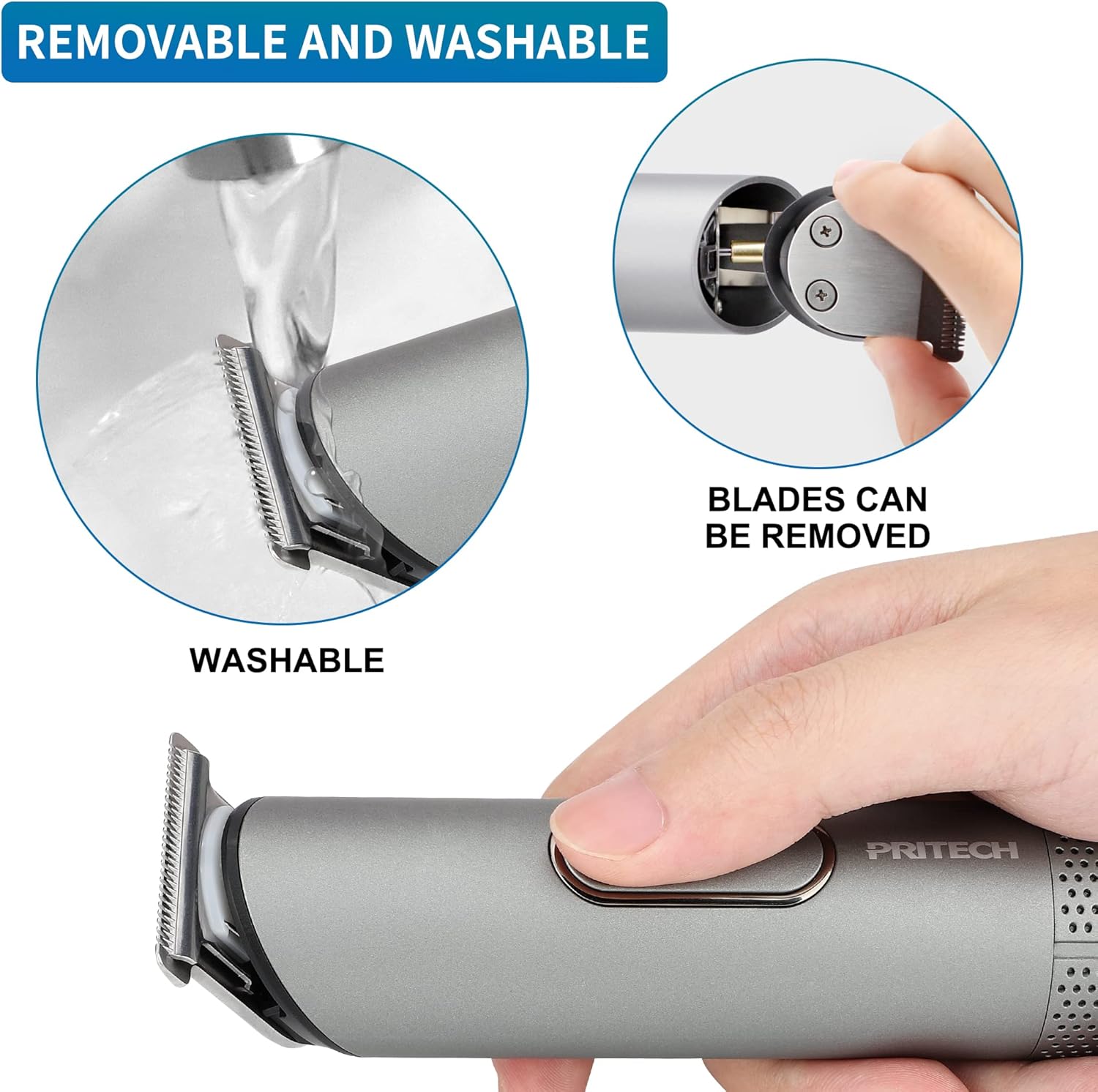
Image: Internal components highlighting the powerful motor and precision blades.

Image: Versatile use for hair, beard, body, and groin areas.
For optimal results, ensure your hair is clean and dry before trimming. Move the trimmer against the direction of hair growth for an even cut. Use the styling comb to guide hair and achieve desired styles.
פּראָדוקט דעמאָנסטראַציע ווידעאָ
Watch this official product video for a visual guide on using the PRITECH Hair Trimmer for various grooming tasks.
Video: Official PRITECH demonstration of the hair trimmer's features and usage.
וישאַלט
רייניקונג די טרימער
The PRITECH Hair Trimmer features removable and washable blades for easy cleaning. Regular cleaning ensures hygiene and extends the lifespan of your device.
- Removing Blades: Gently push the blade assembly forward to detach it from the trimmer body.
- וואַשינג: Rinse the detached blade assembly under running water. The trimmer body is also waterproof (IPX6 rated) and can be rinsed, but avoid immersing the entire unit for extended periods.
- דרייינג: Allow all parts to air dry completely before reattaching the blade assembly and storing the trimmer.
- שמירן: Periodically apply a small amount of clipper oil (not included) to the blades to maintain smooth operation.

Image: Instructions for removing and washing the trimmer blades.
טראָובלעשאָאָטינג
| פּראָבלעם | מעגלעך סיבה | לייזונג |
|---|---|---|
| דער טרימער צינדט זיך נישט אן אדער ארבעט נישט. | באַטערי איז דיפּליטיד. | Charge the trimmer fully (approx. 2 hours). Ensure the charging cable and power source are working correctly. |
| טרימער ציט האָר אָדער שניידט אומגלייך. | די בליידז זענען מאַט אָדער פארשטאפט מיט האָר. | Clean the blades thoroughly. Apply clipper oil if necessary. If blades are dull, consider professional sharpening or replacement if available. |
| Charging dock not working. | Improper connection or missing wall adapter. | Ensure the USB cable is securely connected to both the dock and a working USB power source. Note that a wall adapter is not included and must be provided by the user. |
| Reduced battery life over time. | Normal battery degradation. | Recharge the trimmer more frequently. If battery life becomes unacceptably short, contact customer support for options. |
ספּעסאַפאַקיישאַנז
| שטריך | דעטאַל |
|---|---|
| פּראָדוקט דימענשאַנז | 1.38 X 1.38 X 5.91 אינטשעס |
| וואָג | 9.59 אונסעס |
| באַטערי טיפּ | 1 ליטהיום יאָן באַטאַרייע (אַרייַנגערעכנט) |
| גאַנץ אָפּצאָל צייט | בעערעך. 2 שעה |
| אַרבעט צייט | אַרויף צו 150 מינוט |
| מאַכט מקור | ריטשאַרדזשאַבאַל, אָן שנור |
| האָר טיפּ קאָמפּאַטאַבילאַטי | Fine, All |
| קאָליר | גרוי |
| וואָטערפּרוף רייטינג | IPX6 (וואַשעוודיק) |
וואָראַנטי און שטיצן
PRITECH offers a quality service that guarantees a 100% satisfaction solution. If for any reason you are not satisfied with your Utility Home Haircut Kit, please do not hesitate to contact us for assistance.
For specific warranty details or technical support, please refer to the contact information provided on the product packaging or the official PRITECH webפּלאַץ.
Ask a question about this manual
Ask about setup, troubleshooting, compatibility, parts, safety, or missing instructions. Manuals+ will review the question and use this page’s manual context to help answer it.